
Moving business data to the cloud can improve scalability, accessibility, and operational efficiency. However, the migration process becomes more complex when organizations need to transfer large volumes of data, preserve existing relationships, maintain security, and keep their teams working without interruption.
Cloud data migration involves moving data from an on-premises environment, an existing cloud platform, or another application to a new cloud environment. Depending on the project, this might mean transferring files to cloud storage, moving databases to managed services, or migrating business records between applications such as Jira, Azure DevOps, or ServiceNow.
Each scenario requires different tools, planning, and transfer methods.
In this guide, we'll explain the main types of cloud data migration, compare popular migration strategies and tools, and walk through the data migration process. We'll also look at real-world use cases, including how specialized solutions like Getint support cloud-to-cloud application migrations and transitions between business platforms.

What Is Cloud Data Migration?
Cloud data migration is the process of transferring data from one computing environment to a cloud-based destination. The source might be an on-premises data center, legacy system, existing cloud storage service, or another cloud application.
For example, a company might migrate files from on-premises servers to Microsoft Azure, transfer a database to Google Cloud, or move project data from Azure DevOps to Jira Cloud.
Although these projects share the same general objective, they involve different technical challenges. Transferring data between storage systems primarily concerns file structures, transfer capacity, and data integrity. Migrating application data also requires understanding how information is organized, connected, and used within business processes.
Consider a software development team switching from Azure DevOps to Jira. Simply moving the underlying data is insufficient if tasks lose their descriptions, comments, status information, or relationships with other work items. The team needs this context to continue working effectively in the new system.
Cloud Data Migration vs. Cloud Migration vs. Data Integration
These terms are closely related, but they describe different activities.
Data migration usually has a defined destination and completion point. Data integration supports ongoing information exchange between connected systems.
The two can also work together. During a phased migration, organizations may move historical records first and maintain synchronization between source and target systems until the transition is complete.
Benefits of Cloud Data Migration
Organizations migrate data to the cloud for reasons ranging from reducing infrastructure maintenance to improving collaboration between distributed teams. The potential benefits depend on the cloud provider, migration strategy, and configuration of the target environment.
Scalability and More Flexible Resource Management
Cloud platforms allow organizations to increase or decrease computing and storage resources as demand changes. Instead of purchasing and maintaining physical infrastructure for peak workloads, businesses can use cloud resources according to their operational requirements.
This flexibility is particularly useful for growing organizations, applications with fluctuating demand, and projects that need additional computing capacity during specific periods.
Reduced Infrastructure Maintenance
Moving data from an on-premises data center to managed cloud services can reduce the effort required to maintain physical servers, storage systems, and associated hardware.
Cloud services also provide different storage options, including object storage and archive data tiers. Selecting the appropriate storage class can help control costs, although data access, transfer, and ongoing resource consumption still need to be monitored.
Better Accessibility and Collaboration
Cloud environments make it easier for distributed teams to access business applications and information from different locations, subject to the organization's access controls.
For teams migrating between project management or IT service management tools, accessibility also depends on how well the existing data is transferred. Employees need accurate records, current project information, and relevant historical context to maintain productivity.
Security, Backup, and Disaster Recovery
Major cloud providers offer capabilities such as encryption, identity management, access controls, monitoring, and backup services. Organizations can use these features to strengthen data protection and support their disaster recovery strategies.
However, moving data to the cloud does not automatically ensure data security. Administrators must configure permissions, retention policies, backup coverage, and other security rules correctly. A successful migration should also verify that critical data remains recoverable and that business operations can continue following an outage or system failure.

Types of Cloud Data Migration
The appropriate migration approach depends on the type of information being transferred and how it is used in the target system.
1. Storage Migration
Storage migration involves moving files, folders, backups, or other stored information from existing storage systems to a cloud storage service.
A common example is transferring data from on-premises servers to Amazon S3, Azure Blob Storage, or Google Cloud Storage.
Organizations may use storage migration to reduce hardware maintenance, consolidate data infrastructure, or improve access to archived information. The process often includes reviewing data volumes, selecting transfer methods, and deciding which information should remain actively accessible.
Before moving data, teams should identify obsolete data that can be deleted according to retention policies and information that belongs in lower-cost archive storage.
2. Database Migration
Database migration transfers structured data from an existing database to a new database environment.
For example, an organization might move a database hosted on its own servers to a managed cloud database. Depending on compatibility, the migration could also involve data conversion, schema adjustments, or changes to database configurations.
Maintaining data integrity is especially important during database migration. Teams must verify that records, relationships, data types, and application dependencies function correctly in the target database.
For systems that cannot tolerate extended downtime, database replication and incremental transfer methods may help reduce the interruption required during the final transition.
3. Application Migration
Application migration involves moving an application or its associated data to a different environment or platform.
Some projects transfer an existing application to cloud infrastructure with relatively few modifications. Others replace a legacy application with a cloud-native service or another SaaS platform.
- The second scenario introduces additional challenges because different applications rarely organize data in exactly the same way.
For example, migrating from Asana to Jira requires more than transferring task titles. Teams may need to map project structures, statuses, assignees, descriptions, comments, attachments, and custom fields.
When two applications have different data models, specialized migration tools can help translate existing data into the format expected by the new system.
4. Business Process Migration
Business process migration focuses on transferring or redesigning the workflows and supporting information used to perform business functions.
An organization replacing its IT service management platform, for example, may need to migrate service requests, incidents, associated records, and relevant workflow information while also adapting its service delivery processes.
These projects often involve several departments and data sources. Effective planning requires understanding which data supports each process, which records must remain accessible, and how responsibilities will change after migration.
Business process migration may involve a combination of application migration, data integration, workflow configuration, and employee onboarding.
Cloud Data Migration Strategies and Approaches
Choosing a data migration strategy is one of the most important decisions in the planning phase. The right approach depends on existing infrastructure, application dependencies, business requirements, and how much downtime an organization can accept.
The 7 Rs of Cloud Migration
The 7 Rs framework provides a way to evaluate what should happen to applications and workloads during cloud transformation.
These strategies help determine the future of an application's infrastructure or architecture. They do not, by themselves, define how individual business records will be transferred.
For example, a company choosing to replace a legacy work management platform with a SaaS application might follow a repurchase strategy. It still needs a separate data migration plan for transferring historical tasks, projects, and other records to the new system.
One-Time Migration
A one-time migration transfers the required data during a defined migration window, followed by a cutover to the target system.
This approach is suitable when the data volume is manageable, the organization can schedule an interruption, and users can stop making changes in the source system during the final transfer.
One-time migration can simplify the transition, but it requires careful validation before users begin working in the new environment.
Phased Migration
A phased migration divides the data migration project into smaller stages.
Organizations might move one department, project, database, or business function at a time. This allows teams to test the new environment, address unexpected issues, and reduce the operational risk associated with a single large transfer.
However, a phased approach introduces an additional consideration: how to manage changes while some users remain in the existing system and others have moved to the target system.
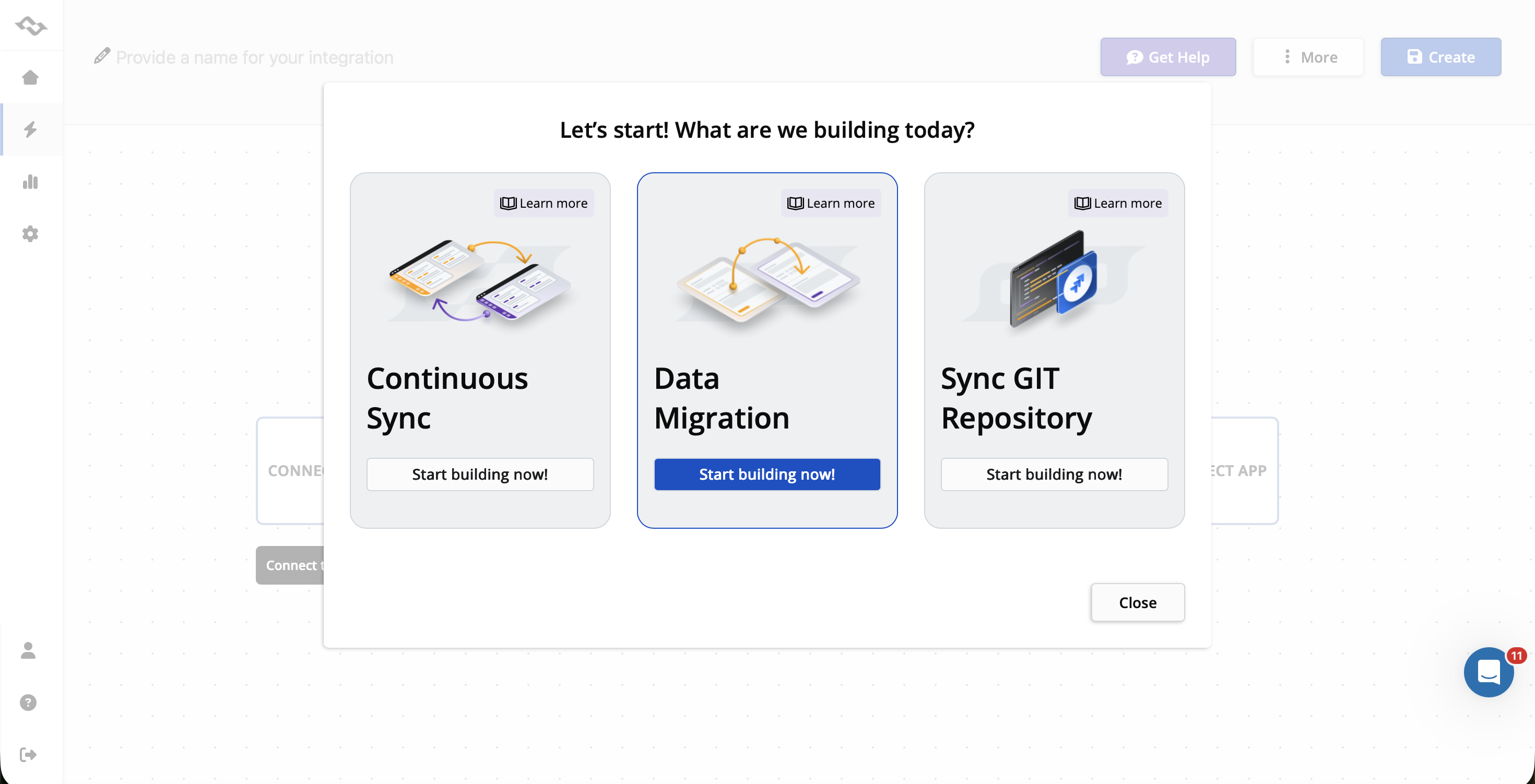
Let's take a look how we managed such case at Getint by migrating 300,000+ ServiceNow Records to Jira Cloud for a Global Logistics Leader, while preserving the continuity of work.
Migration with a Period of Coexistence Between Systems
In some enterprise migrations, switching every user to the new system at once is impractical.
Consider an organization consolidating two Jira instances after an acquisition. One team might be ready to work in the target instance immediately, while another needs several weeks to complete its existing projects and adapt its workflows.
During this period, both systems remain active. Historical data may already be transferred, but newly created or updated records might still need to move between the environments.
An integration platform that supports both data migration and continuous synchronization can help coordinate this transition. Teams can migrate existing information, configure which updates should continue syncing, and gradually move users to the new environment.
The synchronization direction, conflict-handling rules, and final cutover must be planned carefully to avoid duplicates or unintended updates.
The Cloud Data Migration Process: Step by Step
Every migration has different technical requirements, but most successful projects follow a similar sequence: assessment, planning, preparation, testing, transfer, and validation.
Step 1: Assess the Existing Environment
Start by identifying the data sources, applications, databases, storage systems, and dependencies involved in the migration.
- A comprehensive data audit should establish what information exists, how frequently it changes, who uses it, and which records are critical to business operations.
For business applications, this assessment should also document custom fields, permissions, workflow statuses, relationships, and integration dependencies. The objective is to understand the existing data infrastructure before deciding how to move it.
Step 2: Define Objectives and Build a Data Migration Plan
A clear data migration plan should explain what the organization wants to achieve, which data will be transferred, and how success will be measured.
Define the scope, target system, migration schedule, security requirements, acceptable downtime, responsible teams, and rollback procedures.
It is also important to distinguish between information that must be migrated and data that can be archived or retired. Transferring unnecessary records increases costs and can make validation more difficult.
Step 3: Choose the Target Environment and Migration Tools
Select the cloud platform and migration tools based on your technical and business requirements.
For infrastructure migration, this might mean evaluating AWS, Microsoft Azure, or Google Cloud and their supported services.
For business application migration, the decision involves additional questions: Can the tool connect directly to both platforms? Does it support the required data types? Can it preserve important relationships and custom fields? How will it handle records that already exist in the target system?
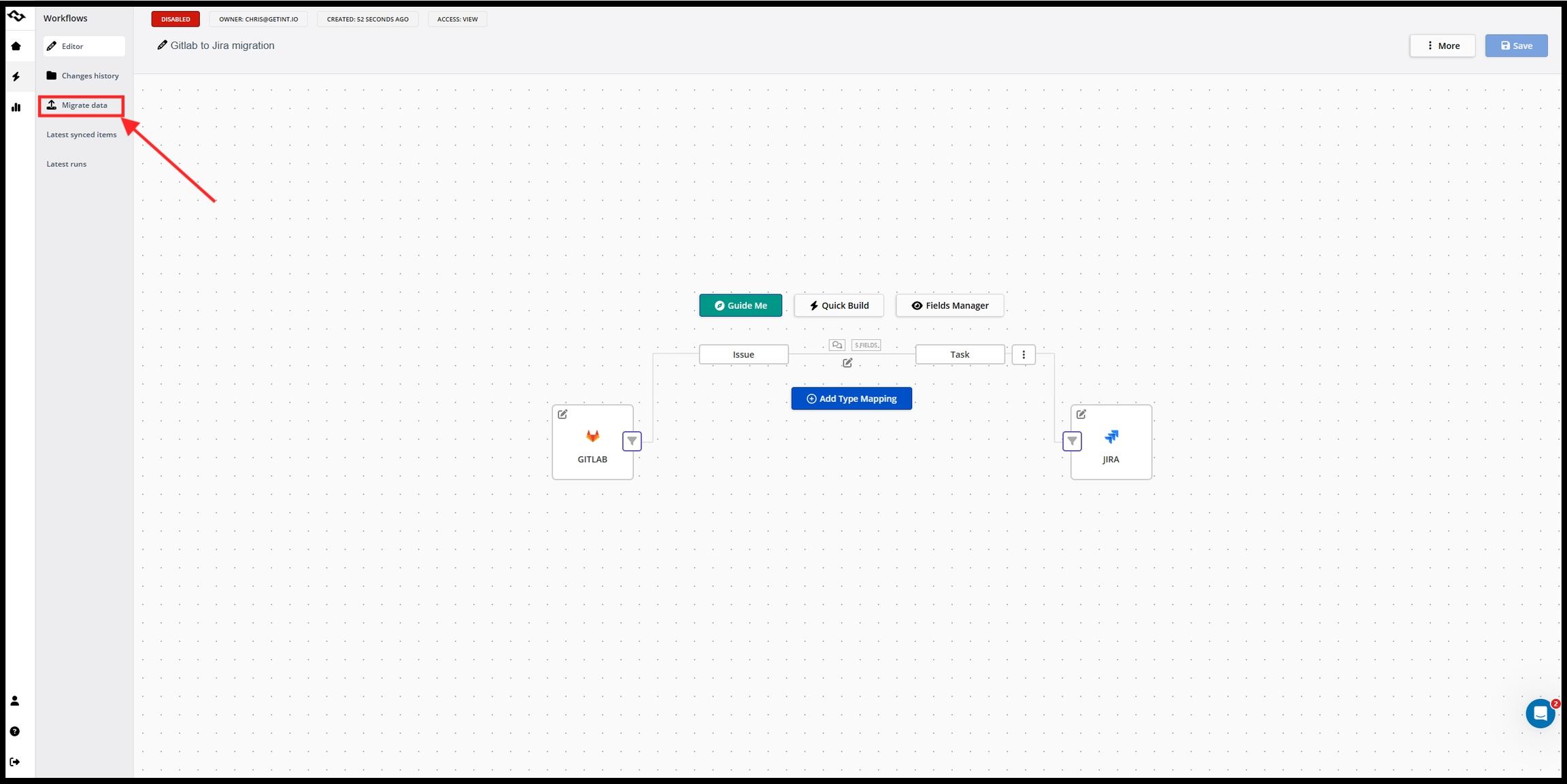
Evaluate the compatibility and limitations of each option before beginning the transfer.
Step 4: Prepare and Map the Data
Data preparation helps avoid transferring errors and inconsistencies into the new environment.
Review duplicate records, outdated information, inconsistent formatting, and missing values. Standardize data where necessary and ensure the target system contains the fields and structures required for the migration.
Application migrations often require explicit mapping between different data models.
For example, a work item classified as a User Story in Azure DevOps might need to become a Story in Jira. Fields, priorities, and workflow statuses may also have different names or available values. These mappings should be reviewed and tested before migrating large volumes of data.
Enter Getint documentation on migration processes to get more details.
Step 5: Run a Pilot Migration
Test the migration with a representative subset of data, including simple records and complex items containing attachments, comments, custom fields, or hierarchical relationships.
A pilot should reveal compatibility problems, performance limitations, and unexpected behavior before the full migration begins.
Check whether records appear correctly in the target system and whether users can complete the business activities that depend on them. Testing should include functionality and security, not only record counts.
Step 6: Execute the Migration and Minimize Downtime
Once the pilot is validated, begin the full data transfer according to the migration plan.
Depending on the volume and chosen approach, the migration process may take hours, days, or months. Large datasets, limited network bandwidth, complex transformations, or strict validation requirements can extend the schedule.
For systems that remain active, incremental migration or synchronization may help transfer changes that occur after the initial data movement.
Monitoring is essential during this stage. Teams should review transfer progress, errors, system performance, and any service disruption affecting users.
Step 7: Validate Data Integrity and Access
After transferring data, compare the source and target environments.
Verify record counts, field values, relationships, attachments, and permissions where applicable. Confirm that the target system's workflows, integrations, and security controls operate as expected.
Pay particular attention to critical data and records that support ongoing business processes. Missing permissions, incorrect field mapping, or incomplete relationships can create problems even when most records were transferred successfully.
Step 8: Monitor and Optimize the New Environment
Migration completion is followed by a period of observation and optimization.
Monitor performance, user access, cloud resources, storage costs, and system errors. Confirm that backups and disaster recovery procedures cover the new environment, and address any functionality issues reported by users.
Once the new system is validated and the organization no longer depends on the source environment, legacy systems can be retired according to the agreed retention and decommissioning plan.
Common Cloud Data Migration Challenges
Even a well-planned migration can encounter technical and organizational difficulties. Understanding these risks early helps teams build a more reliable strategy.
Security deserves particular attention because configurations that worked in the previous computing environment may not translate directly to the new one.
For example, moving a dataset to cloud object storage without reviewing access policies could unintentionally expose sensitive information. Similarly, a successful file transfer does not guarantee that backup schedules, permissions, or retention policies have been preserved.
Testing should confirm that the data remains usable, protected, and recoverable, not simply that it reached the destination.
Real-World Cloud Data Migration Use Cases
The following scenarios illustrate why migration requirements vary between organizations, and why different migration tools may be needed.
Use Case 1: Migrating from Azure DevOps to Jira Cloud
Software teams sometimes consolidate their development processes on a single platform after changing internal tooling or standardizing project management across departments.
This was the case for Veryon, a provider of aviation maintenance and operations software, which migrated project data from Azure DevOps to Jira Cloud. The project involved transferring tasks, backlog stories, and features while retaining important information such as descriptions, comments, attachments, statuses, and custom fields.
Using Getint, the team configured a working migration prototype in under an hour and completed the transition without disrupting its ongoing engineering activities.

The case demonstrates an important requirement of application-level cloud data migration: preserving the business context that makes historical records useful after the transfer.
Use Case 2: Consolidating Applications After a Merger or Acquisition
An acquisition often leaves an organization with duplicate or overlapping software platforms.
Two companies might use separate Jira instances, different project management applications, or independent IT service management systems. Consolidating these environments can reduce administration and improve visibility, but their underlying data structures may differ significantly.
For example, two teams might use different workflow statuses, custom fields, and issue types for similar activities. A migration strategy must determine how records from the source system will be represented in the target environment, which historical data must be preserved, and whether some projects should remain separate.
Specialized application migration tools can support the transfer and mapping of these records, while administrators manage the organizational and workflow changes around them.
Use Case 3: Moving Between Cloud Platforms Without Interrupting Active Work
Imagine an organization replacing its existing project management system with a different cloud application. The business wants to migrate historical data, but some teams still depend on the original system to complete active projects. Moving everything during a single weekend would introduce unnecessary operational risk.
A phased migration may work better.
The organization can transfer historical records first, validate the new environment, and gradually onboard departments. During the transition, ongoing data integration can help keep selected information aligned between the source and target systems.
Once the remaining teams have moved and the transferred records are validated, synchronization can be stopped and the old system retired. This approach requires clearly defined ownership of records, synchronization rules, and cutover procedures, particularly when both environments permit updates to the same information.
Cloud Data Migration Tools: Which Option Fits Your Project?
There is no single migration tool suited to every cloud data migration scenario. A solution designed to transfer large volumes of files to cloud storage solves a different problem from a platform that migrates tasks, tickets, and workflow data between SaaS applications.
For example, AWS DataSync supports transferring file and object data between compatible storage environments, while Azure Storage Mover is designed for supported file and folder migrations to Azure Storage.
These services are appropriate for infrastructure and storage-level projects. They do not replace the application-specific mapping required when transferring Jira work items or service management records between different business systems.
When evaluating migration tools, look for compatibility with your source and target systems, support for required data types, pre-migration assessment capabilities, testing options, error monitoring, security controls, and reliable validation.
Migrating Business Application Data with Getint
When the migration involves business applications, one of the main challenges is transferring data between systems that organize information differently.
Getint supports data migration between compatible work management, ITSM, and development platforms, including scenarios involving Jira, Azure DevOps, Salesforce, Asana, and other supported applications.
Rather than relying entirely on manual data conversion and CSV imports, teams can configure how records from the source application should appear in the target system.
For example, Getint allows teams to:
- Map work item types and fields: Define how tasks, bugs, stories, incidents, and associated fields correspond between systems.
- Configure workflow status mapping: Translate status values between applications with different workflows.
- Transfer supported related data: Include comments, attachments, custom fields, and hierarchical relationships where the connected platforms and configurations support them.
- Select migration scope: Filter records using available criteria, including creation or update dates and supported application filters.
- Monitor migration progress: Review integration runs and logs to identify errors or records requiring attention.
- Support a phased transition: Use continuous synchronization when selected data needs to remain aligned between systems after the historical migration.
Getint's Quick Build feature can also generate an initial mapping configuration for common work item types and fields, which teams can review and customize before proceeding.
For organizations that require greater control over the integration platform's hosting, Getint offers SaaS and On-Premise deployment options.
The important consideration is the scope of the migration. Getint focuses on application-level records and supported workflows. Infrastructure migration, general-purpose cloud storage transfers, and database server migration require other appropriate tools.
The two approaches can be complementary when a larger cloud transformation project includes both infrastructure changes and the adoption of new business applications.
Cloud Data Migration Best Practices
Before declaring a cloud data migration successful, review the following questions:
- Scope: Have all required data sources, critical records, and dependencies been identified?
- Data quality: Has obsolete, duplicate, or inconsistent information been addressed?
- Compatibility: Can the target system represent the data and relationships that need to be preserved?
- Security: Are access controls, encryption settings, permissions, and compliance requirements configured correctly?
- Validation: Have representative records and real business workflows been tested after migration?
- Business continuity: Is there a clear procedure for handling changes and minimizing downtime during the transition?
- Recovery: Are backups, recovery procedures, and rollback options available where needed?
- Ownership: Do the responsible teams know when the new system becomes the authoritative source of data?
The final measure of an efficient data migration is whether employees and applications can use the transferred information correctly and securely in the new environment.
Final Thoughts
Cloud data migration can involve anything from moving archived files to cloud storage to replacing the applications that support essential business processes. Each project brings different technical requirements, data security considerations, and operational risks.
A successful migration starts with understanding the source data, selecting a suitable strategy, and validating how information works in the target system. For complex projects, phased migration and temporary coexistence between systems can help maintain business continuity.
If your organization is planning to migrate data between Jira, Azure DevOps, ServiceNow, or other supported business applications, our teamcan help you manage the transfer of historical records and the synchronization requirements of the transition.
Book a Getint demo to discuss your migration scenario and explore the available options.