
Organizations using Jira rarely operate within a single environment. It’s common to see multiple Jira instances across departments, regions, or partner ecosystems. Development teams use Jira Software, support teams often rely on Jira Service Management, and external partners often use completely separate Jira environments.
This creates a critical challenge: Is there a Jira integration tool that supports many-to-many relationships across projects and instances?
The answer is yes — but only with dedicated integration architecture designed for complex environments.
What Many-to-Many Jira Integration Really Means
Most Jira integration setups are based on simple logic: one work item in a source system is linked to one work item in a target system. While this works for basic use cases, it quickly becomes a limitation in larger environments, or when scaling within the company.
A many-to-many Jira integration allows relationships that go far beyond this model. A single Jira work item can be connected to multiple work items across different Jira instances, while multiple projects can exchange data within one integration setup.
This type of integration is especially important when:
- organizations manage separate Jira instances across departments or regions,
- development teams collaborate with external partners,
- support teams need to connect customer tickets with development tasks,
- or companies operate across disparate Jira environments (Cloud and Data Center).
Instead of isolated connections, many-to-many integration creates a continuous data flow across systems, enabling true cross-team collaboration.
Why Standard Jira Integration Approaches Break at Scale
At a small scale, even basic Jira integration setups can appear sufficient. Connecting one Jira project to another, or syncing issues between two systems, is relatively straightforward. The problem starts when organizations try to extend this model across multiple Jira instances and multiple projects. Most integration tools rely on static connections. Each pair of projects requires a separate configuration, and each connection must be maintained independently. As the number of integrations grows, this creates a fragmented architecture that is difficult to manage.
Over time, teams begin to experience inconsistencies in how data is synced. Changes in one project may not be reflected correctly in another, especially when custom fields or workflows differ. This leads to duplicated Jira work items, redundant tasks, and increasing manual intervention.
What initially looks like a simple integration becomes a system that is hard to scale, hard to maintain, and difficult to trust.
The Real Challenge: Managing Relationships Between Jira Projects
The core issue is not syncing data itself, but defining how work items should move between different projects and multiple instances.
Why One-to-One Sync Models Are Not Enough
Traditional one-to-one synchronization assumes that every work item has a single destination. This approach works only when workflows are simple and tightly controlled.
However, in real-world environments, relationships are rarely linear. A customer ticket may need to be shared with multiple development teams, while several Jira projects may feed into one central project used for coordination or reporting.
Trying to replicate this using one-to-one integrations leads to unnecessary complexity. Teams are forced to create multiple parallel integrations, which quickly become difficult to manage and maintain.

How Getint Supports Many-to-Many Relationships
While many tools struggle with scaling Jira sync queues, Getint integration solution was designed specifically to handle complex, multi-instance environments.
At the core of Getint’s approach is the ability to manage many-to-many relationships between Jira projects and instances within a single integration layer. Instead of configuring separate connections for each project pair, teams can define how data should flow using flexible sync rules and routing logic.
This allows organizations to connect multiple Jira instances, multiple Jira projects, and even external systems such as Azure DevOps Server or CRM tools without creating fragmented integrations.
Many-to-many feature is available for Jira–Jira, Jira-Azure DevOps, Jira-Monday, and Jira–Asana integrations.
Let's take a closer look how it really works.
- To start many-to-many Jira sync with other tools (or another Jira instance), you need to firstly create an integration via Getint app.
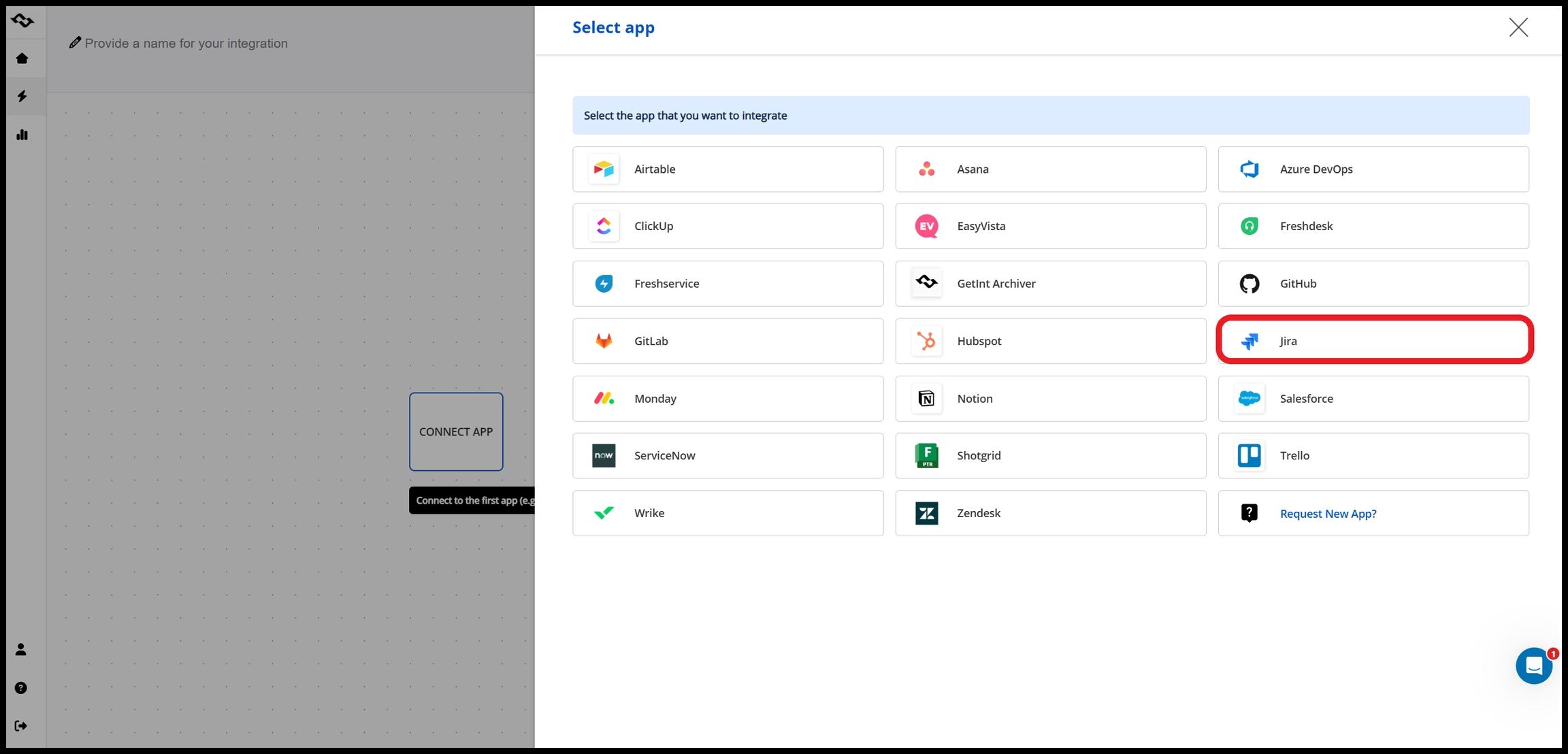
- Then, you need to create a new connection or select an existing one. After that, you will see the box named "sync many projects".
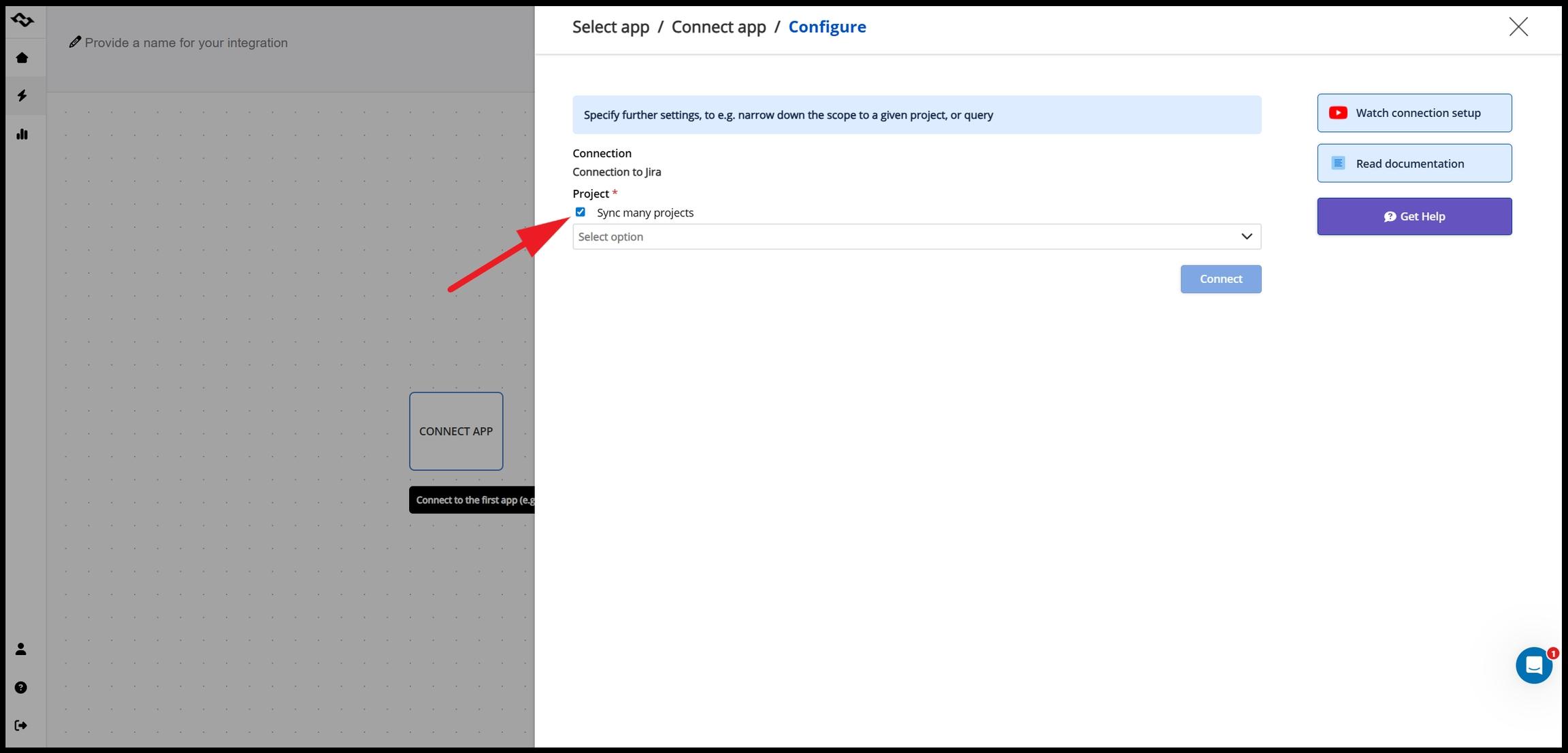
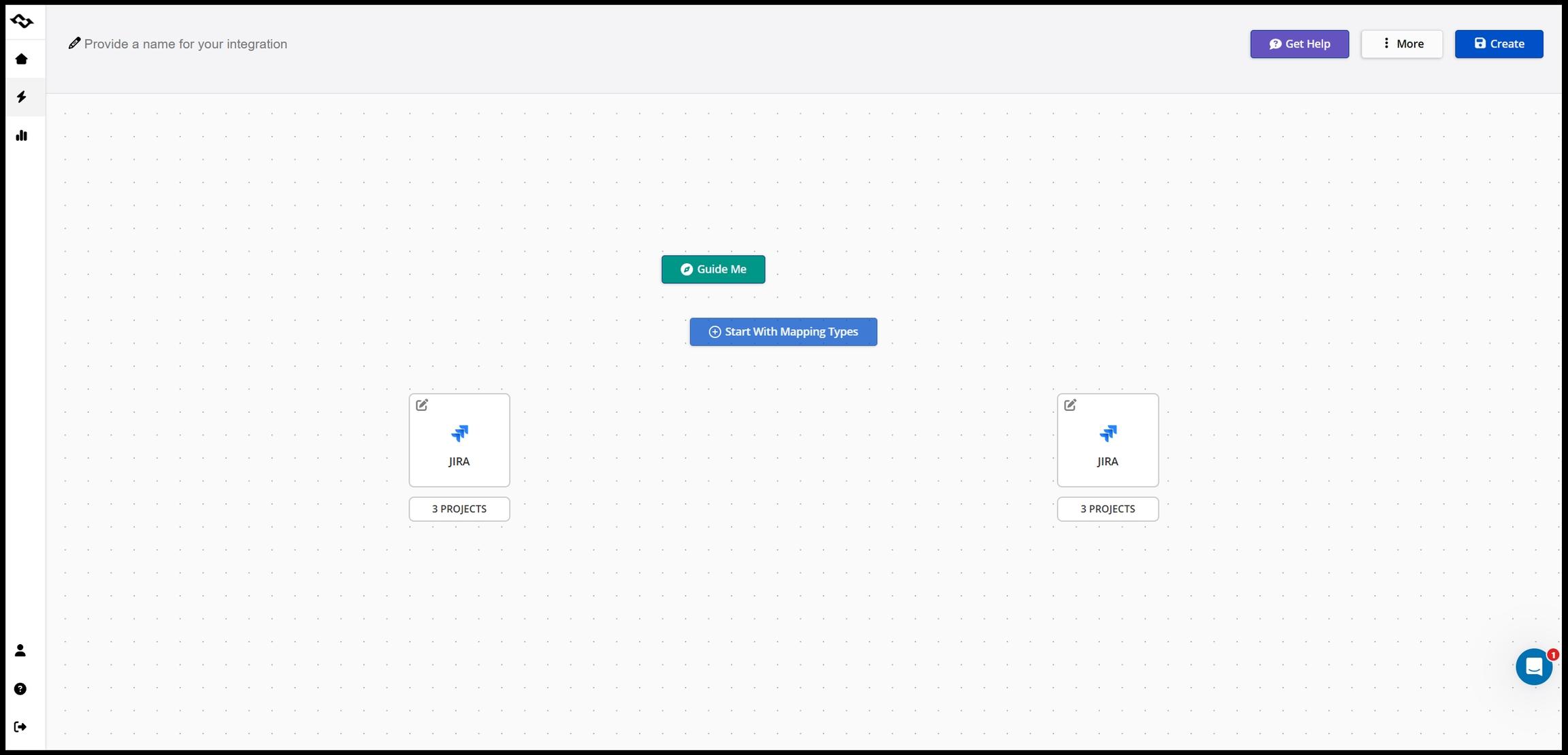
- Right after selecting the projects, you must repeat the steps for the second app. Next, you can start mapping work item types.
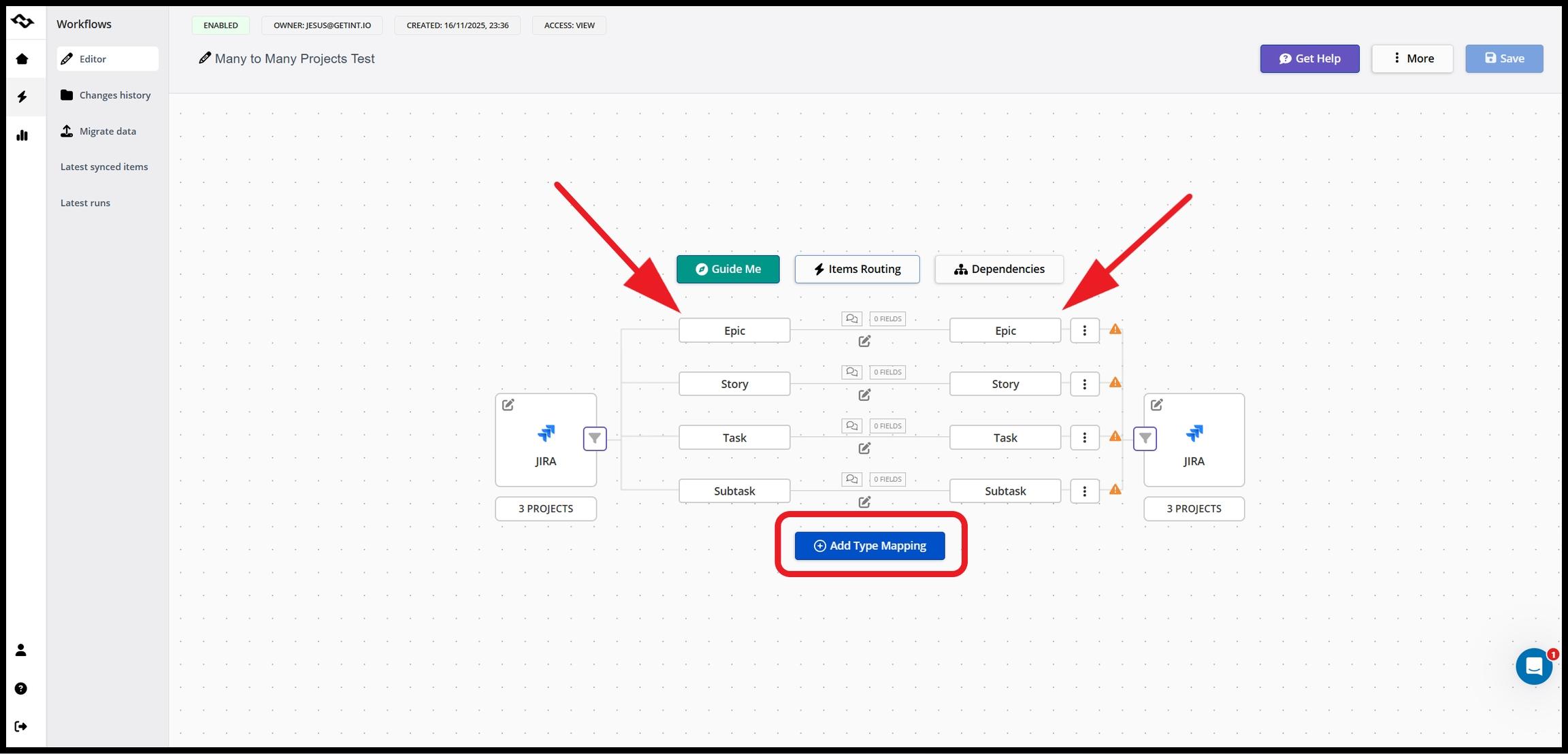
- When type mapping is accomplished, you can proceed with field mapping manually.
Project Switch: Dynamic Item Routing Between Jira Projects
- After configuring type and field mapping, it's time to define conditions. Instead of hardcoding connections between projects, the project switch allows Getint to dynamically decide where work items should be synced based on defined conditions.
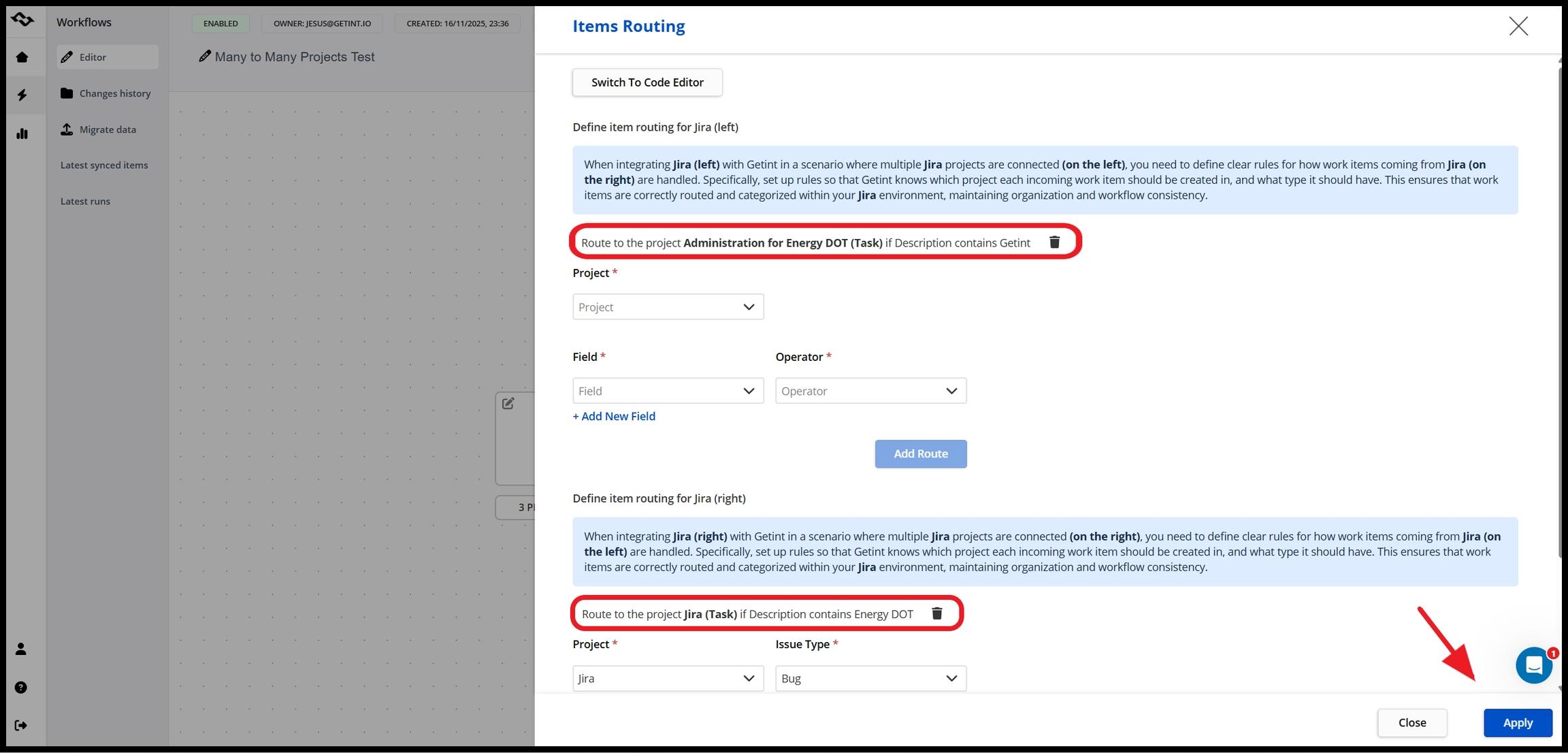
Important note: Define item routing on both sides. If not, work items will not sync.
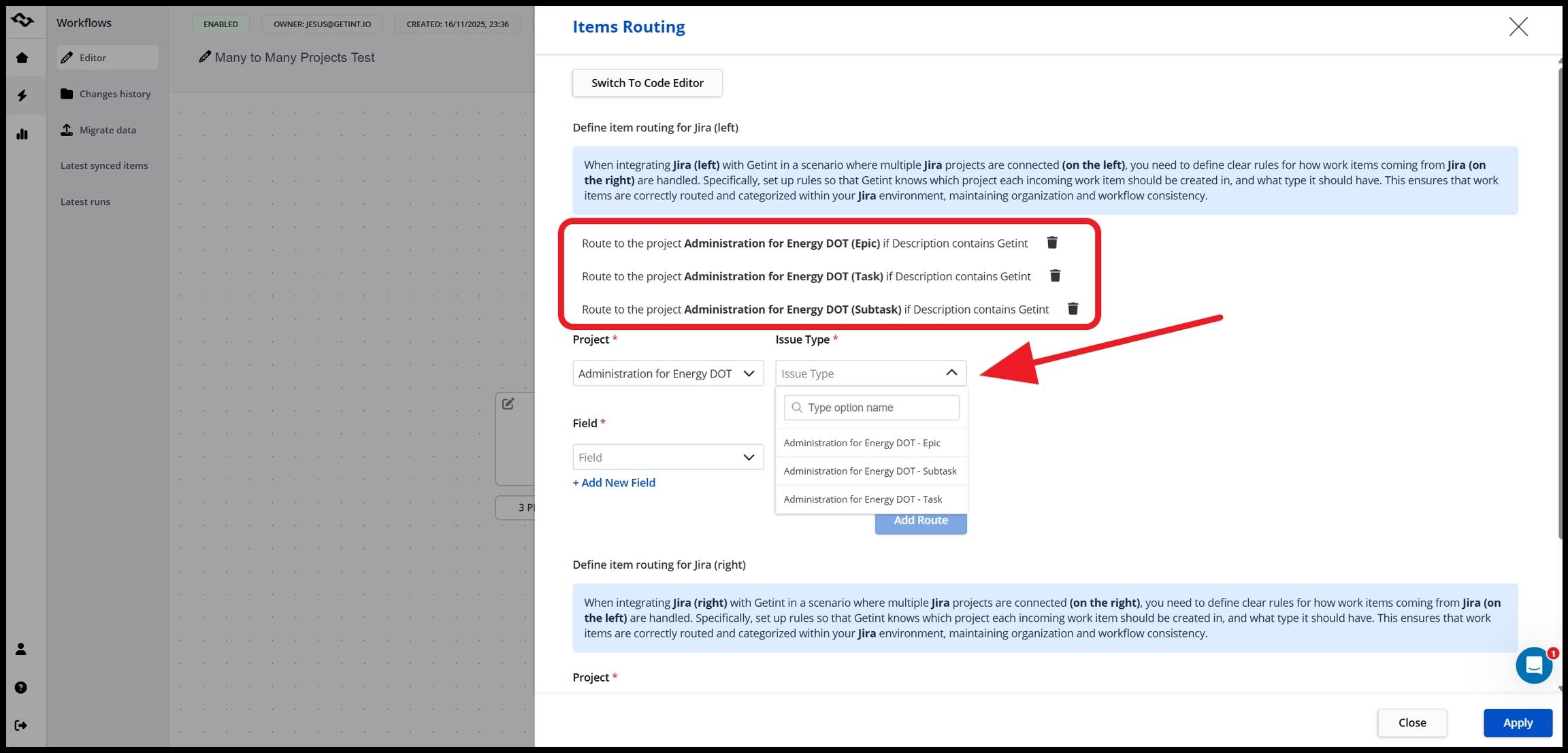
When a Jira work item is created or updated, the integration evaluates rules such as work item type, fields, or project context. Based on this logic, the work item can be routed to one or multiple target projects across different Jira instances.
This means:
- one Jira project can sync work items to multiple target projects,
- multiple Jira projects can feed into a single destination project,
- routing adapts automatically as workflows evolve.
This eliminates the need for maintaining multiple integrations and enables a scalable approach to managing relationships between projects.
- Choose a field that will trigger the sync.
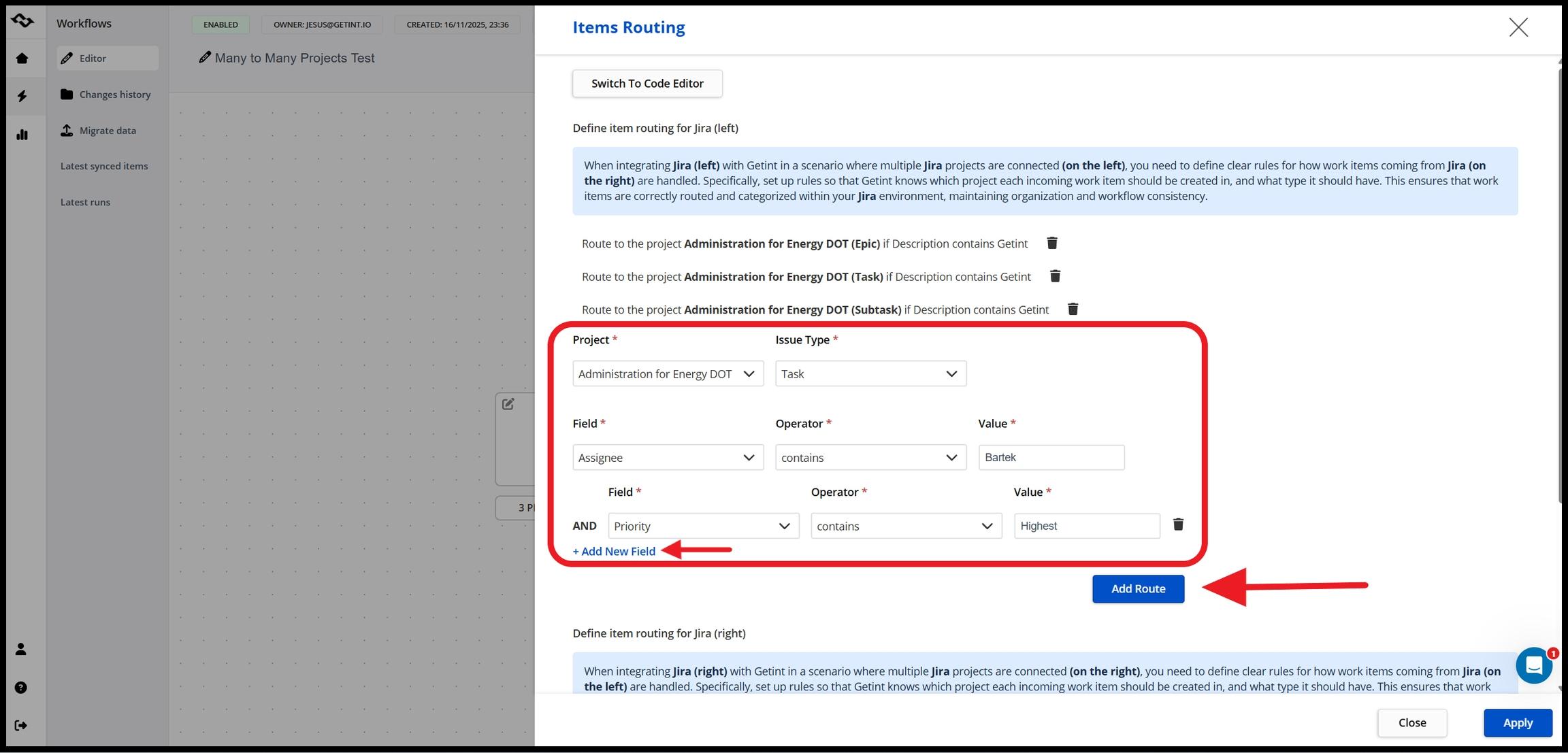
- Repeat those steps for a second part of integration, and save your integration by clicking "Apply".
Other Getint Features That Supports Smooth Integrations
Centralized Sync Rules Instead of Fragmented Configurations
Traditional integration tools require separate configurations for each connection. Getint replaces this model with centralized sync rules that define how data flows across all connected instances and projects.
Instead of managing integrations individually, teams can control synchronization through a single layer of logic. This makes it easier to adjust workflows, introduce new projects, or modify routing without rebuilding integrations from scratch.
As a result, integration becomes more predictable and significantly easier to maintain.
Advanced Field Mapping Across Disparate Jira Instances
Jira instances often differ in structure. Custom fields, workflows, and naming conventions vary between teams, making direct synchronization unreliable.
Getint solves this with advanced field mapping, allowing data to be translated between systems. This ensures that Jira work items remain consistent, even when moving between completely different environments.
This capability is essential for maintaining data integrity in cross-team collaboration scenarios, especially when working with historical data or complex configurations.
Two-Way Synchronization and Real-Time Data Flow
Effective collaboration requires that data moves in both directions. Getint supports two-way synchronization, ensuring that updates made in one Jira instance are reflected across all connected systems.
This allows development teams, support teams, and business teams to stay aligned without relying on manual updates. Real-time synchronization ensures that everyone works with the same information, regardless of which tool or Jira instance they use.
Full Control Over Data, Security, and Compliance
When integrating across multiple systems, especially internal Jira projects with external systems, complete control of sensitive data becomes critical.
Getint provides granular control over what data is shared between systems. Organizations can define exactly which fields and work items are synchronized, ensuring that only relevant information is exchanged.
The platform also meets industry standards such as SOC 2 Type II, ISO 27001, ISO 27018, GDPR, and provides access to detailed security documentation via its Trust Center, giving teams confidence in the security of their integrations.

Key Benefits of Using Getint Integration Solution for Many-to-Many Relationships
Adopting a many-to-many integration model with Getint transforms how technical and non-technical teams collaborate and manage specific workflows based on Jira Software Cloud.
- Integration complexity reduction
Instead of maintaining multiple connections, teams operate within a single, scalable integration layer.
- Data consistency improvement
Controlled synchronization and proper field mapping ensure that Jira work items remain aligned across systems without duplication.
- Seamless collaboration
Teams can continue working in their own Jira instances or tools while staying connected through synchronized data.
- Scalability
As organizations grow and introduce new projects or systems, seamless integration can expand without requiring a complete redesign of existing configuration.
When Getint’s Many-to-Many Integration Makes the Most Sense
Getint is particularly valuable in environments where Jira is used across multiple teams, systems, or organizations.
This includes companies managing multiple Jira instances across departments, teams collaborating with external partners using separate Jira environments, organizations connecting Jira Service Management with development workflows, and enterprises integrating Jira with tools like Azure DevOps Server or CRM platforms.
In these scenarios, many-to-many relationships are not an edge case — they are essential for maintaining efficiency, visibility, and alignment.
Final Thoughts
Many-to-many Jira integration reflects how modern organizations actually operate — across multiple tools, teams, and environments. Simple one-to-one integrations are no longer sufficient. They introduce fragmentation instead of solving it.
Solutions like Getint provide a structured and scalable way to manage complex relationships between Jira instances and projects in just a few clicks. By introducing concepts such as project switch, centralized sync rules, and dynamic routing, Jira integration bridges organizations workflows enabling seamless collaboration.
As a result, separate Jira instances can operate as part of a single, management tool — enabling collaboration without changing priorities.