
Asset tracking and configuration management have become essential for many IT teams that administer hardware, software, licenses, and operational resources at scale.
Jira Service Management (JSM) offers a flexible way to handle these needs through its Assets feature — allowing organizations to track, link, and manage assets with detailed visibility and ITSM-friendly workflows.
In this article, we’ll walk through everything you need to know about JSM asset management: how assets work within Jira Service Management, how to build object schemas, how to search asset data using AQL and JQL, how to optimize lifecycle management, and how platforms like Getint seamlessly integrates work tools to keep detailed information consistent across them. This guide combines technical explanations, practical examples, and best practices to help teams find, manage and track assets effectively, improve service delivery, and make decisions based on accurate assets and configuration items data. Let's get right into the topic.
What JSM Assets Are and How They Fit Into Jira Service Management
JSM Assets is Jira Service Management’s built-in solution for asset and configuration management, designed to help IT teams and business departments track physical devices, software licenses, configuration items, and customer assets within one unified system. Unlike traditional CMDBs (Configuration Management Databases) that rely on rigid, predefined structures, JSM Assets uses an open data structure that adapts to your organization’s needs — whether you’re tracking laptops, mobile phones, service providers, facilities equipment, or internal resources.
Assets in JSM are represented as asset objects, each belonging to an object type (for example: Laptop, Employee, Software License, Network Device). Object types include attributes such as asset name, serial number, vendor, lifecycle state, user, department, warranty, or any specific attributes your environment requires. This flexibility helps teams model accurate asset information and build inventories without the steep learning curve seen in legacy configuration management tools.
Most importantly, assets link directly to Jira work items and service requests, providing context to agents and enabling users to select right assets when submitting tickets. This makes it easier for teams to access assets, perform impact analysis, troubleshoot problems, and understand the impact of changes on further stages of the process — all within Jira Service Management.
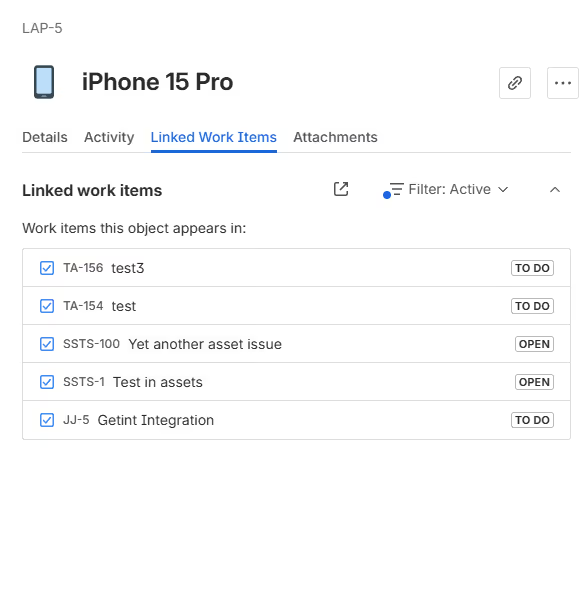
This foundation allows different teams (not just IT) to work with consistent, up-to-date asset data, improve service delivery, and manage resources effectively across the entire company.
Object Schema: The Foundation of Asset Management
Object schemas form the structural backbone of JSM Assets. They define how asset information is organized and help teams turn raw data into a clear, navigable inventory. Instead of spreading information across sheets or disconnected systems, schemas group related items in a way that mirrors real operations and supports ITSM processes.
A schema can cover almost anything your organization needs to manage: laptops and mobile devices, software and subscriptions, employee equipment, vendor relationships, facilities resources, or customer assets.
Example: a hardware schema may include laptops, mobile devices, monitors, or servers; a software schema may track licenses, SaaS subscriptions, and owners; and an HR schema may store onboarding kits or access badges.
The purpose is not only to categorize assets but also to make them easier to link to Jira work items, automate lifecycle updates, and support analysis. Schemas are especially useful for organizations running JSM Premium or Enterprise, where larger inventories and more advanced configuration management practices require a structured approach.
Object Types and Asset Attributes
Within each schema, object types represent the specific categories of assets you want to track. Common examples include Laptop, Server, Software License, Employee, or Customer Asset. Each object type contains the attributes that describe the asset, such as:
- asset name
- serial number
- vendor or manufacturer
- lifecycle state
- assigned user or department
- cost center
- purchase date and warranty period

These attributes create the detailed visibility IT teams rely on. A laptop isn’t just a single record — it’s a combination of characteristics that determine how it’s used, who depends on it, what risks it carries, and when it needs replacement. Software licenses can store renewal dates, owners, seat counts, and compliance details, helping teams avoid unnecessary spend or audit issues.
Because JSM Assets use an open data structure, you can define object types and attributes exactly the way your environment requires. This adaptability avoids the steep learning curve of traditional CMDB systems and supports both IT and non-IT teams who need accurate asset information to make informed decisions.
Lifecycle Management: Keeping Asset Data Accurate and Actionable
Every asset moves through a lifecycle, and JSM provides a simple way to reflect those movements in the system. A laptop might transition from “Ordered” to “In Use,” move into “Under Repair,” and eventually become “Retired.” Software licenses have their own journey: “Active,” “Renewal Due,” or “Inactive.” Capturing these states within Jira Service Management helps maintain accurate records and prevents outdated or misleading data from slipping into your processes.
Lifecycle management directly supports financial planning, compliance needs, and incident resolution. When assets carry the correct lifecycle state, teams understand which resources are operational, which require action, and which pose risks. Over time, this translates into more informed decisions and more predictable service delivery.
Automation enhances lifecycle tracking. JSM can update lifecycle states when related work items are resolved, notify procurement teams when inventory reaches low stock, or warn asset owners about warranty expiration. These automations ensure lifecycle updates don’t depend on manual effort — ensuring assets stay on track even as workloads increase.
Using JSM Assets in Jira Work Items
Assets become most valuable when they meet real work — and in JSM, that happens inside Jira work items. When someone submits a service request, the system can prompt them to pick the exact laptop, phone, license, or configuration item they’re reporting about. This simple step provides IT teams with instant context and reduces back-and-forth questions.
Linking Customer Assets to Service Requests
The connection between assets and work items helps agents understand what they’re working with before they begin troubleshooting. Instead of guessing which laptop is failing or which software version is causing errors, the asset is already attached to the ticket.
This allows teams to:
- diagnose underlying problems faster
- identify recurring failures across asset types
- uncover patterns (e.g., a model that generates frequent requests)
- streamline service delivery
The Assets custom field plays a central role here. It appears on Jira forms and work items, dynamically showing relevant assets based on permissions. Employees might only see the devices assigned to them, while procurement or IT staff have access to a broader set.
Understanding History and Downstream Impact
When assets are consistently linked to work items, teams gain an ongoing history of incidents. A single mobile phone or application license may show a timeline of requests that reveals whether it’s unreliable or nearing replacement. For IT teams practicing configuration management, this visibility supports better impact analysis, risk mitigation, and informed decisions during change management.
This interaction — assets < > work items — is what separates JSM Asset Management from traditional CMDBs that store data but do not connect it to real operational work.
Searching and Reporting on Asset Data: AQL and JQL
Once your asset data sits inside JSM, the next layer of value comes from being able to search, analyze, and interpret it. This is where AQL (Assets Query Language) and JQL complement each other. Together, they allow teams to understand how assets behave, how they impact service delivery, and where potential risks exist.
AQL: Searching the Asset Database
AQL lets teams query assets based on their attributes. Whether you want to locate all laptops assigned to a department, identify software licenses nearing expiration, or filter mobile devices by model, AQL serves as a precise and flexible search tool.
Because AQL works directly with asset attributes, it is especially effective for:
- inventory management
- tracking resources effectively
- compliance activities
- lifecycle audits
- understanding actual asset usage
JQL: Finding Work Items Related to Assets
While AQL helps you search asset objects, JQL focuses on Jira work items linked to those assets. This unlocks powerful insights:
- Which devices cause the most incidents?
- Which licenses generate frequent service requests?
- Is a specific asset type consistently problematic?
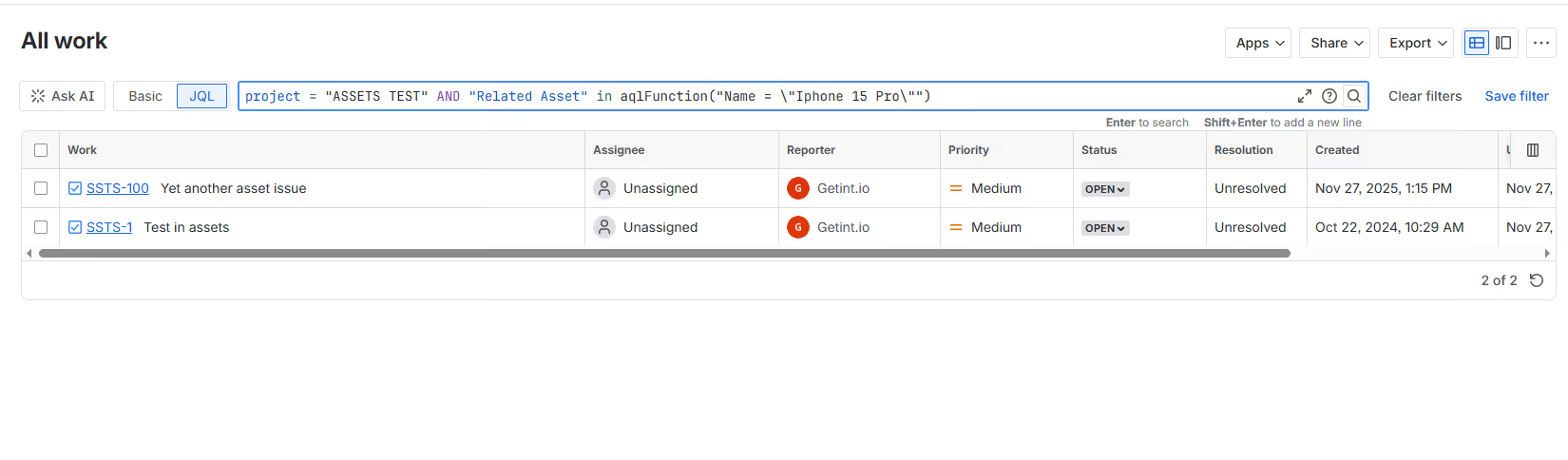
These searches help teams spot patterns, identify potential risks, and justify replacements or upgrades.
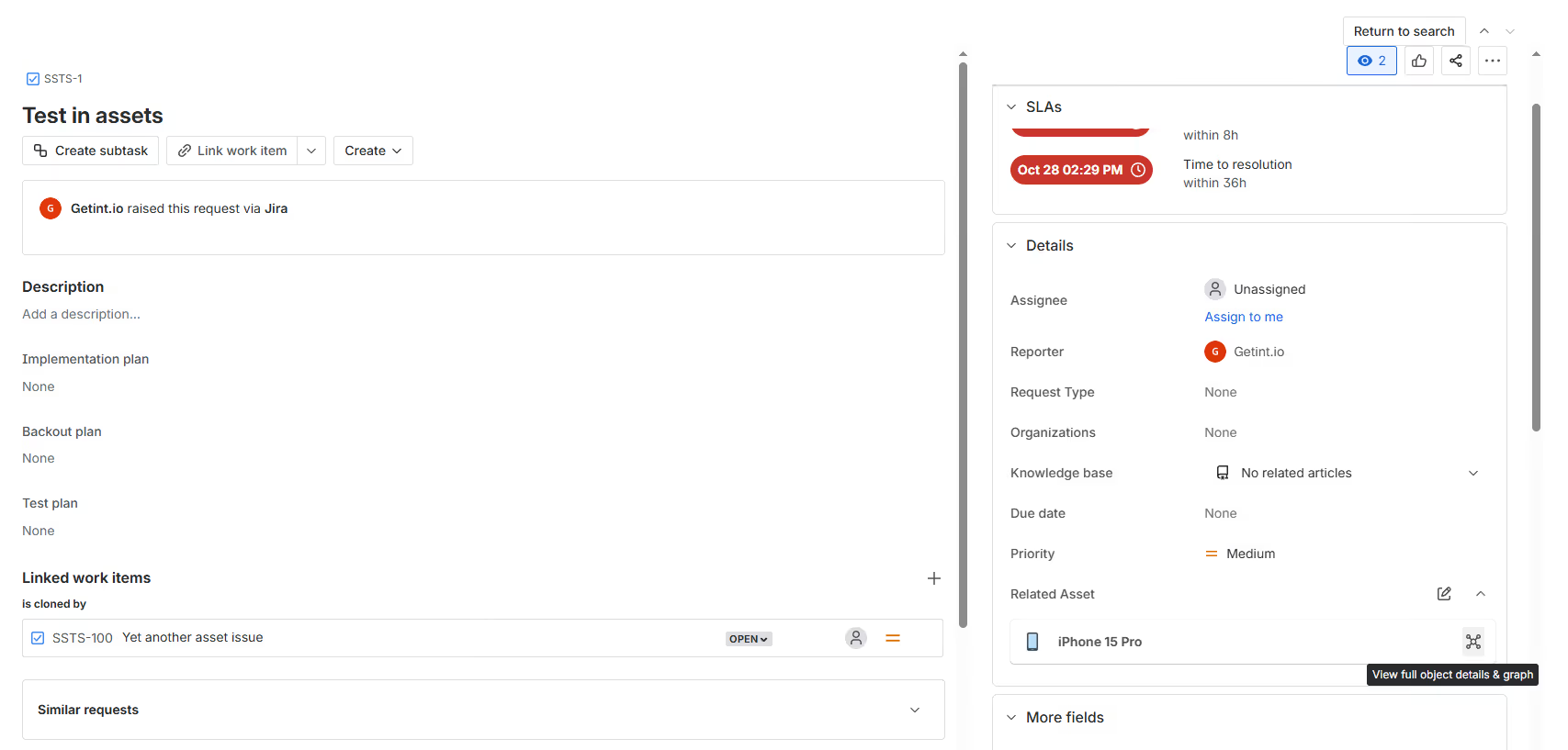
Combining AQL + JQL for Deeper Insights
The real power appears when you combine both query languages.
For example: Search work items related to assets matching an AQL condition.
This allows teams to perform:
- impact analysis for configuration items
- root-cause investigations
- reporting on relevant assets
- operational efficiency audits
This ability to move seamlessly between the asset layer and the work item layer is what makes JSM a strong configuration management tool with advanced features.
Importing Data and Building an Accurate Inventory
Most organizations begin their journey with JSM Assets by importing existing data rather than creating every asset manually. Whether your current inventory lives in spreadsheets, legacy CMDBs, procurement systems, or internal tools, the import capability in Jira Service Management helps you bring everything together in a single, structured environment.
Imports rely on mapping external data fields to asset attributes. During this process, you define which column becomes the asset name, serial number, lifecycle state, owner, or purchase date. Because JSM Assets uses an open data structure, you can tailor this mapping to match your current environment closely, ensuring that your historical inventory accurately translates into a usable object schema.
Once the initial inventory is loaded, it becomes part of JSM’s searchable, relational system. Assets can then be linked to Jira work items, analyzed using AQL, or integrated into lifecycle management workflows. This transition from static data to a dynamic asset database is where many teams start seeing immediate efficiency gains — especially those moving away from static spreadsheets.
Keeping Your Inventory Reliable Over Time
Importing is only the first step. Assets naturally evolve: laptops get reassigned, mobile devices are replaced, licenses expire, and configuration items shift between teams or services. JSM supports these updates through bulk edits, manual adjustments, and automation rules that reduce the burden on IT teams.
Some organizations assign a dedicated data manager to oversee updates, while others build shared responsibility models between IT, procurement, and facilities teams. Whatever the approach, the goal remains the same: maintaining accurate asset information so you can rely on it for decision-making, compliance, audits, and daily service operations.
Automation Rules That Strengthen Asset and Configuration Management
Automation is one of the most powerful features inside JSM Assets. It helps teams maintain consistency and accuracy without relying on manual updates. Instead of waiting for someone to change an asset’s lifecycle state or send notifications, automation keeps data aligned with real events happening across Jira work items.
Lifecycle transitions are a common example. When a work item related to a repair is completed, JSM can automatically move the asset back to “In Use.” When a device is marked “Retired,” the system can trigger a different workflow for procurement or recycling. These actions keep every configuration item aligned with its actual state, reducing both human error and administrative overhead.
Automation also plays an important role in cost control and compliance. Rules can alert teams when inventory levels fall under a defined threshold, when warranties or software licenses approach expiration, or when a high-risk configuration item is modified. These proactive alerts ensure teams act in time, rather than reacting to problems once they’ve already caused disruption.
Supporting Operational Efficiency at Scale
As your asset database grows, automation becomes essential for sustaining reliability. Rather than dedicating hours each week to manual updates, IT teams can trust JSM to keep objects, attributes, and linked work items synchronized and up to date. This frees teams to focus on strategic initiatives instead of clerical updates, and ensures that asset information supports — rather than hinders — service delivery.
Getint + JSM Assets: Keeping Asset Data Consistent Across Systems
Even with strong practices inside Jira Service Management, many organizations operate in multi-tool environments. IT teams frequently work across ServiceNow, Azure DevOps, multiple Jira instances, CRMs, or vendor systems. Without integration, asset data quickly becomes inconsistent: one tool shows a laptop as “In Use,” another as “Retired,” and another still marked as “Unknown.” This discrepancy leads to inaccurate reporting, unnecessary request types, and poor decision-making.
Getint eliminates these gaps by synchronizing asset data and Jira work items across systems. Instead of manual duplication or partial updates, Getint integrates seamlessly the systems so that assets remain up to date everywhere they are referenced. This is particularly valuable for hybrid environments or organizations that manage assets for external customers, where data consistency directly influences service quality.

How Getint Works With JSM Assets
From Getint’s perspective, assets stored inside Jira are structured objects, most often located in custom fields such as the Assets or Multi Related Asset field. Because these objects contain rich attribute data, they require JQL-based filtering to be mapped correctly. Getint integration ensures this by allowing you to define JQL conditions, select the right object schema, and map asset attributes to destinations in other tools.
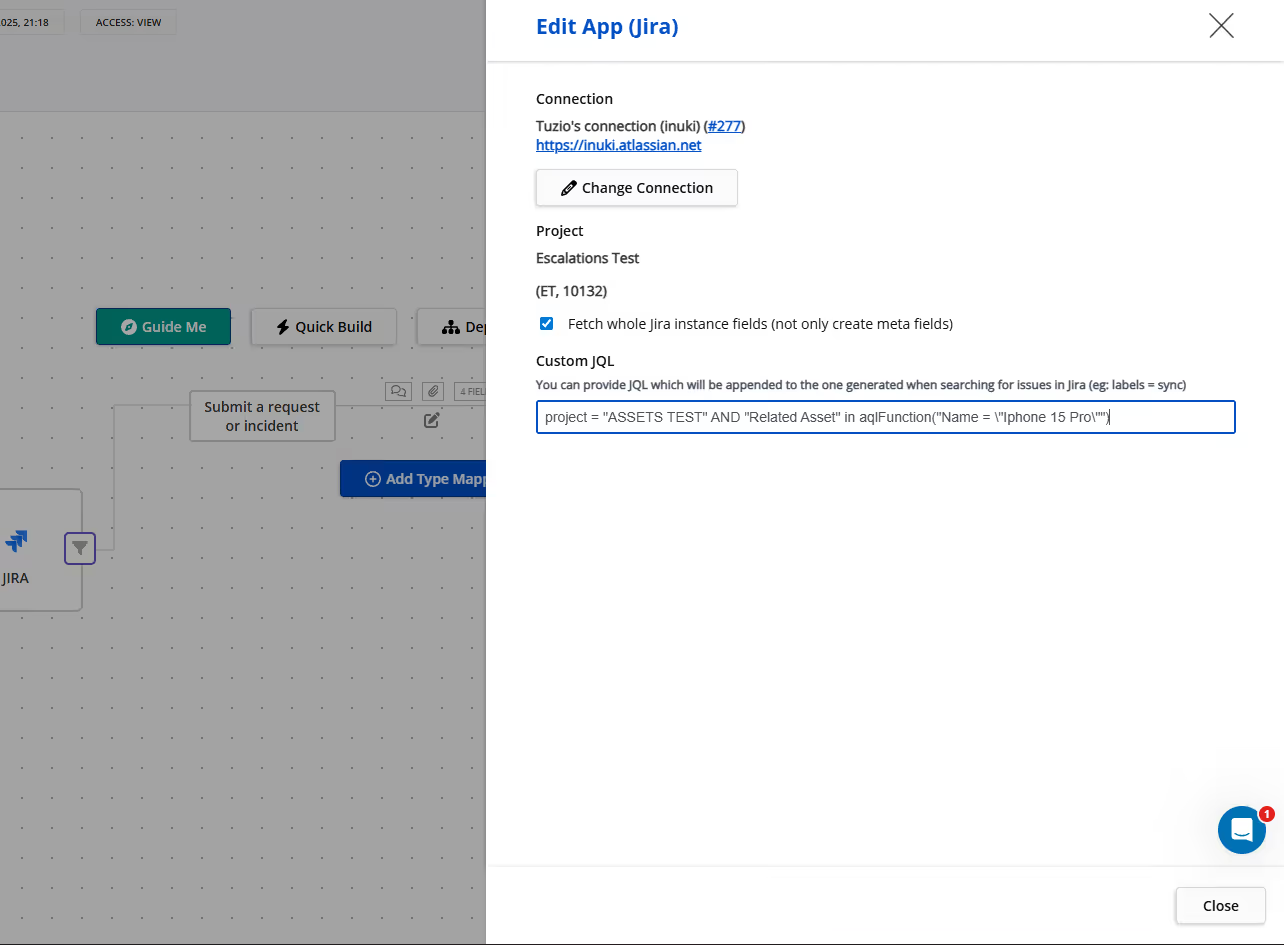
Once configured, Getint can sync assets and associated Jira work items one-way or bidirectionally. For example, if a laptop object in JSM receives an updated lifecycle state after a repair work item is resolved, Getint can push that updated state into ServiceNow or another Jira instance. Conversely, if asset information changes in a partner’s system, Getint can pull that update back into JSM to keep your configuration items aligned.
A Practical Integration Example
Imagine an IT provider supporting a large customer that keeps asset records in Jira, while the provider runs workflows in ServiceNow. With Getint, the customer’s laptop objects, software licenses, or configuration items can be visible inside the provider’s ServiceNow instance — alongside related work items. When the provider resolves a repair ticket, the lifecycle state of the asset updates automatically back in the customer’s Jira. No spreadsheets, no copying, no drift.
This approach ensures clean, consistent asset data across tool boundaries, and helps both sides make crucial decisions based on accurate, real-time information.
JSM Assets vs JSM Assets With Getint: A Quick Comparison
To illustrate how Getint extends the value of JSM asset management, you can take a look at quick comparison in the table.
Best Practices for Managing JSM Assets at Scale
Maintaining a scalable asset management practice inside Jira requires a combination of good structure, consistent data hygiene, and automation.
Design Your Schema for Long-Term Growth
Start with essential assets, but design schemas so they can expand. Keep naming consistent, group related object types logically, and avoid unnecessary complexity in the early stages.
Standardize Attributes and Processes
Define attribute naming conventions and ensure teams follow them. When attributes follow a logical pattern, AQL queries, filters, and reports remain accurate.
Automate Whenever Possible
Use automation rules to update lifecycle states, send alerts, or escalate critical changes. Automations help prevent data drift and reduce manual overhead.
Integrate When Multiple Systems Hold Asset Data
If your organization operates across more than one platform, integration becomes essential. Getint keeps asset information synchronized across environments so that teams rely on one truth, rather than juggling competing versions of the same asset.
Conclusion: Turning Asset Data Into Operational Intelligence
JSM Assets transforms Jira Service Management from a traditional ticketing system into a powerful asset and configuration management platform. By modeling assets as structured objects, linking them to Jira work items, and managing their lifecycle from acquisition to retirement, teams gain clarity and control over their operational environment.
Integrations like Getint extend this even further, ensuring that asset data remains consistent across multiple tools and systems. When information is aligned, teams make better decisions, deliver higher-quality service, mitigate risks of disconnected data, and maintain compliance without extra administrative burden.
Modern ITSM practices require accurate, connected, real-time asset data. JSM Assets — combined with the right integration strategy — gives organizations the visibility and reliability they need to support service delivery, and make confident decisions.