
The majority of engineering teams begin by using manual deployment procedures. Manual procedures become bottlenecks when teams and applications expand. To remain competitive, the modern software development lifecycle demands constant deployment and integration.
Azure DevOps automation is the practice of automating software delivery, infrastructure provisioning, testing, and operational tasks so teams can build, validate, and release software consistently with minimal manual intervention.
As a DevOps engineer, I create Azure DevOps pipelines, use Terraform to automate infrastructure, and deploy to Azure Kubernetes Service (AKS) on a daily basis. Building dependable, repeatable delivery processes is more important for Azure DevOps automation than utilizing every feature. The real value is in developing transparent, consistent workflows that remove manual labor and free up engineers to concentrate on developing products.
In this guide, you'll learn how to design production-ready CI/CD pipelines, automate infrastructure with Terraform, secure deployment workflows, implement operational automation, and extend Azure DevOps with integrations that keep engineering and business teams aligned.
What Azure DevOps Automation Really Means
In your complete software development lifecycle is transformed into version-controlled code by Azure DevOps automation; Terraform infrastructure specifications and YAML pipelines coexist with your application code. Automated compilation, testing, and deployment via staging environments are triggered by each code change. Explicit human consent is needed for production deployments. Teams may decrease human labour and provide unchangeable audit trails for compliance by automating builds, testing, and provisioning. Without having to wait on platform teams, developers can now provide self-service features.
Understanding Azure DevOps Services
For the whole software development lifecycle, Azure DevOps Services offers a centralized platform:
- work tracking is offered by Azure Boards;
- source code is managed by Azure Repos;
- CI/CD workflows for developing, testing, and deploying applications are automated by Azure Pipelines;
- automated testing and continuous testing initiatives are supported by Azure Test Plans;
- and packages and dependencies are managed by Azure Artifacts.
When combined, these services provide development teams with a single, auditable platform rather than a collection of disparate tools, allowing everything to be coordinated in one location, from planning to production.
Designing an Enterprise CI Pipeline
Automation starts with continuous integration. Compiling code, running unit tests, measuring code coverage, conducting code quality analysis, and scanning container images for vulnerabilities are all essential tasks that a production CI/CD pipeline for automated testing must manage. Each step is a gate; the process ends if compilation is unsuccessful. It stops if code quality metrics don't meet expectations. It stops if test cases identify problems. The container image is not pushed to the registry until each quality gate has been passed.
Azure Test Plans integrates automated testing into your CI/CD workflow, catching bugs before production. Security scanning, static analysis, and automated tests enhance code quality. Dependency caching accelerates builds to 30 seconds, while concurrent test execution provides instant feedback developers see results minutes after commit, not hours later. Branch policies enforce code review, successful builds, passing tests, and linked work items before merging to main.
Building Production CD Pipelines with Azure DevOps
Code is tested in four environments:
- development (experimentation),
- quality assurance (integration testing),
- user acceptance testing (UAT),
- and production (customers).
Each has different requirements for approval, uptime expectations, and credentials.
Your CI/CD pipeline progresses through stages: develop → development → QA → UAT → production. Production requires explicit approval via the environment: 'production' keyword. After each deployment, health checks and smoke tests verify success; if they fail, the pipeline halts and alerts the team. Phase dependencies prevent UAT and production from executing if earlier stages fail. Rollbacks are simple via kubectl rollout undo, exposed through a manual pipeline trigger to enable quick production reverts without SSH access or emergency protocols.
A Complete Pipeline Example: From Commit to Production
Here is a realistic multi-stage pipeline that demonstrates the concepts in this guide. The earlier version of this example had DeployProd depend directly on DeployDev, which breaks the moment a main-branch build runs without ever touching develop. The corrected structure below has DeployDev and DeployQA branch off Build independently, with DeployProd gated behind DeployQA instead:
trigger:
  branches:
    include:
      - main
      - develop
    exclude:
      - release/*

pr:
  branches:
    include:
      - main
      - develop

pool:
  vmImage: 'ubuntu-latest'

variables:
  buildConfiguration: 'Release'
  imageName: 'payments-service'
  registryName: 'acrprod'

stages:
  - stage: Build
    displayName: 'Build and Test'
    jobs:
      - job: BuildJob
        displayName: 'Compile, Test, and Scan'
        steps:
          - checkout: self
            fetchDepth: 0

          - task: UseDotNet@2
            displayName: 'Install .NET SDK'
            inputs:
              version: '7.0.x'

          - task: DotNetCoreCLI@2
            displayName: 'Restore NuGet packages'
            inputs:
              command: 'restore'
              projects: '**/*.csproj'

          - task: DotNetCoreCLI@2
            displayName: 'Build solution'
            inputs:
              command: 'build'
              arguments: '--configuration $(buildConfiguration)'

          - task: DotNetCoreCLI@2
            displayName: 'Run unit tests'
            inputs:
              command: 'test'
              arguments: '--configuration $(buildConfiguration) --logger trx'
              publishTestResults: true

          - task: Docker@2
            displayName: 'Build and push Docker image'
            inputs:
              command: 'buildAndPush'
              repository: $(imageName)
              dockerfile: 'Dockerfile'
              containerRegistry: $(registryName)
              tags: |
                $(Build.BuildId)
                latest

  - stage: DeployDev
    displayName: 'Deploy to Development'
    dependsOn: Build
    condition: |
      and(
        succeeded(),
        eq(variables['Build.SourceBranch'], 'refs/heads/develop')
      )
    jobs:
      - deployment: DeployToAKS
        displayName: 'Deploy to dev cluster'
        environment: 'development'
        strategy:
          runOnce:
            deploy:
              steps:
                - task: KubernetesManifest@0
                  displayName: 'Deploy to Kubernetes'
                  inputs:
                    action: 'deploy'
                    kubernetesServiceConnection: 'aks-dev'
                    namespace: 'payments'
                    manifests: '$(Pipeline.Workspace)/manifests/deployment.yaml'
                    containers: '$(registryName).azurecr.io/$(imageName):$(Build.BuildId)'

                - task: Bash@3
                  displayName: 'Verify deployment'
                  inputs:
                    targetType: 'inline'
                    script: |
                      kubectl rollout status deployment/payments-service -n payments --timeout=5m

  - stage: DeployQA
    displayName: 'Deploy to QA'
    dependsOn: Build
    condition: |
      and(
        succeeded(),
        eq(variables['Build.SourceBranch'], 'refs/heads/main')
      )
    jobs:
      - deployment: DeployToQA
        displayName: 'Deploy to QA cluster'
        environment: 'qa'
        strategy:
          runOnce:
            deploy:
              steps:
                - task: KubernetesManifest@0
                  displayName: 'Deploy to Kubernetes'
                  inputs:
                    action: 'deploy'
                    kubernetesServiceConnection: 'aks-qa'
                    namespace: 'payments'
                    manifests: '$(Pipeline.Workspace)/manifests/deployment.yaml'
                    containers: '$(registryName).azurecr.io/$(imageName):$(Build.BuildId)'

  - stage: DeployProd
    displayName: 'Deploy to Production'
    dependsOn: DeployQA
    condition: |
      and(
        succeeded(),
        eq(variables['Build.SourceBranch'], 'refs/heads/main')
      )
    jobs:
      - deployment: DeployToProduction
        displayName: 'Deploy to prod cluster'
        environment: 'production'
        strategy:
          runOnce:
            deploy:
              steps:
                - task: KubernetesManifest@0
                  displayName: 'Deploy to production'
                  inputs:
                    action: 'deploy'
                    kubernetesServiceConnection: 'aks-prod'
                    namespace: 'payments'
                    manifests: '$(Pipeline.Workspace)/manifests/deployment.yaml'
                    containers: '$(registryName).azurecr.io/$(imageName):$(Build.BuildId)'

                - task: Bash@3
                  displayName: 'Production health check'
                  inputs:
                    targetType: 'inline'
                    script: |
                      kubectl rollout status deployment/payments-service -n payments --timeout=10m
                      kubectl run smoke-test --image=curlimages/curl:latest --rm -i --restart=Never -- curl -f http://payments-service:8080/health
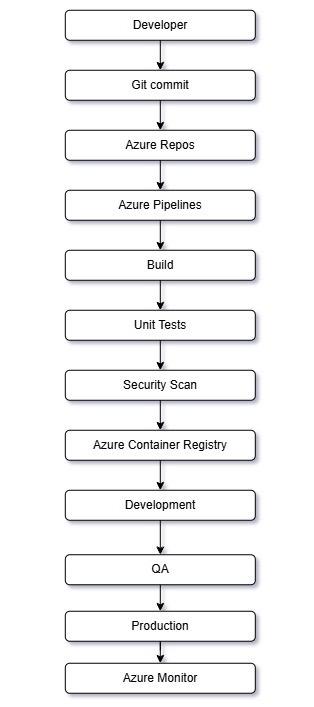
When a commit is made to main or develop, the trigger goes off. A Docker image is pushed to the container registry, the code is compiled, and unit tests are executed. When the branch is developed, DeployDev launches and depends only on Build. Additionally, DeployQA only depends on Build and operates when the branch is main, so regardless of whether develop was ever touched, a main-branch commit always reaches QA. DeployProd is dependent on DeployQA and needs explicit approval via the "production" gate; without human approval, nothing moves forward to production. Before declaring victory, health is verified at each deployment stage.
Automated testing on each commit, quick developer feedback, automatic deployment to lower environments, and gated production deployments under human supervision are all provided by this pattern. What matters is the dependency structure, so modify the stage names, service names, and commands to fit your own stack.
At a glance, the flow looks like this:
Infrastructure as Code with Terraform
Every piece of infrastructure, including databases, storage, networks, and clusters, is housed in Terraform code within Git. When a pull request is opened, a pipeline runs a terraform plan so engineers can review the proposed changes before approving them, then run terraform apply to provision the resources after merge. Using a remote backend allows teams to securely store Terraform state in Azure Storage and collaborate across environments without local state files going stale or conflicting.
Infrastructure as Code improves configuration management by ensuring cloud environments are deployed using repeatable processes instead of manual portal clicks. Teams can automate managing infrastructure across development, testing, and production environments, with state encrypted, versioned, and fully audit-logged. Only pipelines are allowed to run Terraform; developers never apply changes locally against production state.
Azure Automation Runbooks for Operational Automation
Azure Automation complements Azure DevOps automation by handling operational tasks that fall outside the pipeline. Azure Automation Runbooks can restart services, schedule maintenance windows, rotate certificates, and automate routine tasks across cloud resources without a human logging into the portal at 2 a.m.
Runbooks automate what happens to a resource after it has started running, whereas CI/CD pipelines automate the process from commit to production. They are used by operations teams to automate repetitive tasks that used to take up an on-call engineer's week, such as scheduling VM start/stop windows for cost control, cleaning up expired resources, and running scheduled health checks against production infrastructure.
Both development teams and operations teams can benefit from a consistent layer of process automation by combining pipeline-driven deployments with runbook-based operations, one for shipping change and the other for maintaining system health in between releases.
Managing Secrets and Identity in Azure DevOps
Secrets like database credentials and API keys should be stored in Azure Key Vault rather than pipeline YAML. Variable Groups fetch them at runtime, and they’re automatically redacted from logs. Access control is strict: only service principals that genuinely need a secret can access it.
In order to provide secure authentication without storing long-lived credentials at all, modern Azure DevOps workflows are depending more and more on Microsoft Entra ID, Managed Identity, and OIDC federation. Applications use a Managed Identity that is trusted by the OIDC issuer of your Kubernetes cluster; Azure cryptographically verifies the short-lived token that the cluster mounts in the pod. Azure SDK libraries take care of token refresh automatically in the background, so there are no secrets kept, rotation schedules, or credential theft. On top of this, Microsoft Defender for Cloud can identify security threats and incorrect configurations in all of your cloud resources.
Reusable Pipelines and Templates
Resist the temptation to copy-paste pipeline definitions across repositories. Instead, maintain shared pipeline templates in a central platform repository. When the platform team discovers a new security scanning tool or regulatory requirement, adding it to the template automatically applies the improvement to every service’s next build run. New services reference these templates using simple parameters like the programming language, container image name, and Dockerfile location. A new team member sets up a 10-line pipeline file rather than wrestling with hundreds of lines of duplicated configuration.
In practice, teams that make templates the standard pattern see new services get productive much faster, and spend far less time maintaining dozens of nearly-identical pipeline definitions.
Security and Governance
Automation without guardrails is dangerous. Enforce these core controls systematically.
Branch Policies
Require a minimum number of reviewers (at least 2 for main, 1 for develop), restrict approval authority to senior engineers on critical paths, mandate linked work items so every change traces to a task, require successful CI build before any merge, prevent merging stale pull requests by forcing fresh approvals when code changes, and dismiss prior approvals when new commits are pushed.
SAST and Dependency Scanning
Integrate code quality analysis (SonarCloud), automated security analysis, and vulnerability reporting into every build. Add container image scanning to catch known CVEs before they reach production.
RBAC on Service Connections
Service connections are credentials and must be scoped tightly. Allow specific pipelines access to only the environments they need. Grant “Administer” role to senior engineers or a dedicated “Release Admins” group only. For production, require a manual approval gate in addition to RBAC controls.
Environment Approval Gates
Set up production environments to require explicit human approval before any deployment can proceed. Configure business-hour restrictions so deployments only run during change windows. Define quality gates that the pipeline must pass before approval is even possible.
These controls work together: automated scanning catches problems, branch policies enforce review and testing, service connections limit damage scope, and environment gates require human judgment for production changes.
Observability and Automation
Give operations teams a single location to see what's going on across environments by connecting deployment data to Azure Monitor dashboards for real-time visibility into deployment health. Pipeline analytics track failure rates, build success rates, and container image locations to identify patterns and underlying causes over time. Through process automation that operates independently of any particular deployment, Azure Automation runbooks reduce manual errors by handling routine operational tasks in the background.
Real Lessons Learned
- Secrets in Docker: Use BuildKit secrets, not environment variables in layers. A cached layer with a secret is a compromised image.
- Fast CI loops: Builds over 5 minutes discourages developers. Parallelize tests, cache dependencies, use smaller base images.
- No manual deployments: Infrastructure and applications only change via pipeline. Manual portal changes create drift (reality diverges from code).
- Scoped service connections: One connection per environment, not one almighty key for everything.
- Terraform state locks: Terraform locks state via the backend (e.g. an Azure Storage blob lease) while an apply/plan runs, so two runs can't corrupt state simultaneously. If a pipeline gets killed mid-run cancelled build, agent crash, timeout the lock can get stuck even though nothing is actually running. terraform force-unlock <LOCK_ID> releases it, but only run that after confirming the original job is actually dead, not just slow.
Connecting Teams: Cross-Platform Integration
Automation of Azure DevOps doesn't have to end at the engineering boundary. Work item status, delivery schedules, and deployment progress are all visible to teams other than the pipeline's owners thanks to Azure DevOps integration with external cloud platforms and third-party tools. Product and engineering teams can work in the tool they already use without having to log into a system that isn't theirs thanks to sync platforms like Getint, which update tools like Asana in real time as work items move through Azure Boards.
Best Practices Checklist
Before calling your automation “production-ready,” validate these fundamentals:
Version control: Infrastructure and pipeline definitions live in Git alongside application code, not in portals or someone's local machine.
Security: Secrets stay in Key Vault, service connections are scoped narrowly, and every build includes SAST, dependency, and container scanning.
Automated testing: Unit tests, continuous testing, and code coverage thresholds run on every commit and gate the merge to main.
Infrastructure as Code: Every resource is defined in Terraform, reviewed via terraform plan on pull request, and provisioned only through the pipeline.
Monitoring: Deployment history is queryable, failures surface in Azure Monitor dashboards, and rollbacks are practiced regularly as part of ongoing process automation.
Advanced Azure DevOps Patterns
- Variable Groups remove hardcoded values from pipelines by centralizing configuration management in Azure Key Vault. Work items and deployments are linked by Azure Boards automation, which automatically changes tasks to "In Progress" when pull requests merge and to "Done" when deployments are finished.
- Version control for code and packages is offered by Azure Repos and Azure Artifacts. To avoid "works in dev, broken in prod" issues, store NuGet libraries and container images in Azure Artifacts. Git workflows with branch policies that enforce code quality gates are supported by Azure Repos.
- Deployment Strategies like Blue/Green and Canary minimize downtime. Blue/Green runs two identical production environments; Canary routes a small percentage of traffic to the new version, gradually increasing it. Both eliminate binary success/rollback decisions.
- Pipeline Templates solve maintenance at scale. Define a template once for testing, security scanning, and artifact promotion. Every new service references it with parameters.
Conclusion
Azure DevOps automation is about building delivery processes engineers can actually trust. Code commits trigger validation, infrastructure changes get reviewed before they're applied, and deployments move through environments with proper approvals and traceability. When something goes wrong, the fix is a rollback, not a war room.
Start with a single service. Get compilation fast, build a real test suite, surface quality metrics, and enforce coverage standards. Add approval gates and health checks to QA, then run deployments regularly until the team trusts the process.
Only after that foundation is solid should you expand the pattern to more services, more teams, and eventually the kind of predictive, self-optimizing automation that depends on having the fundamentals right in the first place.