
Most organizations don't choose between Jira and Azure DevOps. They end up running both. Project managers and product owners plan in Jira, while development teams write code, review pull requests and ship through Azure DevOps. The tools are excellent on their own, but without a proper Jira Azure DevOps integration, every status change, comment and bug report has to be copied by hand from one system to the other.
So which is the best integration platform to connect Jira and Azure DevOps? In this guide we compare seven options side by side: Getint, the official Azure DevOps for Jira app, Exalate, OpsHub Integration Manager, TFS4JIRA, Unito and Move Work Forward. We look at what each one actually syncs, where it can be deployed, how it is priced and who it fits best, using each vendor's public documentation and Atlassian Marketplace listings as of October 2026.
Short answer: if you need true two-way work item synchronization, support for Jira Cloud and Data Center, on-premise deployment, and predictable pricing that doesn't grow with every synced item, Getint is the strongest all-round choice. If you only need to see commits and deployments inside Jira, the free official app may be enough.

Why Integrate Jira with Azure DevOps? A View from Project Managers and Developers
Jira and Azure DevOps solve different problems. Jira is the standard for backlog management, sprint planning and cross-team project management, while Azure DevOps is where development teams execute. Azure DevOps bundles Azure Boards, Azure Repos, Azure Pipelines and Test Plans into one development environment. Many teams use both because each serves a different audience, and integrating the two systems is what gives everyone complete visibility.
The trouble starts at the handoff. Without integration:
- Project managers chase developers for status instead of seeing development progress in their own Jira project.
- Developer updates in Azure DevOps never reach stakeholders, so the two tools drift apart.
- Bugs logged by QA or support in Jira get retyped as work items, losing comments, attachments and inline images along the way.
- Manual updates create duplicate work and errors, especially across distributed teams in different time zones.
- Custom workflows on each side drift apart, so nobody knows which status is the real one or which item is top priority.
A good integration replaces all of that with automatic synchronization. Updates flow automatically between the two platforms, each team keeps working in the tool it prefers, and leadership gets real time visibility across the whole delivery process.
Two Ways to Connect Azure DevOps and Jira: Dev Info vs. Work Item Sync
Before comparing tools, it helps to separate two very different kinds of "integration":
- Development information only (a basic Jira integration). The integration shows branches, commit messages, pull requests, builds and deployments from Azure DevOps inside Jira issues, linked by issue keys. Nothing is created or updated on the other side. This is what the official Atlassian app does.
- Two-way work item synchronization. The integration creates and updates Jira issues and Azure DevOps work items in both directions: user stories, bugs, tasks, epics, custom fields, statuses, comments and attachments. This is what an Azure DevOps Jira integration platform like Getint, Exalate, OpsHub or TFS4JIRA provides.
If project managers only need to know whether code has shipped, the first type may be enough. If two teams need to work on the same data in two systems, you need the second.
How We Evaluated Each Azure DevOps Jira Integration
We compared every tool on the criteria that matter most when you integrate Jira with Azure DevOps at scale:
- Sync depth: bidirectional sync of work items, custom fields, statuses, comments, attachments, inline images, rich text and hierarchy.
- Platform coverage: Jira Cloud, Jira Data Center, Azure DevOps Services and Azure DevOps Server, plus multiple Azure DevOps organizations and multiple Jira projects.
- Configuration: how easily you can configure no-code mapping vs. custom scripts, and how the tool handles complex workflows and custom workflows on both systems.
- Deployment and security: SaaS vs. on-premise, certifications such as SOC 2 Type II and ISO 27001.
- Pricing model: flat licensing vs. paying per item in sync.
- Migration: whether the same tool can move historical data from Azure DevOps to Jira or the other way around.
Comparison Table: Best Tools to Connect Jira and Azure DevOps
1. Getint: Best Overall Integration Platform for Jira and Azure DevOps
Getint is a no-code integration and migration platform built for exactly this scenario: keeping Jira issues and Azure DevOps work items in sync across teams, projects and even companies. It is available as an app on the Atlassian Marketplace, where it holds a 4.9/5 rating from 54 reviews, carries the Cloud Fortified badge and runs on Atlassian Forge.
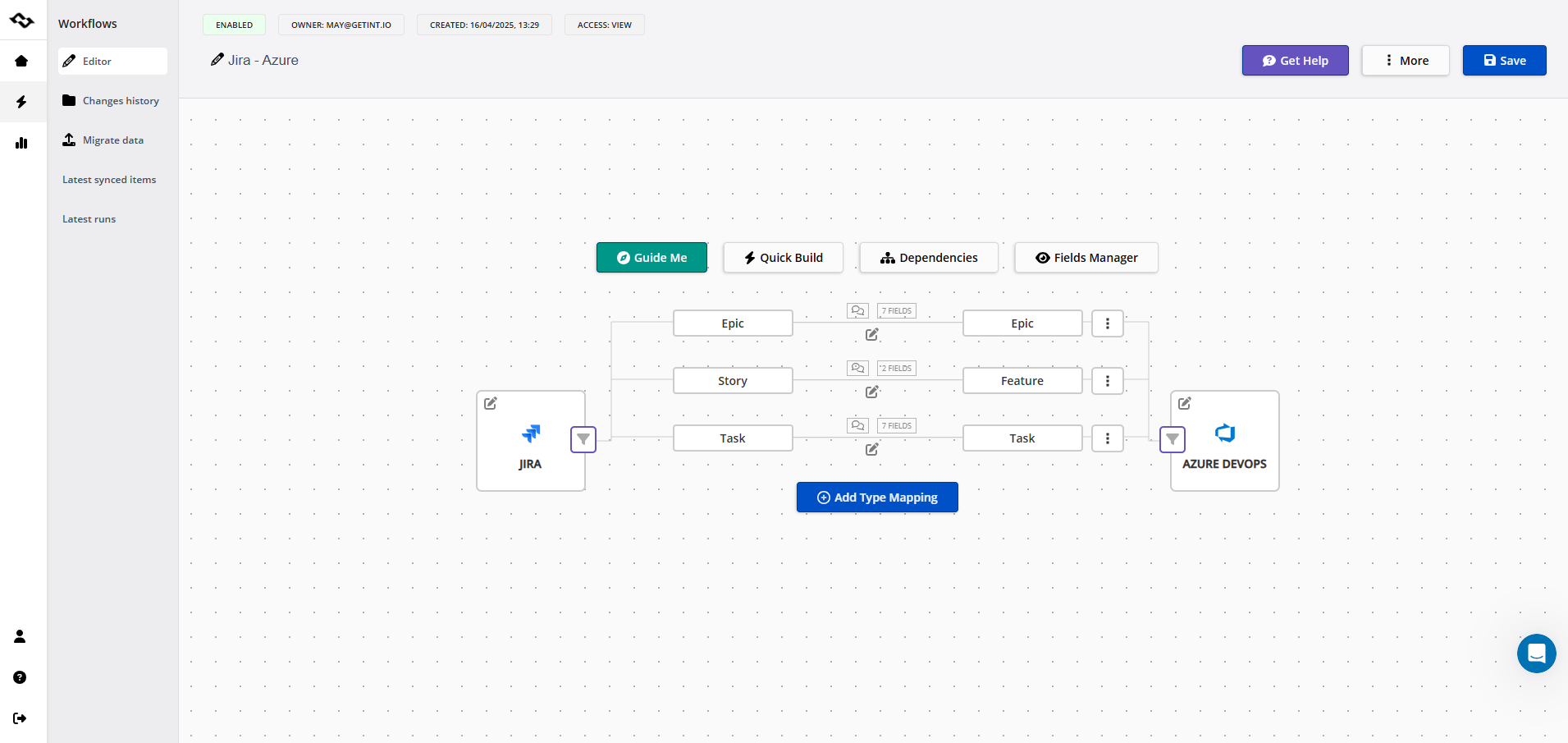
What Getint syncs: fields, hierarchy and inline images
- Work items in both directions: epics, features, user stories, bugs and tasks, with type mapping such as Azure DevOps User Story ↔ Jira Story or Bug ↔ Bug.
- Fields: titles, descriptions, priorities, assignees, labels and custom fields. Iteration paths and area paths can be mapped to Jira fix versions or components.
- Context: comments (with filters by author, date or visibility), attachments, inline images, rich text and status transitions. Each entity type is mapped explicitly, so a Jira Bug and an Azure DevOps Bug always stay paired.
- Hierarchy: parent–child relationships are preserved, so an Azure DevOps Feature and its user stories stay connected to the matching Jira epic and stories.
- Development activity: the Forge app also surfaces Azure Repos branches, commits, pull requests and deployments in Jira Cloud.
How to connect your Azure DevOps account and Jira project
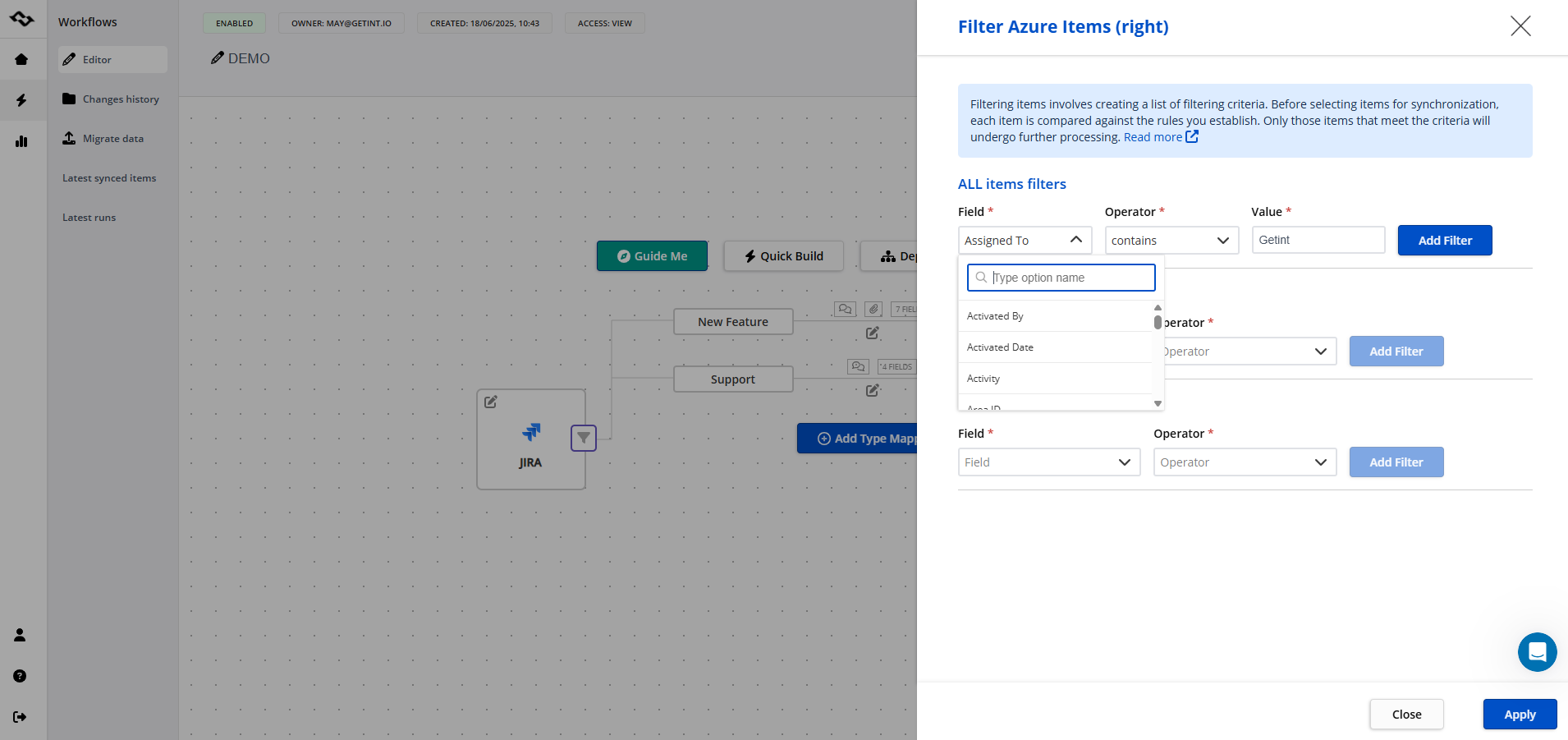
You configure the connection between Jira and your Azure DevOps account (a personal access token or OAuth), pick a Jira project and an Azure DevOps project, and let Quick Build generate type and field mappings automatically. From there you fine-tune status mapping, decide which fields sync one way or both ways, and apply filters to All, New or already Synced items so only the right data crosses over. Teams that need complex workflows can add Groovy scripts for conditional sync logic, but most integrations never need custom scripts.
Getint also supports many-to-many setups. One integration can connect multiple Azure DevOps organizations with multiple Jira projects or a single Jira instance, which is a common requirement after mergers or when one product team serves several engineering units.
Jira Cloud, Data Center, deployment and pricing
Getint can run as SaaS in EU or US tenants or fully on-premise behind your firewall, which matters for banks, public sector and healthcare. The company is SOC 2 Type II audited, ISO 27001 and ISO 27018 certified and GDPR compliant, with evidence published in its Trust Center. Getint is also a Microsoft Partner and lists its connectors on the Azure DevOps (Visual Studio) Marketplace.
Pricing is straightforward. For Jira-based integrations you pay through the Atlassian Marketplace in standard user tiers, and you only buy one app: there is no second license for the Azure DevOps side. Usage of fields, projects and synced items is unlimited. There's a free 30-day trial, and migration between Azure DevOps and Jira is available as a separate premium option.
Pros
- True bidirectional sync with hierarchy, custom fields, comments, attachments and inline images
- Jira Cloud, Data Center and Server; Azure DevOps cloud and on-premise
- SaaS or on-premise deployment, SOC 2 Type II and ISO 27001/27018
- No per-item fees; one app covers both sides
- Integration and migration in one tool, with in-house support and free demos
Cons
- Advanced scripting is available but rarely needed, so script-first teams may expect a code-centric UI
- Standard SaaS sync runs every few minutes; real-time sync is part of enterprise plans
Best for: organizations that need reliable, secure two-way sync between Jira and Azure DevOps without writing code, from a single team to a global enterprise. Companies such as Lufthansa use Getint for Jira Data Center–Azure DevOps integration, and teams like Škoda and Pathlock moved to Getint from other connectors. You can read their stories in Getint case studies.
2. Azure DevOps for Jira (Official): Free, but Development Information Only
The Azure DevOps for Jira (Official) app is built by Atlassian and free for Jira Cloud. After you install the Jira app, sign in with Microsoft, and enable OAuth (turning on third party application access via OAuth in Azure DevOps organization settings), it pulls builds, deployments, branches, commits and pull requests into Jira issues that are referenced by issue key in your development pipelines.
It's useful for visibility, but it is not a sync tool. It doesn't create or update work items in either direction, map custom fields or sync comments. According to Atlassian's documentation, the app supports only a single Microsoft Entra tenant, the OAuth token expires if no data syncs for 12 months, and connections must be re-authorized with Microsoft Entra ID as Microsoft retires its Azure DevOps OAuth platform. It averages 3.3/5 on the Marketplace.
Best for: Jira Cloud teams that only need deployment information and development activities on the board. Many teams pair it with Getint when they also need work item synchronization.
3. Exalate: Script-Driven Sync for Technical Teams
Exalate offers two-way sync between Jira and Azure DevOps (Cloud and Server) with a strong focus on scripting. Sync rules are written in Groovy, with an AI assistant (Aida) that helps generate scripts and a Test Run feature to preview results before production. It handles hierarchy, custom fields, comments and attachments and is often used in cross-company scenarios.
The trade-off is cost predictability and effort. New Exalate is priced by active items in sync: the Starter plan covers 25 items and Scale covers 100, with unlimited items only on Enterprise, and public listings put entry pricing at around $100 per month. Teams syncing thousands of work items can see costs rise quickly, and scripts need someone to maintain them.
Best for: teams with Groovy skills that want fine-grained control. If you'd rather configure than code, compare Getint vs Exalate.
4. OpsHub Integration Manager: Enterprise Toolchain Integration
OpsHub Integration Manager (OIM) is an enterprise platform that connects Jira and Azure DevOps along with more than 70 other ALM, PLM and ITSM systems such as IBM DOORS, ServiceNow and Polarion. It syncs epics, stories, features, test cases and custom work item types with full history and traceability, which appeals to regulated engineering organizations.
OIM is powerful but heavy. Pricing is quote-based, implementations often involve services, and it is more than most teams need for a single Jira–Azure DevOps connection.
Best for: large enterprises building a digital thread across many engineering tools.
5. TFS4JIRA: Long-Standing Connector for TFS and Azure DevOps
TFS4JIRA, now part of Appfire, is one of the oldest Jira–Azure DevOps connectors. It supports one-way or two-way sync, hierarchy, sub-tasks, links, comments and attachments, plus migration in both directions. Pricing is per Jira user: the Cloud version is free for up to 10 users, about $1,103 per year for 25 users and $4,410 for 100 users under Appfire's July 2026 price list, while Data Center starts at $4,400 per year for 50 users. Server licenses are no longer sold.
Best for: organizations with legacy Team Foundation Server environments. Teams that want a broader integration hub (Azure DevOps plus ServiceNow, Salesforce or Asana) usually outgrow it.
6. Unito: No-Code Flows for Many SaaS Tools
Unito is a no-code sync platform covering 60+ work tools. Its Jira–Azure DevOps flows support Jira Cloud, Data Center and Server alongside Azure DevOps Services and Server, with hierarchy, sprints-to-iterations mapping and comments. Its deeper "Advanced Sync" connector, with 200+ Azure DevOps fields, is limited to selected Enterprise plans.
Unito is cloud-only and, like Exalate, priced by items in sync, so large backlogs get expensive.
Best for: smaller teams that want to connect Jira and Azure DevOps along with tools like Asana or Trello.
7. Move Work Forward: Dev Visibility with Light Sync
Move Work Forward's Azure DevOps for Jira app is a paid alternative to the official app for Jira Cloud. It shows pull requests, commits, builds and deployments in Jira, supports smart commits and TFS, and adds one-way or two-way work item synchronization with comments and attachments.
Best for: teams that mainly want richer development data in Jira and a basic work item synchronization, rather than a full integration platform.
What About Custom Integration via REST APIs?
You can build a custom integration on the Jira and Azure DevOps REST APIs, or wire up a general iPaaS like Zapier or Make. A simple one-way trigger is easy. A production-grade two-way sync is not: you need loop prevention, rate-limit handling, rich text conversion between Jira markup and Azure DevOps HTML, attachment handling, status mapping and monitoring. Getint's build vs. buy analysis estimates 420–740 engineering hours for the first version alone, before ongoing maintenance.
Why Getint Is the Best Integration Platform to Connect Jira and Azure DevOps (Including Real Time Sync)
Looking across all seven options, Getint is the only platform that combines every capability most teams end up needing:
- Depth without code. Quick Build and visual mapping cover custom fields, statuses, hierarchy, comments and inline images, with scripts only when you want them.
- Coverage. Jira Cloud and Data Center, Azure DevOps cloud and on-premise, multiple Azure DevOps organizations and many-to-many project setups.
- Real time sync at enterprise scale for the systems that matter most, plus reporting and logs to see every sync run and fix issues fast.
- Security. SaaS or on-premise, SOC 2 Type II, ISO 27001/27018, GDPR, Cloud Fortified.
- Predictable cost. One app, no fees per synced item, unlimited projects and fields.
- Integration and migration in one place, so you can sync today and consolidate later.
- Beyond two tools. The same platform connects Azure DevOps and Jira with ServiceNow, Salesforce, Zendesk, Asana and more, so you don't need a new vendor for every connection.

How to Integrate Jira with Azure DevOps Using Getint
- Install the app from the Atlassian Marketplace and open it in Jira under Apps.
- Choose Continuous Sync for ongoing synchronization, or Migration to move existing data.
- Connect Jira and Azure DevOps. Use a Jira API token (Cloud) and an Azure DevOps personal access token.
- Select the Jira project and Azure DevOps project you want to connect.
- Map types and fields with Quick Build, then review custom fields and sync direction.
- Map statuses (for example, Active ↔ In Progress, Closed ↔ Done) and enable comments and attachments.
- Add filters so only the right items sync, then name the integration and save.
- Test and monitor in the reporting view, which shows every run and synced item.
The full walkthrough is in the Jira Azure DevOps integration documentation.
Which Integration Should You Choose?
- You only need to see commits and deployments in Jira Cloud: start with the free official app.
- You need two-way sync of user stories, bugs and tasks with custom fields, on Cloud or Data Center: choose Getint.
- You must run the integration on-premise or meet strict compliance requirements: choose Getint.
- Your team prefers writing sync scripts and accepts per-item pricing: consider Exalate.
- You are building a toolchain across dozens of engineering systems: evaluate OpsHub Integration Manager alongside Getint's enterprise plan.
- You are planning a Jira to Azure DevOps migration (or the reverse): use Getint's migration mode, ideally after a period of parallel sync.
FAQ
How can I integrate Jira with Azure DevOps?
You can use the free Azure DevOps for Jira app for development information, or an integration platform like Getint for two-way work item synchronization. With Getint you connect both tools with tokens, map types, fields and statuses, and the integration keeps Jira issues and Azure DevOps work items aligned automatically.
Can I connect multiple Azure DevOps organizations to Jira?
Yes. Getint can connect multiple Azure DevOps organizations to one or more Jira projects within a single integration, including many-to-many configurations.
Is Azure DevOps being deprecated?
No. Microsoft continues to develop Azure DevOps Services and support Azure DevOps Server. What is changing is authentication: Microsoft is retiring its Azure DevOps OAuth platform in favor of Microsoft Entra ID, so integrations need to be re-authorized.
Is Jira being phased out?
No. Jira Cloud remains Atlassian's flagship product. Atlassian is, however, phasing out Jira Data Center, so choose an integration platform that supports both Data Center and Cloud during your transition.
What is the equivalent of Jira in Azure DevOps?
Azure Boards is the closest equivalent. It handles work items, backlogs, sprints and boards, while Jira offers more flexible workflows and a larger app ecosystem.
How do I migrate Jira data to Azure DevOps?
Use a migration tool that preserves custom fields, comments, attachments and links. Getint's migration mode moves work items in either direction and lets you run a dry run first to validate field mappings.
Conclusion
The best integration platform to connect Jira and Azure DevOps depends on what you need to move between the two tools. For development visibility only, the official app is a fine free start. For anything more, such as keeping user stories, bugs, custom fields and comments in sync across teams, Getint delivers the most complete package: deep no-code bidirectional sync, Jira Cloud and Data Center support, on-premise deployment, enterprise security and transparent pricing without per-item fees.
Ready to see it with your own projects? Start a free 30-day trial on the Atlassian Marketplace or book a free demo with a Getint integration expert.