
Relying on Jira and ServiceNow to manage different parts of workflows is a bread and butter for many companies. Development teams typically use Jira Software or Jira Service Management, while IT and support world works with ServiceNow, handling incidents, service requests, and change requests inside a ServiceNow instance.
The problem is simple: these systems were not designed to work together.
As a result, teams often struggle with:
- duplicated Jira work items and ServiceNow tickets
- manual updates between systems
- delayed incident resolution
- lack of visibility across workflows
That’s why more companies are asking: how can I integrate Jira with ServiceNow in a scalable and reliable way?
This guide explains how Jira ServiceNow integration works, what options you have, and how to implement it step by step.

Why Jira and ServiceNow Integration Matters
Jira and ServiceNow play different roles in organizations, but they are deeply connected.
- ServiceNow focuses on service management, handling incidents, requests, and enterprise workflows
- Jira supports development teams managing tasks, bugs, and agile delivery
When these systems operate in isolation, business and technical teams lose alignment. For example:
- a ServiceNow incident may require developer input, but there is no automatic Jira work item created
- developers resolve a bug in Jira, but the ServiceNow ticket remains outdated
- communication happens outside systems, increasing confusion
A proper Jira ServiceNow integration solves this by creating a shared data layer between systems, enabling cross-team collaboration and synchronized workflows.
What Does Jira ServiceNow Integration Actually Mean?
At its core, integration means that Jira and ServiceNow exchange data automatically.
This includes:
- syncing ServiceNow incidents with Jira work items
- transferring comments (including work notes)
- updating statuses and assignment group values
- syncing custom fields and attachments
Instead of manually copying data, integration allows teams to connect workflows across platforms while continuing to work in their preferred tools.
In practice, this creates a unified experience where:
- support teams work in ServiceNow
- developers work in Jira
- both see the same, up-to-date data
Main Ways to Integrate Jira with ServiceNow
There are several approaches to integrate ServiceNow and Jira, depending on your technical requirements.
Native ServiceNow and Jira Capabilities
ServiceNow offers integrations such as the Jira Spoke, which connects Jira through predefined actions. While useful, it often requires configuration via business rules and may not cover complex enterprise use cases.
This approach works best for simple scenarios like sending ServiceNow incident events into Jira.
REST APIs and Custom Integration
Another option is to build a custom integration using REST APIs.
This involves:
- generating an API key
- configuring endpoints between Jira Cloud and ServiceNow
- writing scripts to handle data exchange
While flexible, this approach introduces challenges:
- high maintenance
- dependency on developers
- difficulty scaling across multiple projects or systems
Integration Tools
Most organizations choose a dedicated Jira ServiceNow integration tool.
These tools act as a ServiceNow connector and provide:
- no-code or low-code configuration
- two-way synchronization
- visual field mapping
- filtering and workflow control
Unlike basic integrations, these solutions are designed for enterprise environments, where multiple teams, systems, and workflows must stay aligned.

How Jira ServiceNow Integration Works
A typical integration connects both platforms and defines how data flows between them.
It usually includes three key layers:
1. Connection Between Systems
You connect your Jira instance (e.g., Jira Cloud) with your ServiceNow instance using secure authentication.
2. Field Mapping
Field mapping defines how data is translated between systems.
For example:
- ServiceNow incident → Jira work item
- assignment group → Jira assignee or team
- work note → Jira comment
This step is critical because both platforms use different data structures.
3. Sync Logic and Workflows
You define what happens during synchronization:
- when to send ServiceNow incident events
- which service requests should create Jira tasks
- how statuses change across systems
This allows you to control workflows instead of forcing teams to adapt manually.
Step-by-Step: How to Integrate Jira with ServiceNow Using Getint
Below you can find steps to accomplish if you want to connect Jira and ServiceNow using integration platform like Getint.
For a thorough guiding, check out the Alex Ortiz video on connecting Jira with ServiceNow via Getint.
Step 1: Define Your Use Case
Start by identifying what you want to achieve:
- Do you want to sync ServiceNow incidents with Jira work items?
- Should the integration be one-way or two-way?
- Which teams (support, development, operations) are involved?
Clear scope prevents overcomplicated configurations later.
Step 2: Install an App from the Atlassian Marketplace

For most enterprise use cases, integration tools offer the best balance between flexibility and simplicity.
Step 3: Connect Jira and ServiceNow
At this stage:
- authenticate both systems
- configure permissions
- establish the connection
This creates the foundation for data exchange.
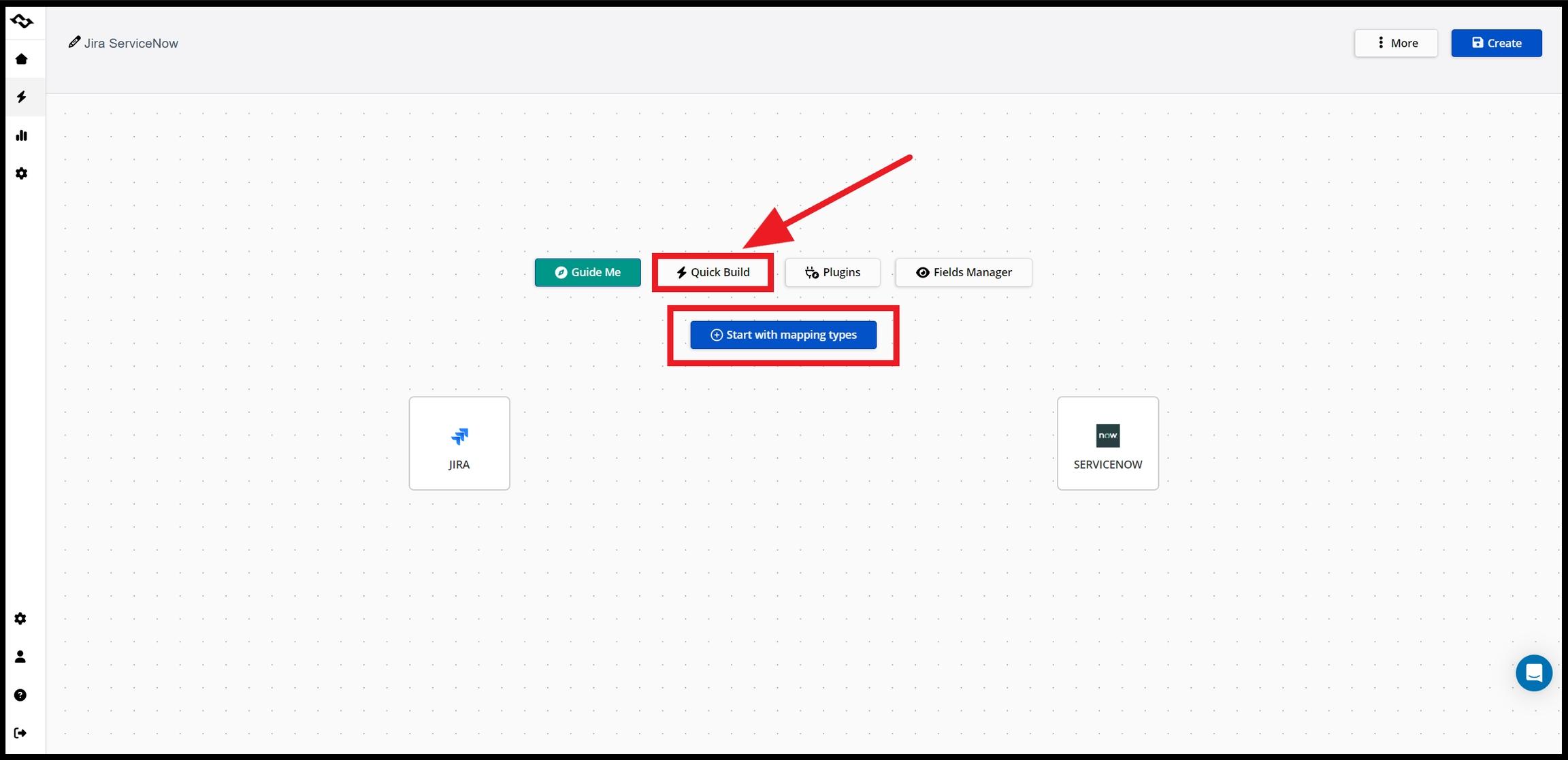
Step 4: Configure Field Mapping
Map key elements between platforms:
- incidents ↔ Jira work items
- change requests ↔ tasks
- custom fields ↔ custom fields
Well-defined mapping ensures accurate data synchronization and avoids inconsistencies.
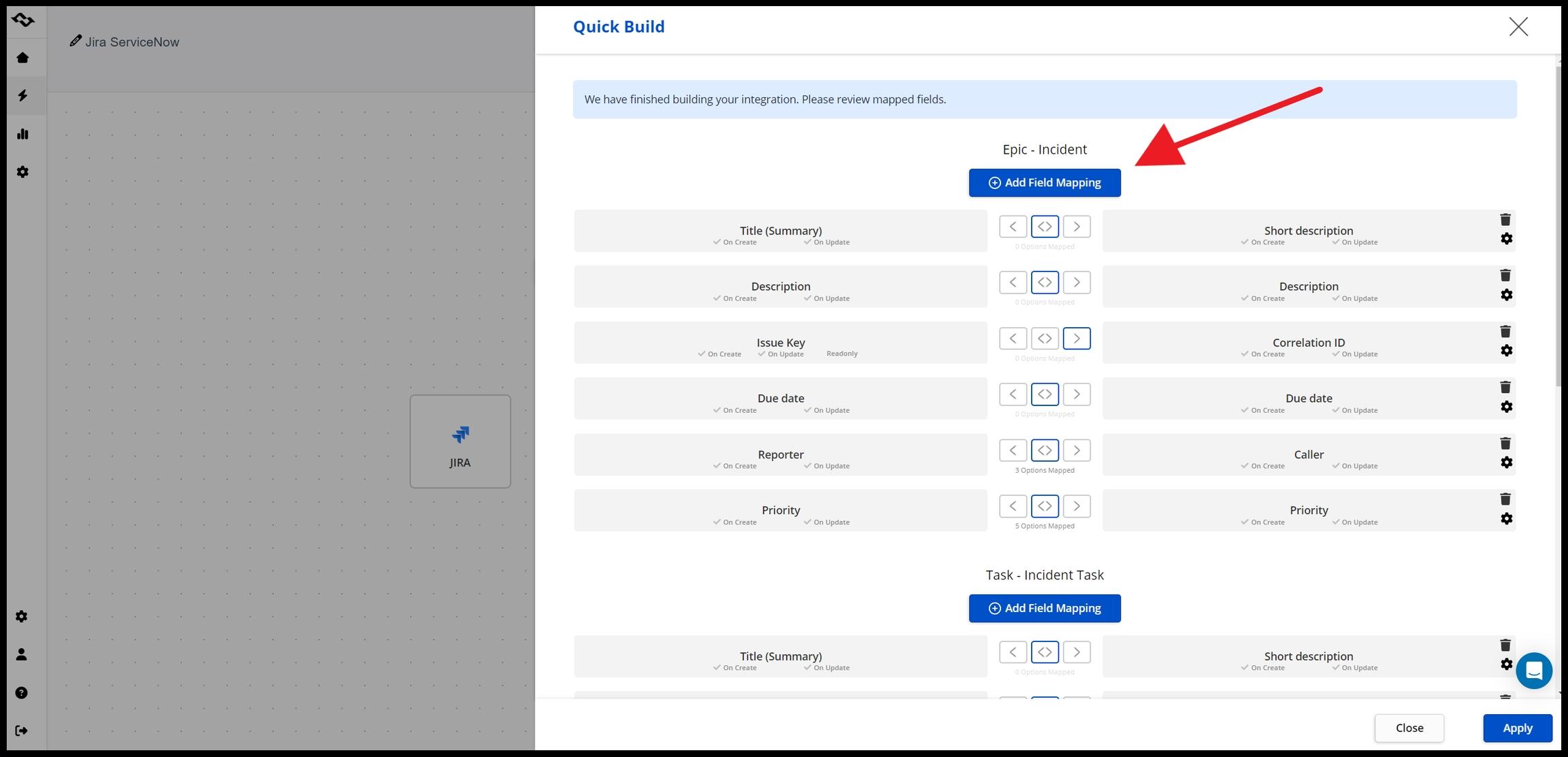
Step 5: Set Filters and Business Rules
You don’t want to sync everything.
Instead, configure:
- which tickets are included
- filters based on assignment group or status
- conditions for triggering sync
For example:
- sync only high-priority incidents
- sync only tickets assigned to a specific team
Step 6: Test the Integration
Before going live, use testing purposes:
- create sample tickets
- validate data flow
- check workflows and updates
This step ensures the integration behaves as expected.
Step 7: Monitor and Optimize
After deployment:
- monitor sync logs
- adjust field mapping
- refine workflows
Modern tools provide visibility into sync status and errors, giving you full access to your workflows.
Common Use Cases for Jira and ServiceNow Integration
Incident Escalation
ServiceNow incidents automatically create Jira work items for development teams, ensuring faster resolution.
ITSM and Development Collaboration
Support teams and developers work in separate systems but share the same data.
Enterprise Workflows
Large organizations integrate multiple systems to manage workflows, tasks, and service requests across departments.

Decentralized Integration Solution Between Companies
In some cases, integration connects different organizations, allowing secure data exchange without exposing full systems.
What to Look for in a Jira Integration with ServiceNow
When evaluating solutions, focus on:
- Two-way synchronization between Jira and ServiceNow
- Flexible field mapping for custom fields
- Filtering and workflow control
- Security and compliance for enterprise environments
- Scalability across multiple projects and teams
Modern platforms are moving toward more intelligent integration, where systems not only sync data but also adapt to workflows and reduce manual configuration.
Final Thoughts
If your organization uses both Jira and ServiceNow, integration is no longer optional, it’s essential.
Without it, teams operate in silos. With it, you create a connected system where:
- incidents, tasks, and requests flow seamlessly
- development teams and support teams stay aligned
- data remains consistent across platforms
Whether you choose REST APIs, native options like ServiceNow Integration Hub, or a dedicated integration platform like Getint, the goal is the same: to connect Jira and ServiceNow in a way that matches your workflows, not the other way around.