
When IT and development teams rely on different tools, even simple requests become complicated. ServiceNow handles incidents, service requests, and change management. Jira drives engineering and DevOps work. Both platforms are incredibly strong within their domains — and incredibly disconnected by default.
That gap is exactly where delays happen: tickets get copied by hand, status changes fall out of sync, and teams lose visibility into what others are doing. Integrating Jira and ServiceNow solves this friction — but only if the integration is designed with intention.
A solid connection between the two tools isn’t just “syncing fields.” It’s understanding how teams work, how information travels, and how decisions are made.
In this guide, we’ll explore what ServiceNow Jira integration actually does, why integrating these tools matters, and what are the best practices that ensure data integrity; stable, predictable, and ready to grow workflows. We’ll also look at integration approaches — from scripts to enterprise-grade platforms like Getint — and help you understand how to choose the right, one system.
What Is Jira?
Jira is Atlassian’s flagship project management and development platform, used widely by development teams, DevOps teams, product teams, ITSM teams, and cross-functional organizations. Originally a bug tracker, Jira Cloud has evolved into a powerful work execution system supporting agile methodologies, kanban boards, sprint planning, release management, and large-scale product delivery.
Its biggest strength — and challenge — is flexibility. Jira Software and Jira Service Management allow teams to create custom fields, workflows, statuses, automations, integration options, and permission schemes. One organization may have hundreds of Jira projects, each with unique processes, statuses, fully customizable.
Because Jira is where technical execution happens, it becomes the natural system where ServiceNow incidents, ServiceNow requests, and ServiceNow change tasks should be resolved. This makes Jira integration one of the most important requirements for enterprise DevOps teams that need efficient workflows, reduced manual updates, and real time synchronization with ServiceNow.
What Is ServiceNow?
ServiceNow is a leading enterprise platform for ITSM operations, customer service, HR workflows, and increasingly broad digital transformation initiatives. It is built around ITIL processes and provides the governance, approvals, consistency, and structure that large organizations depend on.
ServiceNow supports critical operational workflows such as:
- incident management
- request fulfillment
- change management
- problem management
- asset management and CMDB
- service catalogs and enterprise workflows
While Jira excels at enabling flexibility and rapid work execution, ServiceNow excels at enforcing process, compliance, and traceability.
Why Integrating Jira and ServiceNow Matters
When Jira and ServiceNow operate independently, work becomes scattered across two systems that were never designed to function as one. ServiceNow incidents may require development investigation, infrastructure fixes, or code updates in Jira. Jira work items often depend on ITSM context, approvals, or customer updates tracked in ServiceNow. Without an integrated system, people spend valuable time reconstructing information manually — and that slows everything down.
This disconnect creates predictable issues, including:
- status mismatches between Jira tickets and ServiceNow incidents
- inconsistent data across systems and collaborators
- broken SLA due to delayed updates
- repetitive manual entries, often leading to errors
- delays in escalations for critical customer issues
- a lack of an integrated system, making context hard to find
- limited visibility into progress across multiple users
- higher risk of data lapse and difficulty maintaining audit trails
These problems compound over time and make it harder to combine ServiceNow users' work with Jira effortlessly.
Jira ServiceNow integration solves these difficulties by creating a unified, real-time workflow where information flows automatically between one tool and another. With the right integration platform, your company gain:
- stable, scalable workflows that grow with your organization
- real time synchronization of key fields, comments, and other factors
- seamless workflows between ITSM agents, DevOps teams, and engineers
- full context for incident management, change management, and request management
- improved collaboration without switching tools
- reduced manual data entry and stronger data connectivity
A well-designed ServiceNow Jira integration transforms the way work moves across the whole organization — ensuring both systems stay aligned, reliable, and ready to scale.
Benefits of ServiceNow Jira Integration
ServiceNow Jira integration offers far more than basic cross-tool synchronizations. It transforms how IT and engineering coordinate daily work, resolve issues, and manage long-term operations. Let's see the quick summary of ServiceNow and Jira integration benefits.
Common Jira–ServiceNow Integration Use Cases
Integrating ServiceNow with Jira is not a one-size-fits-all scenario. Different companies synchronize different types of work depending on their goals, responsibilities, and service management processes. The right integration platform must be flexible enough to support all of these.
- Incident Management: An incident created in ServiceNow often requires investigation, bug fixes, or code changes in Jira. Without an integration, service desk agents must chase developers for updates. With a sync in place, progress becomes transparent and automatic.
- Change Management: ServiceNow often handles approvals, CAB meetings, and compliance controls, while Jira teams manage code changes, deployments, and testing tasks. An integrated system ensures that change requests, statuses, and technical tasks remain aligned, creating an integrated system that supports traceability and reduces risk.
- Problem Management: Root cause analysis frequently happens in Jira, where engineers can coordinate sub-tasks and perform long-term remediation. Meanwhile, ServiceNow problem records must reflect accurate progress. Integrating these ensures seamless collaboration and prevents data discrepancies between platforms.
- Request Management: Employee or customer requests that originate in ServiceNow may require development work, configuration changes, or operational tasks that live in Jira. A two-way integration keeps both systems synchronized from ticket creation to closure.
- DevOps Escalations: SRE, DevOps, and operations teams rely on real-time visibility. Escalations from ServiceNow incidents can automatically create Jira tickets, allowing development teams to act immediately. Real time synchronization ensures that high-severity issues are resolved quickly, without communication gaps.
These use cases show that a scalable integration must support multiple workflows, multiple tools, and multiple teams — not just simple field syncing.
Best Practices when Integrating ServiceNow and Jira
Below are the practices that consistently produce stable, maintainable integrations — the kind that remain reliable even as your organization grows.
Start With Workflow Clarity — Not Field Mapping
A successful ServiceNow Jira integration begins with understanding how work moves across teams, not with fields or technical configuration. Before you integrate ServiceNow with Jira, map out:
- When a ServiceNow incident should create a Jira ticket
- Whether the integration should be two-way or one-way
- What each team needs to see to collaborate efficiently
- How comments, approvals, and ticket updates should move between tools
- What information supports seamless collaboration and prevents manual updates
Once the workflow becomes clear, the field mapping process becomes focused and intentional — not arbitrary.
Keep the Data Model Clean and Minimal
One of the most important best practices is keeping your integration simple. Syncing too many custom fields, statuses, and metadata creates noise and slows down both systems.
A clean data model improves:
- data integrity
- synchronization reliability
- overall system performance
- incident management accuracy
- ability to collaborate between Jira and ServiceNow users
Organizations should sync only the fields required to ensure trouble-free workflows, minimize manual input, and prevent data loss across systems.
Map Statuses Based on Meaning, Not Labels
Jira and ServiceNow represent work differently. Jira workflows tend to be detailed and developer-focused — “In Dev,” “In Review,” “Ready for QA,” “Testing,” “Done.” ServiceNow workflows follow ITIL and are intentionally streamlined — “New,” “In Progress,” “Resolved,” “Closed.”
Trying to mirror every Jira status into ServiceNow (or vice versa) is one of the most common integration mistakes. It creates:
- confusing transitions
- overwritten values
- sync loops
- large volumes of unnecessary updates
- challenges maintaining data integration
The goal of mapping is functional alignment, not literal matching. That means:
- Several Jira statuses may map to a single ServiceNow workflow step.
- Jira’s “Done” may correspond to “Resolved” in ServiceNow, depending on process.
- Some statuses in Jira (like internal review steps) should not sync back.
When teams map statuses by meaning, they get stable syncs, clear lifecycle tracking, and predictable system behavior.
Document Ownership and Governance Early
A ServiceNow–Jira integration touches multiple stakeholders — ITSM owners, development teams, integration architects, platform admins, and sometimes external partners. Without defined ownership, integrations slowly degrade as systems evolve.
Clarify governance from day one:
- Who owns the integration configuration (usually ITSM or platform admins)
- Who updates mappings when new custom fields or statuses are added
- Who monitors incidents related to sync failures
- Who handles ServiceNow instance changes that may affect the integration
- How Jira instance changes (new projects, new issue types) are rolled into the sync
- What change control process governs updates
- What documentation must be maintained for audits or onboarding new admins
Governance prevents fragmentation and ensures your integrated system stays stable even as the company grows.
Always Test in a Non-Production Environment
Integrating ServiceNow and Jira directly between production environments is risky — especially in enterprises with strict ITSM processes, large volumes of incidents, or regulated service desk operations.
Testing in a safe environment helps identify issues early:
- Use ServiceNow sub-production or development instances
- Use Jira sandbox or test projects
- Validate ticket creation rules and field mappings
- Validate status transitions
- Test syncing attachments, comments, and internal notes
- Check permissions, roles, and visibility settings
- Test conflict scenarios (updates from both sides at once)
- Simulate large volumes to ensure the integration tool performs reliably
This ensures your integration behaves predictably and prevents unexpected ticket creation spikes, or corrupted workflows.
Protect Data With Clear Sync Logic
To ensure a seamless ServiceNow and Jira integration, your solution must have unambiguous rules for:
- source of truth for each field (e.g., priority may come from ServiceNow; technical fields from Jira)
- where updates are allowed, and where values are read-only
- what happens when fields conflict
- which comments are synchronized (public vs. internal notes)
- whether attachments sync in both directions
- how timestamps and status changes propagate
- direction of synchronization (one-way or two-way per field)
Clear sync logic protects information and ensures teams never wonder why a Jira ticket or ServiceNow incident looks inconsistent.
This is especially important for organizations managing:
- customer issues
- sensitive incidents
- service desk operations
- regulated service requests
A strong integration platform prevents data corruption and guarantees safe, predictable synchronization.
Build for Growth and Future Changes
A modern integration solutions must evolve with your organization. That includes supporting:
- new ServiceNow instances
- multiple Jira instances
- new teams or service desk groups
- additional projects, issue types, or custom fields
- new workflows introduced by DevOps teams
- changes in approval flows for change management
- updated ITSM processes
- increased ticket volume or large data transfers
Teams often underestimate how frequently their service management and development environments change. Integrations must be flexible, configurable, and ready to scale — without needing to be rebuilt every quarter.
Choosing the Best Integration Platform
Selecting the right integration approach to connect ServiceNow and Jira is one of the most important decisions you’ll make. Jira and ServiceNow both offer APIs and integration options, but not all approaches are equally reliable, scalable, or secure. The integration method you choose determines everything that follows — from maintenance cost to data integrity to how efficiently teams collaborate.

Below are the most common integration options, along with their strengths and limitations.
Comparison of integration options
When organizations need stable data synchronization, advanced field mapping, full ticket lifecycle coverage, and strong error handling, dedicated integration platforms consistently outperform generic automation tools or internal scripts. This is where Getint often becomes the preferred solution.
Why Organizations Choose Getint for Jira–ServiceNow Integration
Organizations that depend on ServiceNow for ITSM and Jira for development processes often discover that traditional integration methods — ServiceNow Integration Hub, scripts, plug-ins, or generic automation tools — simply do not cover their real-world complexity. Getint fills that gap.
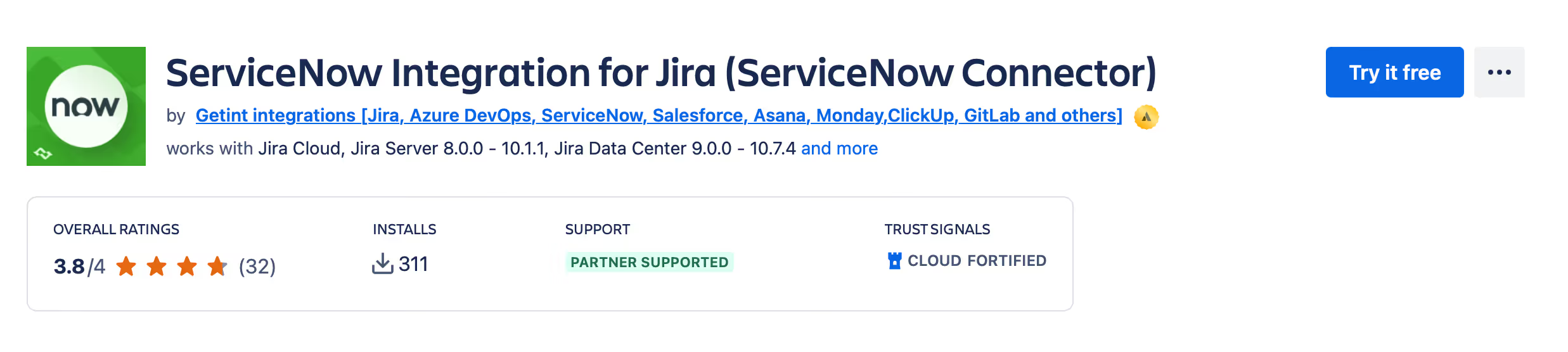
As a dedicated no-code/low-code integration platform, it's designed specifically for work management, development, DevOps, and ITSM tools. It offers reliable two-way synchronization, secure connectivity, and deep customization capabilities without forcing teams into fragile scripting or manual processes.
Below is a detailed view of why Getint is chosen by enterprises worldwide.
A No-Code/Low-Code Platform That Anyone Can Configure
Getint allows administrators, ITSM managers, DevOps engineers, and integration architects to configure Jira–ServiceNow integrations visually — without writing code. This makes it accessible to a much broader group of users while reducing dependency on developers.
For advanced needs, the platform also supports low-code scripting, enabling:
- field transformations
- conditional logic
- service desk routing logic
- advanced data filtering
- custom business rules
This combination supports both quick deployments and complex enterprise use cases.
Deep, Bidirectional Synchronization Across All Key Elements
Getint synchronizes all the important components needed for smooth workflows, including:
- ServiceNow incidents, problems, changes, requests
- Jira work items across Jira Software and Jira Service Management
- comments, attachments, internal notes, and work logs
- custom fields and advanced data types
- assignments, priorities, and statuses
- parent/child relationships and linked issues
With real time or near-time synchronization, teams always have an accurate view of progress, regardless of which tool they work in.
Cloud or On-Premise Deployment — Based on Your Needs
Getint offers two deployment models designed to meet the security, governance, and operational needs of modern enterprises. Organizations can run the platform fully in the cloud or install it inside their own infrastructure — including restricted or air-gapped environments.
Cloud (SaaS) Deployment
This option is hosted and managed entirely by Getint. It delivers fast setup, automatic updates, and minimal operational overhead, making it ideal for teams that want a fully managed integration experience.
On-Premise Deployment
For organizations working with strict compliance, data residency, or network isolation requirements, Getint can be deployed inside the customer’s environment. This gives IT teams full control over data, access, and security, while still using the same no-code/low-code configuration experience available in the cloud version.
Both deployment models provide the same level of flexibility, deep synchronization, and enterprise-grade reliability — the only difference is where the platform runs.
Read more on how Airbus Protect integrated Jira instance with a customer’s ServiceNow ITSM using Getint.

Precise Control Through Advanced Filtering and Field Mapping
Getint’s field-mapping engine is one of the most flexible on the market. Teams can:
- map any custom field
- define directional rules
- apply transformations
- add conditions or advanced logic
- filter items based on any field or metadata
This level of precision ensures that each team sees only the data that matters, which is essential for high-volume or multi-instance environments.
Built-In Reliability: Logging, Retry Logic, and Data Connectivity Protection
Enterprise integrations require transparency and resilience. Getint provides:
- real-time logs
- detailed error traces
- auto-retry mechanisms
- conflict handling rules
- monitoring dashboards
- clear audit trails
These features ensure that data flows remain reliable even during ServiceNow upgrades, Jira workflow changes, instance migrations, or API limitations. Moreover, Getint is certified in cybersecurity field, maintaining SOC 2 Type II, ISO 27001 & ISO 27018, GDPR & CCPA compliance.
Multi-Instance Support for Complex Organizations
Many enterprises run multiple Jira instances, multiple ServiceNow instances, or both.
Getint is designed to manage:
- cross-instance syncing
- federated project structures
- distributed teams
- multi-tenant environments
This is where Getint outperforms many competitors — especially generic iPaaS tools or native connectors with limited scope.
Predictable, Fair Pricing — Not Usage-Based Surprises
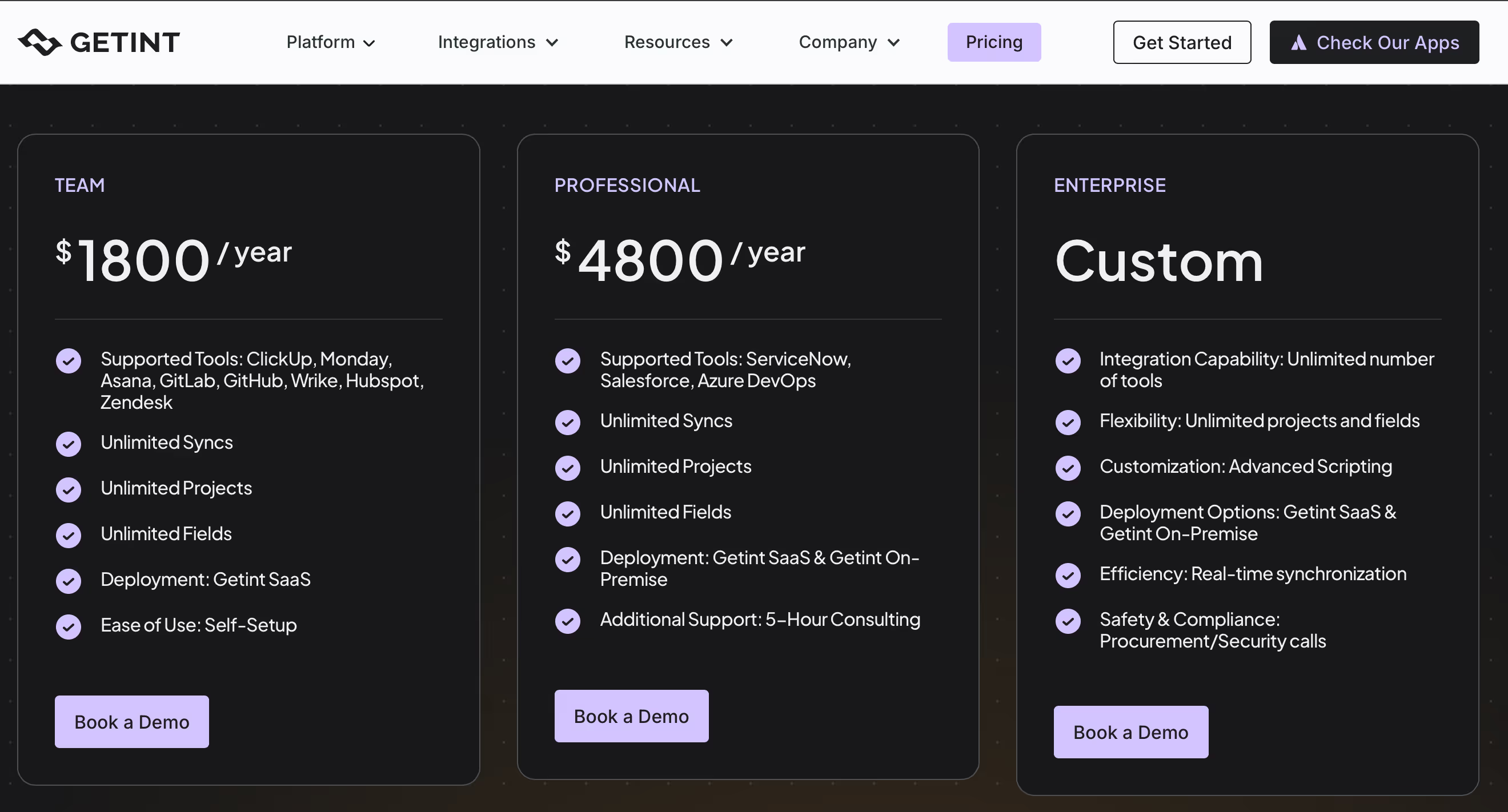
Unlike usage-based automation platforms, Getint uses predictable, connection-based pricing. Costs don’t spike with ticket volume, comment activity, or API consumption. This makes budgeting straightforward, easy to calculate total cost, and eliminates the fear of unexpected overruns for heavily integrated environments.
Human Support That Understands Jira and ServiceNow
Getint support team isn’t just answering tickets — our experts understand the nuances of Jira configurations, ServiceNow modules, and ITSM processes. This dramatically reduces onboarding time, eliminates guesswork, and accelerates ROI for integration projects.
Conclusion
Integrating Jira and ServiceNow is not simply a technical task — it's an operational strategy. When designed with clarity, clean data structures, strong governance, and thoughtful sync logic, the integration becomes a foundation for reliable collaboration between ITSM and engineering teams. It improves visibility, reduces manual effort, strengthens data integration, and accelerates resolution across the organization.
A well-implemented integration doesn’t just connect two tools. It connects teams, responsibilities, and outcomes — enabling your organization to deliver faster, better, and at scale.