Deciding between Jira and Wrike is more complicated than quickly comparing project management tools. In 2026, teams rarely operate within a single workflow model. Software development teams, marketing experts, project managers, and business stakeholders often work differently, prioritize various reporting structures, and manage their work using completely different processes. This is why Jira vs Wrike discussion has many angles to cover.
Jira software remains heavily associated with agile software development, issue tracking, and structured workflows for technical teams, while Wrike is more commonly adopted for cross-functional collaboration, project timelines, and operational planning across business teams. In many companies, both platforms coexist across different departments, creating new challenges around visibility, workflow alignment, and project coordination.
Comparing those collaboration tools requires more than feature checklists though. The real differences between Wrike and Jira appear in workflow structure, scalability, reporting depth, collaboration style, operational flexibility, and how each platform supports different project management needs.
This guide explores those differences in detail. Instead of treating Jira and Wrike as interchangeable project management tools, we’ll examine where each platform performs better, where each creates operational friction, how they improve team's productivity, and why many enterprises ultimately end up using both Wrike and Jira together.

Why Jira and Wrike Are Rarely Used for the Same Purpose
Many comparisons feel shallow because they assume both Wrike and Jira were built for the same kind of work. They were not.
- Jira grew out of software development and agile project management. Its structure reflects the needs of teams that manage backlogs, bugs, dependencies, releases, and detailed issue tracking.
- Wrike developed from a broader work management direction, where project timelines, task management, approvals, resource planning, and team collaboration are often more important than engineering-specific workflow depth.
This difference affects how each platform feels in daily use.
The real comparison is about operating model
Neither approach is inherently better but the comparison becomes more complex in larger organizations, where structured engineering workflows and cross-functional business coordination often exist side by side. Instead of choosing a single project management style, companies increasingly look for ways to align different operational models without creating silos between teams. Let's dive deeper into the characteristics of both tools.
Why Jira Continues to Dominate Agile Software Development
Jira remains one of the strongest Agile tools streamlining processes around software development projects. It supports the operational depth that technical teams usually need as they scale.
Small teams can manage tasks in almost any project management software. But once dev teams start coordinating multiple releases, dependencies, bugs, and sprint cycles, lightweight task management is usually not enough.
Agile project management features become critical at scale
For agile teams, the difference is not just whether a tool has a board. The real question is whether the platform can support the way software work actually moves through planning, development, testing, and release.
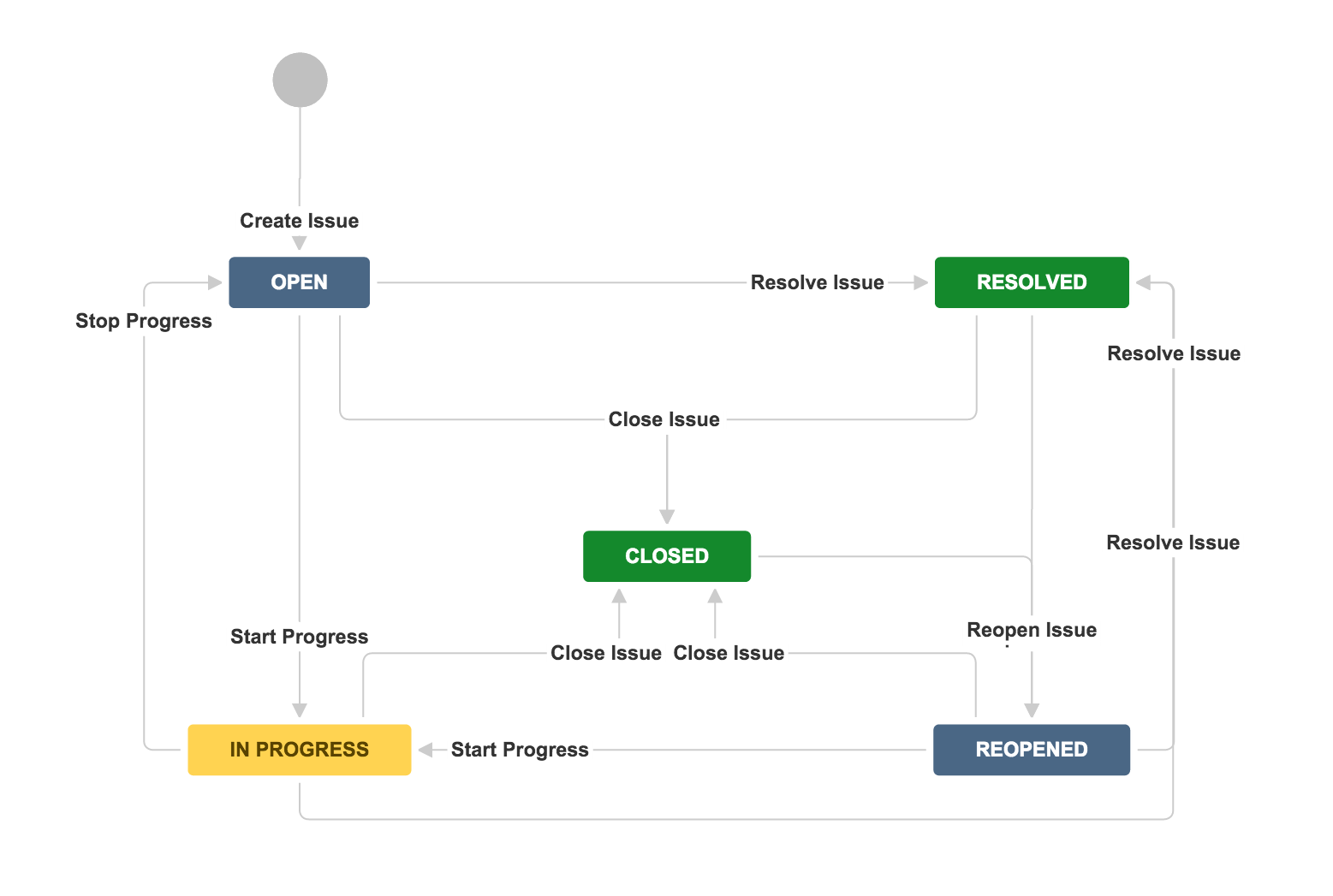
Jira supports Scrum boards, Kanban boards, backlog prioritization, story points, sprint planning, release tracking, and bug tracking as core parts of the workflow. These features are not secondary add-ons. They are central to how Jira is used on a daily basis by many teams.

This matters because agile methodologies become harder to manage when teams grow. Without consistent operational processes, project progress becomes harder to measure, dependencies become easier to miss, and project managers lose visibility into what is blocking delivery.
Custom workflows make Jira valuable to manage projects' complexity
Jira’s biggest strength is not just that it supports agile boards. Its deeper value is that teams can create custom workflows that reflect how their organization actually works.
A software development team may need different workflows for bugs, advanced features, incidents, security reviews, or release approvals. Enterprise teams may also need specific permissions, compliance steps, escalation paths, and reporting structures. Jira can support that level of detail.

This is why this platform often becomes valuable in very large projects. It gives engineering teams enough control to model real development processes rather than forcing every team into the same generic workflow.
The tradeoff is a steeper learning curve
Jira’s flexibility also creates operational overhead. The same customization that makes it useful for complex projects can make it harder for non technical teams to adopt.
When workflows, fields, permissions, and automations multiply, Jira requires careful administration. For software developers and technical teams, this tradeoff often makes sense because the platform supports detailed issue tracking and engineering visibility.
For business teams focused mainly on visualizing project timelines, file sharing, and cross-functional coordination, Jira can feel heavier than necessary.
Wrike’s Biggest Advantage: Cross-Functional Visibility
Where Jira prioritizes workflow structure and engineering control, Wrike focuses more heavily on visibility, coordination, and operational accessibility across teams. That difference becomes especially noticeable in organizations where project management extends beyond software development.
For many business teams, the challenge is not managing sprint cycles or dependency hierarchies, but keeping multiple stakeholders aligned across deadlines, approvals, deliverables, and shifting priorities without creating confusion. This is where Wrike often feels more natural.
Wrike prioritizes visibility over workflow rigidity
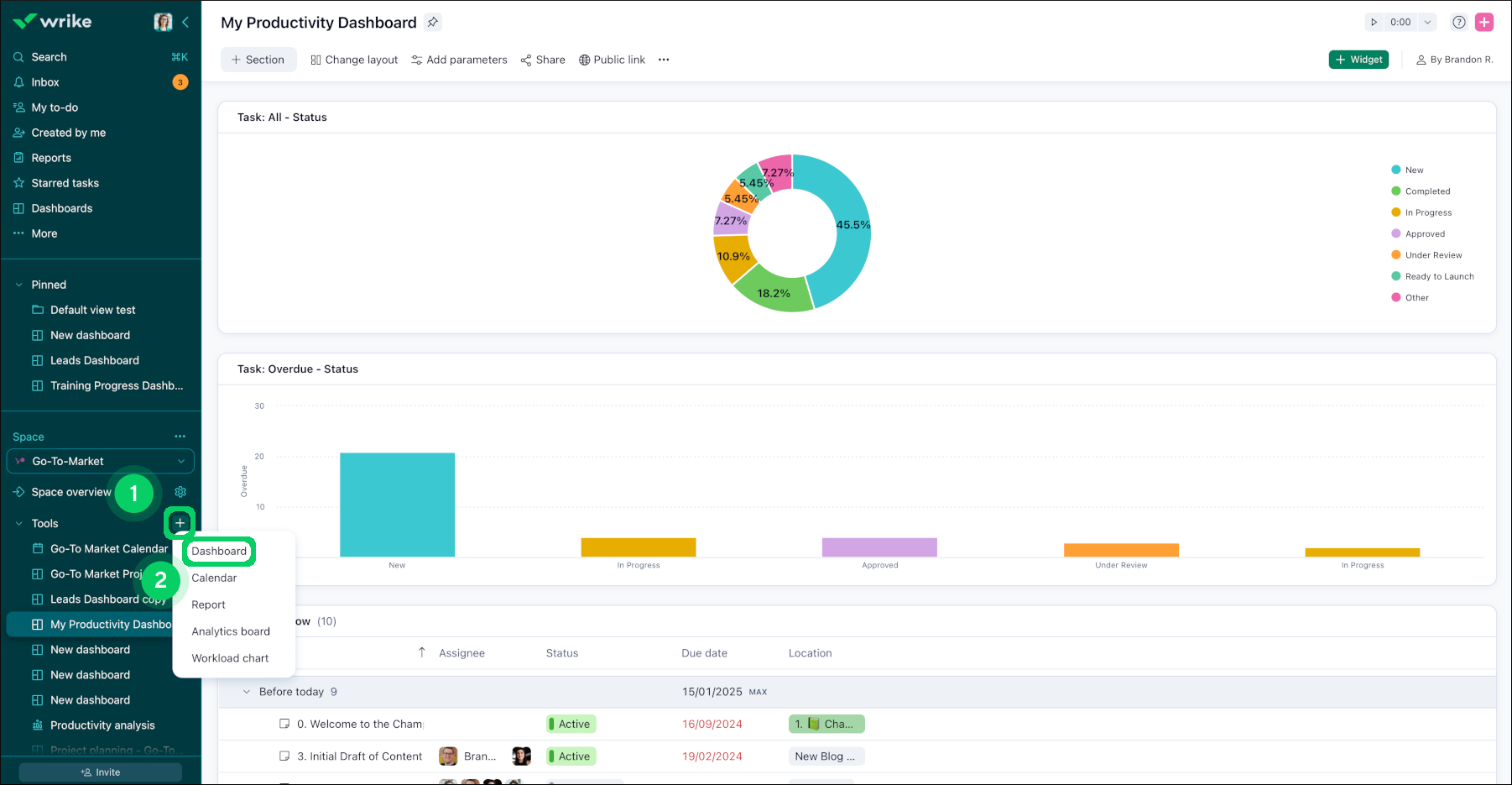
Wrike is designed around project coordination rather than engineering execution. Its intuitive interface emphasizes timelines, workload visibility, task ownership, and collaboration between departments that may work very differently from one another.
Compared to Jira, Wrike usually requires less workflow administration to get started. Teams can organize creative projects visually, manage tasks across multiple projects, and track progress without configuring deeply layered issue structures or detailed workflow schemes.
That simplicity is one reason Wrike is frequently adopted outside technical environments.
Marketing teams managing campaign launches, creative teams coordinating approvals, and operations teams handling resource planning often prioritize:
- visibility across projects,
- intuitive task management,
- and operational clarity for non technical stakeholders.
In these scenarios, Wrike’s lighter workflow structure can reduce friction.
Project timelines and resource planning feel more accessible
Wrike also places stronger emphasis on visual planning and workload coordination than many agile-focused project management tools.
Features such as Gantt charts, shared calendars, workload dashboards, and integrated time tracking help project managers understand how work moves across departments rather than only through engineering workflows.
This becomes particularly valuable for cross functional teams coordinating:
- campaign launches,
- creative production,
- client delivery,
- operational planning,
- or enterprise-wide initiatives involving multiple business units.
Instead of focusing heavily on issue relationships and sprint structures, Wrike is often optimized around scheduling, coordination, and keeping teams aligned around deadlines.

Wrike reduces operational overhead for less technical teams
One reason Wrike expands quickly across business environments is that it generally introduces less administrative complexity than highly customizable engineering platforms.
Teams can usually create workflows, manage tasks, and organize projects without needing extensive platform governance or technical configuration. For organizations that prioritize ease of adoption and faster onboarding, this can enhance collaboration significantly.
That does not necessarily make Wrike “simpler” in capability. It reflects a different operational philosophy.
Jira tends to optimize for process depth and engineering governance. Wrike tends to optimize for coordination speed and accessibility across broader organizational structures.
Jira vs Wrike Key Features: Differences at a Glance
The differences between Jira and Wrike become much more noticeable once workflows scale across multiple teams, reporting structures, and operational processes.
For some organizations, these differences are minor. For others, they directly affect how teams achieve project success, report progress, and scale workflows across departments. This becomes especially visible when technical teams and business teams operate inside the same organization but rely on different project management styles.
Wrike vs Jira Pricing and Scalability in 2026
Jira and Wrike both offer free plans, but their pricing structure starts diverging once organizations scale across multiple teams, workflows, and reporting requirements.
Jira’s pricing is generally more flexible for software development teams already operating inside the Atlassian ecosystem.
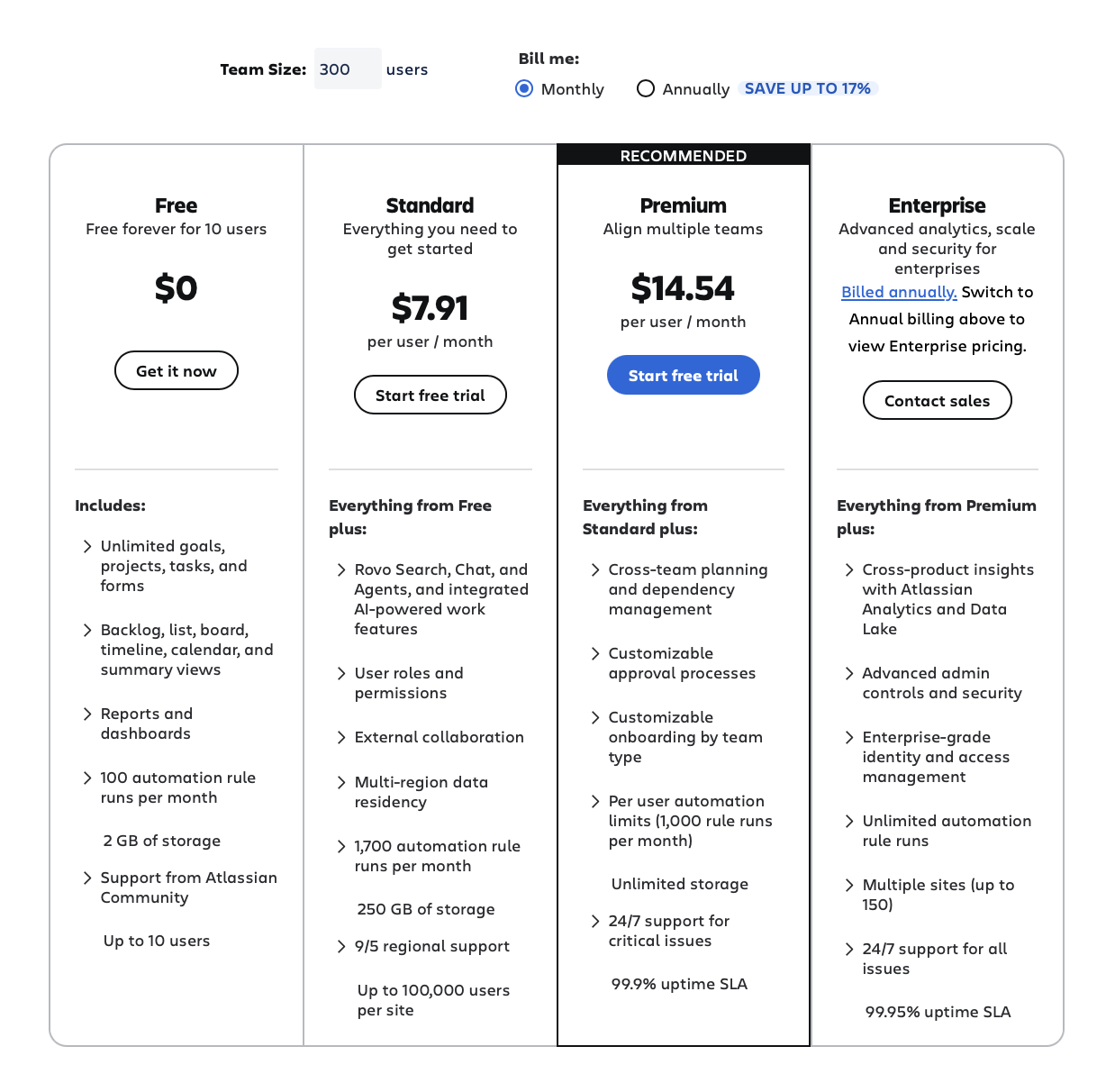
According to Atlassian’s current pricing model, Jira offers:
- a Free plan for small teams,
- a Standard plan focused on core project management features,
- a Premium tier with advanced automation, reporting, and administration capabilities,
- and an Enterprise plan designed for larger organizations requiring centralized governance and scalability.
*Costs of the Standard and Premium plan vary depending on the total number of users
Example:
team size - 300 > $7,91 (Standard), $14,54 (Premium)
team size - 100 > $9,05 (Standard), $18,30 (Premium)
Wrike follows a broader business collaboration pricing model. Its plans are positioned more heavily around operational coordination, reporting, workload management, and enterprise collaboration features.
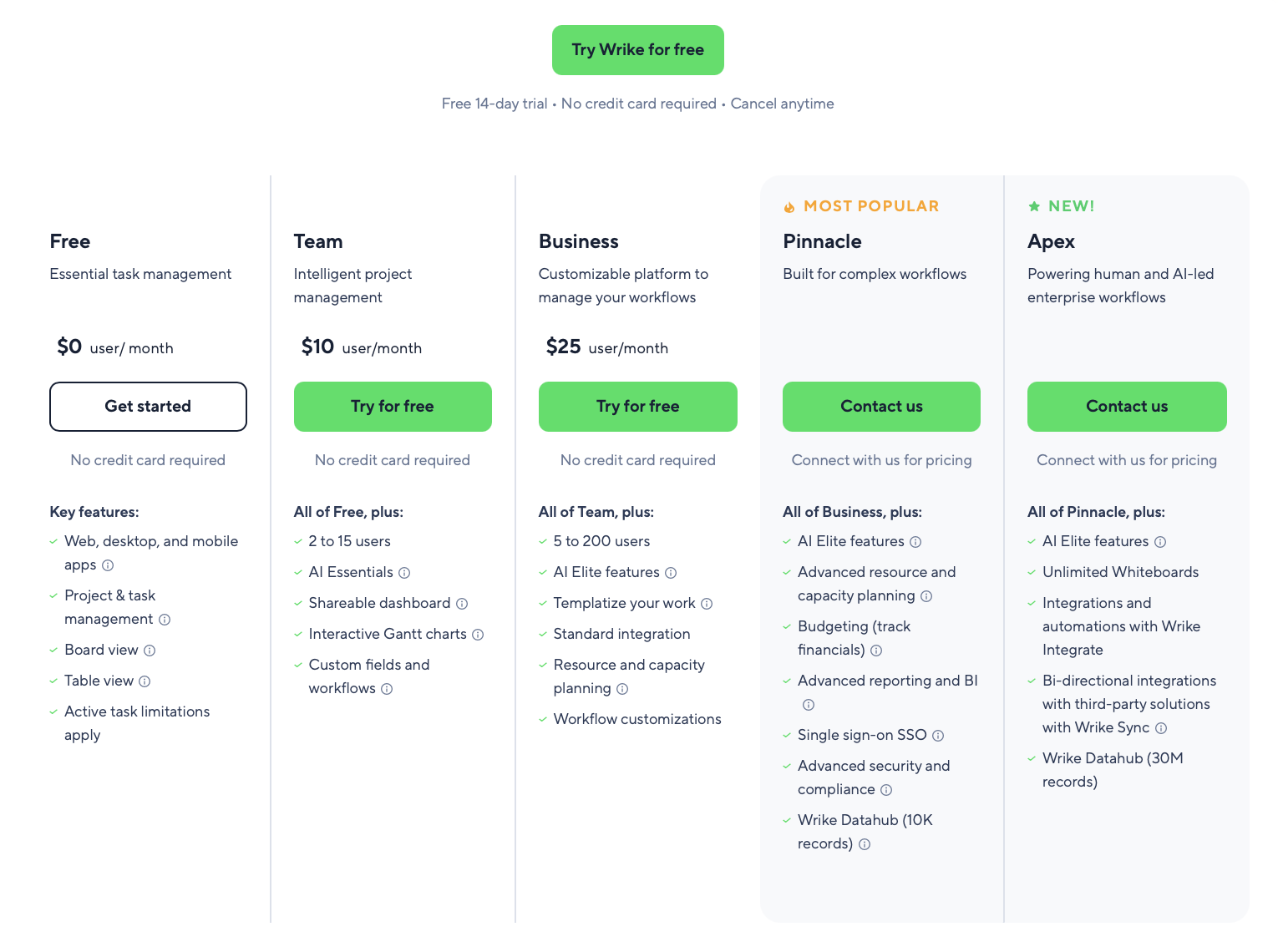
Wrike’s structure typically includes:
- a Free plan for basic task management,
- Team and Business plans for growing operational teams,
- and Enterprise/Pinnacle tiers focused on advanced security, reporting, and resource planning.
The biggest pricing difference usually appears after scaling.
Jira organizations often expand costs through:
- marketplace apps,
- automation usage,
- advanced administration,
- and additional integrations.
Wrike environments more commonly scale through:
- reporting requirements,
- workload planning features,
- resource management,
- and enterprise collaboration capabilities.
This means the long-term operational cost depends less on entry pricing itself and more on how teams structure workflows across departments.
The Hidden Problem: Cross Functional Teams No Longer Work in One Platform
For many organizations, the biggest challenge is no longer choosing between Jira and Wrike. The real challenge appears once different departments begin operating in different systems at the same time.
This has become increasingly common in larger companies and fast-scaling environments.
For example:
- software development teams may manage agile workflows in Jira,
- marketing teams may coordinate campaign launches in Wrike,
- while project managers and leadership teams still need visibility across both environments.
In theory, this sounds manageable. In practice, disconnected workflows quickly create operational gaps.
Tasks become duplicated between systems, reporting structures stop aligning, and teams lose visibility into project progress across departments. Technical teams may optimize around sprint execution, while business stakeholders focus on deadlines, approvals, and operational coordination using entirely different reporting models.
As these environments scale, workflow fragmentation becomes harder to manage manually.
This is one reason many organizations stop treating project management software as a “single platform” decision. Instead, they focus on how workflows align between systems without forcing every team into the same operational model.

Integrating Jira and Wrike with Getint
This is where integration platforms such as Getint become increasingly valuable.
Rather than replacing existing workflows, Getint acting as a third-party application, allows organizations to synchronize Jira and Wrike while preserving how different teams already operate. Development teams can continue managing agile software development inside Jira, while business teams coordinate operational planning and timelines inside Wrike.
With Getint, organizations can synchronize through the user-friendly interface:
- tasks and work items,
- statuses,
- comments,
- attachments,
- custom fields,
- and workflow updates between platforms.
This helps reduce duplicated work while improving visibility across both technical and non-technical teams.
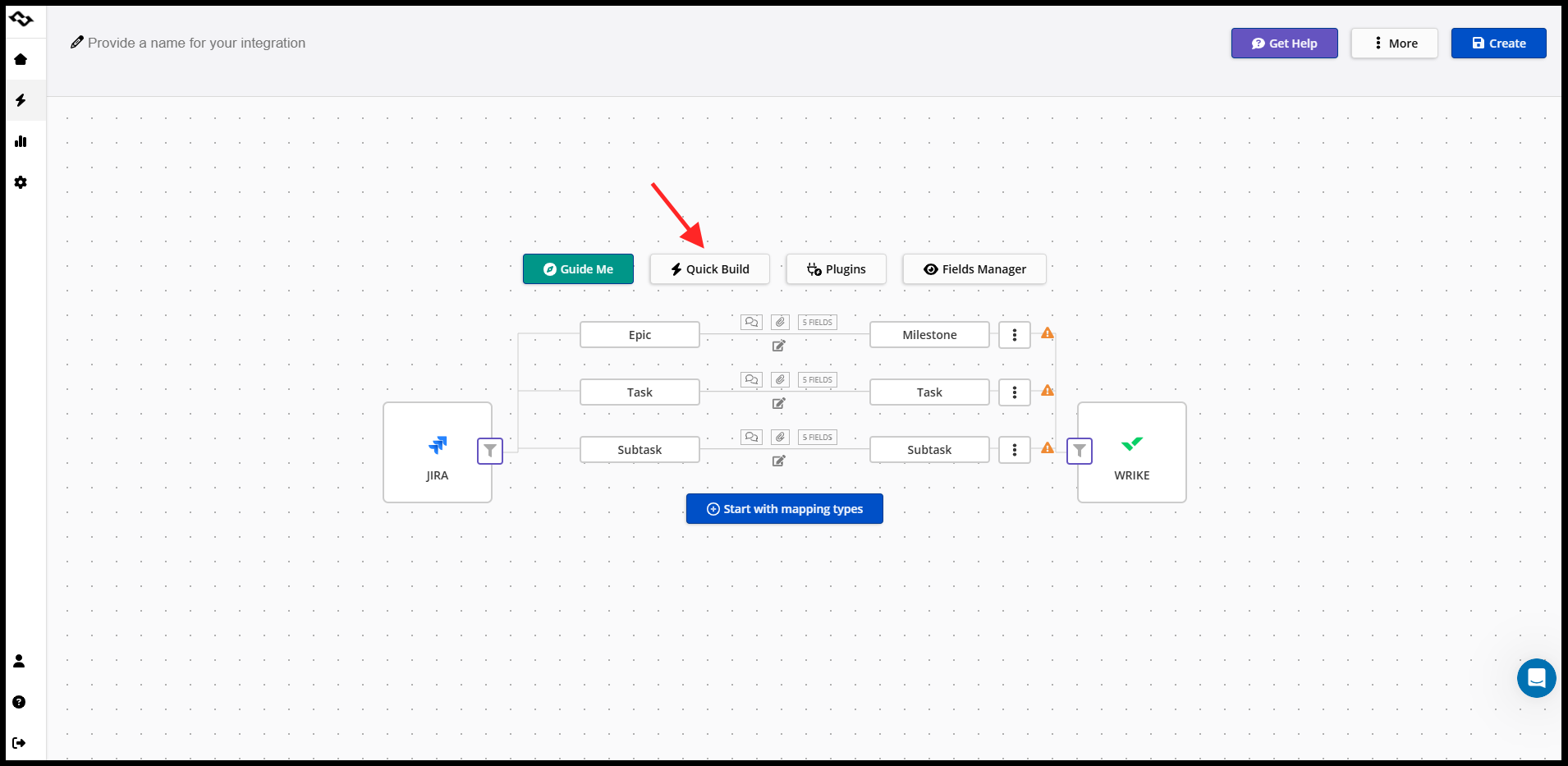
The operational advantage is not simply “connecting tools.” It is maintaining workflow alignment across departments without forcing organizations to standardize every team around a single project management style.
That distinction becomes increasingly important in enterprises where agile teams, creative teams, project managers, and business stakeholders all operate differently but still depend on shared project visibility.
Final Thoughts
Jira and Wrike solve very different project management problems. Jira is typically the stronger choice for software development teams that need detailed issue tracking, agile project management features, customizable workflows, and operational control across complex engineering environments. Wrike is often a better fit for organizations prioritizing project timelines, workload visibility, resource planning, and collaboration across business teams.
But for many companies, the decision is no longer strictly Wrike vs Jira. Technical teams, marketing departments, creative operations, and project managers frequently operate in different systems at the same time, especially in larger organizations where workflows and reporting structures evolve independently across departments.
In those environments, the bigger challenge becomes maintaining visibility, coordination, and workflow alignment without forcing every team into the same operational model. This is also why no-code integration platforms like Getint are becoming increasingly important, helping organizations connect workflows across teams while allowing each department to continue working in the platform that fits its processes best.