
A platform engineering team I worked with last year inherited an interesting problem. They ran a Node.js monorepo on GitHub with about forty active services, used GitHub Actions for everything, and had it tuned reasonably well. Then their company acquired a smaller startup whose entire engineering stack lived on self-hosted GitLab, including three production services running on GitLab CI/CD pipelines that nobody on the original team understood.
The leadership question was the obvious one: which platform do we consolidate to? The honest answer turned out to be neither — at least not immediately. The cost of migrating either side, retraining engineers, and rewriting pipeline definitions exceeded the cost of running both deliberately for the next eighteen months.
That's the version of "gitlab ci cd vs github actions" most blog posts skip. They treat it as a greenfield decision where you weigh features against a checklist and pick a winner. In production, most teams are either running both already or are about to inherit both. This piece is for those teams.
We'll cover:
- the foundational comparison — the mental model,
- the same pipeline implemented in each platform,
- the genuine differences in production — and then get into the part that actually matters at scale:
- how to run both without doubling your platform engineering overhead.
A companion GitHub repo with the same Node.js application pipelined in both .github/workflows/ and .gitlab-ci.yml is linked at the end. Fork it, mirror it to GitLab, and watch both run.
The mental model
The core distinction is one sentence: GitHub Actions is an event-driven marketplace platform built around reusable actions, while GitLab CI/CD is an integrated DevSecOps platform built around pipeline definitions inside the same product as your repo, issues, and security scanning.
- GitHub Actions focuses on events. A push, a pull request, a release tag, an issue comment — anything that happens in the GitHub ecosystem can trigger a workflow. Workflow files live in .github/workflows/, and the killer feature is composition: most of what your pipeline does is wiring together pre-built actions from the marketplace, with a thin layer of your own scripts on top.
- GitLab CI/CD takes a different shape. A single .gitlab-ci.yml at the root of your repo defines the entire pipeline. Stages, jobs, and dependencies are first-class concepts in the YAML schema rather than emergent properties of how you structure workflows. Because GitLab ships as one product — repo, CI, container registry, security scanning, Kubernetes integration, package registry — the pipeline has tight integration with everything else. A merge request shows pipeline status, security scan results, and code review state in the same view.
This shapes everything downstream. GitHub Actions optimizes for ecosystem breadth. GitLab CI/CD optimizes for a unified experience.
Side-by-side: the same pipeline in both
Let's make this concrete. Here's a build–test–deploy pipeline for a Node.js application, implemented in both platforms.
GitHub Actions (.github/workflows/ci.yml):
name: CI

on:
  push:
    branches: [main]
  pull_request:

jobs:
  test:
    runs-on: ubuntu-latest
    steps:
      - uses: actions/checkout@v4
      - uses: actions/setup-node@v4
        with:
          node-version: '20'
          cache: 'npm'
      - run: npm install
      - run: npm test

  build:
    needs: test
    runs-on: ubuntu-latest
    steps:
      - uses: actions/checkout@v4
      - uses: actions/setup-node@v4
        with:
          node-version: '20'
      - run: npm install
      - run: npm run build
      - uses: actions/upload-artifact@v4
        with:
          name: dist
          path: dist/

  deploy:
    needs: build
    if: github.ref == 'refs/heads/main'
    runs-on: ubuntu-latest
    steps:
      - uses: actions/download-artifact@v4
        with:
          name: dist
      - run: ./scripts/deploy.sh
GitLab CI/CD (.gitlab-ci.yml):
stages:
  - test
  - build
  - deploy

default:
  image: node:20
  cache:
    paths:
      - node_modules/

test:
  stage: test
  script:
    - npm install
    - npm test

build:
  stage: build
  script:
    - npm install
    - npm run build
  artifacts:
    paths:
      - dist/

deploy:
  stage: deploy
  script:
    - ./scripts/deploy.sh
  rules:
    - if: $CI_COMMIT_BRANCH == "main"
Two pipelines, same outcome, noticeably different shapes.
- GitHub Actions composes pre-built actions: actions/checkout, actions/setup-node, actions/upload-artifact. Each is maintained by GitHub or a third party, versioned, and pulled from the marketplace at runtime. Job dependencies are explicit through needs:, and parallelism is the default — jobs run concurrently unless you say otherwise.
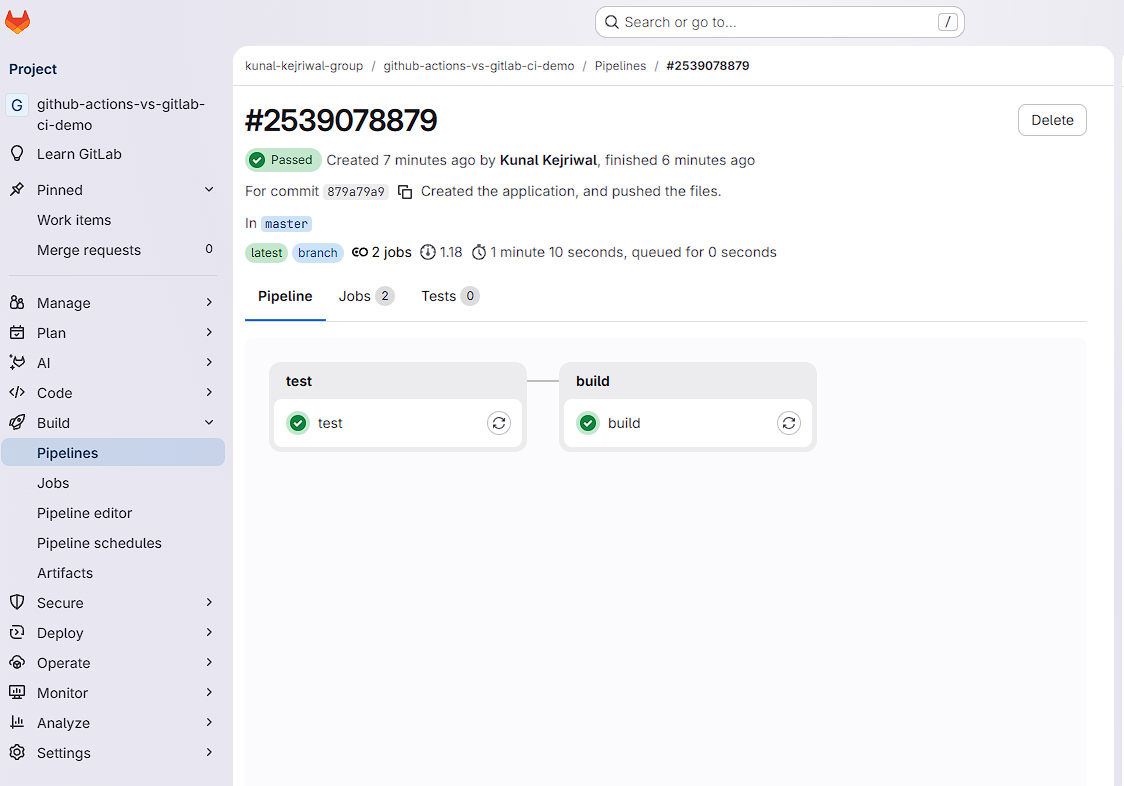
- GitLab CI is more script-driven. Stages run sequentially, jobs within a stage run in parallel, and artifacts pass between stages automatically. You define image: node:20 once at the top and every job inherits it. There's less ceremony but also less composition — you're writing more shell, less wiring.
Here's what the same pipeline looks like rendered in each platform's UI. GitHub Actions shows it as a job summary with the three jobs as connected nodes:

GitLab CI renders the same pipeline as a stage-based DAG:
Key differences in terms of production
The feature surface looks similar from a distance. Up close, six areas matter.
1. Runners and self-hosting
GitHub provides hosted runners on Linux, Windows, and macOS, billed by the minute. GitLab offers shared runners with similar economics. Both support self-hosted runners, and this is where the platforms diverge on cost at volume. A team running 50,000 CI minutes a month on GitHub-hosted runners will pay materially more than the same workload on self-hosted runners on a $200/month VM, and the crossover happens earlier than most teams expect. GitLab's self-hosted story is more mature for organizations that need it as the default rather than the exception — partly because GitLab itself is often self-hosted, so the runners follow the same operational model.
2. Reusable workflows and composition
GitHub Actions has reusable workflows (one workflow calling another via uses:) and composite actions (a single action that bundles multiple steps). GitLab uses include:, extends:, and the newer CI/CD Catalog for the same purpose. Both work; both have rough edges at scale. If you have fifty repositories that need the same pipeline, you'll end up building internal tooling on either platform to keep them in sync.
3. Secrets and identity
GitHub manages secrets at the repo, organization, and environment level, with environment-level protection rules for sensitive deployments. GitLab uses project, group, and instance-level variables, with the ability to mark them protected (only available on protected branches) and masked. Both platforms now support OIDC for keyless deploys — GitHub Actions to AWS, GCP, Azure, and others via OIDC trust; GitLab via JWT-based ID tokens. If you're deploying to cloud and still using long-lived service account keys in either platform, you're a year behind the curve.
4. Built-in security scanning
This is one of GitLab's strongest differentiators and worth being specific about. GitLab ships SAST, DAST, dependency scanning, container scanning, license compliance, and secret detection as part of the platform, with results surfaced inline on merge requests. GitHub Advanced Security covers similar ground — CodeQL, Dependabot, secret scanning — but it's a paid add-on with a different surface area. If your security team's requirement is "show me vulnerabilities on every MR without buying a separate product," GitLab wins this category cleanly. If you're already paying for Snyk or similar, the gap narrows.
5. Marketplace versus catalog
GitHub's marketplace has tens of thousands of actions covering nearly every imaginable integration. GitLab's CI/CD Catalog is newer and smaller. For most teams, GitHub's ecosystem breadth is a genuine advantage — there's an action for almost anything, and you compose rather than write. The tradeoff is the maintenance tax: third-party actions go unmaintained, introduce supply chain risk if you don't pin versions, and create dependencies you didn't choose. GitLab teams write more shell scripts. GitHub teams audit more dependencies.
6. Monorepos and complex pipelines
Both platforms handle complex workflows, but they get there differently. GitLab supports dynamic child pipelines (a job that generates a .gitlab-ci.yml for downstream pipelines to run) and path-based rules. GitHub Actions handles matrix builds elegantly and supports reusable workflow inputs for parameterized pipelines. For path-filtered builds in a monorepo, both work; the GitLab version is more verbose, the GitHub version more declarative.
Performance, DX, and the things that look small
Pipeline execution speed depends mostly on what you're pipelining, but a few details matter. Caching on GitHub Actions is action-driven (actions/cache); caching on GitLab is built into the job schema. Both work well once tuned; both are slow if you ignore them.
- Log experience differs in personality
GitHub Actions renders logs as collapsible step blocks with a job summary view that's hard to beat for skimming.
GitLab renders logs as a single continuous stream per job with the pipeline DAG as the navigational surface.
- Re-running failed jobs is one click on both
SSH-into-runner debugging exists on GitHub via third-party actions and is generally cleaner; on GitLab it requires more setup.
- Free tier and usage limits change often enough that you should verify before committing, but the rough shape:
GitHub Actions includes 2,000 minutes per month on the free tier for private repositories and unlimited usage for public ones.
GitLab.com offers a similar free tier with usage caps that have tightened over the past few years.
Both are generous enough for small teams and start to bite at production scale, which is where self-hosted runners become the right answer.
The honest take on developer experience: GitHub Actions is easier to start with. The marketplace lets a developer go from zero to a working pipeline in fifteen minutes. GitLab CI has a steeper learning curve — stages, needs, rules, extends, includes, child pipelines are more concepts to absorb up front — but the ceiling is higher for teams that invest in learning it. Extensive documentation exists for both; GitLab's is more comprehensive in one place, GitHub's is more scattered but better SEO'd.
The dual-platform reality
This is the section that gets skipped in most comparison posts, and it's where the real engineering work lives.
The fiction is that teams pick one platform and stick with it. The reality is that organizations end up with both for reasons that are rarely about technical merit — acquisitions, regional offices that standardized differently, security mandates that require self-hosted GitLab for some workloads, open-source projects that live on GitHub because the community does. The question isn't "which one wins." The question is "how do we run both without it doubling our operational load."
A few patterns work in practice:
- Code on one platform, deploy from the other
Some teams keep source of truth on GitHub for the pull request workflow and developer experience, but run deploys through GitLab CI for the security scanning and self-hosted runner story. This works when one platform is clearly better for one half of the pipeline. It breaks when engineers have to context-switch between two systems for every change — the cognitive cost compounds.
- Repository mirroring
GitLab's pull mirroring from GitHub is mature and reliable; you can mirror a GitHub repo into GitLab and have GitLab CI run against the mirrored copy. The reverse direction — pushing from GitLab to GitHub — works for code but doesn't carry merge request state, reviews, or CI status. Mirroring solves the code-sync problem but not the work-item-sync problem.
- Standardizing pipelines across both
The honest answer here is that you'll maintain two pipeline definitions. Tools like Dagger let you write pipeline logic in code that runs on either platform, and shared shell scripts called from both YAMLs reduce duplication, but you won't eliminate it. Budget for the duplication and put your engineering effort into making the duplicated parts as thin as possible — push the real logic into scripts or programs that both YAMLs invoke.
- Keeping issues, MRs, and PRs synchronized
This is the second-order problem most teams underestimate. When code lives on both platforms, work tracking fragments. An engineer opens a pull request on GitHub, but the linked issue lives on GitLab, but the security finding came from a GitLab MR on a mirrored repo. Status drifts. Audit trails fragment. Engineers spend their day context-switching.
If your team is already running both platforms, the pipeline question is solvable — you write two YAMLs and move on. The harder problem is keeping issues, merge requests, and pull requests synchronized so each platform stays the source of truth for what it does best. Integration plartforms like Getint handles that sync layer between GitHub and GitLab (and across Jira, Azure DevOps, and others), which keeps engineers from doing the manual reconciliation themselves.

Summary
The question worth asking isn't which CI/CD platform wins. It's which workload belongs where, and what infrastructure you need to keep both honest if the answer is "both."
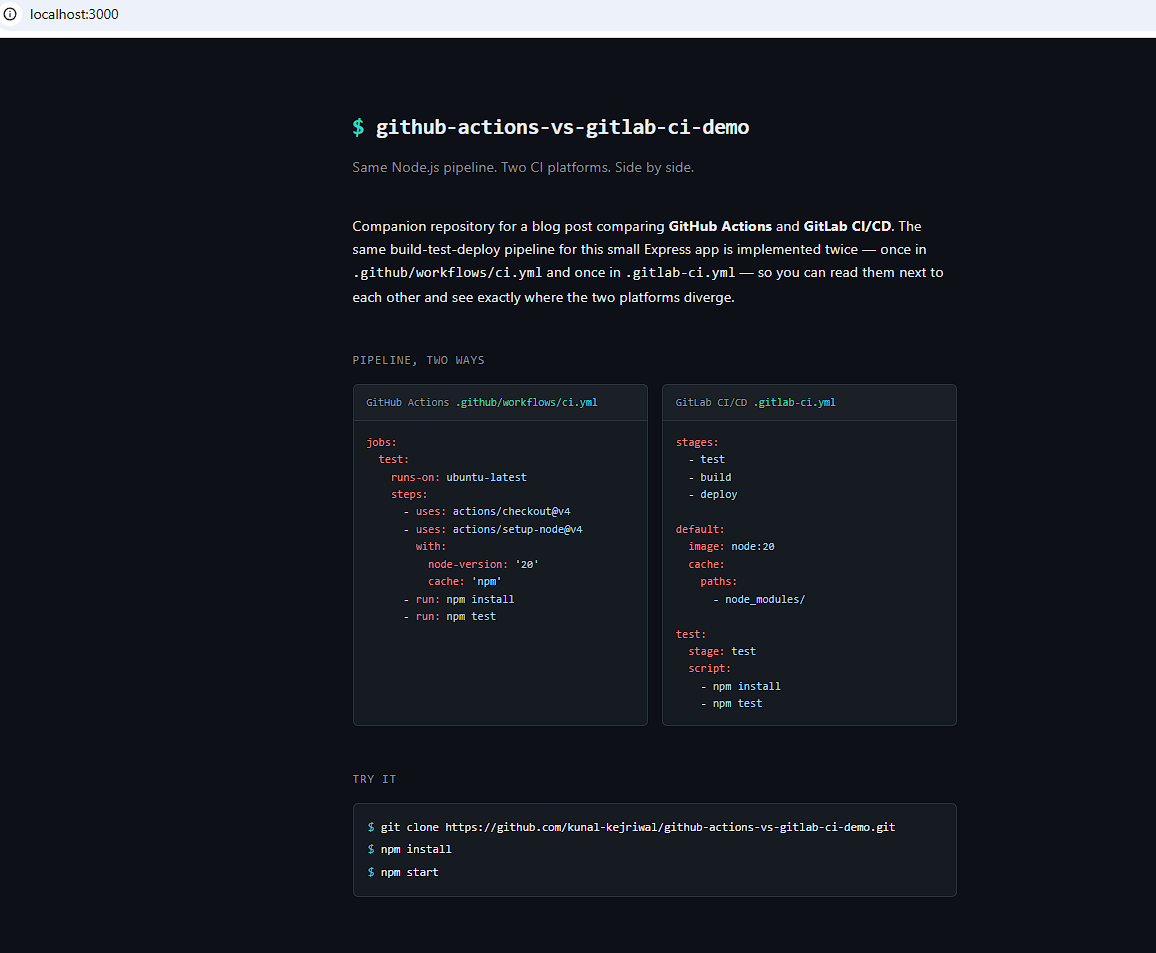
The companion repo for this piece is at github.com/kunal-kejriwal/github-actions-vs-gitlab-ci-demo. It contains the Node.js application above, the GitHub Actions workflow, the GitLab CI configuration, and a README walking through how to fork to GitHub and mirror to GitLab so you can watch both pipelines run against the same code. Fork it, break it, send issues.
At a glance: GitHub Actions vs. GitLab CI/CD