
In the software development industry, Jira vs Azure DevOps remains a top debate for software development teams. Jira software excels in agile project management, while Azure DevOps offers a comprehensive suite covering the entire software development lifecycle. Both are widely recognized project management tools supporting agile methodologies, agile frameworks, and agile best practices like Scrum and Kanban boards. Yet, their primary focus differs: Jira boasts extensive customization options for issue tracking, and Azure DevOps integrates seamlessly with the Microsoft ecosystem.
This guide dives into Jira pros, Azure DevOps pros, key differences, project management methodologies fit, and why teams often use both Jira and Azure DevOps together via integration capabilities like Getint. Whether choosing Jira, Azure DevOps, or blending DevOps tools with management tools, you'll get practical advice for 2026's hybrid environments.
What Is Jira Software? Primary Focus and Strengths
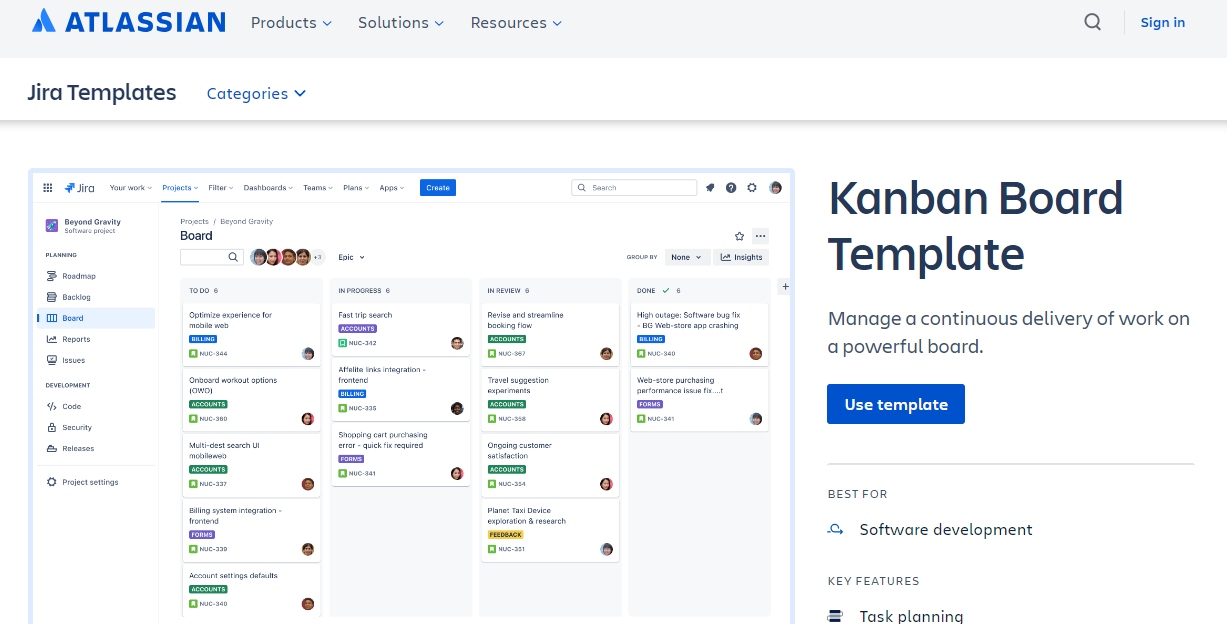
Jira, Atlassian's flagship, is a project management tool optimized for agile project management and bug tracking. Software development teams love its ability to create custom workflows, track progress across epics/stories/tasks, and manage the development process with visual Kanban boards.
Jira Pros and Robust Capabilities:
- Jira excels at issue tracking, bug tracking, and sprint planning with customizable workflows.
- Vast marketplace for native integration with CI/CD, documentation, and more.
- Granular permissions and advanced permissions for multiple teams.
- Extensive customizability for project needs, from visual Studio extensions to custom screens.
Jira boasts flexibility for DevOps and Jira hybrid setups, making it ideal for product-led teams prioritizing visibility over native dev tools. Its user interface supports agile best practices without dictating code management or test management.
What Is Azure DevOps?
Azure DevOps is Microsoft's robust tools platform, providing a more comprehensive suite for the entire development lifecycle. Unlike Jira's coordination layer, Azure DevOps excels in end-to-end coverage, from planning to deployment, with deep integration into Azure cloud services, Microsoft products, Visual Studio, and other Microsoft services.
Azure DevOps integrates seamlessly with Azure Active Directory for security and scales for development teams in the Microsoft ecosystem.
Azure DevOps Core Services: All the Tools You Need
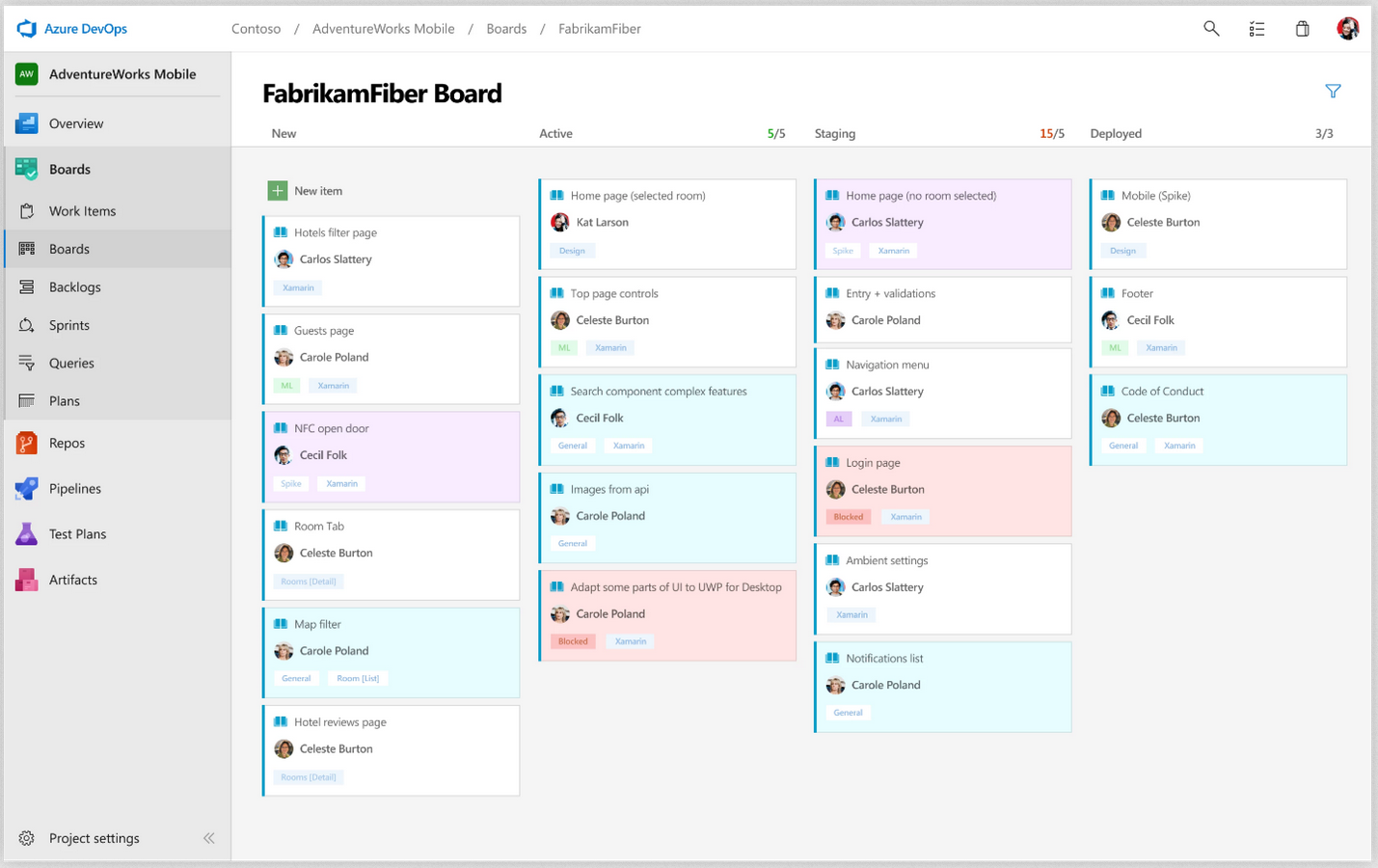
- Azure Boards: Agile project management with work items, backlogs, and Kanban boards — tightly integrated to code.
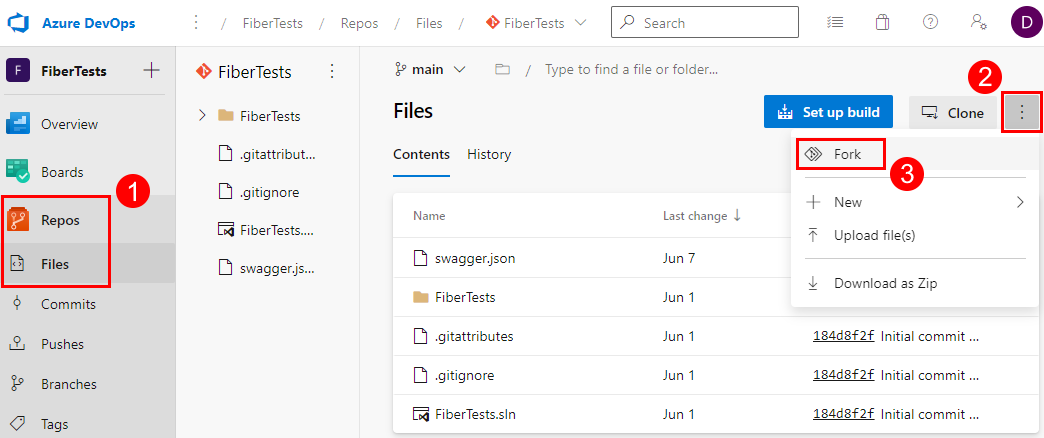
- Azure Repos: Git repositories with pull requests, branch policies, and code management.
- Azure Pipelines: Continuous integration and CI/CD across Azure cloud, on-prem, or multi-cloud.
- Azure Test Plans: Native test management with plans, suites, and traceability to builds/releases.
- Azure Artifacts: Secure package management for dependencies and NuGet feeds.
This deeply integrated setup offers robust capabilities, reducing tool sprawl. Azure DevOps pros include seamless traceability — link a user story in Azure Boards to a commit in Azure Repos, a build in Azure Pipelines, tests in Azure Test Plans, and artifacts in Azure Artifacts.
Jira vs Azure DevOps: Key Differences at a Glance
Jira excels in coordination; Azure DevOps offers a tightly integrated, more comprehensive suite.
Use Cases: Choose Jira, Choose Azure DevOps, or Both?
When to Choose Jira
Opt for Jira if agile project management drives your project needs:
- Product teams need extensive customization options and visual Kanban boards.
- Both Jira and management tools like external Git repositories or CI/CD are in play.
- Track progress across distributed software development teams with granular permissions.
Example: Marketing tech firms use Jira for backlog grooming, integrating with DevOps tools.
When to Choose Azure DevOps
Azure DevOps shines when you want all the tools in one place:
- Development teams require code management, continuous integration, and test management.
- Your org leverages Microsoft services, Azure cloud, or Visual Studio.
- Tight lifecycle coverage from Azure Boards to Azure Artifacts is key.
Example: Fintech enterprises build compliant apps, tracing requirements through Azure Test Plans.
Why Both Azure DevOps and Jira? Real-World Hybrid Wins
Many teams use DevOps and Jira side-by-side: Jira for planning/visibility, Azure DevOps for execution. This leverages Jira's extensive customizability and Azure DevOps' robust tools — but silos emerge without integration capabilities.
Common pain points:
- Duplicated issues between systems.
- Out-of-sync statuses from Jira to Azure Boards.
- Lost visibility in the entire software development lifecycle.

Pricing and Scalability: Jira vs Azure DevOps Costs in 2026
Cost is a key factor in Jira vs Azure DevOps for software development teams and multiple teams. Both offer free tiers but scale differently — Jira via per-user licensing, Azure DevOps via service bundles.
Jira Pricing (Atlassian 2026 Rates)
- Free: Up to 10 users.
- Standard: $9.05/user/month (Rovo search, Ai features, automation rules, basic boards, 250GB storage, up to 100k users).
- Premium: $18.30/user/month (advanced automation rules, unlimited storage, cross-team planning, custom workflows).
- Enterprise: Custom (unlimited storage and automation rules, advanced analytics, advanced admin controls, 24/7 support).
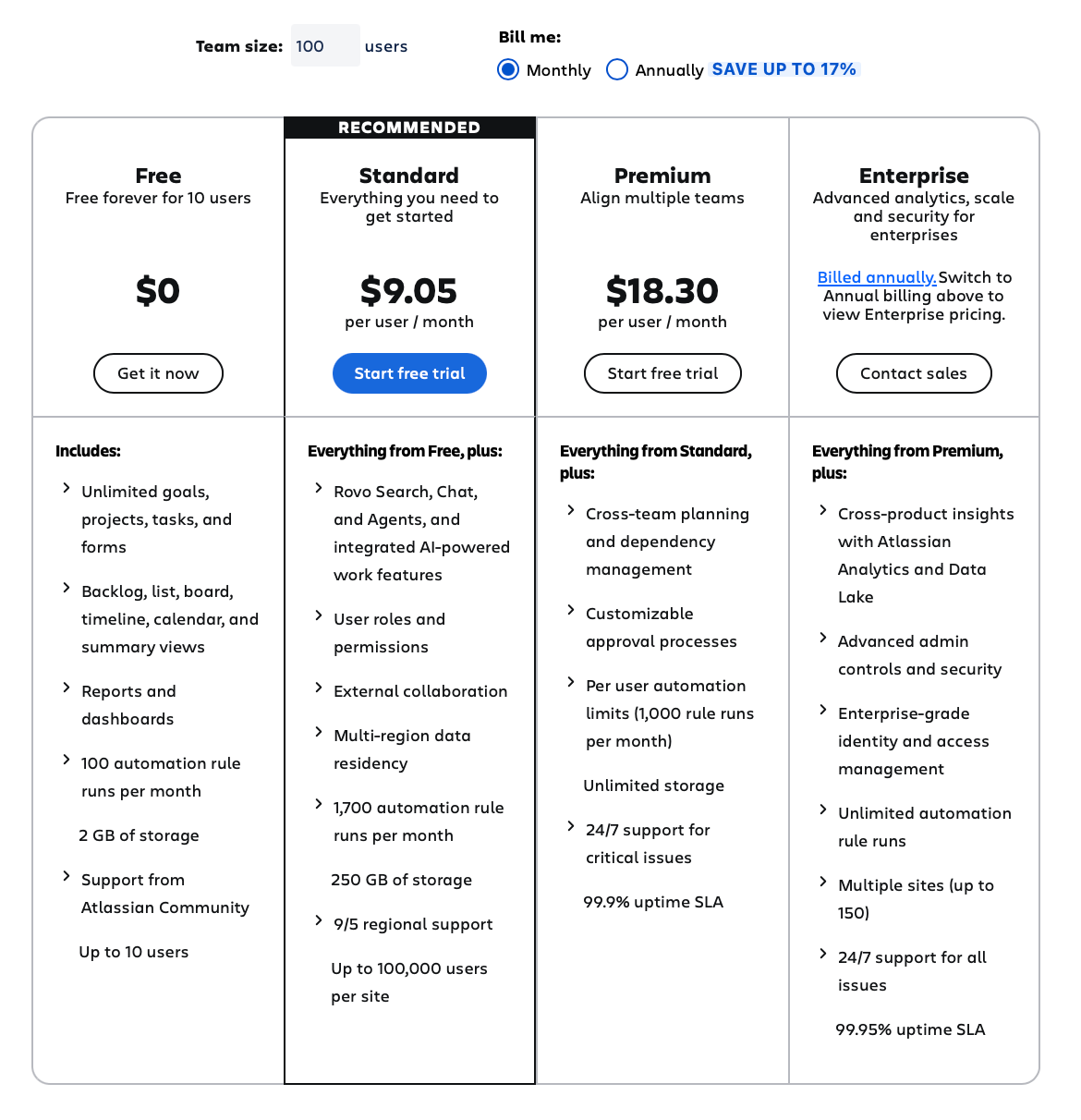
Jira scales well for multiple teams with project-level licensing, but costs rise with extensive customization options and vast marketplace usage.
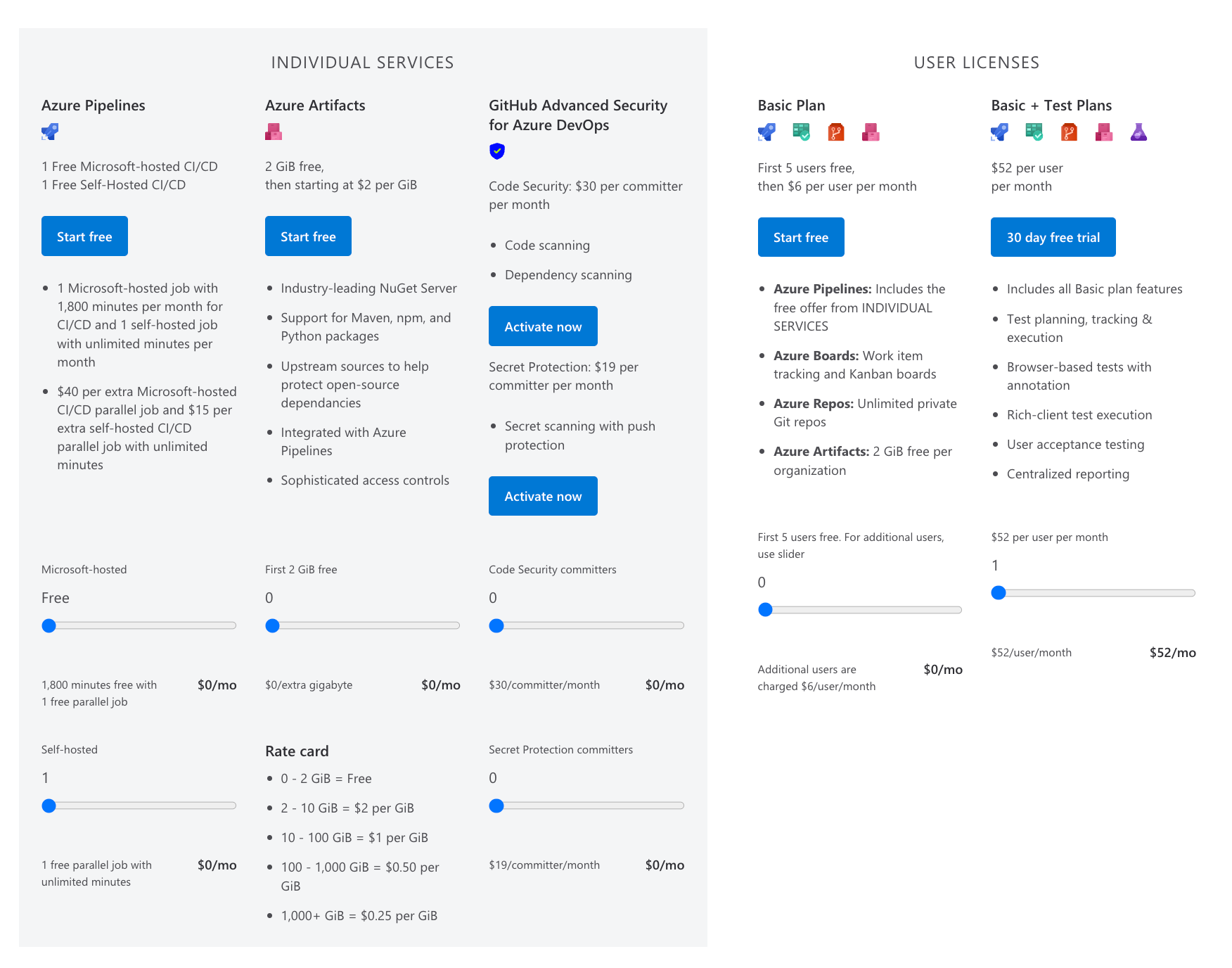
Azure DevOps Pricing (Microsoft 2026 Rates)
- Free: Unlimited users for public projects; 5 users basic private + 1,800 pipeline minutes.
- Basic: $6/user/month (unlimited private repos, Azure Boards).
- Stakeholder: Free for read-only access.
- Pipelines Extra: $40/1,000 minutes beyond free tier.
- Test Plans/Artifacts: $52/user/month add-on.
Azure DevOps excels in value for Microsoft ecosystem users — pay per active user/service, with Azure cloud services discounts. It's cheaper for dev-heavy teams but pricier for test management scale.
Integrating Jira and Azure DevOps: Seamless Integration with Getint
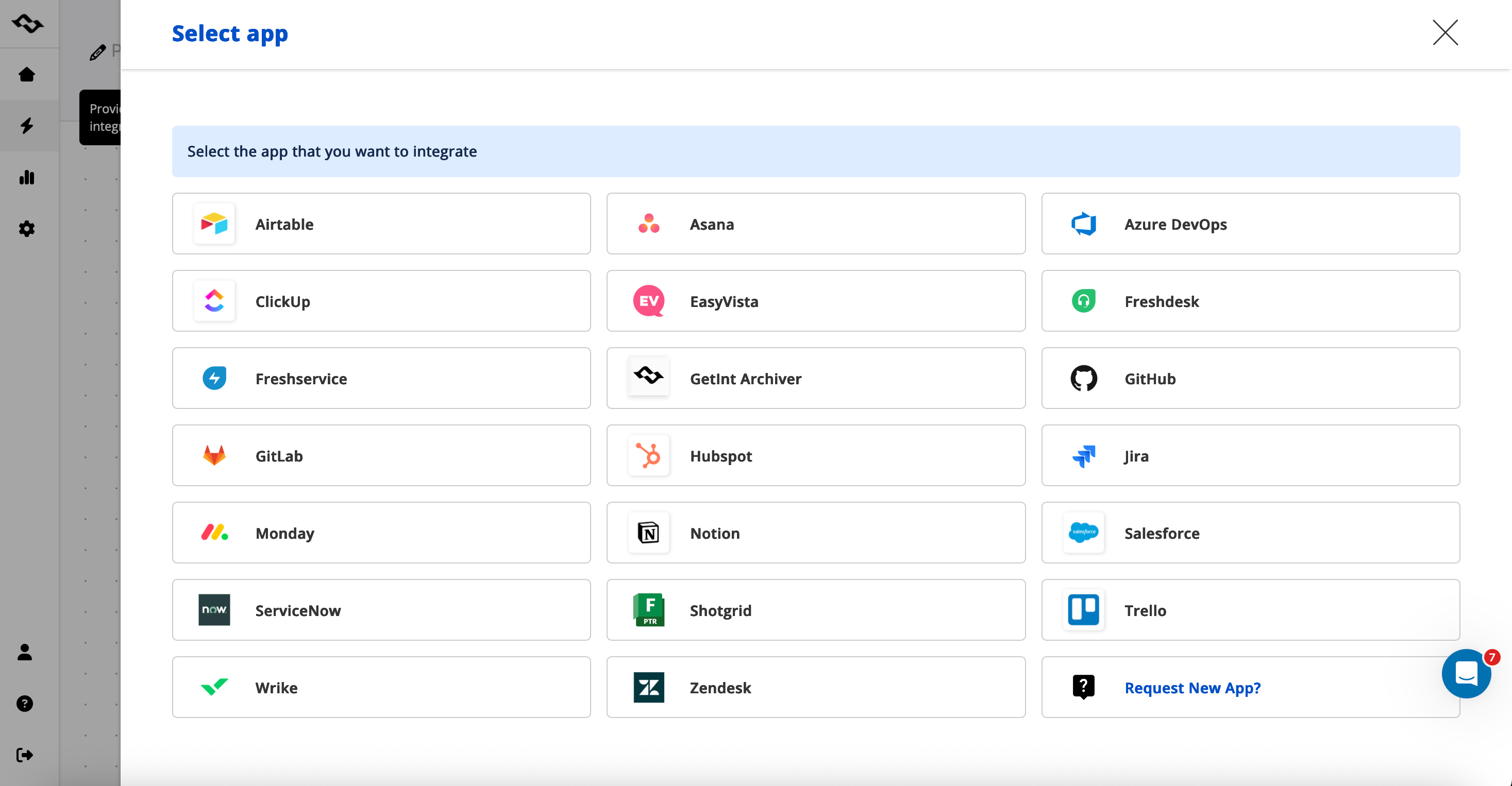
Getint provides no-code, bi-directional sync for Jira and Azure DevOps and many more project management tools (GitLab, Clickup, Freshservice, Salesforce, etc.), preserving custom workflows. It syncs issues, comments, attachments, and statuses — ideal for software development teams blending both Azure DevOps and Jira.
Key Benefits:
- Real-time updates across tools.
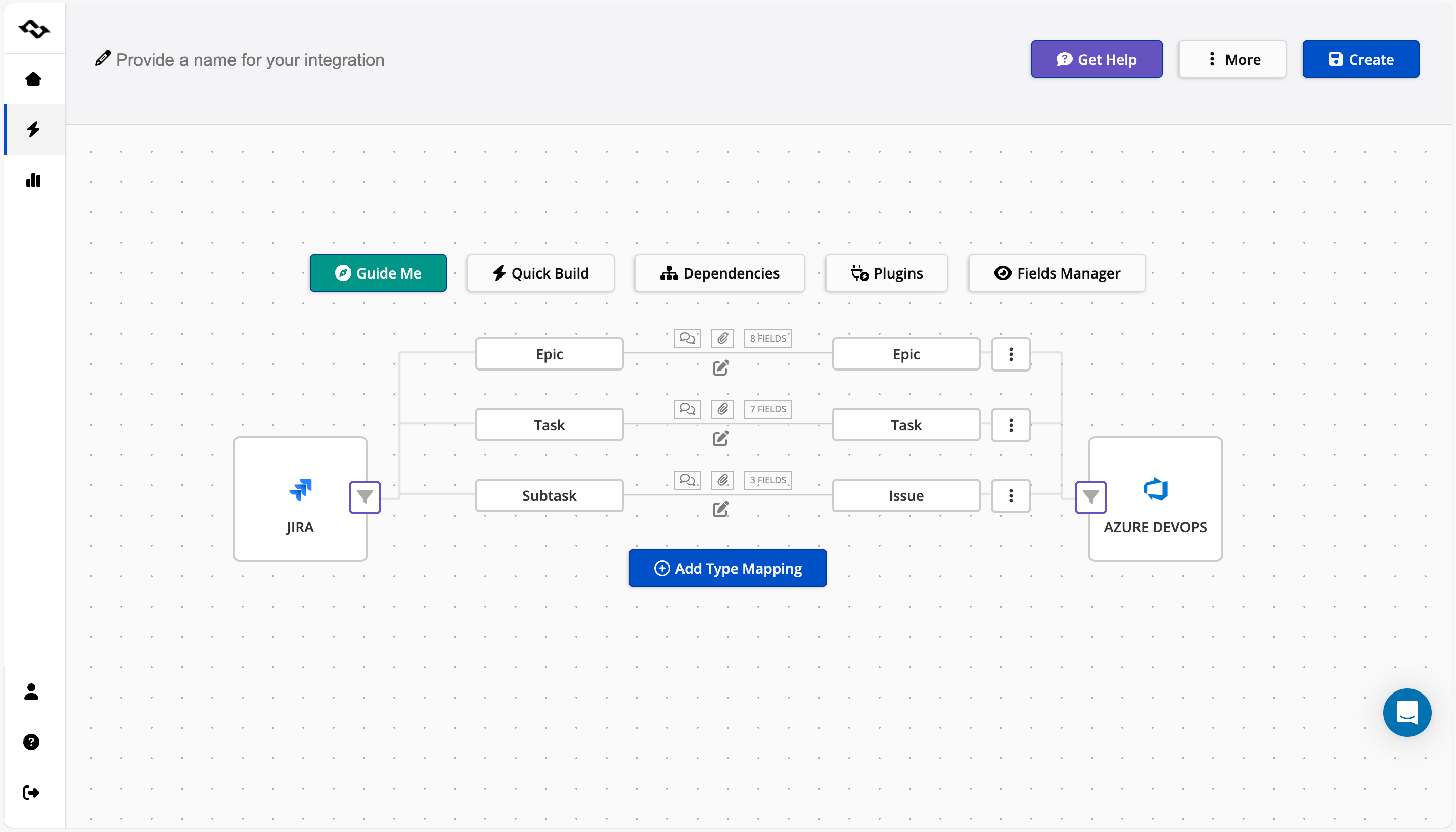
- Custom field mapping (e.g., Jira priority to Azure severity).
- Audit logs for compliance.
- Supports both Jira and Azure DevOps in regulated setups.
Check out our case study on "Lufthansa: Azure DevOps—Jira Integration"

Step-by-Step: Jira-Azure DevOps Integration (Per Getint Docs)
- Sign Up & Connect: Create a Getint account. Authorize Jira (Cloud/Server) and Azure DevOps with API tokens.
- Select Projects: Choose Jira project(s) and Azure DevOps project/team. Define sync direction (bi-directional default).
- Map Fields & Workflows: Align types (e.g., Jira "Bug" ↔ Azure "Bug"), fields (status, assignee, custom fields), and rules (e.g., sync on create/update/resolve).
- Configure Filters & Automations: Set JQL queries for Jira work items; add webhooks for instant triggers. Enable comment/attachment sync.
- Test & Activate: Run a dry-run sync on sample issues. Monitor via Getint dashboard; adjust for edge cases like transitions.
- Scale & Report: Add multi-project syncs. Use built-in reports for cross-tool visibility.
This creates custom workflows that feel native, boosting productivity by 70% in hybrid setups (Getint benchmarks).
Final Decision Framework: Tailor to Your Project Needs
- Pure coordination? Choose Jira — its extensive marketplace and Jira pros fit agile best practices.
- Full-stack dev? Choose Azure DevOps for the comprehensive suite covering planning to deployment.
- Mixed experience? Use both with Getint for DevOps and Jira harmony.
Teams looking to bridge their development and project management workflows can benefit from a dedicated Jira Azure DevOps integration that synchronizes issues, work items, and statuses automatically. Getint's Jira-Azure DevOps connector supports bidirectional sync with field mapping, filters, and no-code setup.