Choose Linear if you run a product or engineering team that wants to prioritize speed, ship in short cycles, and spend almost no time configuring its issue tracker. Choose Jira if many teams across your organization need custom workflows, deep reporting, enterprise controls, and the wider Atlassian ecosystem. That is the short answer to the Linear vs Jira question, and the rest of this guide explains where each tool wins.
Both systems handle issue tracking, project tracking, and agile project management for software teams. They differ in philosophy. Linear is opinionated and keyboard-first, with fewer configuration choices. Jira is a highly configurable agile tool built to model almost any process, from Scrum and Kanban boards to portfolio-level planning across departments.
This comparison is for engineering leads, product managers, startup founders, and IT decision-makers choosing between the two tools, or considering whether Linear can replace Jira. We compare key features, speed, customization, integrations, reporting, AI, security, and pricing, and finish with clear recommendations by team size.
Why it matters: your issue tracker shapes how development teams plan, how fast they move, and how much context switching they absorb every day. Picking the wrong one means either fighting a steep learning curve and configuration overhead, or hitting a ceiling when your organization grows.
Linear vs Jira at a glance
Linear wins on speed, simplicity, and Git-driven workflows; Jira remains the stronger choice for deep customization, cross-team planning, and large enterprises.
Prices checked in November 2026. Confirm current numbers on Linear's pricing page and Jira's pricing page.
What is Linear?
Linear is an issue tracker and project management tool built for software and product development teams that want to move fast. Linear says more than 50,000 companies use it. Its design is clean and minimal, and it is optimized for speed: the app uses a local-first sync architecture, so views, filters, and status changes feel instant.
Instead of letting every team invent its own process, Linear gives you a focused model and sensible defaults. That keeps the product development process streamlined without heavy configuration and reduces administrative overhead.

Key features of Linear
- Issues, projects, and initiatives. Issues belong to a team, projects group delivery work, and initiatives connect projects to company-level goals.
- Cycles instead of sprints. Cycles are lightweight, repeating time boxes of one to eight weeks. They give teams a rhythm without the ceremony of traditional sprints.
- Keyboard-first design. Press C to create an issue, Cmd/Ctrl + K to open the command palette, and single keys to change status or assignee.
- Native Git workflow. Linear integrates with GitHub and GitLab, links pull requests and commits to issues, and updates issue status automatically as code moves from branch to merge.
- Triage and Linear Asks. Incoming requests land in a triage queue. Linear Asks turns Slack messages and emails into issues on Business plans and above.
- Linear Insights. Business and Enterprise plans add analytics on cycle time, throughput, and workload.
Linear's AI and agent features
Linear has invested heavily in AI. Every plan includes the agent platform, MCP access, and the Linear Agent, which can draft issues, summarize threads, and act inside your workspace. A cloud coding agent can run coding sessions against linked issues, billed through prepaid AI credits.
Business and Enterprise plans add Triage Intelligence, which suggests labels, assignees, and duplicates for incoming work, and Code Intelligence, which gives the agent context from your codebase.
What is Jira?
Jira is Atlassian's project management and issue tracking platform, and for many teams it is still the default agile tool. It is built for organizations with complex workflows and cross-department collaboration, where engineering, IT, marketing, and operations all need to work in one system.
Jira's core strength is flexibility. Admins can define issue types, custom fields, custom workflows, automation rules, and permission schemes for each project. That depth is why Jira remains the standard in large enterprises and regulated industries. It is also why Jira's interface can feel heavy, and why over-customization is a common complaint.
Key features of Jira
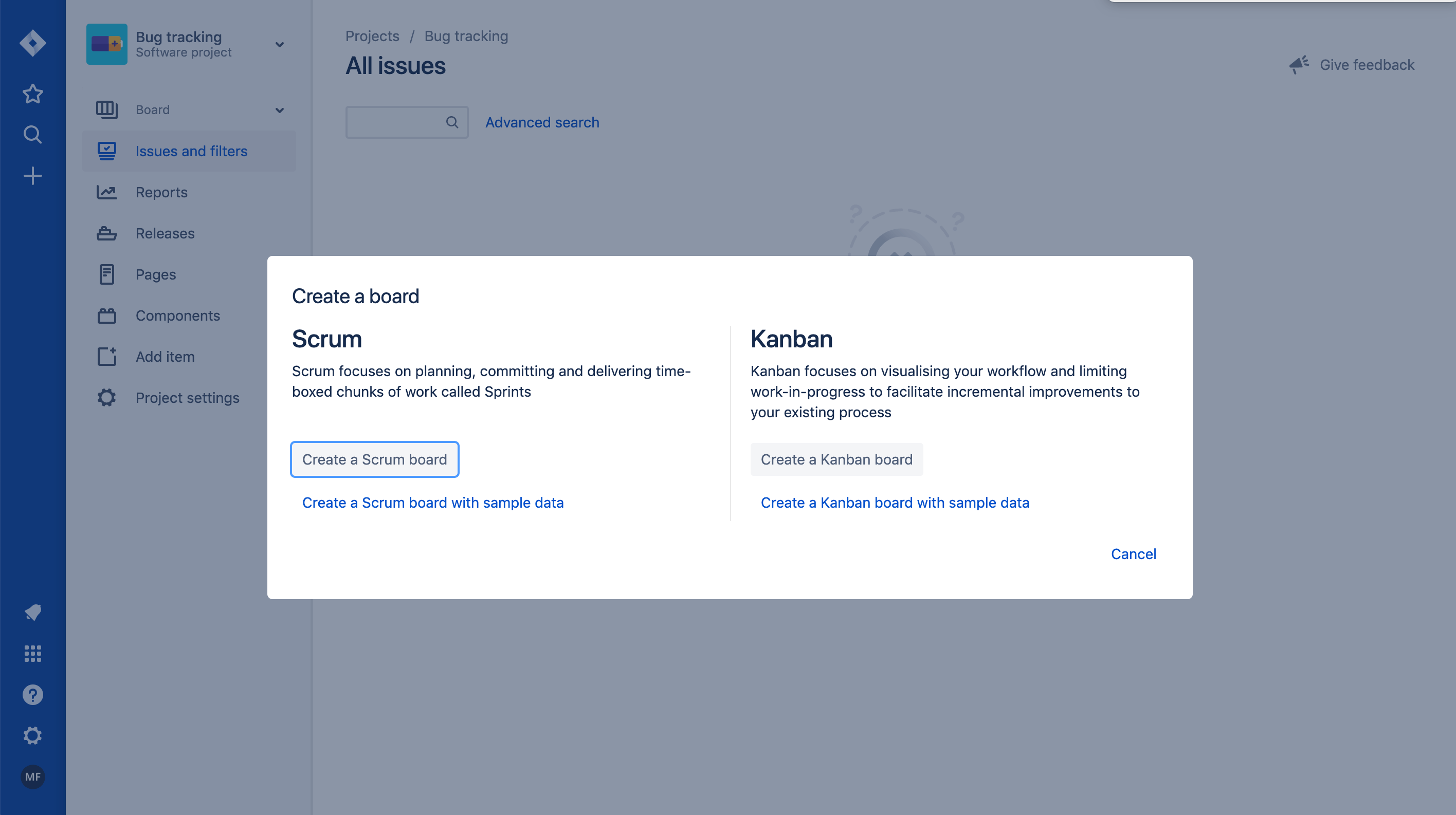
- Scrum and Kanban boards. Jira supports both Scrum and Kanban out of the box, with backlogs, sprint planning, and sprint velocity tracking.
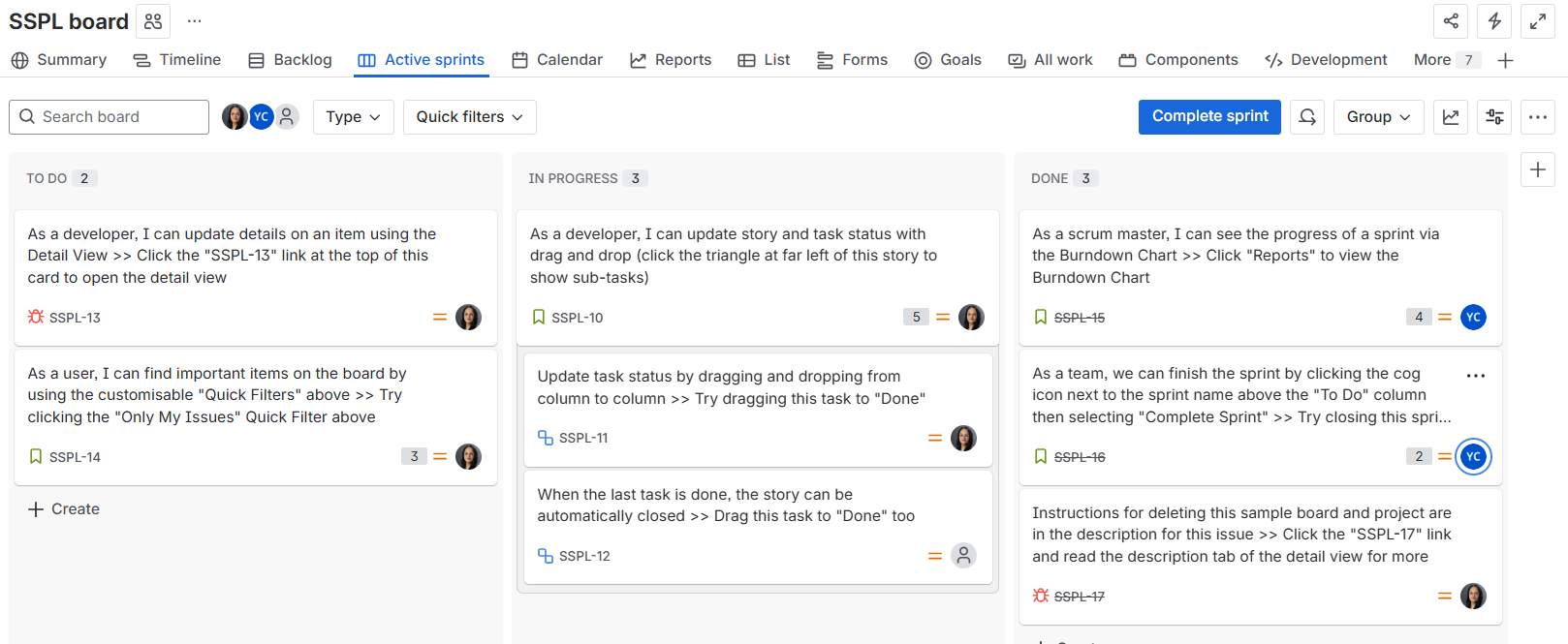
- Custom workflows and fields. Each team can model its own statuses, transitions, approvals, and required fields.
- Automation rules. No-code automation handles transitions, assignments, and notifications, with run limits that grow by plan.
- Advanced planning. Premium adds cross-team planning, dependency management, and portfolio-level planning across many projects.
- Advanced reporting. Burndown charts, velocity reports, dashboards, and, on Enterprise, Atlassian Analytics and Data Lake.
- Atlassian ecosystem and marketplace apps. Jira connects natively with Confluence, Bitbucket, and Jira Service Management, and the Atlassian Marketplace offers more than 3,000 apps (including Getint integration solution), test management and time tracking apps.

Jira Cloud vs Data Center
New evaluations should focus on Jira Cloud. Atlassian ended new Jira Data Center sales on March 30, 2026, with end of life listed for March 28, 2029. Jira Cloud offers data residency in several regions, including the EU, on Standard plans and above.
On the AI side, Jira paid plans include Atlassian Rovo for search, chat, and agents, with usage limits and advanced capabilities varying by tier.
Linear vs Jira: key differences
The two tools differ most on speed, configuration depth, and how far they scale beyond engineering. Here is how they compare area by area.
Speed and user experience
Linear's speed is its signature. Its local-first sync architecture keeps data on the device and syncs in the background, so opening issues, filtering views, and changing statuses feel instant. Jira loads more of each page from the server, so page transitions are noticeably slower, and the delay adds up across a day of updating issues. That waiting time also means more context switching for developers.
Linear's keyboard-first design compounds the difference. You can create an issue with a single key, assign it, and set its status without touching the mouse. In Jira, the same task usually means clicking through project, issue type, and form fields. Jira can also slow down on large projects with many custom fields and apps.
Verdict: Linear wins for daily speed and developer productivity.
Learning curve and setup
Linear emphasizes user experience with a low learning curve. Most teams are productive within an afternoon, which makes it a strong fit for startups that need fast setup. Jira has a steep learning curve, especially for admins configuring schemes, screens, and workflows, and for non-technical users opening it for the first time.
Verdict: Linear for fast onboarding; Jira when you have a dedicated admin.
Customization and workflows
- This is where Jira supports what Linear deliberately avoids. Jira offers custom fields, custom workflows, multiple issue types, permission schemes, and automation rules per project. That suits many teams with genuinely different processes, but the same flexibility can lead to over-customization, with dozens of fields and statuses nobody remembers creating.
- Linear offers team-level workflows, labels, templates, and automations tied to Git events, with fewer configuration choices. Its design prevents the configuration bloat common in Jira, but teams with complex approval chains or compliance-driven processes may find it limiting.
Verdict: Jira for deep customization; Linear for teams that want guardrails.
Project tracking and planning
Both tools cover backlogs, boards, and roadmaps.
- Linear structures work as issues, cycles, projects, and initiatives, and is optimized for rapid delivery in short cycles.
- Jira supports both Scrum and Kanban boards, sprint velocity, and timelines, and its Premium plan adds cross-team planning, dependency management, and portfolio-level planning across dozens of projects.
Verdict: Linear for product delivery; Jira for advanced planning across a portfolio.
Reporting and analytics
Jira provides advanced reporting for project tracking: burndown and velocity charts, sprint reports, configurable dashboards, and Atlassian Analytics on Enterprise. Linear includes progress reports and Pulse updates on every plan, Linear Insights on Business, and dashboards on Enterprise. Linear's analytics are fast and clean but less deep.
Verdict: Jira for teams that report engineering metrics to leadership.
Integrations
- Jira offers extensive integrations: more than 3,000 marketplace apps, plus native links to Confluence, Bitbucket, and the wider Atlassian ecosystem. Marketplace apps cover test management, time tracking, asset management, and compliance, though many carry their own per-user fees.
- Linear's integration ecosystem is smaller, at roughly 250 integrations, but its developer integrations are tight. Linear integrates natively with GitHub and GitLab: a branch named after an issue moves it to In Progress, and a merged pull request moves it to Done automatically. Slack, Sentry, Figma, Zendesk, and Intercom are also covered.
Verdict: Jira for breadth; Linear for the smoothest Git-driven workflow.
AI features
Linear builds AI into the workflow: the Linear Agent on all plans, Triage Intelligence and Code Intelligence on Business, and a cloud coding agent that runs coding sessions on prepaid AI credits. Jira's AI runs through Atlassian Rovo, which searches and acts across Jira and Confluence on paid plans. Rovo is stronger when your knowledge lives across the Atlassian suite.
Security and enterprise controls
Jira supports enterprise governance with audit logs, granular permission schemes, data residency on Standard and above, and Atlassian Guard for SAML and SCIM (included on Enterprise, a separate product on lower tiers). Jira Enterprise adds multiple sites and a 99.95% uptime SLA.
Linear holds SOC 2 Type II and ISO 27001 certifications and lets new workspaces choose an EU or US data region. Private teams and guests start on Business. SAML, SCIM, audit logs, IP restrictions, and HIPAA compliance require Enterprise.
Verdict: Both handle enterprise security, but Jira offers more enterprise controls at lower tiers.
Jira vs Linear pricing
List prices are close on paid plans; the real difference is in the free tiers and in what each tier unlocks. Linear's pricing is a flat per-user rate, while Jira's pricing is tiered based on user count and billing frequency.
Linear pricing
Source: Linear pricing.
Two details matter for budgeting. Linear charges for every unsuspended user, and guests on Business are billed as regular members. Coding sessions and some agent workflows also consume prepaid AI credits on top of seats.
Jira pricing
Source: Jira pricing. Standard and Premium figures are monthly rates at the pricing page's default team size in November 2026; the per-user price falls as user count grows, and annual billing is sold in user tiers.
Free plan: Linear free vs Jira free
The free tiers are built for opposite situations. Linear's free plan supports unlimited users with a 250-issue cap. Jira's free plan caps users at ten, but allows unlimited projects and issues.
- Linear free suits a pilot or a small team with a modest backlog and many observers. Once a workspace passes 250 issues, existing data stays, but no new issues can be created until you upgrade or archive.
- Jira free suits a stable team of up to 10 people with a growing backlog. The moment you add an 11th user, including a freelancer or agency contractor, every seat moves to a paid plan.
What a 25-person team pays
At list prices, a 25-person team pays about $250 per month on Linear Basic versus about $212 on Jira Standard, and about $400 on Linear Business versus about $389 on Jira Premium. The totals shift once you add Jira marketplace apps, Atlassian Guard, or Linear AI credits, so price out the full stack, not just the seat.
Which tool fits your team?
Team size and how many departments share the tool decide most cases. Linear is ideal for engineering teams under roughly 50 people and works well up to about 150; Jira suits large enterprises with complex workflows.
Choose Linear if
- You are a startup or small team that needs fast setup and wants to prioritize speed.
- Software and product development sit at the center of your process.
- You want GitHub or GitLab activity to drive issue status automatically.
- You prefer fewer configuration choices and opinionated defaults over deep customization.
- You want AI agents and triage built into the workflow.
- You need unlimited members on a free tier while you pilot.
Choose Jira if
- Many teams, including non-engineering departments, need custom workflows, fields, and forms.
- You need cross-team planning, dependency management, and portfolio-level planning.
- You report sprint velocity and engineering metrics to leadership and need advanced reporting.
- You already rely on the Atlassian ecosystem, such as Confluence or Jira Service Management.
- You need marketplace apps for test management, time tracking, or compliance.
- You work in regulated industries and need audit logs, granular permissions, and data residency at lower tiers.
Can Linear replace Jira?
Yes, when your core work maps cleanly to Linear's teams, issues, cycles, projects, and initiatives. It is harder when Jira holds many custom fields, workflows, marketplace apps, and cross-department processes.
Before switching, ask who besides engineering uses your Jira. If the answer is nobody, migration is usually straightforward. If marketing, finance, or operations depend on it, moving only engineering to Linear creates two tools that must stay in sync.
Migrating from Jira to Linear, or running both tools
Migration from Jira to Linear is possible, but customization differences make it more than a one-click move. Linear offers a native Jira importer and Jira Sync, which maps a Jira space to a Linear team and keeps new issues aligned during a pilot.
What moves cleanly and what doesn't
- Moves cleanly: issues, comments, attachments, assignees, statuses, epics, and project structure.
- Needs manual work: custom fields without a Linear equivalent, complex workflow statuses, and automation rules.
- Doesn't carry over: marketplace app data, sprint history, velocity charts, and reports built on Jira's data model. Export these before you switch.
A safer migration path
- Pilot with one active team and a realistic backlog of 100–500 issues.
- Keep Jira and Linear in sync during the pilot rather than doing a big-bang cutover.
- Compare which workflows survive, not just whether every row arrived.
- Export historical reports and document an exit plan before committing.
Extend Jira with Getint integrations from the Atlassian Marketplace
If you choose Jira, Getint's apps on the Atlassian Marketplace connect it with the tools your other teams already use, so nobody has to switch platforms. Each app offers one-way or two-way sync of work items, statuses, comments, attachments, and custom fields, and most also support migration to Jira with full history.
This is how Jira supports cross-team collaboration without forcing every department into one tool. Developers can stay in Azure DevOps or GitLab, support agents in Zendesk, and the marketing team in monday.com or ClickUp, while Jira remains the shared source of truth.
Getint is a Gold Marketplace Partner, and its apps are Cloud Fortified and built on Atlassian Forge. Integrations are set up visually, with scripting available for advanced mapping. Getint is SOC 2 Type II, ISO 27001, and GDPR compliant, which matters for enterprise plans and regulated industries.
See all apps on Getint's Atlassian Marketplace page.

Conclusion: Linear vs Jira in 2027
Linear and Jira solve the same problem for very different organizations. Linear is the better choice for development teams that value speed, clean design, and Git-driven automation, and that are happy to work within an opinionated model. Jira remains the better choice when many teams, departments, and compliance requirements must live in one configurable system.
Start from your real constraints: team size, who else uses the tool, how much reporting leadership expects, and which integrations you cannot live without. Then run a short pilot on the same backlog in both tools. The tool fits when your team stops noticing it.