
Checked against Salesforce documentation in August 2026. Limits change with each release and vary by edition and license count, so confirm anything critical against the Developer Limits and Allocations Quick Reference and against your own org.
Salesforce integration limits are the constraint most teams discover last and should have priced first. They affect how often you can poll, how you batch records, how retries behave, which APIs you use, and ultimately whether an integration continues working once real production volume arrives.
This guide is for developers, integration engineers, Salesforce architects, and technical teams designing or maintaining integrations with Salesforce. It covers the API limits that matter most in practice, how those limits interact with common integration patterns, how to authenticate using an External Client App, and how to reduce unnecessary API consumption through batching, upserts, event-driven approaches, and better retry logic.
It also looks at the problem from the perspective of Getint, where Salesforce platform is connected with other business platforms through configurable integrations rather than custom-built sync logic. Getint doesn't bypass Salesforce API limits, but it can reduce how much of the surrounding integration logic your team has to design, implement, and maintain manually.
By the end, you should be able to estimate the quota cost of an integration before building it, choose the right Salesforce API for different workloads, recognize the patterns most likely to exhaust an org's limits, and understand when it makes sense to build the integration yourself versus using a platform such as Getint.
Why Salesforce integration limits break integrations in week three
The build goes well. Auth works first try, the field mapping gets signed off, and the sync runs clean against a sandbox for two weeks. You ship it on a Friday.
Monday is fine. Tuesday is fine.
Wednesday afternoon, everything stops. Not just your integration. The marketing platform stops too, and the data warehouse connector, and the reporting sync finance runs every hour. All returning HTTP 403 with the same error code: REQUEST_LIMIT_EXCEEDED. Nobody deployed anything. Data volume was completely normal.
What happened is that somewhere in your retry logic, a loop found a record that could never save, and spent four hours finding that out one API call at a time.
I've watched versions of this happen more than once, and the pattern is always the same. Teams treat Salesforce integration limits as an operations problem to sort out after launch. They aren't. They're an architecture constraint, and almost every design decision carries a quota cost you should be pricing up front.
Polling every sixty seconds instead of every five minutes is a 5x multiplier, and it applies whether or not any data changed. Writing records one at a time instead of in collections is 200x. Checking whether a record exists before you write it, the most natural thing in the world to do, quietly doubles consumption for as long as the integration lives.
None of these look wrong in code review. That's the problem.
Salesforce doesn't have one limit. It has five.
People talk about "the Salesforce API limit" as if it's a single number. There are several, they sit in separate buckets that don't share allocation, and the one most likely to take you down isn't the one everybody optimises for.
Daily API request limits by edition
The headline figure. It counts REST, SOAP, Bulk, Bulk 2.0, and most Connect REST API calls, measured over a rolling 24 hour window rather than a calendar day.
That rolling part matters more than it sounds. Burn through your allocation at 3pm Tuesday and you aren't clear at midnight. You're clear around 3pm Wednesday, and even then only gradually, as the oldest calls fall out of the window.
An Enterprise org with 200 full licenses lands around 300,000 requests per day. Extra capacity can be bought in blocks from 200 to 10,000.
Two things surprise people. The limit is soft: Salesforce lets your org go over it, and only when consumption keeps climbing does a system protection limit kick in and start refusing calls. That's sensible, since one unusual burst shouldn't take down every integration in the org. It is not permission to plan your steady state above your entitlement.
And the Monthly API Entitlement, which shows up in contracts and reporting, isn't enforced against anything. Ignore it when designing.
Bulk API limits live in a separate bucket
The most useful fact in this article, and the one most integrations never exploit.
Bulk draws on a separate allocation of 15,000 batches per rolling 24 hours, shared between Bulk API 1.0 and 2.0. Each batch holds up to 10,000 records. Bulk 2.0 handles batching for you, and only ingest jobs consume batches. Query jobs don't touch the allocation at all.
The effect isn't incremental. Moving a big write workload to Bulk 2.0 doesn't shave a percentage off daily consumption, it relocates the work into a different bucket almost entirely. Something that would have cost 40,000 REST calls costs a handful of calls to set up, upload, and poll, plus four batches out of fifteen thousand.
Two constraints. Payload caps at 150 MB base64 encoded, so aim for roughly 100 MB of raw CSV. And Bulk is asynchronous, so if your integration needs synchronous confirmation before it can move on, Bulk is wrong regardless of volume.
Rule of thumb: above 2,000 records, Bulk 2.0. Below that, bulkified synchronous calls.
Concurrent request limits have no safety net
Production and sandbox orgs allow 25 concurrent long running requests, where long running means over 20 seconds. Go past that and further requests get refused on the spot. No grace period, no gradual degradation.
You don't need high volume to hit it. Twenty parallel workers each running an unselective query against a large object will do it on an org sitting nowhere near its daily entitlement. If your integration runs in parallel, this is the limit that pages you at 2am, and it's the one almost nobody writes about.
Timeouts and event delivery
A single request caps at ten minutes, after which you get REQUEST_RUNNING_TOO_LONG or QUERY_TIMEOUT. With Composite resources the timeout covers the whole request, not each subrequest, so bundling twenty five slow operations to save quota can cost you all twenty five.
Platform Events and Change Data Capture have their own delivery allocation. Publishing is inconsistent in a way worth knowing: publish through Pub/Sub, Apex, or Flow and you consume no daily API requests, but publish the same event through REST or SOAP and you do.
What counts, and what doesn't
REST, SOAP, Bulk, Bulk 2.0, and most Connect REST APIs count. Outbound Apex callouts don't, being governed separately by a per transaction cap of 100. Neither do calls to the Versions URI at /services/data/, or calls from certain Salesforce authored apps like the mobile client.
The one that genuinely catches people out: the Limits resource itself counts. The endpoint you'd use to monitor your quota consumes the quota it reports on. A monitoring job hitting it every thirty seconds spends 2,880 calls a day watching a number.
Checking your org's real number
Setup, then Company Information, shows both your consumption and your ceiling. Here's a fresh Developer Edition org before any of the test runs below, sitting at 19 calls against a 15,000 maximum:
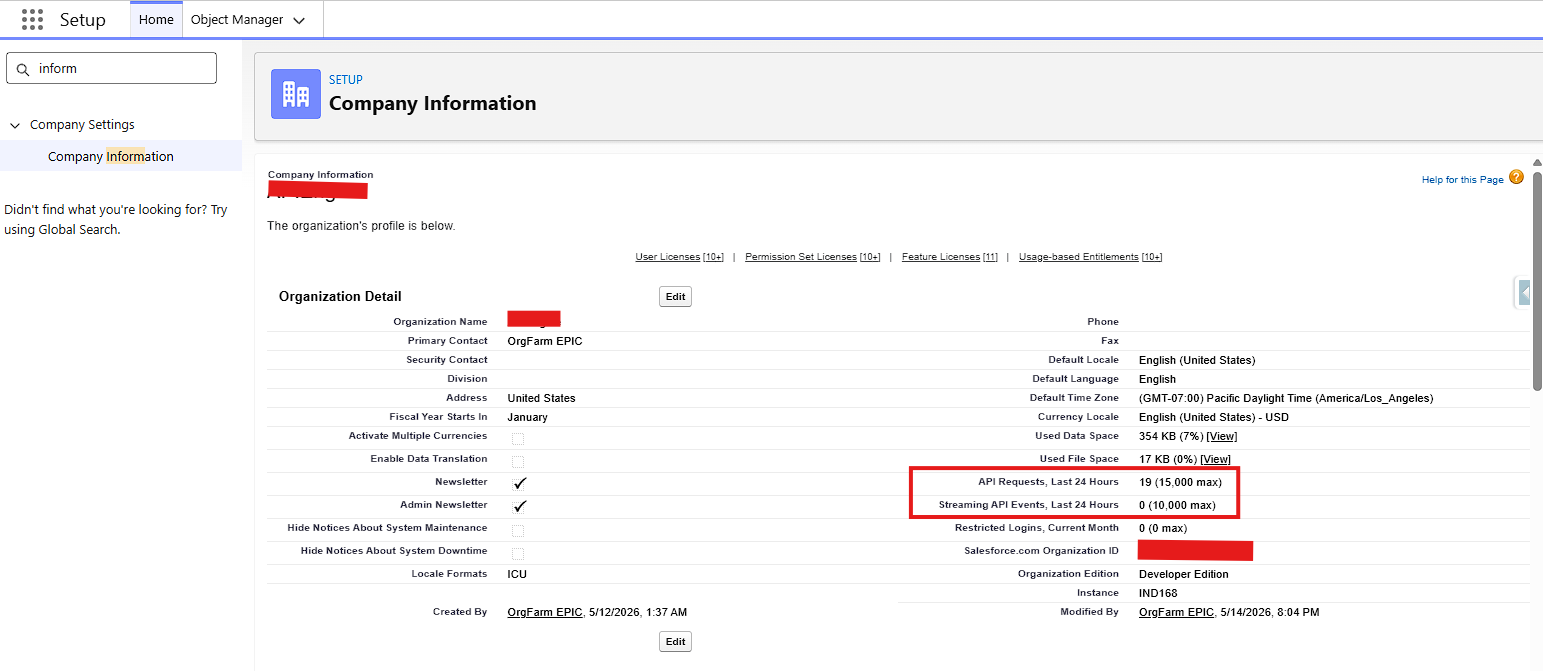
Developer Edition org before testing. Note the edition confirmed on the same page, and that 354 KB of data is already using 7% of available storage, which becomes relevant later.
System Overview shows the same figures and is generally the more reliable of the two. The Limits REST resource returns DailyApiRequests with Max and Remaining. And every REST response carries a usage header:
Sforce-Limit-Info: api-usage=1212/15000
One caveat: the "API Calls Made Within Last 7 Days" report under reports some Bulk calls. Use System Overview or the Limits resource when the number matters.
Setting up the connection with an External Client App
Nearly every Salesforce integration tutorial online opens with "create a Connected App." That advice is out of date.
Connected app creation has been restricted since Spring '26. Existing ones keep working, but Salesforce now points new development at External Client Apps, and creating a new connected app means going through Support to ask for it.
External Client Apps are the replacement: same OAuth foundations, better lifecycle management, metadata based deployment, staged credential rotation, and hooks into external secret managers. They support fewer flows. The username password flow is gone, which reads as a loss until you remember what it was doing with your credentials.
If you're maintaining an existing integration on a connected app, there's no fire. Plan the migration, do it in a sandbox, and test the failure paths before touching production credentials.
Picking an OAuth flow
Client Credentials trades a consumer key and secret for an access token, running as a designated integration user. No certificates, no browser redirect. The trade off is in Salesforce's own docs: anyone holding that key and secret can get a token, so rotate it on a schedule and immediately if it leaks.
JWT Bearer is certificate based. No shared secret travelling anywhere, no refresh token to expire mid run, no dependency on a user session a password reset can invalidate. More setup, considerably better security posture.
Client Credentials if you want to be running within the hour. JWT Bearer for anything that needs to still be running in a year.
Creating the app
Setup, then External Client App Manager, then New External Client App. Give it a name that means something (orders-sync-prod, not Integration).
Under API (Enable OAuth Settings), tick Enable OAuth and fill in a callback URL. Client Credentials never redirects, so the value is functionally irrelevant, but the field is mandatory and validated. https://login.salesforce.com/services/oauth2/success is Salesforce's own success page and works fine.
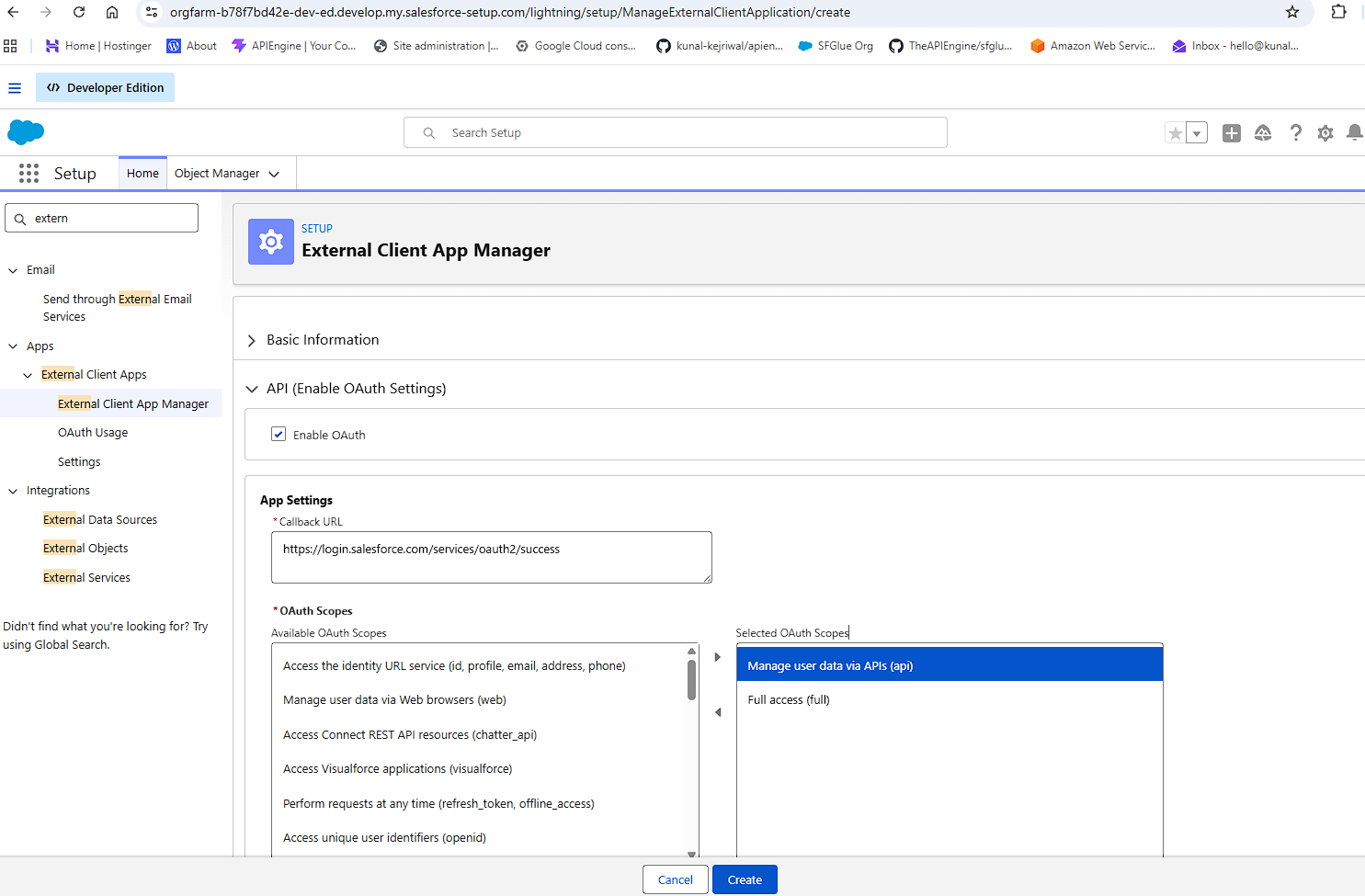
Select api and nothing more. It's tempting to add full while you're here, but that grants everything the Run As user can do, including Apex and metadata access. Your integration doesn't need it.
Further down, Flow Enablement is where you turn on Client Credentials:
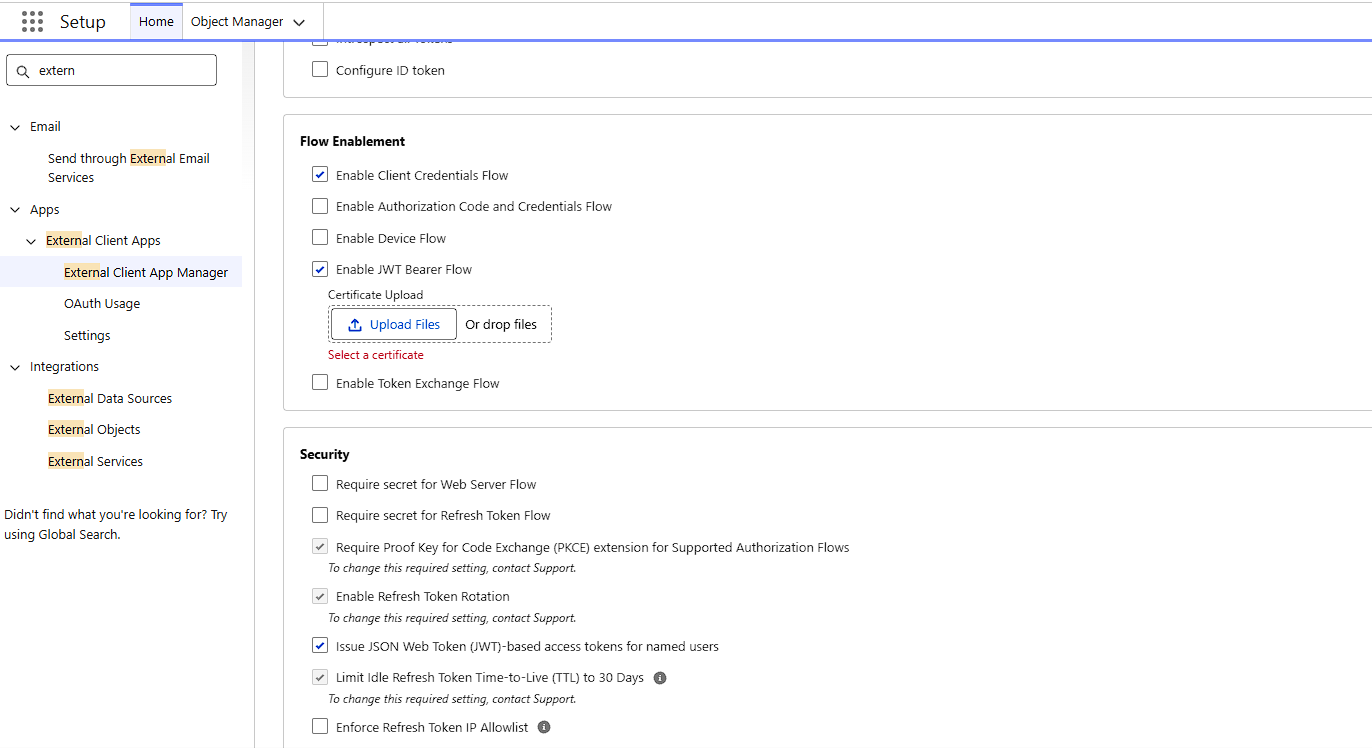
Save, then open the app's Policies tab to nominate the Run As user, and collect the Consumer Key and Consumer Secret. New credentials can take a few minutes to propagate, so if your first token request returns invalid_client_id and you're sure the key is right, wait before you start debugging.
Use a dedicated Salesforce Integration user
This decision carries more weight than the rest of the setup combined.
The Salesforce Integration user license exists for exactly this. It grants access through the API only, and it's available by default in Enterprise, Unlimited, Performance, and Developer Editions, with add on licenses purchasable. Dedicating one user per integration restricts each to its own subset of data, giving you tighter control and much better traceability at every integration point.
Never point the Run As user at a real person's account. When that person leaves or gets their permissions trimmed in an access review, your sync breaks, and it breaks in a way that takes an unreasonable amount of time to diagnose.
Give that user the minimum it needs through a permission set: API Enabled, plus object and field level access for exactly the objects you sync. Field level security applies to API users, which produces one of the nastiest failures in this line of work. A field the integration user can't see syncs as null. Silently. It looks exactly like data loss, and it's a permissions bug.
Getting a token
POST /services/oauth2/token
grant_type=client_credentials
client_id=<consumer key>
client_secret=<consumer secret>
The response gives you an access token and, importantly, an instance_url. Use that for every call afterwards and don't hardcode the endpoint. My Domain settings change, orgs get migrated, sandbox refreshes move things. A hardcoded host is the most common reason an integration works in one environment and fails inexplicably in another.
Tokens are short lived with no refresh token, so treat a 401 as a signal to re authenticate and retry once, not as a failure.
How to reduce Salesforce API calls
I ran the same workload (1,000 Accounts and 2,000 Contacts) through six approaches against a Developer Edition org, where 15,000 is small enough to watch the counter move. To make the consumption visible, the client parses the Sforce-Limit-Info header off every response and streams it to a dashboard, so each call shows up the moment it lands.
Check then write is where most people start: query to see if a record exists, then insert or update. Two calls per record, 6,000 for the workload. That's 40% of a Developer Edition org's daily entitlement to sync three thousand records once.
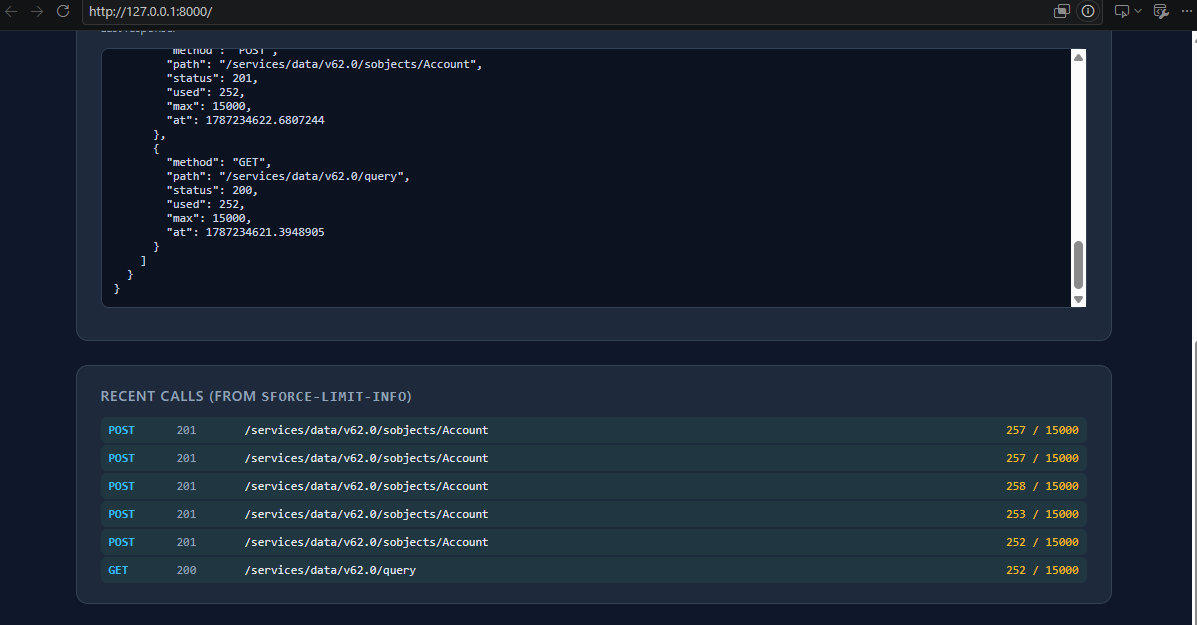
Upsert by External ID halves it, but the bigger win is idempotency. Retrying a failed upsert can't create a duplicate, and a redelivered webhook does nothing harmful. That removes a whole category of data integrity bug, and it's the first optimisation to reach for, before batching enters the conversation.
sObject Collections takes 3,000 calls down to 15, sending up to 200 records per request as one call:
{ "allOrNone": false,
  "records": [ { "attributes": {"type": "Account"}, "Name": "Acme" } ] }
For most sync workloads you want allOrNone false with per record error handling, because the other 199 records should still land.
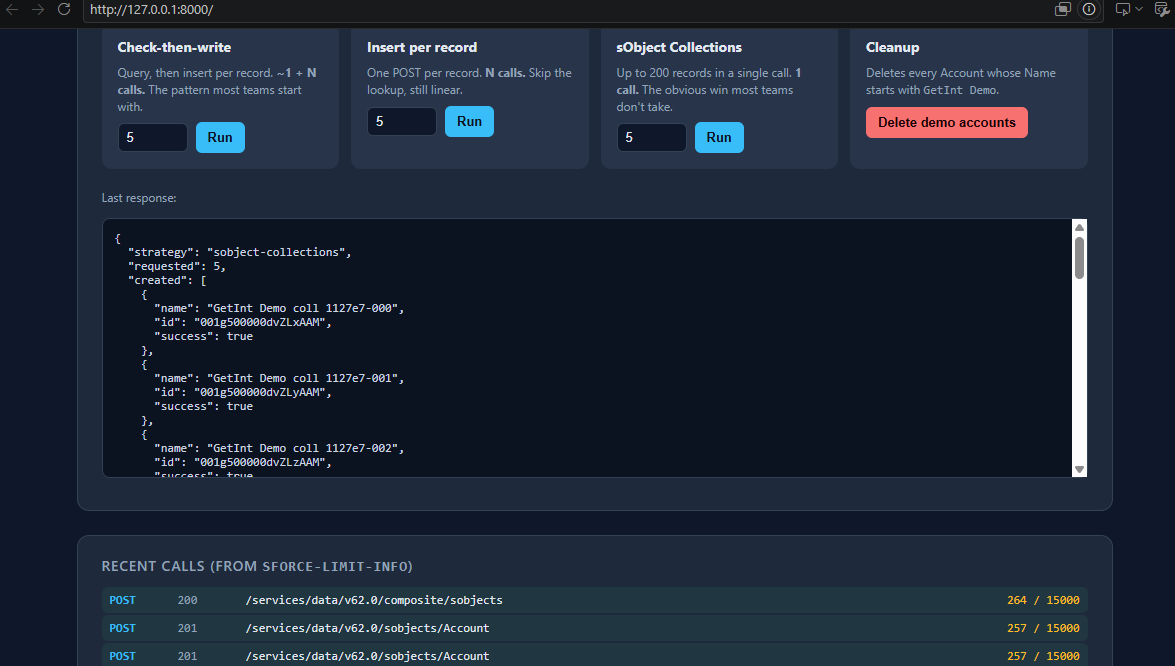
Composite bundles up to 25 subrequests into one call and lets later ones reference earlier ones, so you can create an Account and a Contact pointing at it in a single round trip using "AccountId": "@{acct0.id}" instead of querying for the parent ID.
There's a trap worth understanding first. Governor limits apply cumulatively across all subrequests: 100 SOQL queries, 150 DML statements, 10,000ms of CPU. Blow any one and the entire request aborts. Put a trigger on the object, bundle twenty five subrequests, and you can save exactly one API call while losing twenty five records. Size batches against the governor budget, not the 25 subrequest cap.
Bulk API 2.0 is the endgame for volume. Around six calls plus one batch, because the work is charged somewhere else entirely.
The reads nobody counts
Every article on Salesforce integration limits is about writes. Reads are where the quiet consumption hides.
Fetch 50 Accounts, then loop and query Contacts for each: 51 calls. A parent child SOQL subquery does it in one. Anyone who's used an ORM will recognise this instantly, except now the N+1 has a quota attached.
Pagination is less obvious. REST pages large query results, so pulling 5,000 records means following the next records URL and paying per page. One query is not one call, and this gets missed almost every time someone sizes an integration on paper.
The two things that actually exhaust an org's quota
Neither is about record volume, which is exactly why they blindside people.
Polling costs the same whether anything happened or not. A job polling five objects every sixty seconds spends 7,200 calls a day. Run it against a completely idle org and the counter still drains. A SystemModstamp filter reduces payload but not call count, because you make the request either way. The only real fixes are polling less often or not polling at all, since Platform Events, Change Data Capture, and Outbound Messages consume no inbound API calls whatsoever.
Polling frequency is a quota decision dressed up as a latency decision. Price it as one.
Retry storms are worse. A retry loop that treats every failure as transient will hammer a record that can never save. A validation rule rejection isn't a temporary condition. Retry it a thousand times and you get a thousand identical rejections and a thousand consumed calls.
Classify errors before writing any retry code. Row lock contention, 503s, and with a long backoff REQUEST_LIMIT_EXCEEDED itself are retryable. Validation failures, missing required fields, and malformed requests are terminal, and go straight to a dead letter queue with no retry at all. Wrap the retryable set in exponential backoff with jitter.
In my experience, retry logic rather than sync volume is the most common single cause of an org running out of quota.
Monitoring your usage
Sforce-Limit-Info comes back on every REST call for free. Parse it once in whatever HTTP layer you're using and store it. Ten lines of code, and afterwards every call your integration makes is measurable, including the accidental N+1 you haven't noticed yet.
Set the Sforce-Call-Options header with a client name, which gets logged with every call from that application. When an org runs six integrations and one is eating everything, that's the difference between a five minute diagnosis and a two day one. Register a separate External Client App per integration for the same reason.
Then set usage notifications at 70% and 85% of entitlement. Alerting at 100% is alerting after the outage has started.
Before you build: six questions
- What edition is the target org, and what's its actual entitlement? Check System Overview rather than assuming.
- How many records per sync run, how often, and what share of the entitlement does that consume?
- What else already consumes this org's quota? Yours won't be the only integration.
- Is there an External ID field on every object you sync, so writes can be idempotent upserts?
- Which errors are retryable and which go to a dead letter queue, written down before any retry code exists?
- Is your polling interval a real latency requirement, or a number someone picked?
Get through those and Salesforce integration limits stop being something you find out about in production. They become what they should have been from the beginning: a design input with a price on it, like every other constraint you work around.
Where Getint fits in the frame
Nothing in this article can be bypassed. The allocations are Salesforce's, they apply to every inbound caller equally, and no integration tool gets a private lane. What a mature platform changes is who has to implement the optimisations, and whether they're still correct two years from now when the person who wrote them has moved teams.
Getint's Salesforce connector authenticates the same way the demo above does: an instance URL plus a client ID and client secret from an External Client App. Past that point, most of the decisions this article has spent three thousand words explaining become configuration rather than code.
- Field and entity selection. You choose which objects and which fields participate, and the sync carries only those. Every field you don't map is payload you don't move and, at scale, requests you don't make.
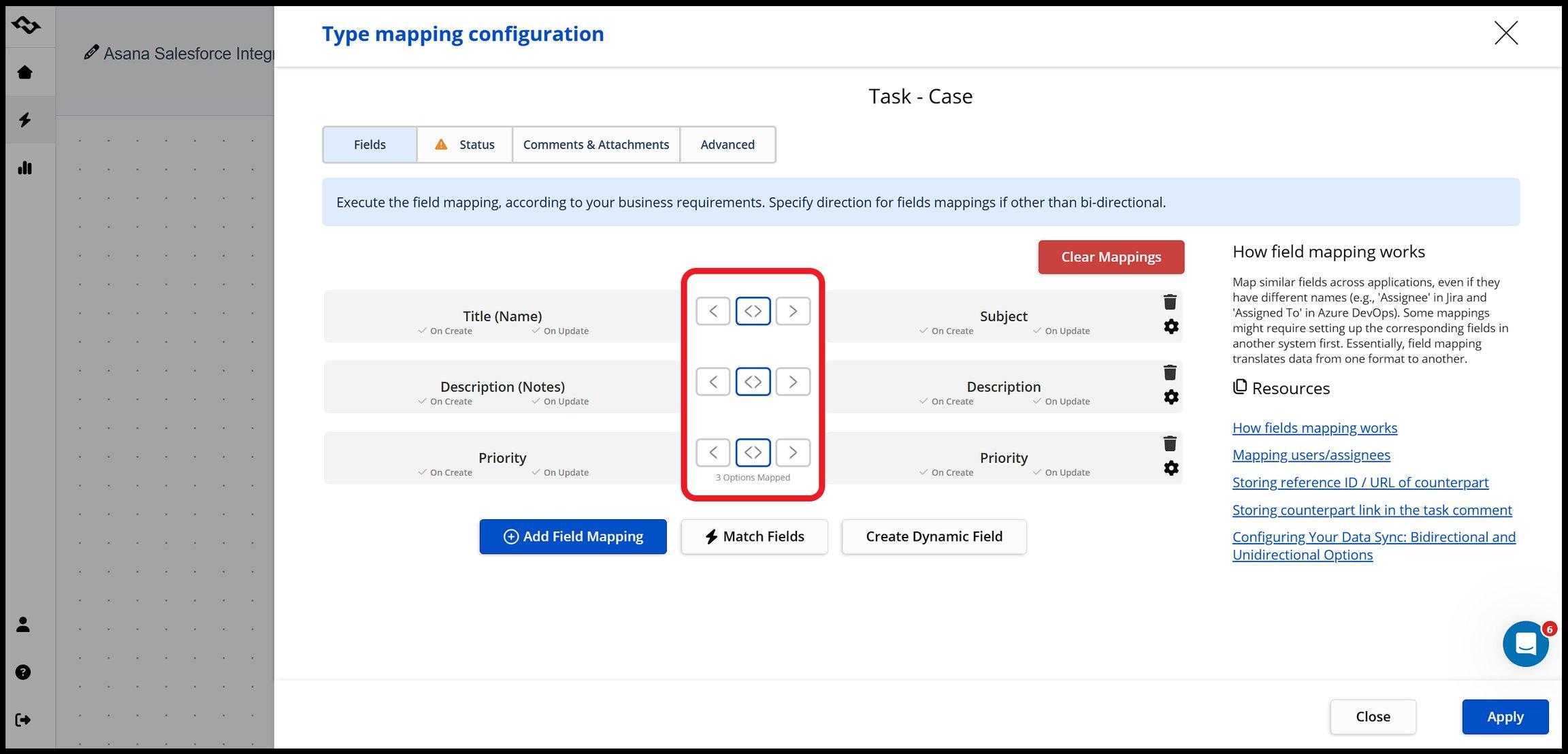
- Per field direction. Mapping is configurable per field as one way or two way. That's the field level ownership model from earlier, expressed as an arrow in a UI rather than a conflict resolution module you maintain. It also closes off the echo problem, where a write in one system triggers a write back that triggers another write.
- Correlation that persists. Records are correlated when they're first linked, so the mapping between the two systems is maintained rather than rediscovered on every run. The relationship between a Salesforce record and its counterpart is something the platform already knows, not something each sync has to work out again.
- Alerting on failures. Instant alerts on integration issues matter here more than they look like they should. The two things that actually exhaust an org's quota, runaway retries and silent polling, both announce themselves as error rates long before they announce themselves as a 403.
The honest framing is this. If you're syncing a few hundred records a day between two systems and you enjoy this kind of problem, build it. The API is well documented and this article is most of the design work.
If you're syncing across several tools, with people who need to change a field mapping without a deployment, the interesting question stops being how many calls a strategy costs and becomes who's on the hook when Salesforce revises an allocation in the next release.