
Azure DevOps is one of the most trusted platforms for managing software delivery. It's also a complete environment where teams can plan work, write code, track project progress, test, build, and release software; it’s not just project management software.
That is one reason why many software teams choose it.
- Project managers get visibility into user stories, bugs, tasks, sprints, and releases.
- Development teams get repositories, pipelines, test tools, and traceability.
- Product managers get a place where business ideas can become real delivery work.
Still, ADO does not remove project management challenges. It makes many things visible, but it does not solve weak planning, poor ownership, unclear priorities, or missing communication. At the end of the day, it’s just a tool that can help, but the professionals - project managers are those who do or don’t do the things.
In most cases, project management challenges with Azure DevOps appear after the first success. One team starts using Azure Boards. Then another team joins. Then, stakeholders ask for reports. Then dependencies appear. Soon, the project manager is no longer managing one backlog. They are managing several teams, many priorities, and different expectations.
From my experience, Azure DevOps is rarely the problem at the beginning. The challenge arises when the organization grows faster than its project governance can keep pace with.
That is why, in this article, I’ll discuss the most common challenges related to Azure project management and how to address them.
Why Azure DevOps Became a Standard Tool for Software Delivery
Azure DevOps has deep roots in Microsoft’s software development ecosystem. Before Azure DevOps, many teams used Microsoft Team Foundation Server, known as TFS, the successor of Visual Studio Team System (VSTS). My teams and I were one of many. At that time, TFS was one of the strongest enterprise tools for software delivery. It brought together source (version) control, work tracking, builds, testing, and reporting in a way that matched how serious software teams worked. VSTS and TFS implemented Microsoft's working methodology (meta model), the Microsoft Solutions Framework (MSF).
I’m sure that many will agree that Visual Studio was already one of the best IDEs in the world. TFS completed the picture around it. It helped teams manage the rest of the software development lifecycle.
Later, Microsoft moved this capability toward cloud delivery. TFS evolved into Azure DevOps Server for on-premises use, while other Azure Services became the cloud platform.
This history matters. Azure DevOps was not born as a generic task management tool. It came from software engineering. That is still visible today. That’s why I chose it as the center of my toolkit whenever I have the chance to choose my “weapon” as a project manager on a team of peers developing a software product or solution, especially if the tech stack is Microsoft-based.
Azure Boards and the Connected Azure DevOps Ecosystem
- Azure Boards supports backlogs, epics, features, user stories, bugs, tasks, sprints, queries, dashboards, and Delivery Plans - everything I need as a project manager to support me while I tackle the challenges.
- Azure Repos connects work with code.
- Azure Pipelines connects code to builds and releases (the ex-Build Server from the days of TFS). It consists of continuous integration (CI) and continuous delivery (CD) flow.
- Test Plans support test management.
This makes ADO different from many tools that focus mainly on tasks and the goal to collaborate.
Traceability and Practical Governance in Azure DevOps
For project managers, the biggest value is traceability. A requirement can be connected to a user story. A user story can be connected to code. Code can be connected to a build. A build can be connected to a release. This gives the project manager a stronger base for reporting and risk management. But traceability and transparency are important not only to a project manager; they are important to the entire team and relevant stakeholders.
Managing Projects with Azure DevOps: Balancing Structure and Flexibility
Azure DevOps also strikes a good balance. It gives structure without forcing too much process at the start. Atlassian Jira (another great tool), for example, offers great flexibility. But many organizations require extensive configuration, workflows, plugins, and governance before they achieve the setup they want. Azure DevOps often provides software teams with a strong starting point and less configuration overhead.
In my experience, the best Azure DevOps implementations are not the most customized. They are the ones where teams agree on a few simple rules and consistently follow them.
Keeping Visibility Across Multiple Teams
Visibility is simple when a single team works on a single backlog. It becomes harder when many teams work on the same product, platform, or program.
Common problems include separate backlogs, different sprint calendars, different definitions of done, and unclear ownership. Stakeholders may ask a single project manager for a single view of progress, even though the real work is spread across many teams.
This is where Azure DevOps Boards can help, but only if the structure is clean. Epics, features, user stories, bugs, and tasks should not be used randomly. Each level should have a clear purpose.
A good executive-level setup usually looks like this:
- Epics represent major business goals or large initiatives.
- Features represent capabilities that support those goals.
- User stories represent team-level delivery work.
- Tasks represent technical steps needed to complete a story.
- Bugs represent defects that must be triaged and prioritized.
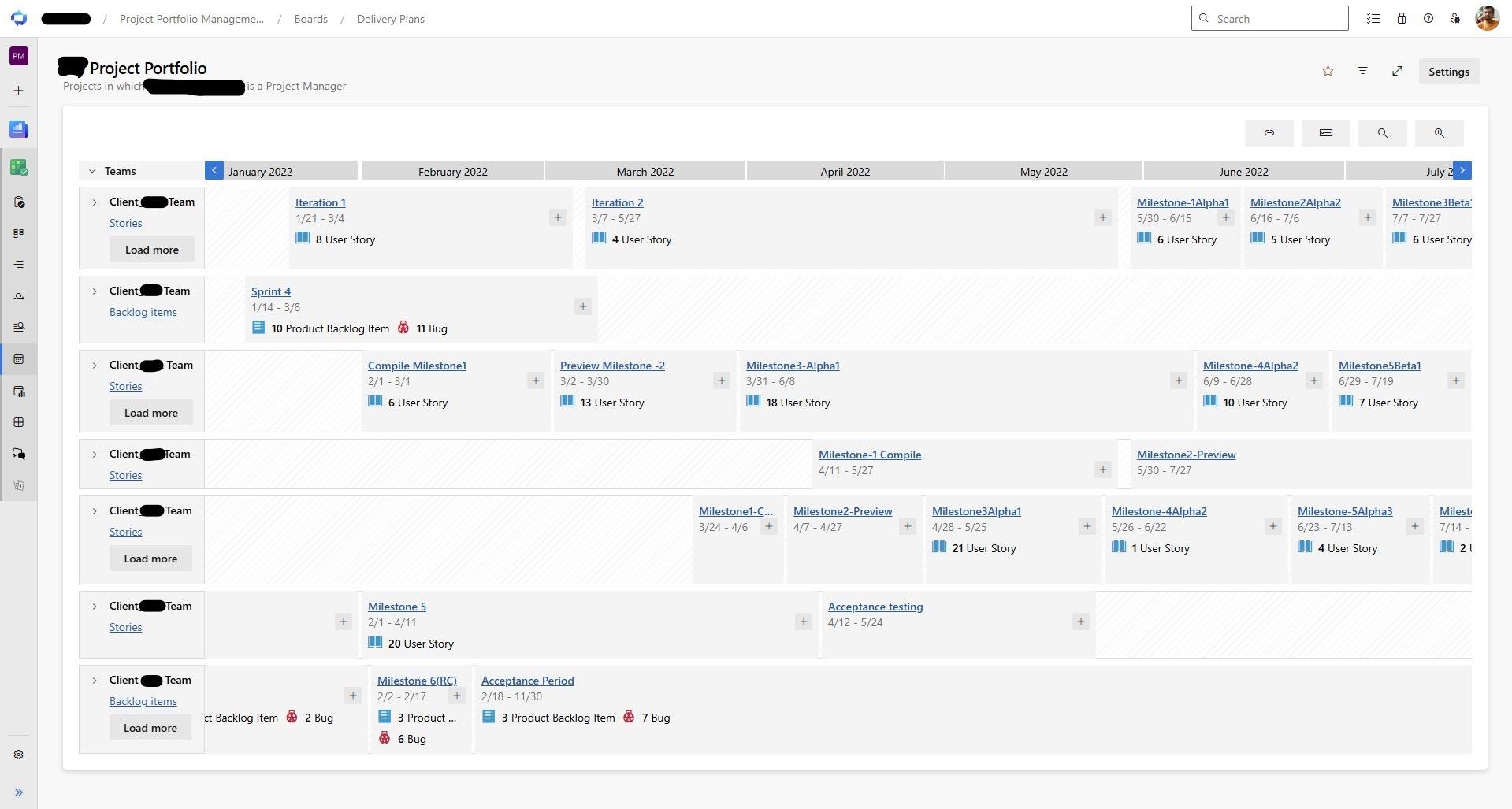
Delivery Plans can be very useful for portfolio visibility. They allow leaders to see work across teams and iterations in one calendar-style view. For a project manager or PMO, this is helpful when several teams contribute to the same release or when one project depends on another.
On one occasion, when I had a chance to govern the project management office with three project managers (including myself) that had 20+ parallel projects, this Azure DevOps feature helped us configure separate views (delivery plans) per project manager, but also projects that were logically connected (there were dependencies between them), making it easier to follow the programs the organization had.
I have a few practical recommendations in the context:
- Keep a single agreed-upon hierarchy for all teams.
- Use shared area paths and iteration paths with care.
- Create standard queries for project managers and stakeholders.
- Use dashboards for decision-making, not decoration.
- Review Delivery Plans during portfolio or steering meetings.
In my experience, if executives do not trust the dashboard, they will ask for (PowerPoint/Slides) reports. If they keep asking for PowerPoint reports, the Azure DevOps data model is probably not clear enough.
Balancing Agile, Waterfall, and Hybrid Approaches
Many companies say they are Agile. In real life, most are hybrid.
They may run Scrum teams, but still need yearly budgets. They may use Kanban boards to visualize work item flow through defined stages, but still report milestones to executives. They may write user stories, but still need formal sign-off, contracts, procurement steps, and release approvals.
This is not wrong. It is reality.
Various working methodologies apply various principles covering traditional (usually referenced from the Waterfall working model - predictive lifecycle) and more modern - Agile principles. For instance, Agile methodologies encourage working software, customer collaboration, regular feedback, and continuous improvement. PMI practices bring structure, governance, risk management, and stakeholder control. Even though it’s a legacy framework/meta model (current version: 4.0, released 2005) with limited popularity among modern software development teams in 2026, the Microsoft Solutions Framework also had a strong focus on team roles, risk management, iterative delivery, and readiness. Lean Development adds focus on flow, waste reduction, and value.
A good project manager does not fight these models. They combine them in a way that fits the organization and the project's business goals.
In Azure DevOps, this means execution can occur within sprints, while planning remains milestone-based. A feature may be part of a quarterly roadmap. User stories under that feature may be delivered across several sprints. Releases may still need approvals and communication long term plans.
A practical hybrid model can look like this:
- Use epics for strategic initiatives.
- Use features for roadmap planning.
- Use user stories for sprint execution.
- Use tags or custom fields for compliance, priority, or release grouping.
- Use dashboards for weekly delivery control.
- Use Delivery Plans for cross-team alignment.
In one enterprise project, a team may have regulatory milestones that cannot move. At the same time, the development team needs the flexibility to change the story order within a sprint. Azure DevOps can support both. The fixed milestone stays visible, while the team keeps control over delivery details.
When Agile Methodologies Meets Core Features of Traditional Project Management
And if you are still strong on keeping the lines of "apply only this" or "only that" approach, I would offer you a reference to the collaboration between PMI (the most recognizable organization advocating formal and traditional principles of project management) and Agile Alliance (a global nonprofit member organization dedicated to promoting Agile concepts and enterprise agility, as outlined in the Agile Manifesto). The PMBOK Guide, sixth edition, released on September 6, 2017, includes the Agile Practice Guide for the first time, produced in collaboration with Agile Alliance. In the 7th edition (2021) of the PMBOK Guide, Agile and hybrid approaches were extended as core principles.
On December 31, 2024, the Project Management Institute and Agile Alliance completed the integration of Agile Alliance into PMI. This milestone reflects a broader industry recognition that successful software delivery rarely depends on a single methodology. Modern organizations increasingly combine the governance, risk management, and strategic planning strengths of traditional project management with the adaptability, customer focus, and continuous improvement principles of Agile. The integration reinforces the idea that project managers should focus on delivering business value rather than defending a particular framework.
For those who still question hybrid project management, the alignment between two of the most influential organizations in the profession provides compelling evidence that the future of project delivery lies in selecting the right practices for the situation, not in following a single methodology by ideology.
From my experience, Hybrid delivery works best when leadership understands which parts are fixed and which parts can change. Confusion starts when everything is treated as both fixed and flexible.
Resource Planning and Capacity Management
Capacity planning is one of the most difficult areas in software project management.
Azure DevOps supports sprint capacity and team planning, but the tool cannot know the real pressure on people unless the data is maintained. Project managers must still understand who is available, who is overloaded, and which specialist is a bottleneck.
The most common problem is sharing resources with specific expertise required across the organization for various projects and work streams. One architect, DevOps engineer, database expert, UX designer, or security specialist may support many projects. Each project plan may look realistic in isolation. Together, they create overload.
Azure DevOps helps when work is visible at the right level. If all dependency work is hidden inside user stories, the project manager will miss the risk. If technical tasks are not owned, no one will see capacity problems early.
Practical recommendations:
- Track specialists work explicitly.
- Do not hide dependencies in comments.
- Use sprint capacity honestly.
- Review carry-over work before the next sprint.
- Watch blocked items and aging work.
- Make dependencies visible at the feature level when they affect delivery dates.
Lean thinking is useful here. Long queues, too much work in progress, and frequent context switching reduce flow. A team that is always busy is not always productive. In software development, full utilization can slow delivery because people have no space to solve problems.
Project managers should also separate team capacity from project capacity. A team may have ten people, but only six may be available for project work after support, meetings, maintenance, and unplanned incidents.
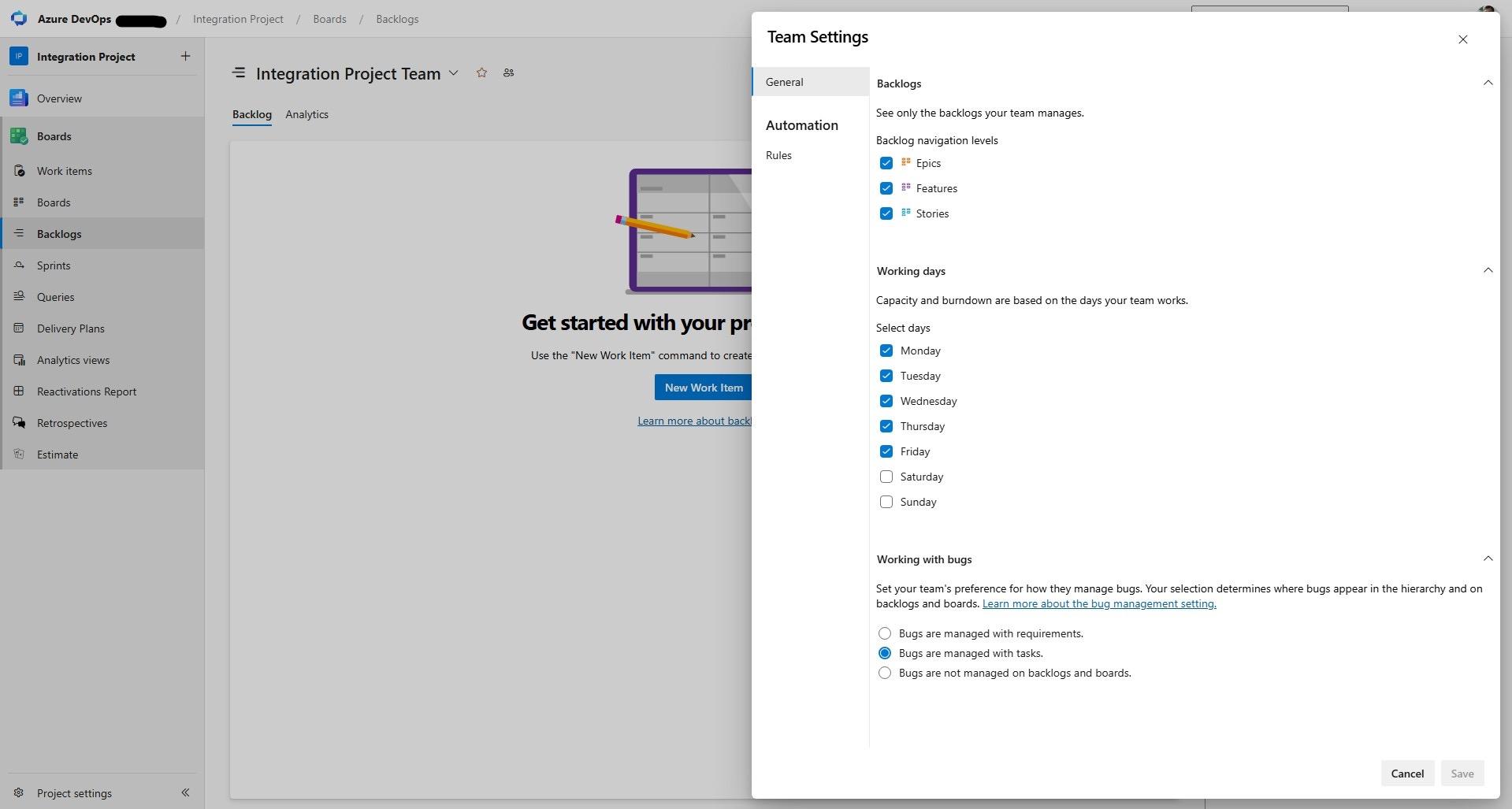
- Configuring working days for a team working on a project affects capacity planning and the burndown chart.
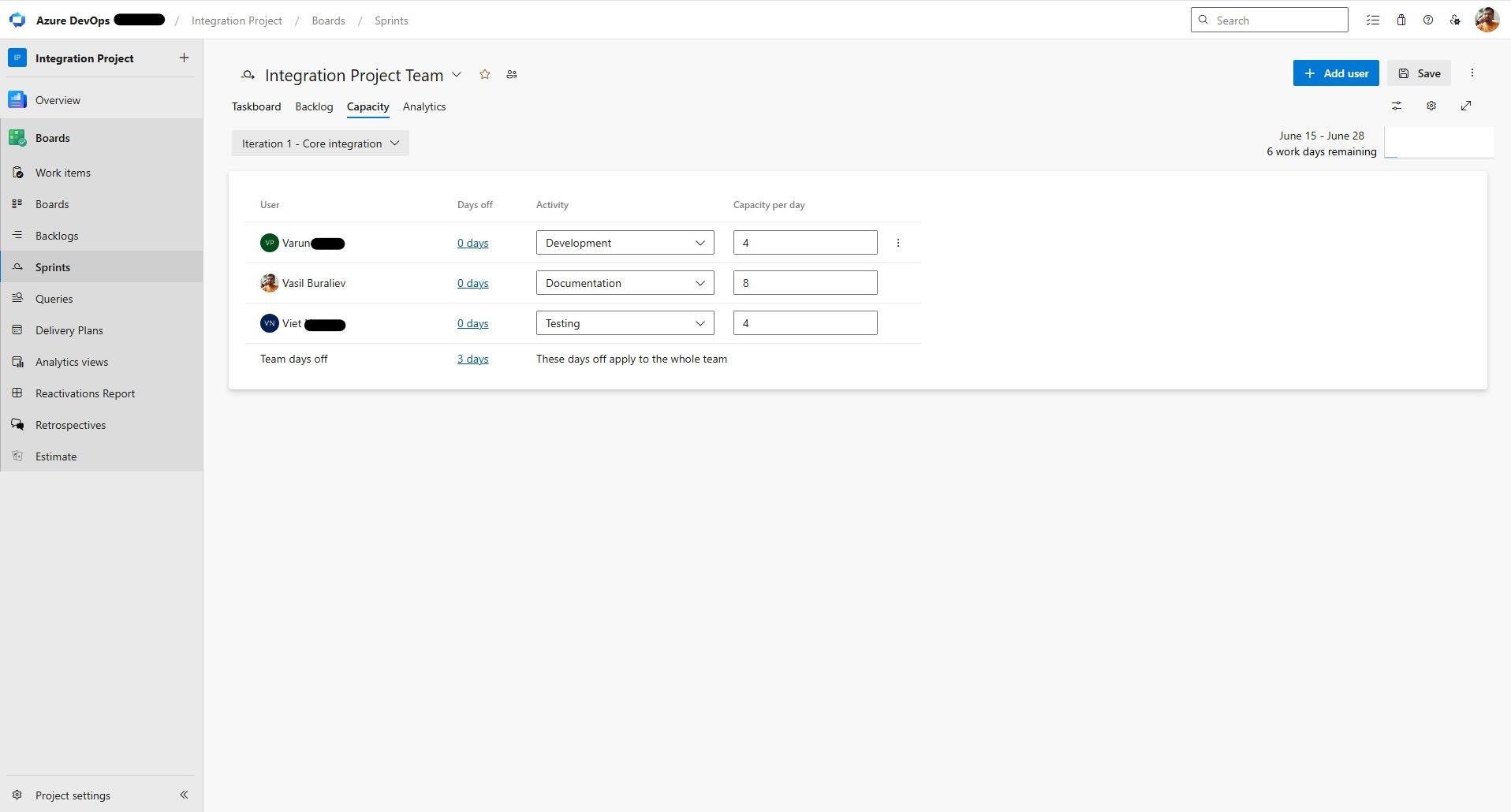
- Don't forget to set the team's days off and each team member's capacity per iteration/sprint.
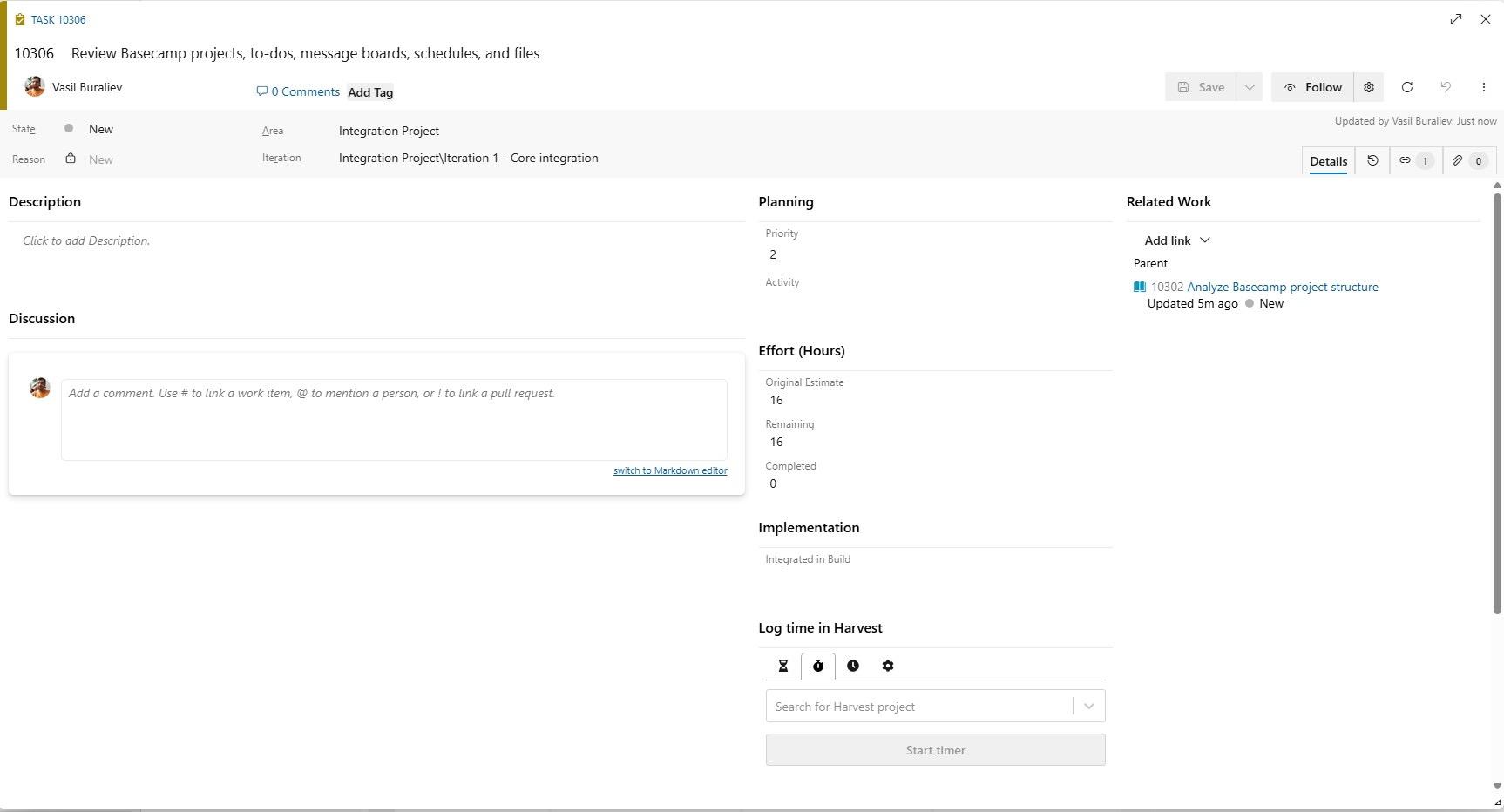
- Assess the required effort for each task and set the baseline for Original Estimate and Remaining, which are usually equal initially.
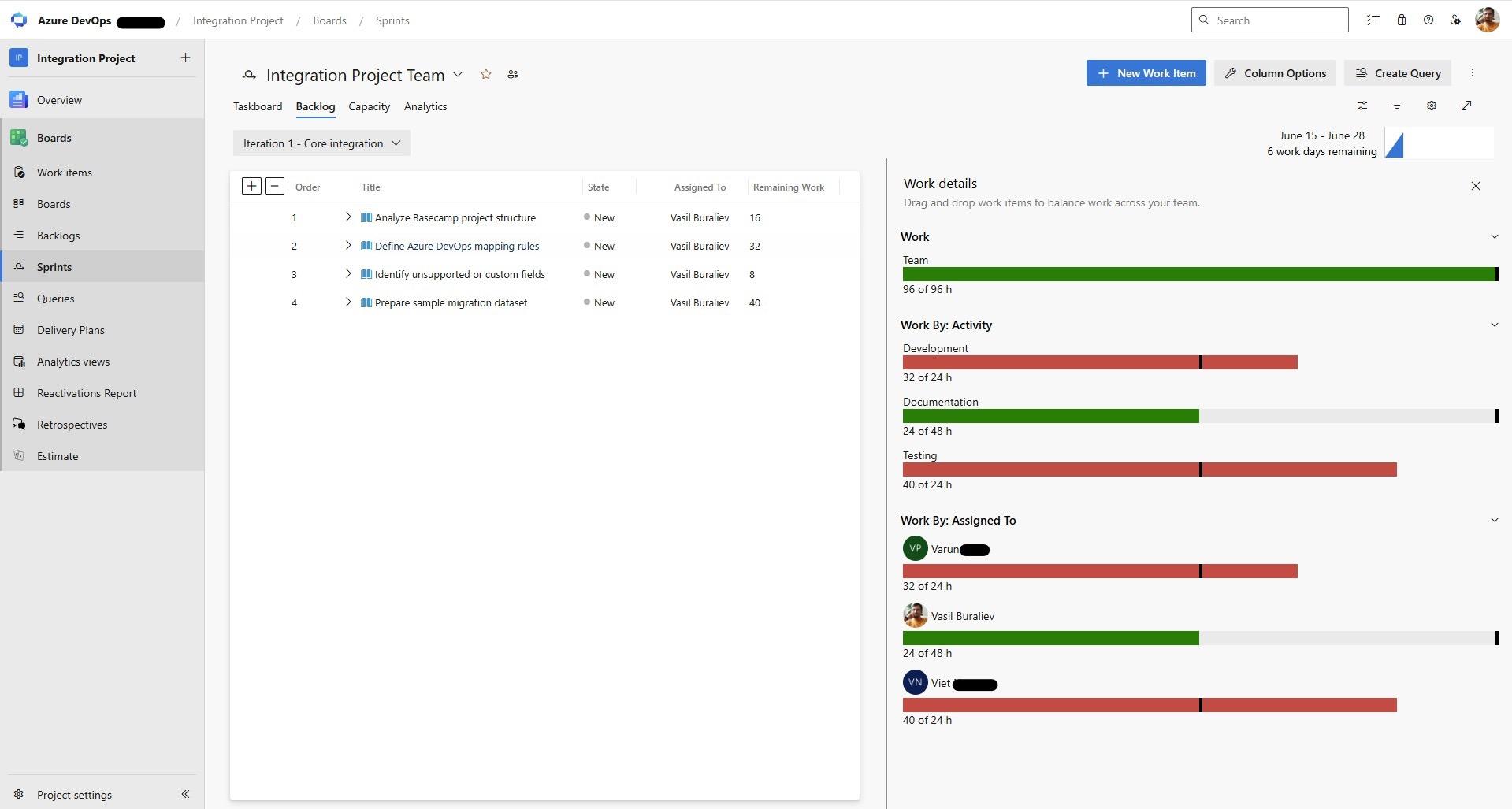
- The Work Details view gives a clear picture of the team members' workload, with a red bar indicating a risk of iteration/sprint delays and a call for a project manager to do his magic.
In my experience, the most dangerous plan is the one where every person is booked at 100%. It looks efficient on paper and fails in execution.
Managing Stakeholder Expectations
Stakeholders do not need the same information.
A product manager may want to know whether a feature will meet user needs. A sponsor may want to know whether the project will be finish on time. A development lead may need to see blocked stories. A PMO (project management officer) may need portfolio status. A customer may only want clear progress and honest risks.
Azure DevOps contains much of this data, but project managers must translate it.
Dashboards should be designed for the audience. A development dashboard can show sprint burndown, active bugs, pull requests, and blocked tasks. An executive dashboard should show progress against goals, release confidence, major risks, and decisions needed.
Forecasting is also a challenge. Many teams misuse velocity as a promise. Velocity is a planning signal, not a contract. It can help forecast, but only when the backlog is stable enough and the team is mature enough.
The Velocity Chart in Azure DevOps can help with planning for upcoming iterations.
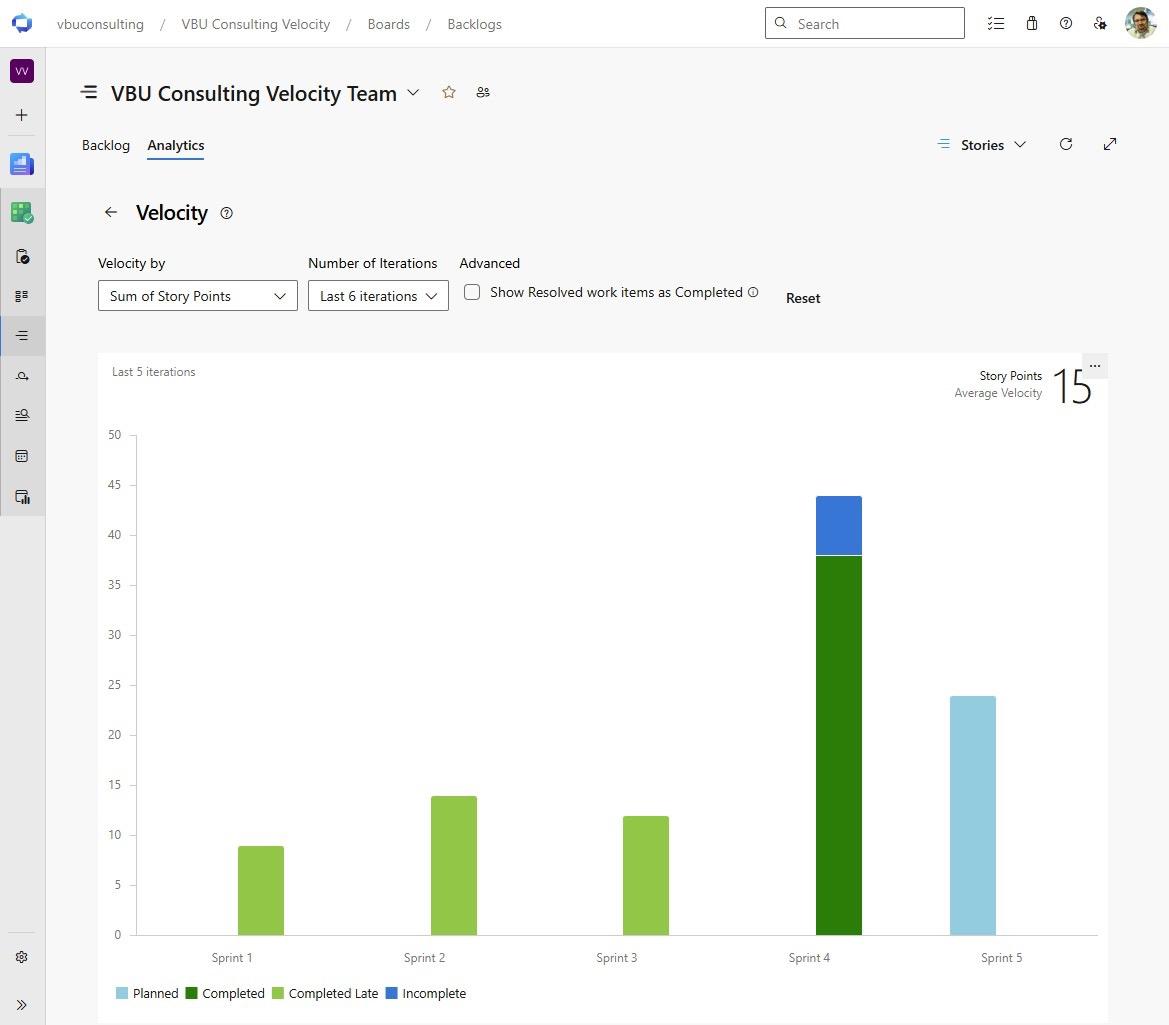
Good stakeholder communication should include:
- What was completed?
- What is in progress?
- What changed.
- What is blocked?
- What decisions are needed?
- What risk exists if nothing changes?
Azure DevOps can support this through queries, dashboards, delivery plans, tags, and work item links. But the project manager still owns the story behind the data.
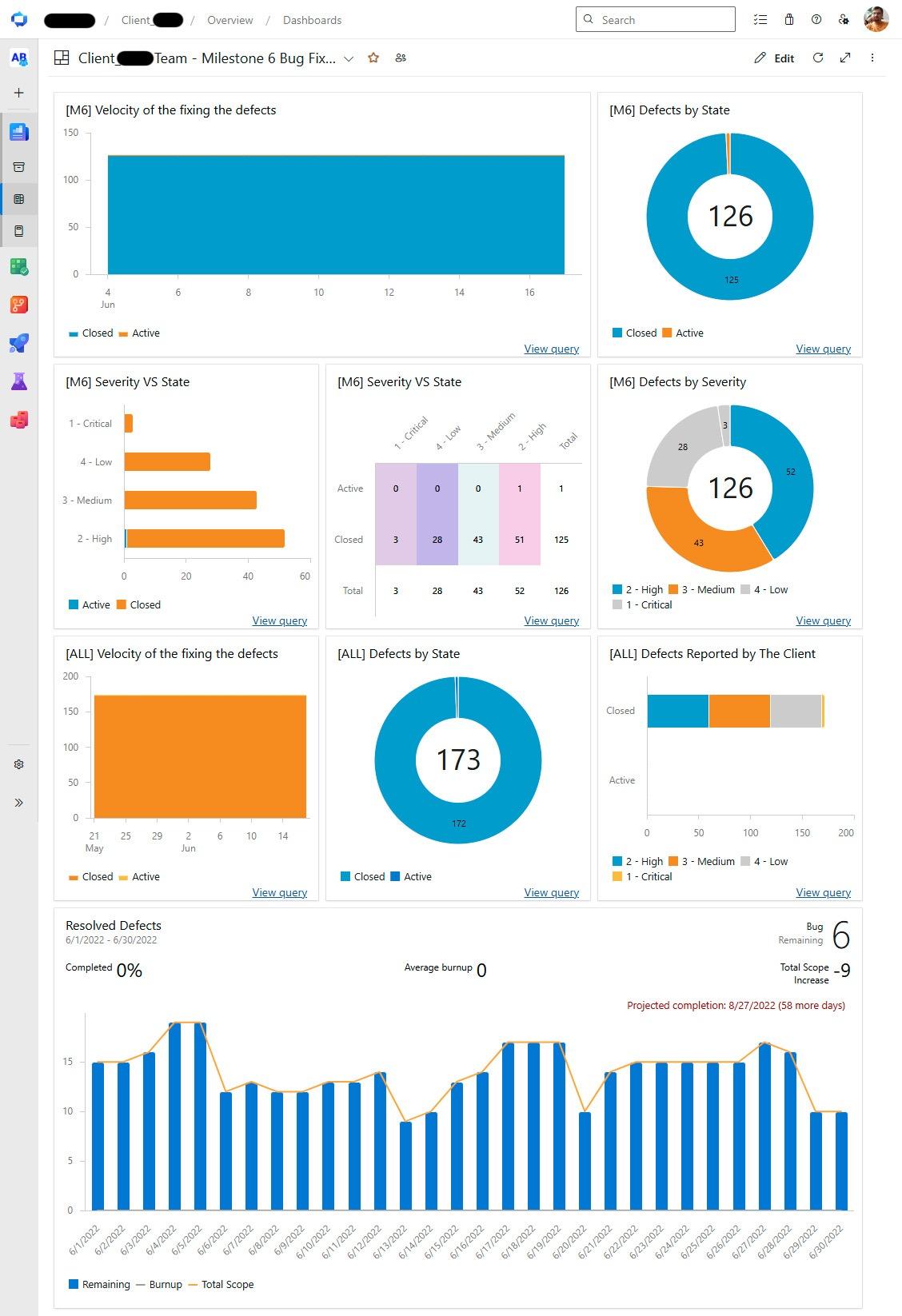
- Bug fixing iteration dashboard in Azure DevOps
- Project portfolio of a project manager visible through Delivery Plans feature in Azure DevOps
- Development dashboard in Azure DevOps, which integrates views/charts, represents various aspects of the project in progress.
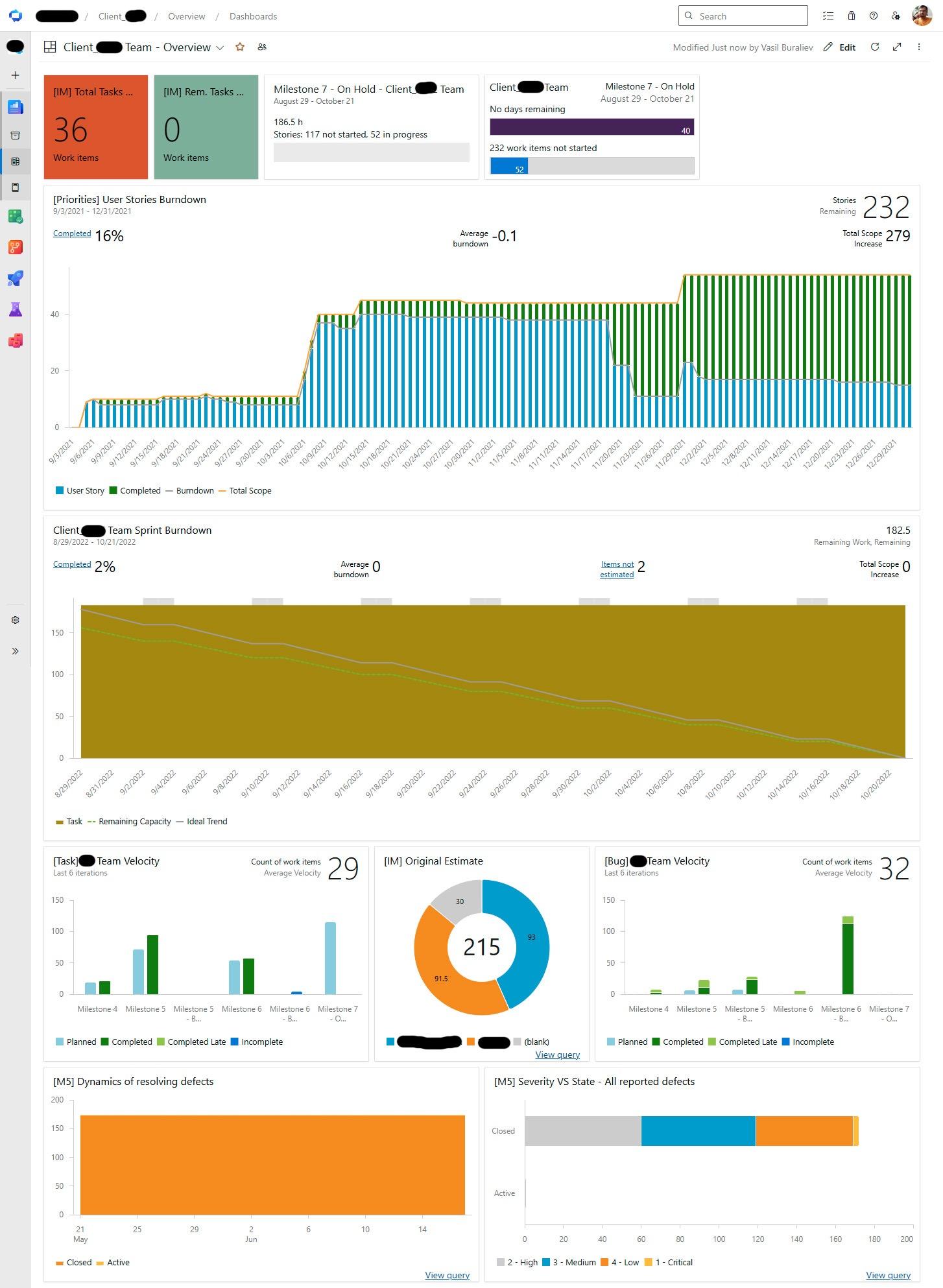
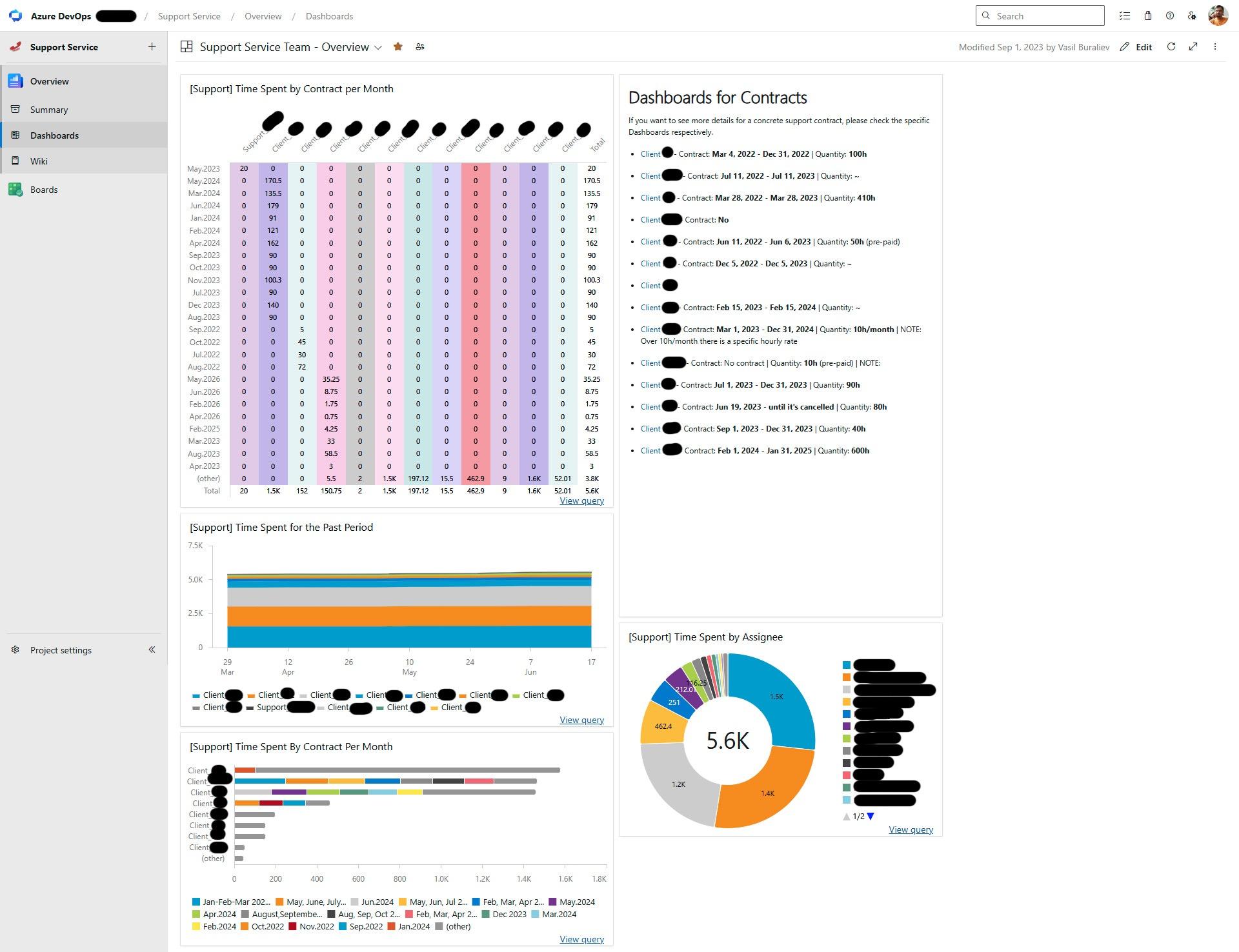
- Dashboard for an overview of the portfolio of support services across the clients visible to the organization's top management.
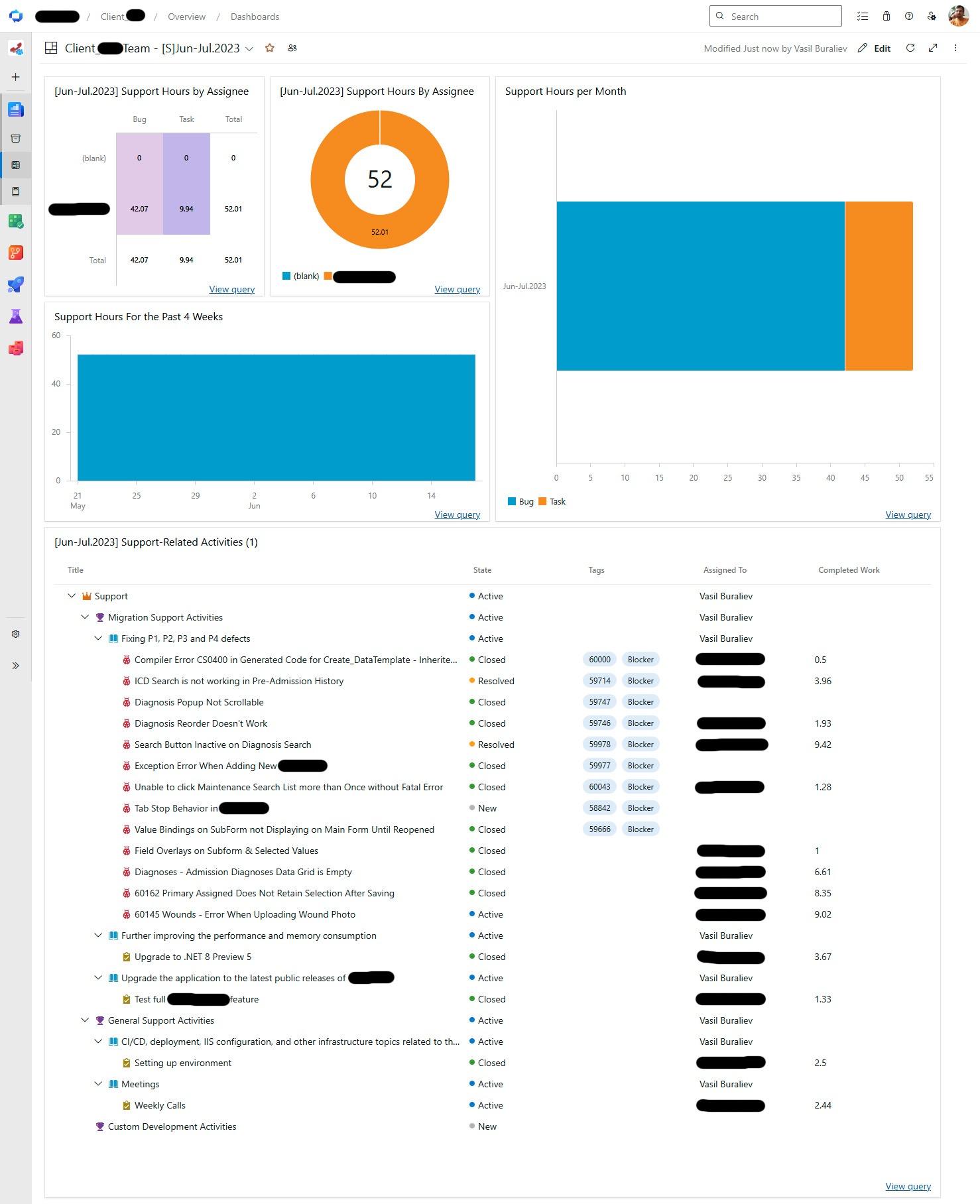
- Dashboard for maintenance of a software solution created for the external stakeholder - customer who used a different (internal) issue tracking system. The same defects were registered in the maintenance services provider's Azure DevOps instance, which used Tags to reference the corresponding defect in the customer’s issue-tracking system. The seamless synchronization between the two tools could significantly improve the manual process.
In my experience, stakeholders do not lose trust because a project has problems. They lose trust when they discover problems too late.
When Teams Use Different Project Management Tools
As organizations grow, not every team wants to work in Azure DevOps, especially if the work stream or new project is not software development.
- Development teams may prefer Azure DevOps because it fits engineering work.
- Product teams may prefer ClickUp because it is easier for roadmapping, planning, task management, note-taking, and cross-functional collaboration. Marketing, operations, sales, and customer success may use other tools such as Monday.com, Asana, Jira, or ServiceNow.
This creates a real project management challenge. The product plan may live in ClickUp. The delivery work may live in Azure Boards. Stakeholders may ask for one status. Teams may update two systems manually. Soon, data becomes inconsistent.
A common scenario is product management in ClickUp and development in Azure DevOps.
The product team creates initiatives, roadmap items, and business tasks in ClickUp. The engineering team breaks approved work into features, user stories, bugs, and tasks in Azure DevOps. Without integration, the project manager becomes the human bridge between the systems.
This is risky and expensive.
A practical integration scenario is to synchronize approved ClickUp tasks with Azure DevOps work items. Status changes, ownership, comments, and selected fields can flow between tools. Product managers keep their planning view in ClickUp. Developers keep their delivery workflow in Azure DevOps. Project managers achieve better alignment without forcing a single tool on everyone.
This is where Getint can be introduced. The integration platform can help organizations connect Azure DevOps with tools such as ClickUp and keep work items synchronized across systems. The value is not only technical integration. The real value is reducing manual updates, improving visibility, allowing teams to focus, and ensuring each team productivity while using their favorite tools. This reduces administrative overhead and helps teams maintain a single source of truth across systems.
The same logic applies to software agencies, enterprise PMOs, and companies where different departments use different tools for managing work items or tickets. The goal is not to make every team use the same platform. The goal is to make sure important delivery data moves reliably between platforms.
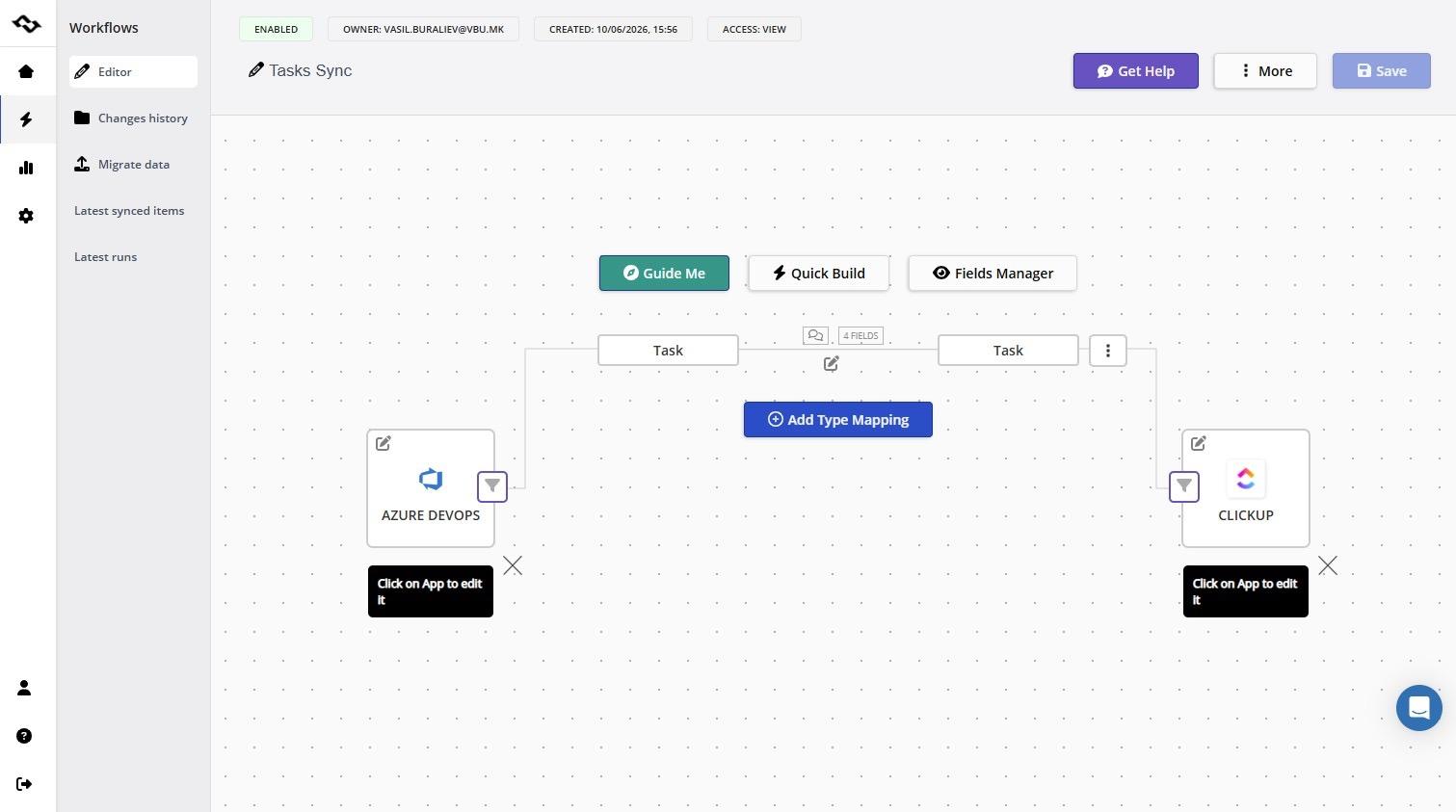
- I configured the Azure DevOps-ClickUp integration using Getint in 10 minutes, and after that, the bidirectional sync worked seamlessly.
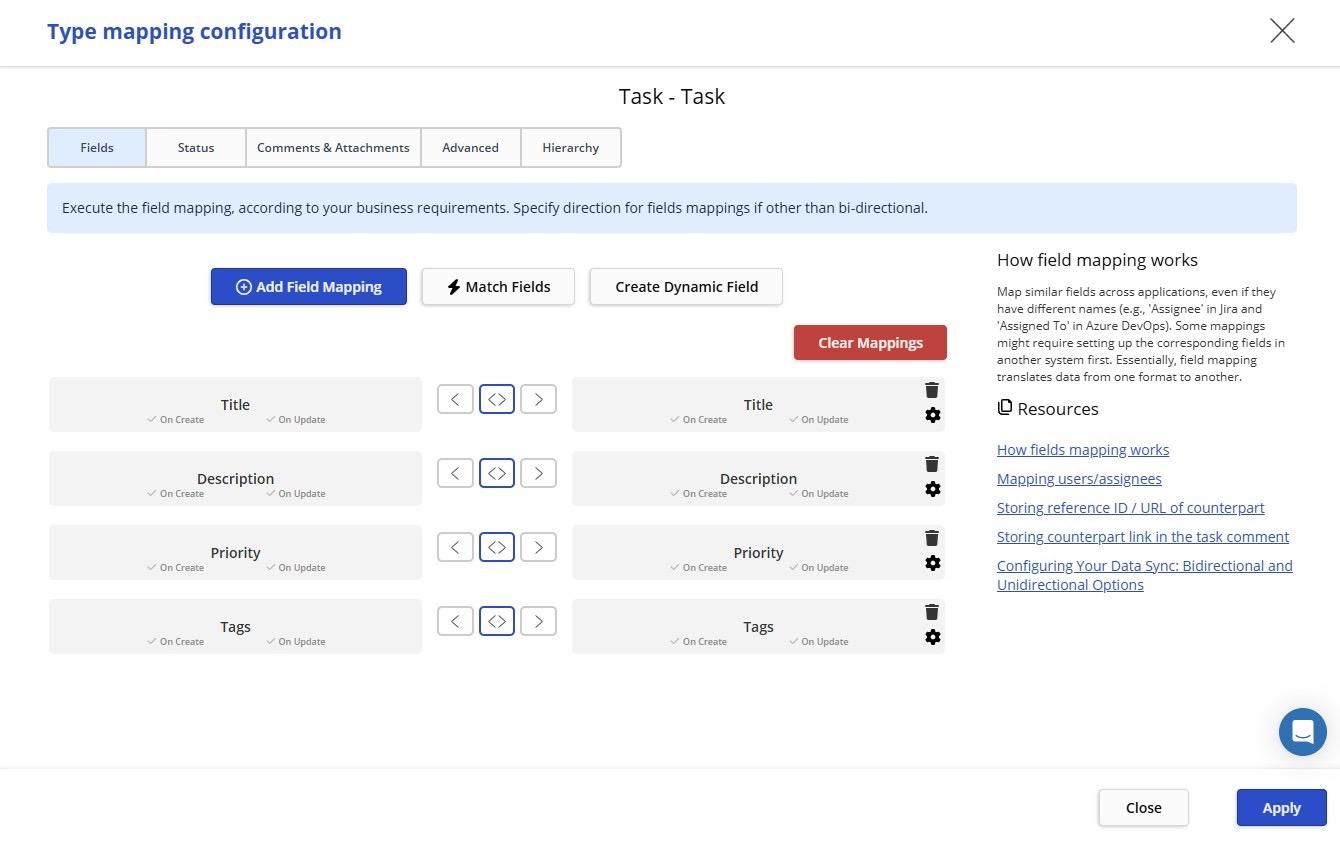
- To map fields, I just set the basic task fields, plus bidirectional synchronization for status, comments, and attachments.
- I checked the detailed report about the performed synchronizations in Getint.
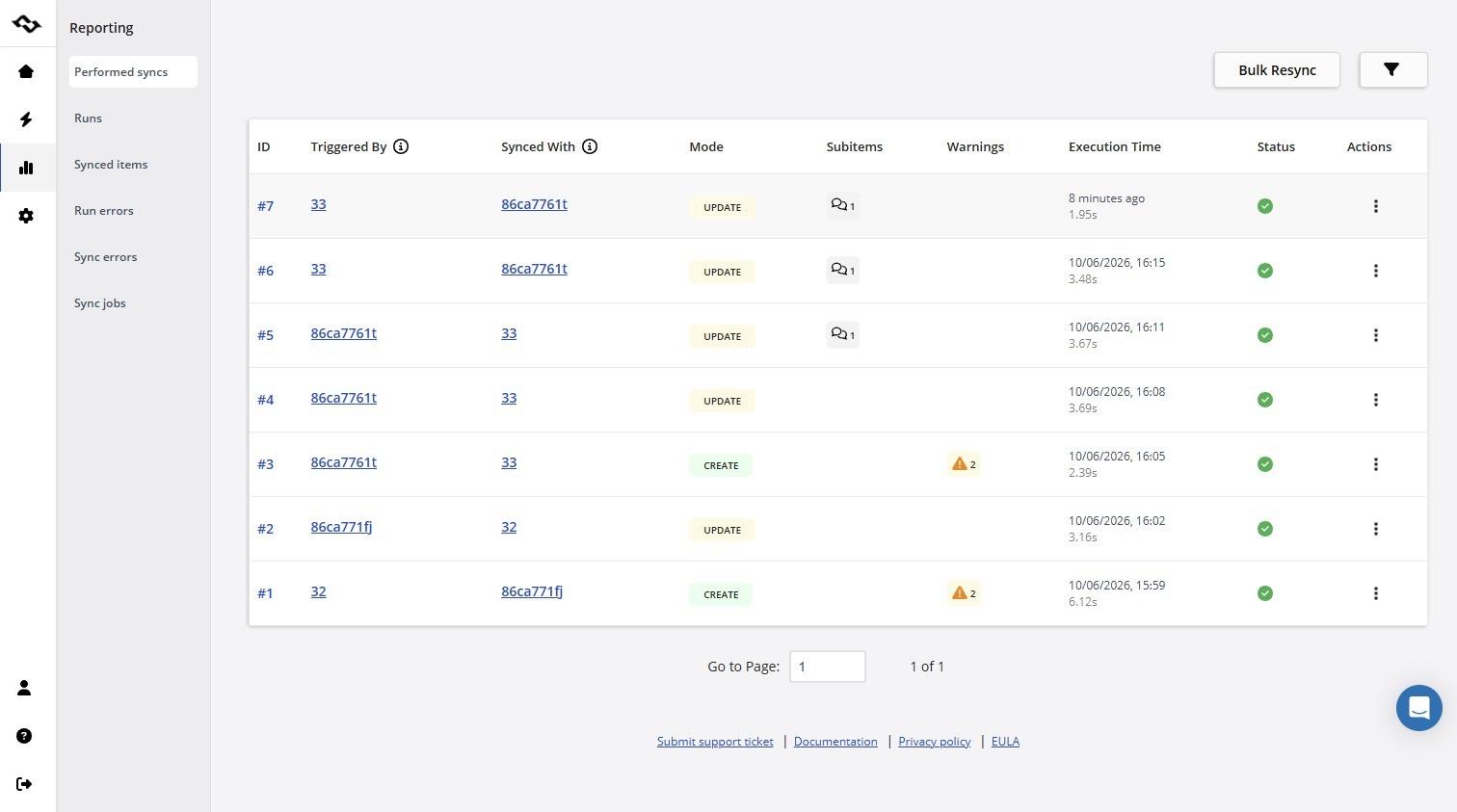
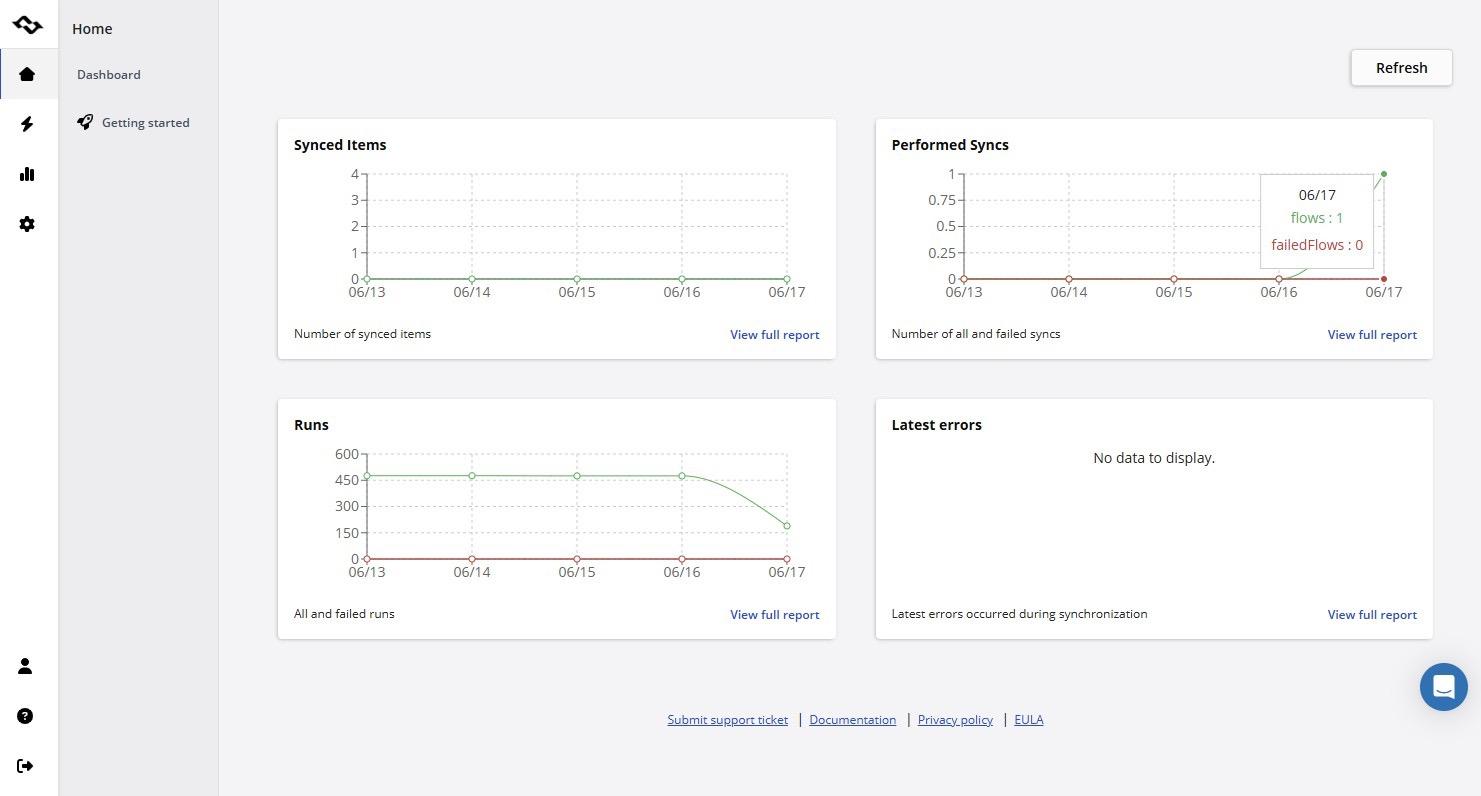
- I testified to the most recent synchronization between my project in Azure DevOps and the ClickUp list by identifying it in the dashboard chart.
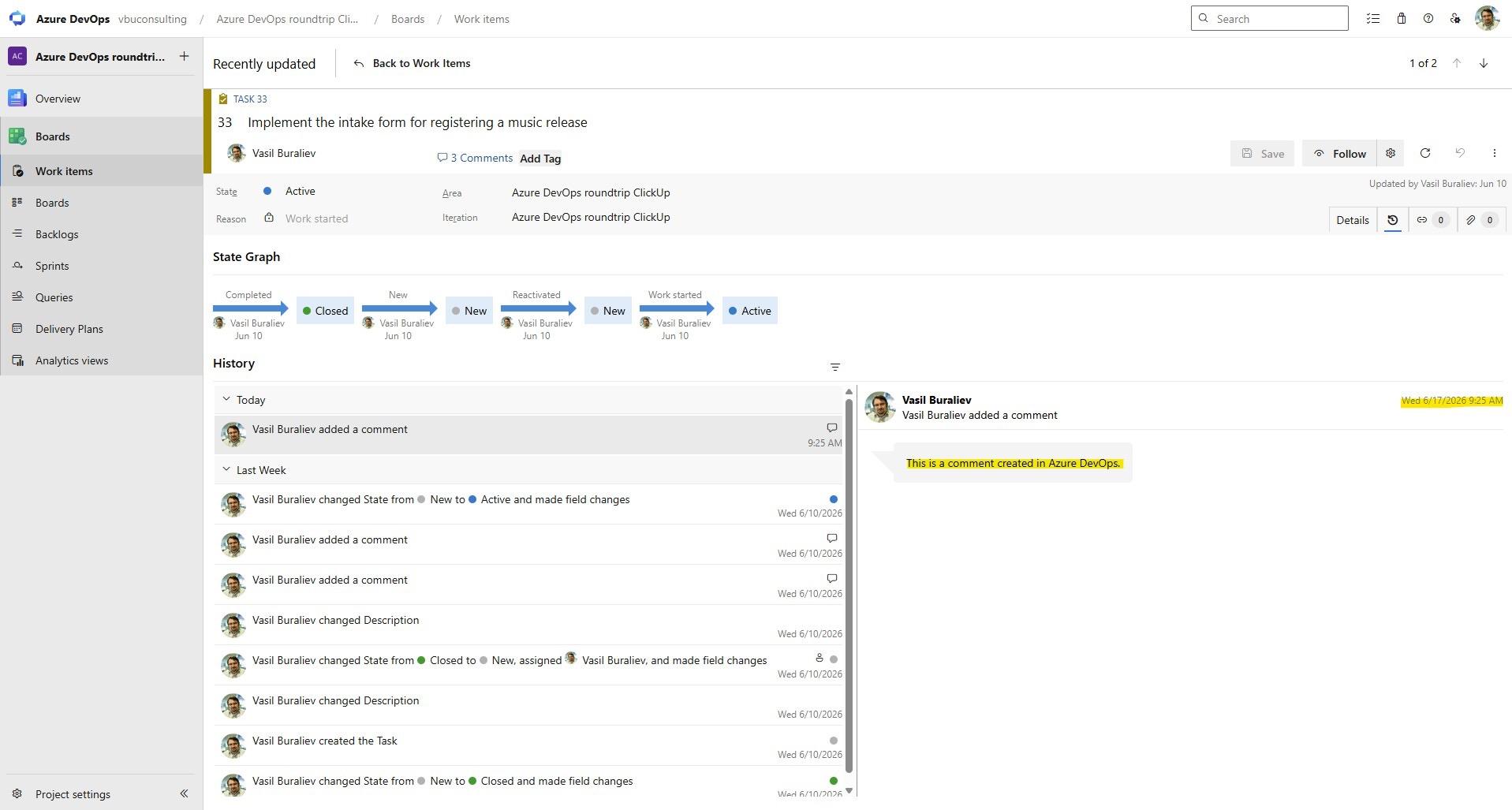
- History of changes for a task in Azure DevOps. I created a comment in a task.
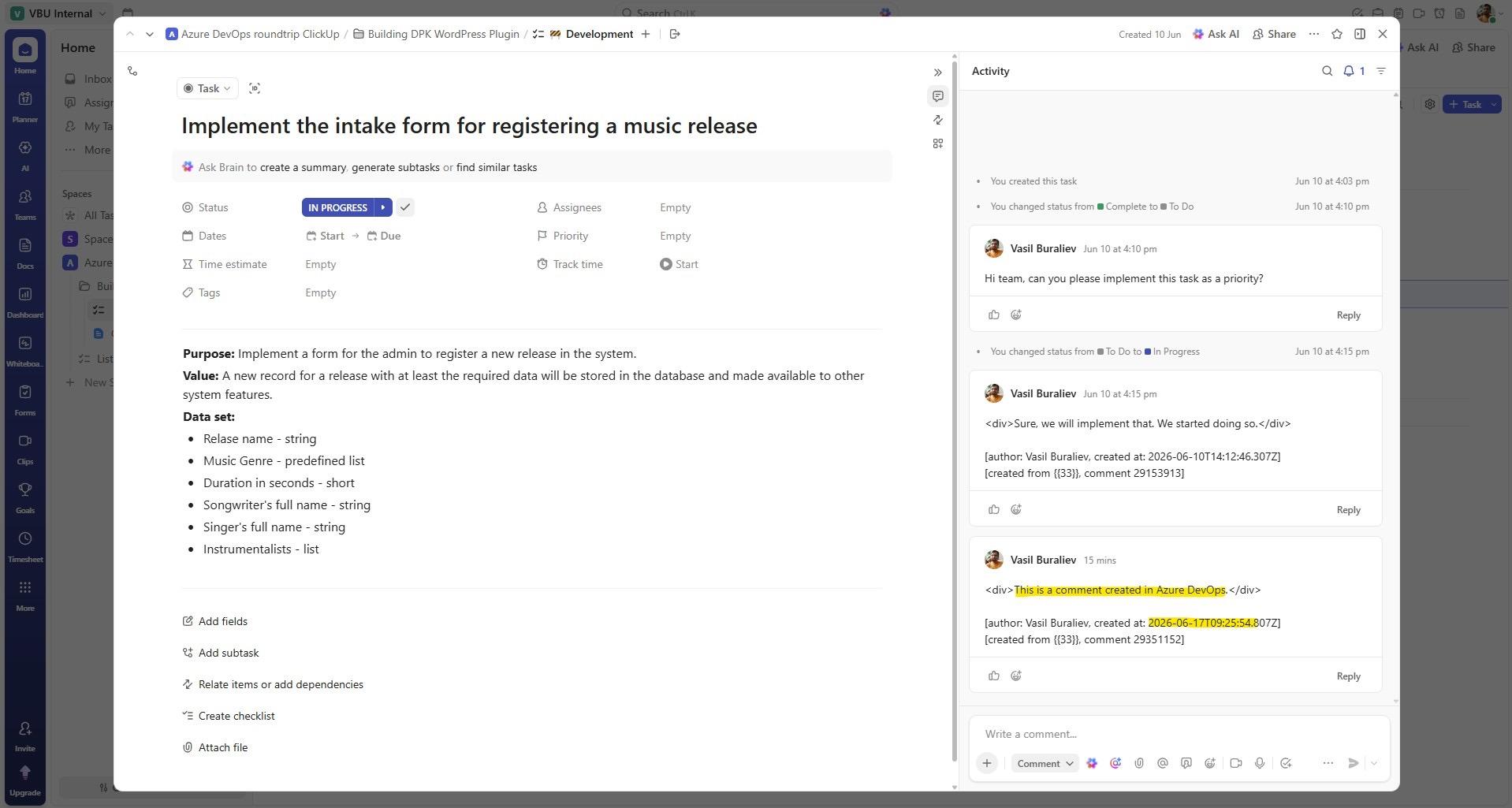
- Previously created comments on a task in Azure DevOps were visible in ClickUp's list item almost in real time.
In my experience, tool standardization sounds good in board meetings. In real delivery work, integration is often more realistic. You cannot always standardize tools with customers who already have tools they use, and you will surely come to the point where both sides, you as a software service provider and your customer, want to manage the identified defects on your side and in your critical system.
Maintaining Data Quality in Azure DevOps
Reporting quality depends on data quality.
If user stories have no owner, reports are weak. If statuses are wrong, dashboards are misleading. If bugs are not triaged, risk is hidden. If work items remain open long after delivery, progress becomes unclear, and Azure DevOps analytics tools fail to provide value.
Azure DevOps offers project managers many reporting options, but it also exposes a lack of discipline. A dashboard can only show what teams maintain. Data quality is not administrative work. It is part of delivery management basic processes.
Maintaining data quality requires daily discipline. A short daily habit of updating work items, recording progress, and re-estimating active work improves reporting accuracy and forecasting.
Practical recommendations:
- Define ownership rules.
- Keep statuses simple.
- Use required fields carefully.
- Update the work items daily.
- Close completed work quickly.
- Review stale work items every week.
- Avoid too many custom fields. If you are starting from scratch, avoid custom fields. Add the complexity incrementally.
- Agree on what “done” means. (Definition of Done)
- Use tags only when they have a clear purpose.
The project manager should not become the cleaner of every work item. Each team must own its data, and every team member should contribute to creating quality data. However, the project manager should define the minimum quality needed for reliable reporting.
Poor data quality is usually not a tool problem. It is a leadership and discipline problem.
Final Thoughts for Project Managers
Azure DevOps is a robust platform that supports software development projects, especially when teams need a close integration of planning, development, testing, and delivery.
But the platform alone does not guarantee project success.
The real challenge is how the organization uses it. Project managers need clear structures, realistic capacity planning, quality team, transparent stakeholder communication, and disciplined data ownership. They also need to accept that different teams may use different tools.
Azure DevOps works best when it supports the delivery model, not when it becomes the delivery model.
Key Takeaways
- Azure DevOps works well when teams keep clear ownership, clean data, and simple delivery rules.
- Project managers should not treat Azure DevOps only as a team board to track work progresses. It is a delivery management system.
- Visibility across teams needs structure. Separate backlogs, inconsistent statuses, and weak reporting can quickly reduce trust.
- Hybrid delivery is normal. Many companies combine Agile, Waterfall, MSF-style governance, PMI practices, and Lean principles.
- Capacity planning requires discipline. Sprint planning is not enough when key specialists are scattered across multiple projects.
- Tool integration becomes important when product, business, and engineering teams work in different systems.
Vasil Buraliev is a Project Manager, Product Manager, and software development consultant with more than 25 years of experience delivering technology solutions across public and private sectors. Founder of three software development companies, Re-aktiv, Phoenix Interactive, and VBU Consulting. As the founder of VBU Consulting, he helps organizations transform ideas into scalable software products by combining strategic product leadership, project delivery expertise, and deep technical knowledge. Throughout his career, he has contributed to more than 100 software projects, working with distributed teams on digital transformation initiatives and complex business applications. Vasil regularly shares insights on project management, product development, and software engineering through ITuziast, the VBU Consulting blog, and other industry publications.