Software teams rarely choose to work with a single platform across the entire development lifecycle. Devs may work in GitLab for source code management, CI/CD pipelines, merge requests, and deployment workflows, while agile teams and stakeholders rely on Jira for project planning, issue tracking, reporting, and custom workflows. This overlap is exactly why it's worth comparing GitLab and Jira in 2026, and rethink your team's toolset.
Although both platforms now support agile boards, issue tracking, milestones, and workflow management, they are built differently and optimized for specific tasks.
For many organizations, the decision is no longer about replacing one tool with another. It's about understanding where GitLab and Jira fit best — and whether in some cases integrating both platforms creates a more efficient and scalable workflow.
In this comparison, we break down:
- agile project management capabilities of both tools,
- CI/CD and DevOps workflows,
- issue tracking and reporting,
- workflow customization,
- integration flexibility,
- pricing models,
- the types of software development teams each platform supports best.
GitLab and Jira Were Built With Different Priorities
Although GitLab and Jira now overlap in several areas, both platforms were designed for different operational goals.
- GitLab evolved from source code management into a complete DevOps platform covering CI/CD pipelines, merge requests, security workflows, compliance pipelines, infrastructure automation, and deployment management inside a single platform.
- Jira evolved differently. Instead of becoming a centralized DevOps platform, this tool became the orchestration layer connecting software teams, project management workflows, governance processes, reporting, and external development systems.
That distinction still shapes how both platforms are used in 2026. In short, GitLab focuses on development execution and delivery continuity. Jira, on the other hand, focuses on workflow coordination, agile project management, and operational visibility across teams.
Agile Features: GitLab and Jira Approach Agile Very Differently
Agile project management is one of the main reasons why GitLab vs Jira became such a common comparison for software development teams. Both GitLab and Jira now support agile boards, issue tracking, scrum workflows, milestones, sprint planning, and project planning features.
However, both platforms were optimized differently for particular purposes.
GitLab extends agile workflows from development execution.
Jira builds development workflows around project management and organizational coordination.
That distinction changes how agile teams use both tools in practice.

GitLab Keeps Agile Planning Close to Development Workflows
GitLab approaches agile project management as part of the entire software development lifecycle. Instead of separating planning from repositories, CI/CD pipelines, merge requests, infrastructure, and deployment workflows, GitLab keeps software delivery inside a single platform.
Teams can create user stories, manage agile boards, connect issues to merge requests, monitor milestones, and track deployment progress without switching between multiple tools.
This model works especially well for DevOps-oriented software development teams trying to improve productivity and reduce dependency on other applications.
Jira Treats Agile Planning as an Organizational Coordination Layer
Jira approaches agile project management from a broader organizational perspective. Instead of centralizing development execution, Jira focuses on coordinating workflows across agile teams, governance processes, reporting structures, and operational approvals.

Its biggest advantage is flexibility. Organizations can create Jira custom workflows adapted to specific requirements, whether they manage scrum delivery, compliance approvals, portfolio planning, or complex workflows spanning multiple departments.
Jira Agile Features for Enterprise Teams
Jira offers significantly more advanced Agile features for large organizations managing complex workflows.
Jira also scales naturally across agile teams working in different operational contexts.
Product managers can plan roadmaps, QA teams can track release validation, leadership teams can monitor projects through reporting dashboards, and operations teams can coordinate deployment workflows.
Which Agile Approach Works Better?
GitLab works best when agile planning stays closely connected to repositories, CI/CD pipelines, and development execution. Jira becomes stronger once software development expands into governance, reporting, approvals, and cross-team coordination. This is why many enterprises ultimately use both GitLab and Jira together instead of replacing one platform with the other.
We’ll discuss the process of integrating the two applications later in this text.
GitLab Prioritizes Delivery Continuity Over Workflow Flexibility
GitLab makes sense in environments where development execution remains the center of software delivery.
Unlike Jira, GitLab tries to keep software development workflows inside one operational environment, reducing dependency on external DevOps tools.
Jira Starts Making More Sense Once Software Delivery Stops Being Only an Engineering Process
Jira becomes significantly stronger once software delivery expands beyond engineering execution into governance, reporting, approvals, and cross-team coordination.
Jira Software and Jira Data Center are especially valuable for organizations managing complex workflows, multiple teams, and enterprise reporting requirements.
Key Features at a Glance
While GitLab and Jira overlap in areas such as issue tracking, agile boards, and project planning, their strongest capabilities reflect the different roles they play in software development.
GitLab Key Features
GitLab's feature set is built around development execution and DevOps workflows. Beyond source code management, the platform includes tools that help teams plan and monitor delivery without leaving the development environment.
Notable features include:
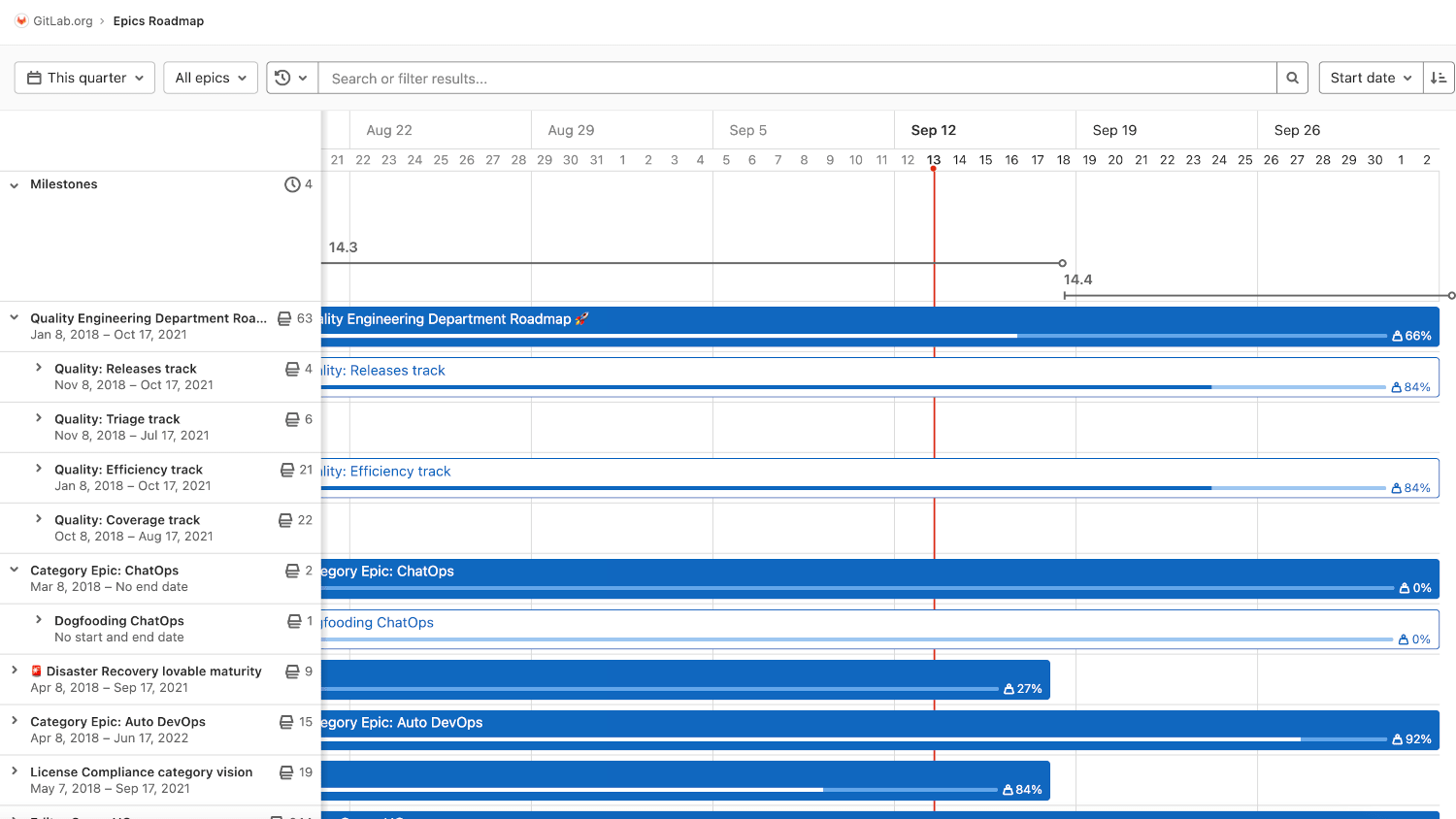
- Epic Roadmap, which visualizes epics, deadlines, and completion progress across larger initiatives
- Customizable Issue Boards, allowing teams to create multiple boards using labels and filters for different workflows
- Built-in CI/CD Pipelines for automating testing and deployments
- Security and Compliance Tools available in higher-tier plans
- Milestones and Roadmaps for sprint and release planning
These capabilities make GitLab particularly attractive for teams looking for a complete DevOps platform with planning and delivery tightly connected.
Jira Key Features
Jira's strengths are centered around project management, workflow flexibility, and visibility across teams.
Some of its most valuable features include:
- Highly Customizable Workflows that adapt to different business and development processes
- Automation Rules that reduce repetitive project management tasks
- Advanced Reporting and Dashboards for tracking team performance and project progress
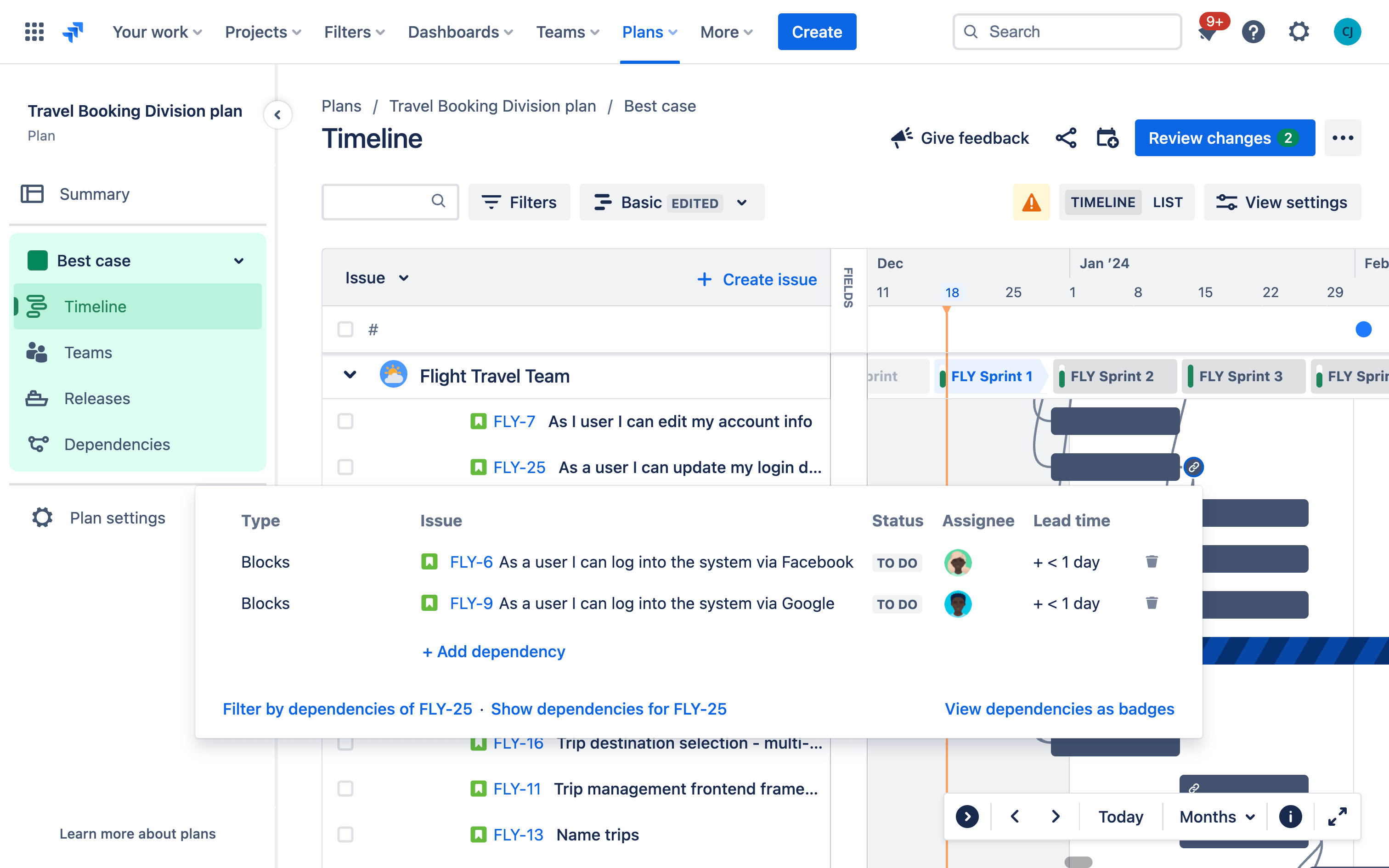
- Roadmaps and Dependency Tracking for coordinating larger initiatives
- Custom Work Item Types and Hierarchies that help teams organize work beyond standard tasks and user stories
Jira also provides strong permission management, approval processes, and cross-project planning capabilities, making it particularly effective in organizations managing multiple teams and complex workflows.
The Biggest Difference
GitLab's strongest features are designed to help developers build, test, review, and deploy software within a single platform. Jira's strongest features are designed to help organizations plan, coordinate, track, and report on work across multiple teams and projects.
GitLab vs Jira Pricing
Both GitLab and Jira provide a 30-day free trial for their paid editions, allowing teams to evaluate the platforms before committing to subscription:
- GitLab offers a transparent pricing model with free and paid tiers based on features and users. It provides Free, Premium, and Ultimate tiers (its higher-tier plans focus on advanced CI/CD, security, compliance pipelines, and DevSecOps capabilities).
- Jira offers Free, Standard, Premium, Enterprise, and Data Center plans.
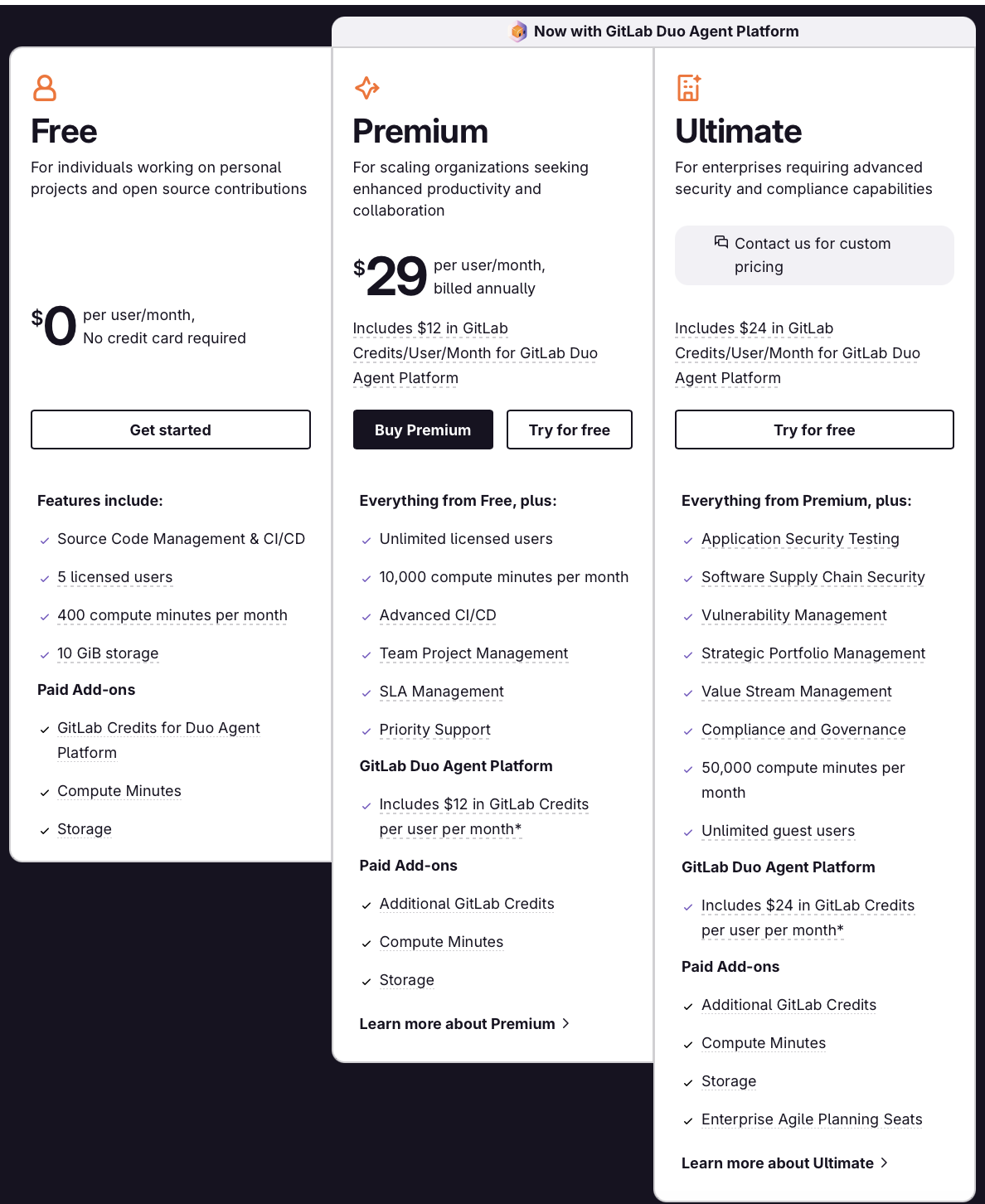
Jira follows a more modular pricing approach, with lower entry costs for project management and agile teams. However, many organizations also use Atlassian products such as Confluence, Jira Service Management, or Marketplace apps, which can increase the overall cost as requirements grow.
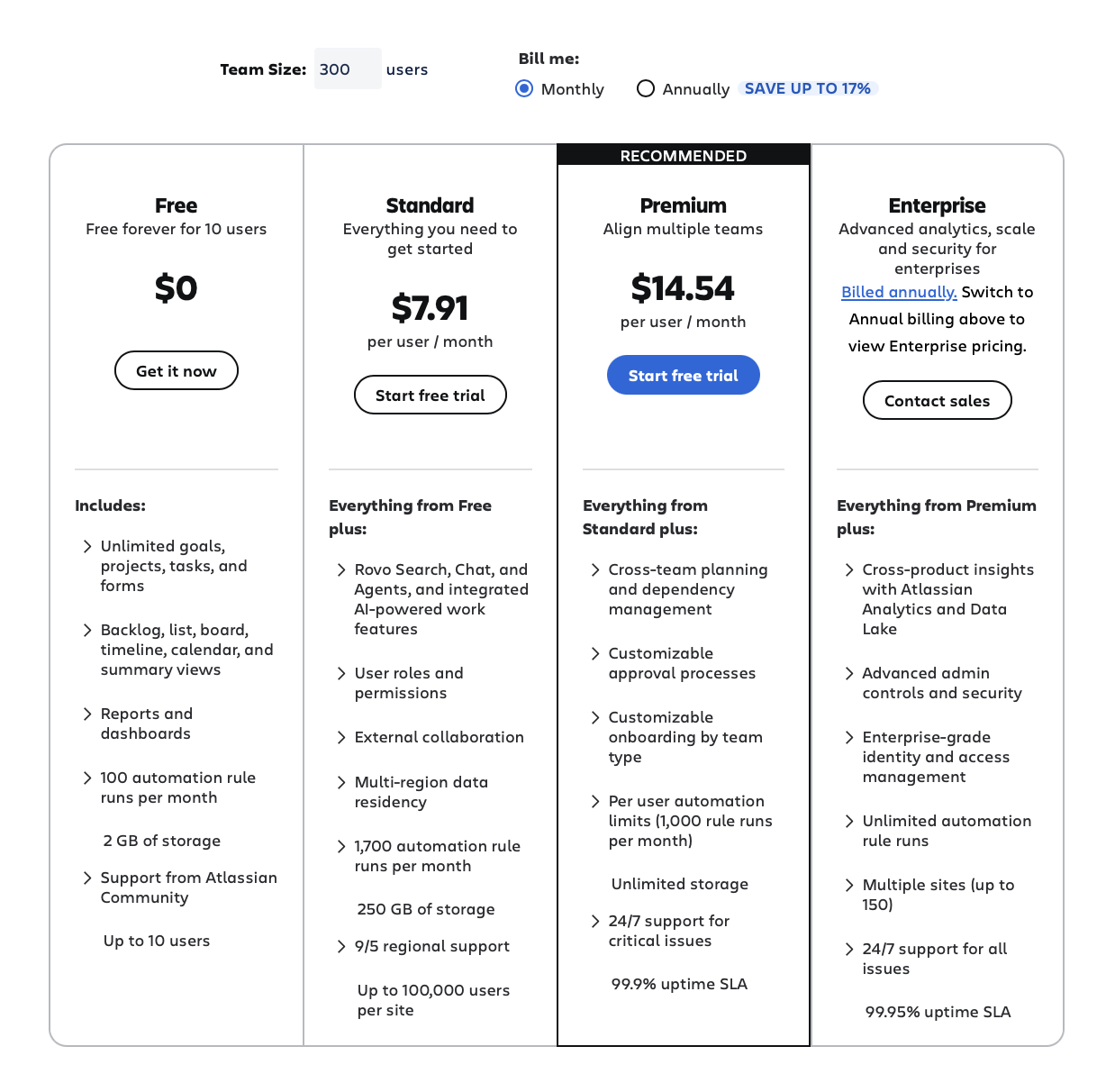
At first glance, Jira has a lower entry price. However, the total cost often depends on how many additional tools, integrations, and enterprise features an organization requires.
Why Many Enterprises Ultimately End Up Using Both Platforms
For many organizations, choosing between GitLab and Jira is not necessary because both platforms serve different teams.
Development teams often prefer GitLab because it keeps source code management, merge requests, CI/CD pipelines, testing, and deployment workflows in one place. Product managers, project managers, and agile teams, on the other hand, typically work in Jira because it provides stronger project planning, reporting, backlog management, and workflow customization capabilities.
A common setup looks like this:
- Developers work in GitLab
- Product and delivery teams work in Jira
- Leadership relies on Jira reporting and dashboards
- Development progress is tracked through GitLab repositories and pipelines
This approach allows each team to use the tool that best fits its day-to-day work instead of forcing everyone into the same platform.
The challenge appears when information needs to move between both systems. If development updates remain only in GitLab while planning activities remain only in Jira, teams can quickly lose track of progress, duplicate updates, or spend time manually transferring information between tools.
This is why many organizations choose to connect GitLab and Jira rather than replace one with the other.

Connecting GitLab and Jira
In fact, many organizations use GitLab and Jira together. Fortunately, both platforms offer strong integration capabilities. GitLab supports integrations with Jira and other third-party applications, while Jira is designed to connect with development tools through native integrations, APIs, and the Atlassian Marketplace.
The challenge is not establishing a connection between the platforms. The challenge is keeping information synchronized as projects evolve.
Using Getint to Connect GitLab and Jira
Getint provides bidirectional synchronization between GitLab and Jira, allowing teams to work in their preferred job environment while maintaining consistent project data across both systems.
With Getint, organizations can synchronize:
- Issues, tasks, bugs, and user stories
- Workflow statuses and custom workflows
- Comments and discussions
- Custom fields and metadata
- Sprint information and milestones
- Labels and project attributes
- Attachments and links
- Merge requests and development updates
This approach allows development teams to continue working in GitLab while project managers and agile teams maintain visibility in Jira without relying on manual updates or duplicate work.

Instead of duplicating updates manually or forcing teams into one operational model, organizations have the ability to see the most up-to-date information flowing across both systems while preserving their specialized workflows. For enterprises operating across complex software delivery environments, this often becomes a much more scalable approach than trying to consolidate every process into a single source (one platform).
GitLab vs Jira Summary Table
GitLab Makes More Sense For
- DevOps-heavy software development teams
- Organizations prioritizing CI/CD automation
- Platform engineering environments
- Infrastructure-as-code workflows
- Security-focused delivery pipelines
- Teams looking for a single DevOps platform
Jira Makes More Sense For
- Large agile organizations
- Product management teams
- Enterprises managing complex workflows
- Companies requiring advanced reporting
- Organizations coordinating multiple departments
- Teams relying heavily on third party applications
Final Thoughts
GitLab and Jira are not direct replacements for one another. GitLab is strongest when software delivery execution is the primary operational challenge. Organizations focused on CI/CD automation, infrastructure workflows, DevSecOps, and centralized development pipelines often benefit from GitLab’s single-platform approach.
Jira becomes stronger when organizational coordination becomes more complex than development execution itself. Enterprises managing governance, portfolio planning, reporting, approvals, and cross-team collaboration usually gain more flexibility from Jira.
In practice, many organizations need both, and choose to connect them by using integration options. At least, it's all about creating visibility and workflow consistency across the entire software development lifecycle.