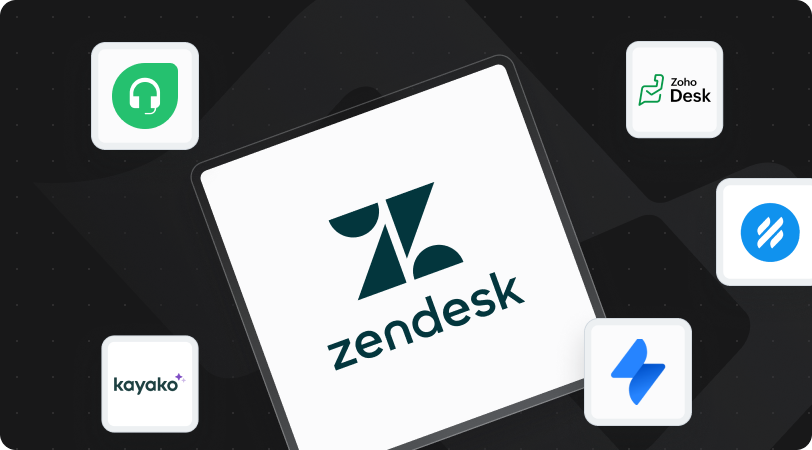
Zendesk is a mature customer support platform, but rising per-agent costs, add-on AI pricing and configuration effort are pushing many teams to compare alternatives. A small team may want something simpler to run; an enterprise support teams may need deeper integrations or more control over where its data lives.
The alternatives below serve different purposes. Some focus on affordable ticketing and shared inboxes, some on AI agents that resolve conversations, and some on IT service management. This guide compares 11 of them on features, verified pricing, AI capabilities and limitations, and explains what to plan for if your ticket history needs to move with you.
Quick answer: the best Zendesk alternatives in 2026
- Freshdesk for growing teams that want a familiar, like-for-like help desk.
- Zoho Desk for the lowest entry price, especially inside the Zoho ecosystem.
- Help Scout for small, email-first teams.
- Hiver for teams that want to keep working in Gmail.
- ProProfs Help Desk for simple ticketing with minimal setup.
- Intercom for AI-first, in-app conversational support.
- Gorgias for Shopify and e-commerce stores.
- Kayako for teams prioritizing AI ticket resolution.
- Jira Service Management for IT and technical support teams.
- Salesforce Service Cloud for enterprises already running on Salesforce.
- HubSpot Service Hub for CRM-connected support in the HubSpot ecosystem.
Why are businesses looking for Zendesk alternatives?
Most teams start looking for four reasons: cost that grows with every seat and add-on, configuration effort, pressure to adopt AI, and the need to connect support with other systems.
Per-agent costs and add-ons
On Zendesk's pricing page, Support Team costs $19 per agent per month, Suite Team $55 and Suite Professional $115, all billed annually (monthly billing is $25, $69 and $149). Copilot is a separate $50 per agent per month add-on. AI agents are billed per automated resolution: each plan includes a small monthly allowance (5 or 10 per agent), then $1.50 per committed resolution or $2.00 pay-as-you-go. For a team of dozens of agents, these layers add up quickly.
Configuration effort
Zendesk's routing rules, triggers, views and automations are powerful. Small teams can be running within weeks, but larger deployments with complex integrations and data migrations can take several months, and may need a dedicated administrator or an implementation partner.
Pressure to adopt AI
A Gartner survey of 321 customer service leaders found that 91% report pressure from executive leadership to implement AI in 2026. AI quality and pricing vary widely, though: a platform that charges per resolution makes total cost depend on ticket volume.
Customer experience is at stake
Slow or poor support has measurable consequences. In PwC's Experience Is Everything research, 32% of customers said they would walk away from a brand they love after a single bad experience. Twilio's 2024 Consumer Preferences Report found 65% of consumers felt frustrated or annoyed by slow replies.
Work that crosses systems
Development work often lives in Jira or Azure DevOps, customer data in Salesforce, IT processes in ServiceNow. When a support request needs another team, the ability to sync data and automate handoffs becomes part of the platform decision.
How we evaluated these help desk software alternatives
Each platform was assessed on the same six criteria, chosen to reflect why teams leave Zendesk in the first place:
- Pricing transparency: published entry price, what is gated to higher tiers, and how AI is billed.
- AI depth and pricing model: whether AI drafts replies, resolves conversations on its own, or both, and whether it is bundled or charged per resolution.
- Ease of setup: how much configuration a team needs before it is productive, and the learning curve for agents.
- Channel coverage: email, chat, messaging, social and phone support.
- Workflow depth: routing, SLAs, automation and approvals at real ticket volume.
- Integration capabilities: how well the platform connects to Jira, Salesforce, ServiceNow and other systems support work depends on.
All prices in this guide were checked against each vendor's own pricing page (or, where the page could not be read directly, against vendor documentation and several recent independent sources) in November 2026. Prices are in USD and change often, so confirm current rates before you buy.
Best Zendesk alternatives: quick comparison
Entry prices range from $7 per user per month (Zoho Desk) to custom enterprise contracts, and AI is priced very differently from one platform to the next.
Best Zendesk alternatives for everyday customer support: tools & key features
For teams that mainly handle customer emails, support requests and knowledge base content, straightforward ticketing and automation are often enough. These five platforms balance cost, collaboration and ease of use differently.
1. Freshdesk – Best for growing support teams
Freshdesk, from Freshworks, is one of the closest like-for-like alternatives to Zendesk. It combines ticketing, automation, self-service and reporting in an approachable interface.
Key features
- Ticket assignment, prioritization and internal notes
- Automated routing, SLA management and workflows
- Knowledge base for customer self-service
- Large marketplace of integrations
AI capabilities: Freddy AI supports ticket classification, reply suggestions and AI agent conversations. The Freddy AI Copilot add-on costs $29 per agent per month on Pro and Enterprise. Teams that need chat, phone and social should compare Freshdesk with Freshdesk Omni, which is priced separately.
Pricing: Growth starts at $19 per agent per month billed annually (Pro $55, Enterprise $89), per Freshworks. A Free Program covers 1–2 agents for six months, Freshdesk only.

Limitations
- AI assistance and broader channels raise the effective price well above the entry tier
- The free option expires after six months
How it compares to Zendesk: Freshdesk covers most of what teams use in Zendesk for less money and less configuration, but it follows the same model of charging extra for AI.
2. Zoho Desk – Best affordable Zendesk alternative
For teams leaving Zendesk mainly over cost, Zoho Desk offers one of the lowest entry prices in the category while still covering ticketing, SLAs, automation and self-service.
Key features
- Multichannel ticketing with SLAs and workflow rules
- Help center and self-service portal
- Native connection to Zoho CRM and other Zoho apps
AI capabilities: Zia, Zoho's AI assistant, can analyze customer sentiment, summarize conversations and suggest replies. More advanced AI sits on higher tiers.
Pricing: A free plan covers up to 3 users. Express costs $7 per user per month billed annually and is capped at 5 agents; Standard is $14, Professional $23 and Enterprise $40.

Limitations
- Advanced AI, reporting and omnichannel features require higher tiers
- Teams outside the Zoho ecosystem should check integration effort for their existing tools
How it compares to Zendesk: Zoho Desk covers the essentials at a fraction of Zendesk's per-agent cost, with less depth for complex enterprise workflows.
3. Help Scout – Best for email-first customer support
Help Scout is built for teams that want a shared inbox that feels like email rather than a ticketing system. It suits SaaS businesses and customer satisfaction teams where support is conversational and relationship-driven.
Key features
- Shared inboxes with assignment, private notes and saved replies
- Customer profiles and conversation history
- Docs knowledge base and Beacon help widget
- Workflows for routine automation
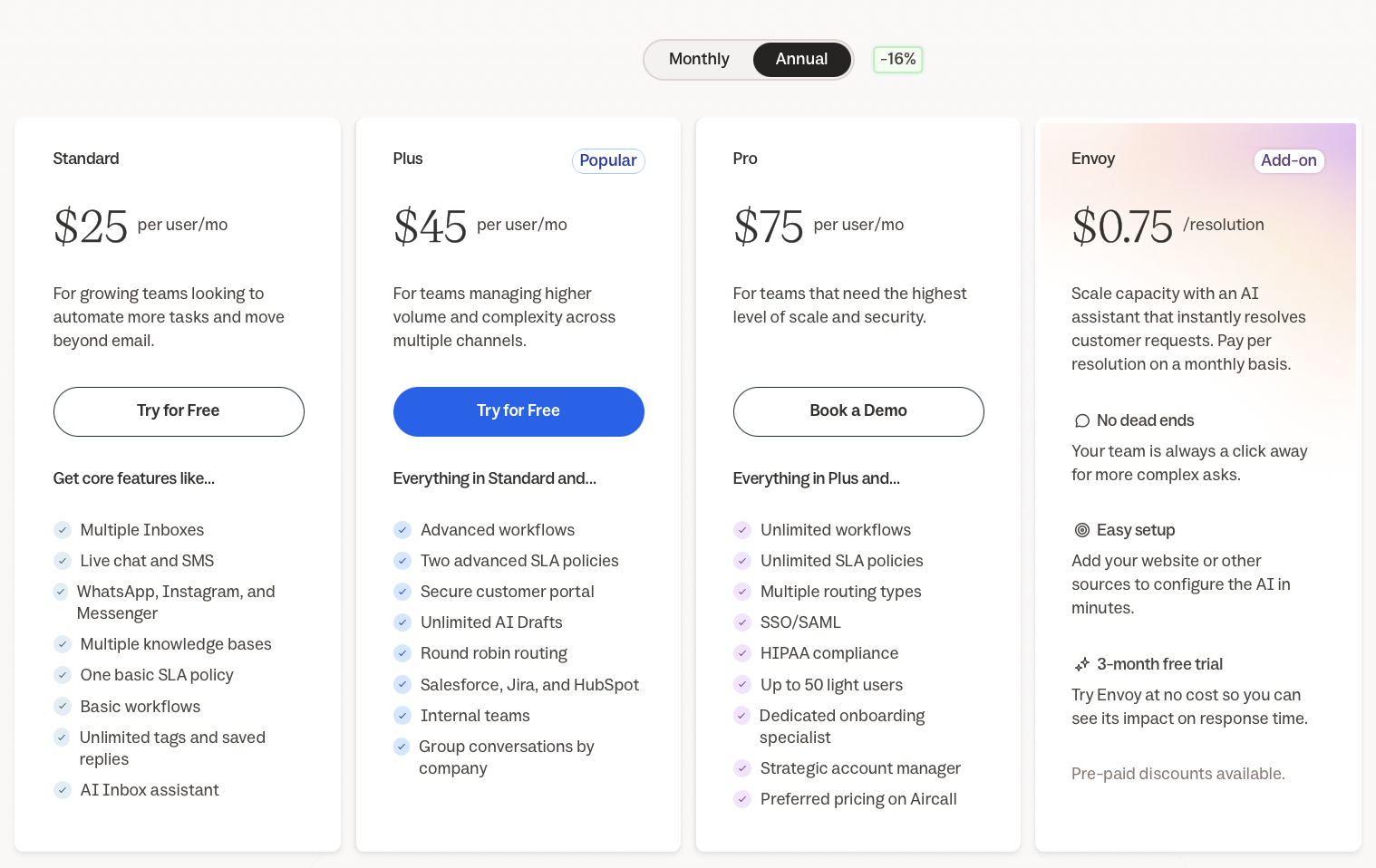
AI capabilities: AI Assist edits and translates replies on all plans; AI Drafts and AI Summarize come with paid plans. Envoy, Help Scout's AI agent, supports customers and answers them using your knowledge base for $0.75 per resolution, with a three-month free trial, and an optional monthly spending cap.
Pricing: On Help Scout's pricing page, Standard is $25 per user per month, Plus $45 and Pro $75 (10-user minimum). The free plan supports 5 users, 1 inbox, 1 Docs site and 100 contacts per month.
Limitations
- Phone support only through integrations
- Native Salesforce, Jira and HubSpot integrations require the Plus plan
How it compares to Zendesk: Help Scout wins on simplicity and predictable pricing, and gives up channel breadth and enterprise workflow depth.
4. Hiver – Best Zendesk alternative for Gmail users
Hiver in Gmail lets teams manage shared support conversations without leaving Gmail, so agents keep working in a familiar tool. Hiver also sells a separate omnichannel product, Hiver Omni, with its own plans.
Key features
- Shared inbox and ticketing inside Gmail, plus a help center
- Rule-based automations, pre-built analytics and basic integrations on Growth
- Customer portal, SLAs, CSAT surveys, advanced analytics and API access on Pro
- Skill-based routing, custom objects, SSO, HIPAA and custom roles on Elite
AI capabilities: AI Agents are included on all plans; they triage and resolve requests and can take actions across connected systems, pausing for human approval on actions marked sensitive. Growth also includes AI Copilot, Skills and AI Knowledge Builder; Elite adds AI QA, AI Insights and Customer Intelligence.
Pricing: Hiver in Gmail costs $25 per user per month for Growth, $55 for Pro and $85 for Elite, billed annually. Growth can be started with a free trial; Pro and Elite are sold through a demo. There is no free plan.

Limitations
- Teams above 10 users must move to Pro
- Less suited to complex development escalations or enterprise incident management
How it compares to Zendesk: Hiver avoids a full help desk migration for Gmail-based teams, but offers less depth for specialized service workflows.
5. ProProfs Help Desk – Best for simple ticket management
ProProfs Help Desk adds structure to customer support without significant implementation time.
Key features
- Shared inbox for multiple addresses
- Ticket assignment, categorization and child tickets for cross-team work
- Automation rules and saved replies
- Reporting on where tickets get stuck
AI capabilities: ProProfs states that its AI reply assistance is included in the core plan rather than sold as an add-on.
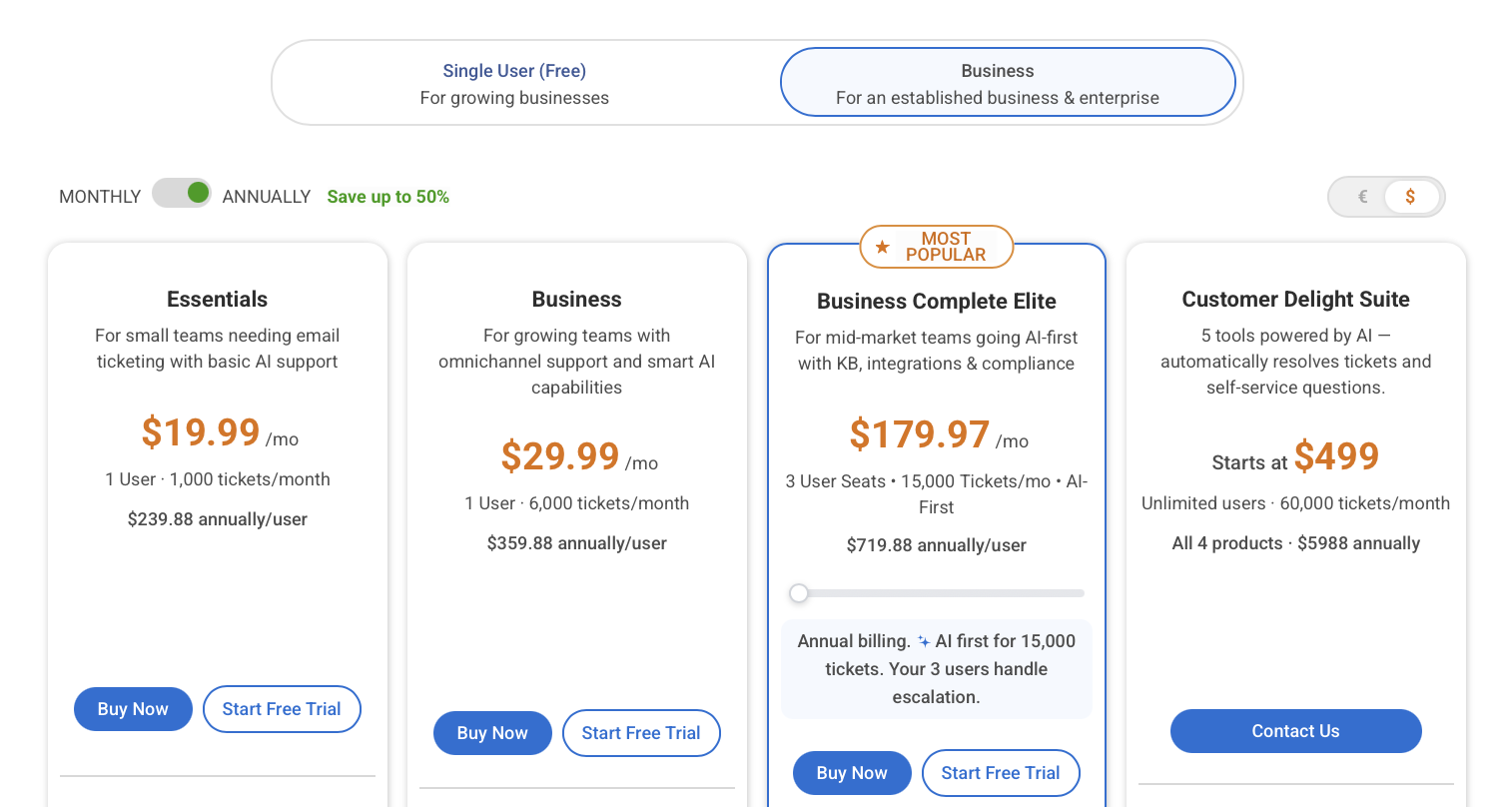
Pricing: Paid plans start at $19.99 per user per month, and a free plan is available for one agent.
Limitations
- No downloadable or on-premise version
- Less suited to enterprises needing extensive customization or advanced omnichannel support
How it compares to Zendesk: ProProfs suits small teams with simple processes that want to avoid Zendesk's administrative overhead.
Best Zendesk alternatives for AI-first and specialized support
These platforms are worth evaluating when a team has specific needs a traditional ticketing system does not fully address: AI agents, in-app messaging or e-commerce workflows.
6. Intercom – Best for AI-first conversational support interactions
Intercom suits SaaS and digital businesses whose customers expect help inside the product. It emphasizes live chat, in-app messaging and conversational support over email tickets.
Key features
- Shared inbox with routing, escalation and workflows
- In-app messaging and Messenger
- Help center that powers both self-service and AI answers
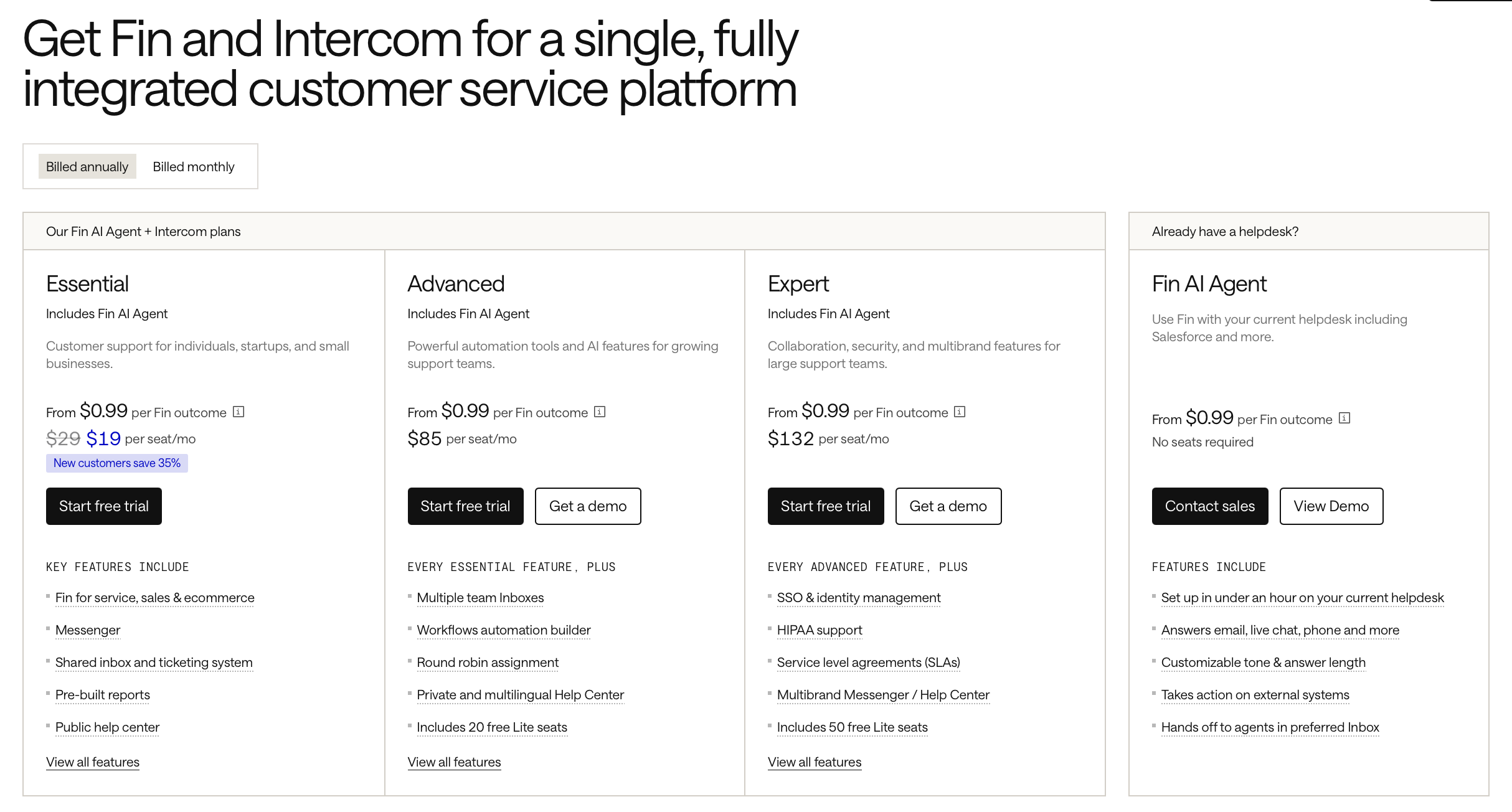
AI capabilities: Fin AI Agent answers questions from approved content, performs supported actions and escalates to humans when needed. Fin can also run on top of other help desks, including Zendesk, Salesforce, HubSpot and Freshdesk.
Pricing: Per Intercom's pricing guide, Essential costs $29 per seat per month billed annually, Advanced $85 and Expert $132. Fin costs $0.99 per outcome, billed separately from seats.
Limitations
- Seat fees plus per-outcome charges make costs harder to forecast at high volume
- Less aligned with traditional phone support or IT service management
How it compares to Zendesk: Intercom is more conversational and AI-led, but its two-layer pricing model needs the same careful modeling as Zendesk's add-ons. Test Fin's accuracy and escalation quality on your own tickets before committing.
7. Gorgias – Best for e-commerce customer support
Gorgias is built for online stores, with deep integration into Shopify and other commerce platforms.
Key features
- Order and customer data shown alongside each conversation
- Supported order actions directly from the support interface, depending on platform and permissions
- Automation for routine retail questions such as shipping status
AI capabilities: Gorgias's AI Agent handles common retail requests and routes complex refund or delivery problems to agents. It is priced separately from the help desk, based on automated interactions.
Pricing: Starter costs $10 per month for 50 billable tickets (monthly billing only, 3 seats), with $0.40 per extra ticket. Higher plans are priced by ticket volume rather than per agent.

Limitations
- Costs rise with ticket volume, including seasonal peaks
- Less relevant outside e-commerce
How it compares to Zendesk: For an online store, Gorgias puts order context in every ticket from day one; for non-commerce support, Zendesk's broader feature set fits better.
8. Kayako – Best for AI-powered ticket resolution
Kayako positions itself around AI that completes requests rather than only suggesting replies.
Key features
- Kay AI agent that uses support content and integrations to carry out supported tasks
- Ticketing, shared inbox and customer history
- Knowledge base resources
AI capabilities: Kayako reports that one customer, Contently, reached 68% autonomous resolution. This is a vendor-reported result for a single customer, not a guaranteed outcome; results depend on request complexity, integrations and the content available to the AI.
Pricing: Kayako does not publish prices on its pricing page; costs for the platform and the Kay AI agent are quoted by sales. There is no free plan.
Limitations
- No public pricing, so comparing total cost requires a sales quote
- Best suited to teams with substantial, predictable ticket volume
How it compares to Zendesk: Kayako puts AI resolution at the center rather than selling it as an add-on. Ask for a quote based on your ticket volume and compare it with platforms that publish their rates.
Best Zendesk alternatives for IT, enterprise and CRM-connected support
Larger organizations often need support agents to work with IT service management, software development and CRM systems, especially when requests involve approvals, several departments or regulated information.
9. Jira Service Management – Best for IT and technical teams
Jira Service Management fits businesses where support requests regularly turn into technical work. Atlassian now sells it as part of its Service Collection, which also includes Customer Service Management, an app built for external customer support.
Key features
- Request queues, approval workflows, SLAs and customer portals
- Incident, problem and change management
- Native links between service requests and Jira development work
- Knowledge base and multi-channel intake (portal, email, chat, Slack, Microsoft Teams)
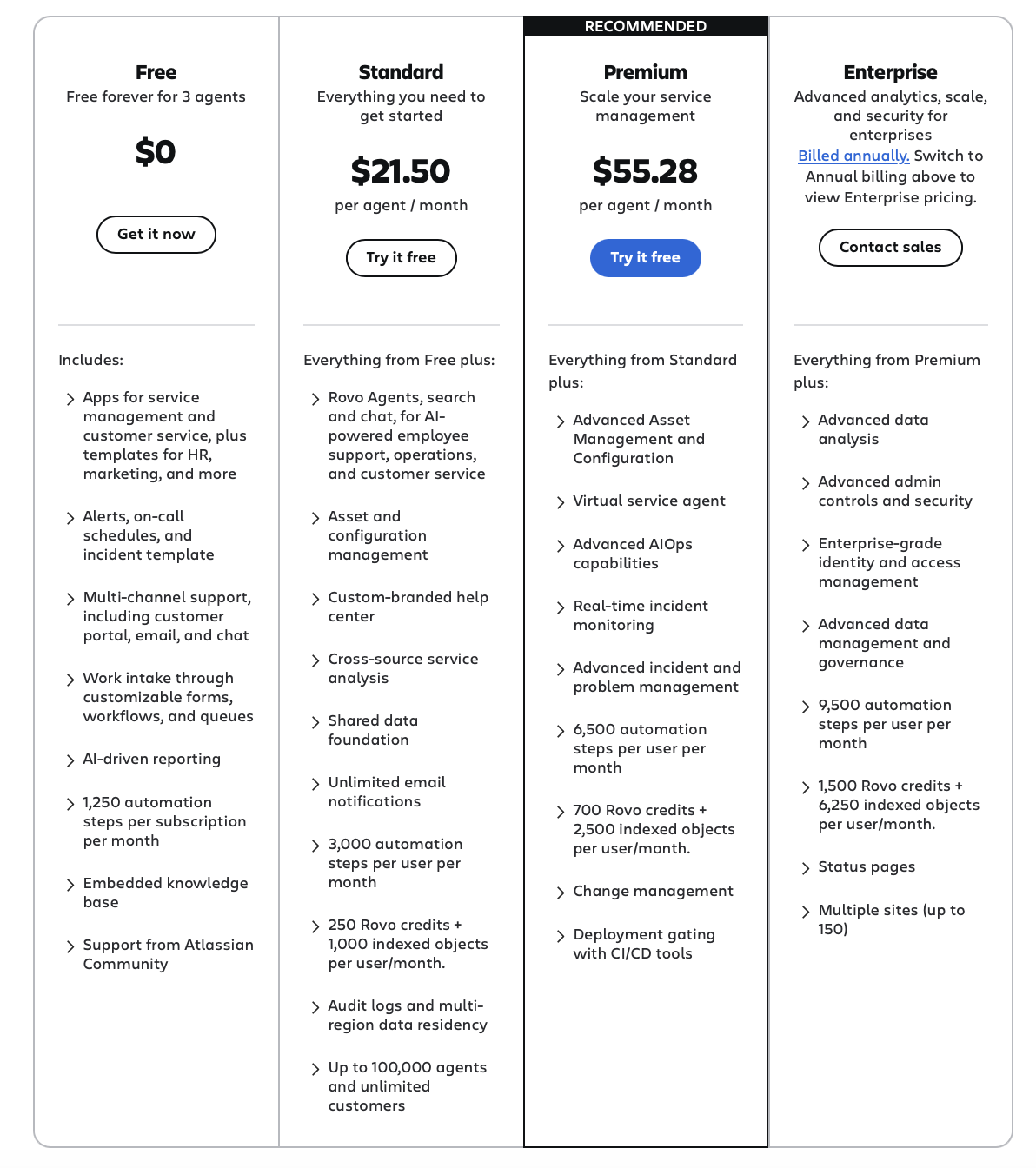
AI capabilities: Rovo Agents, search and chat are included from the Standard plan; Premium adds a virtual service agent.
Pricing: On Atlassian's pricing page, the Free plan covers 3 agents. Standard is priced per agent and decreases with team size; at the calculator's default it showed $21.50 per agent per month, and small teams on monthly billing pay around $25. Customers who submit requests are free. A self-managed Data Center edition is also available.
Limitations
- Request types, workflows and permissions take time to configure
- Customer-facing B2C support can feel secondary to IT use cases
How it compares to Zendesk: For IT teams and companies already on Jira, it closes the loop between support and engineering. When moving from Zendesk, plan how tickets, comments and attachments will be migrated into Jira.
10. Salesforce Service Cloud – Best for enterprise customer support
Service Cloud connects support with sales, account management and other CRM activity, so agents see customer history without separate records.
Key features
- Case management, knowledge management and omnichannel routing
- Workflow automation, approvals and escalations
- Deep customization on the Salesforce platform
AI capabilities: Agentforce can automate selected service interactions and assist agents, using data already in Salesforce.
Pricing: On Salesforce's pricing page, Starter Suite costs $25 per user per month, Pro Suite $100, Enterprise $175, Unlimited $350 and Agentforce 1 Service $550. These are very different editions, so the entry price is not representative of an enterprise deployment.

Limitations
- Substantial implementation and administration requirements
- Custom workflows and advanced AI may need specialized expertise
How it compares to Zendesk: Service Cloud makes sense when Salesforce is already the system of record; otherwise it can bring more administrative burden than Zendesk.
11. HubSpot Service Hub – Best for CRM-connected customer success
Service Hub brings support into the HubSpot ecosystem, connecting service with marketing, sales and customer success on shared customer records.
Key features
- Ticketing, shared inbox and live chat
- Customer feedback tools
- Knowledge base, advanced reporting and automation on higher tiers
AI capabilities: AI assistance is available, with more capability on higher tiers.
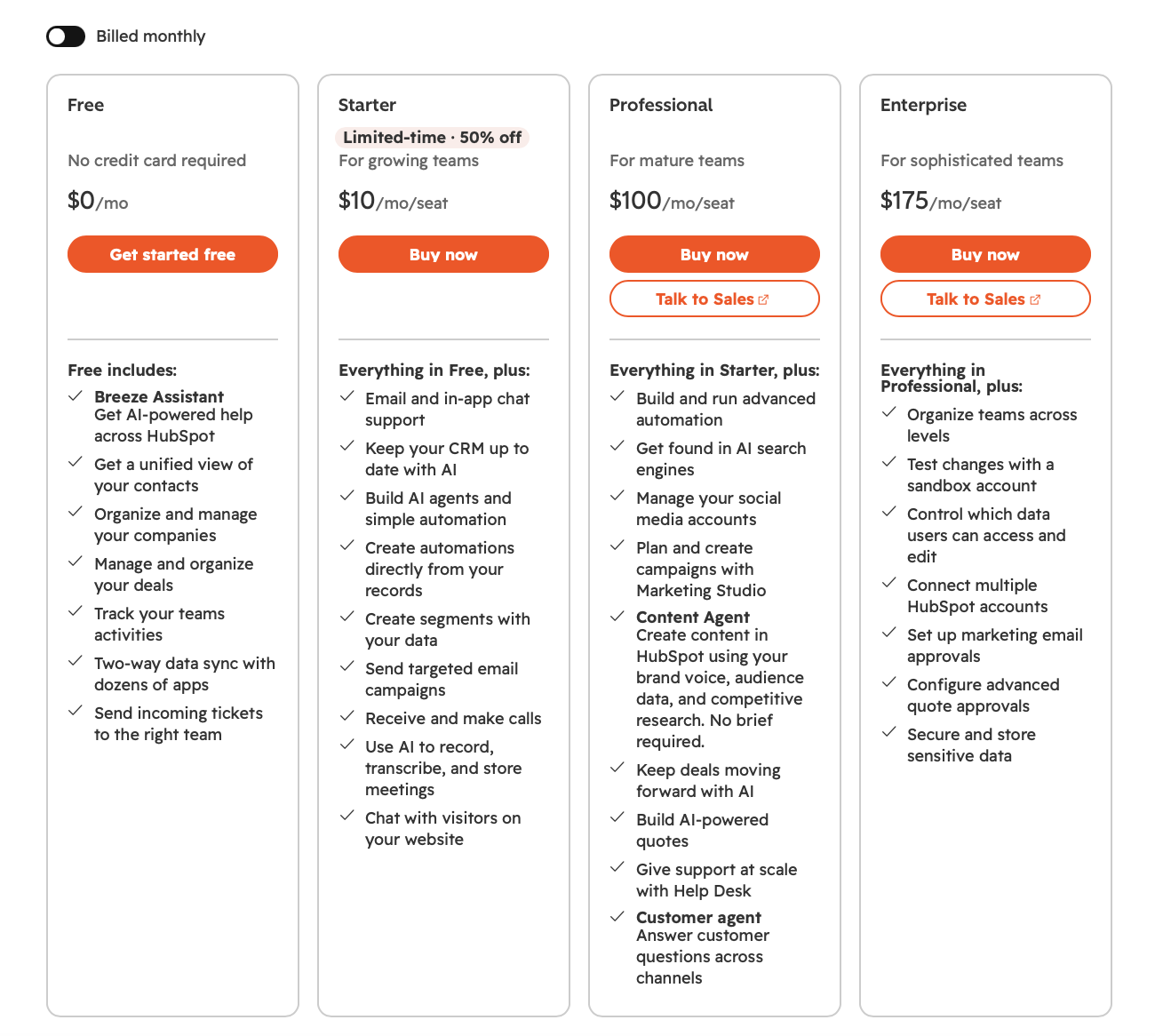
Pricing: Free tools cover up to 2 users. Starter is listed at $20 per seat per month, and HubSpot frequently offers lower promotional rates on annual billing; check the current offer. Professional and Enterprise add onboarding fees.
Limitations
- Real support depth requires the Professional tier or above
- Value depends on using HubSpot's wider CRM
How it compares to Zendesk: Service Hub trades some of Zendesk's support depth for full CRM context, which pays off mainly for HubSpot-native companies.
What Zendesk alternatives really cost at scale
For a 10-agent team whose AI resolves 1,000 conversations a month, monthly cost ranges from about $1,000 to $2,500 among the platforms that publish both seat and AI rates. The entry price alone does not show this.
Two patterns stand out. Per-resolution AI can cost more than the seats themselves once automation works well, so a successful AI rollout raises the bill. And the cheapest seat price does not guarantee the lowest total: model your own ticket volume and expected AI resolution rate before comparing.
How to choose the right Zendesk alternative
The best choice is the platform that removes your team's biggest bottleneck, not the one with the longest feature list.
If you…
- want a cheaper like-for-like help desk → Freshdesk or Zoho Desk
- are a small team that lives in email → Help Scout, or Hiver if you work in Gmail
- run product-led, in-app support → Intercom
- run an online store → Gorgias
- want AI to resolve a large share of predictable tickets → Kayako or Intercom
- handle internal IT or engineering-heavy support → Jira Service Management
- already run on Salesforce or HubSpot → Service Cloud or Service Hub
Before committing, answer four practical questions:
- What will it cost at your ticket volume? Per-agent pricing is simple; per-resolution AI and ticket-volume plans need modeling (see the example above).
- Can it handle your existing workflows? Test assignment, internal notes, custom fields, approvals and escalation rules with real tickets.
- What happens when a request leaves the support team? Check whether integrations with Jira, Salesforce or ServiceNow support the fields, mappings and bidirectional sync you need.
- Does it meet your security requirements? Review certifications, data retention, access controls and deployment options. Organizations with strict requirements may prefer on-premise integration infrastructure.
How to migrate from Zendesk without losing momentum
A successful move off Zendesk depends less on the new platform than on how carefully ticket history and workflows are carried over. Teams that have used Zendesk for years may hold thousands of tickets with conversations, internal comments, attachments and custom fields that agents still need.
- Audit triggers, automations and views. List the ones that drive real outcomes and retire the rest, so you only rebuild what matters.
- Decide what data moves. Typically ticket history, customer conversations, internal notes, custom fields, attachments, users and ownership.
- Map fields and statuses. Platforms represent the same information differently; a Zendesk status may not correspond directly to a workflow status in Jira Service Management.
- Protect internal notes. Map private comments carefully so information visible only to agents does not become visible to customers.
- Test with a small dataset first. Migrate a sample, check mappings and fix problems before moving the full history.
- Run both systems in parallel. Keep Zendesk and the new platform connected for a short overlap, so nothing falls through while the transition is validated.
- Cut over before renewal. Time the switch to your Zendesk renewal date to avoid paying for both platforms longer than needed.
Real-world use case: Van Der Sluis migrates from Zendesk to Jira Cloud
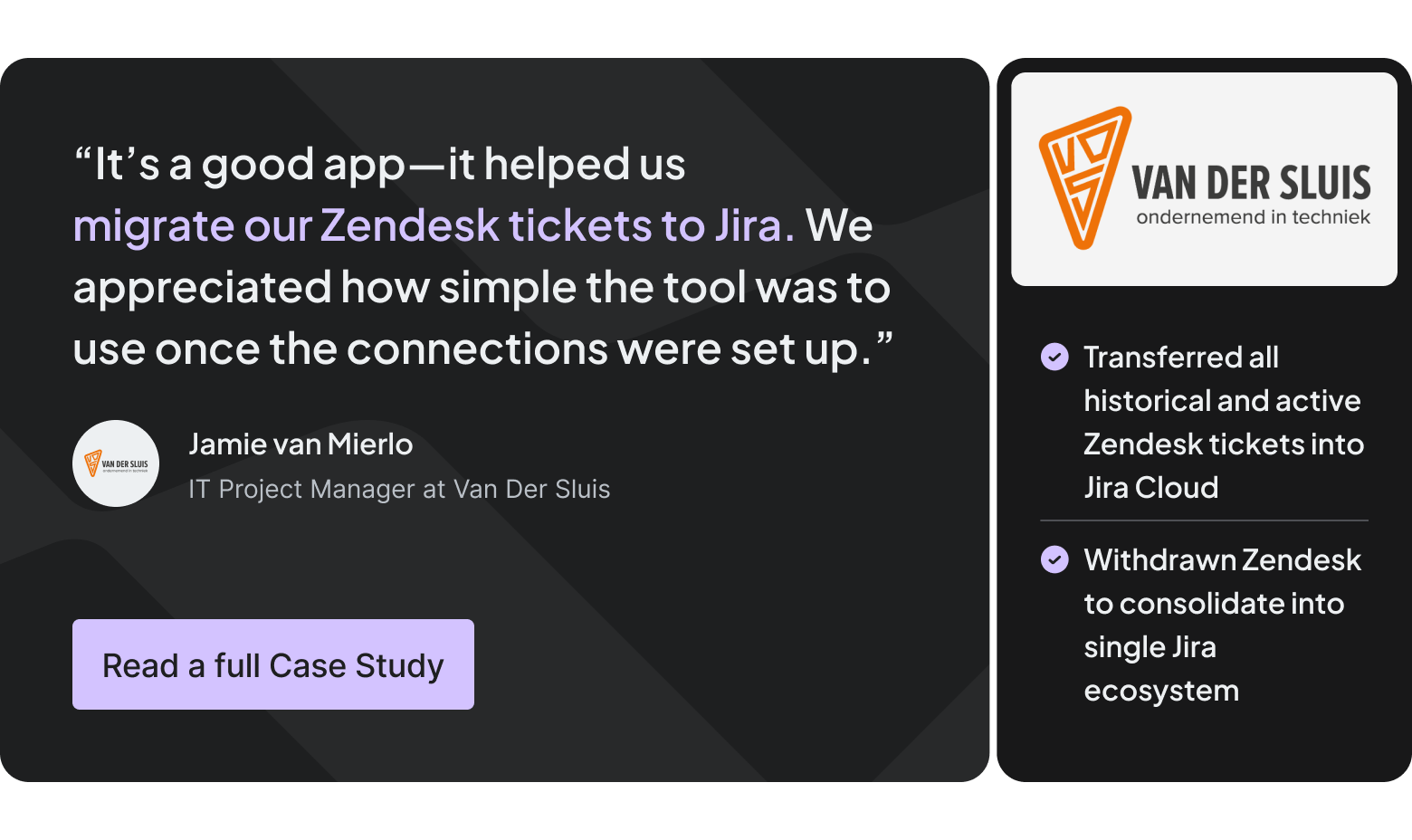
Van Der Sluis, a Dutch construction and technical services company, consolidated its support operations in Jira Cloud. Using Getint, it migrated historical and active tickets while preserving comments, priorities, custom fields and attachments.
This let the company leave Zendesk while keeping the support history its operations depend on. Read the Van Der Sluis Zendesk to Jira migration case study.
How Getint supports Zendesk integrations and migrations
Getint is a no-code and low-code integration platform for synchronizing and migrating data between business applications. It supports three common scenarios: moving historical data off Zendesk, connecting Zendesk with another tool, and running both systems side by side during a transition.
- Integration: support keeps working in Zendesk while developers work in Jira or Azure DevOps; statuses, comments and other supported fields stay in sync.
- Configurable sync: one-way or bidirectional synchronization, field and status mapping, selective sync and monitoring.
- Migration: historical tickets move into supported destinations, including Jira Cloud.
- Security: SaaS or fully on-premise deployment, with ISO 27001, ISO 27018, SOC 2 Type II and GDPR compliance.
Explore Getint's Zendesk integrations or discuss your requirements with an integration expert.

Final thoughts: which Zendesk alternative should you choose?
Pick the platform that matches your channels, budget, automation needs and the systems your support work depends on, and include migration in the evaluation from day one. Preserving customer history and keeping connections to tools like Jira or Salesforce is often what decides whether a switch goes smoothly.
Considering a Zendesk migration or integration? Book a demo with Getint to discuss your workflows, destination platform and data migration requirements.
FAQ
What is the best Zendesk alternative in 2026?
It depends on the job. Freshdesk and Zoho Desk lead for a cheaper traditional help desk, Help Scout for small email-first teams, Intercom and Kayako for AI-led resolution, Gorgias for e-commerce, and Jira Service Management for IT and technical support.
Why do teams leave Zendesk?
The most common reasons are per-agent costs that grow with headcount, AI billed on top of seats (Copilot at $50 per agent per month plus per-resolution charges), and the admin effort needed to maintain triggers and automations in larger deployments.
Which Zendesk alternatives offer a free plan?
- Zoho Desk: free for up to 3 users.
- Help Scout: free for 5 users, 1 inbox, 1 Docs site and 100 contacts per month.
- Jira Service Management: free for up to 3 agents.
- HubSpot Service Hub: free tools for up to 2 users.
- ProProfs Help Desk: free for 1 agent.
- Freshdesk: a Free Program for 1–2 agents, limited to six months.
Free plans suit low volume; advanced AI, automation and extra channels usually need a paid plan.
How much cheaper are Zendesk alternatives?
Entry prices start at $7 per user per month (Zoho Desk Express) against Zendesk's $19 Support Team and $55 Suite Team. Total cost depends heavily on AI usage: at 10 agents and 1,000 AI resolutions a month, published rates put Help Scout at about $1,000 and Zendesk Suite Professional at about $2,500.
Which Zendesk alternative has the best AI capabilities?
Intercom's Fin AI Agent and Kayako's Kay focus on resolving conversations autonomously; Freshdesk's Freddy AI and Zoho Desk's Zia focus more on assisting agents. Compare answer quality, escalation, and the total cost of per-resolution pricing on your own tickets.
How long does it take to set up Zendesk compared with alternatives?
It depends on complexity. Small teams can be running on most help desks within weeks; large deployments with many integrations and data migrations can take several months on any platform, including Zendesk, Salesforce and Jira Service Management.
Are there Zendesk alternatives with on-premise options?
Zendesk is cloud-only. Jira Service Management is available as a self-managed Data Center edition. Integration platforms such as Getint can also run fully on-premise, which suits organizations with strict security requirements.
Is Jira Service Management a good alternative to Zendesk?
Yes, especially for IT teams, software companies and organizations where support often involves technical departments. It needs more configuration than simpler help desks, and consumer-facing phone support is better served by dedicated contact center platforms.
Can I migrate from Zendesk without losing my ticket history?
Yes. Migration platforms such as Getint can move historical tickets, comments, attachments, priorities and custom fields into supported destinations, including Jira Cloud. Test a small dataset first to catch mapping problems before migrating everything.