
Many organizations operate multiple Jira instances across their technology stack. A development team may manage agile work in one environment, while customer support relies on Jira Service Management in another. In larger enterprises or SaaS companies, partners, vendors, and subsidiaries may also maintain their own Jira Cloud instances.
When teams work in separate Jira environments, collaboration becomes more complex. Issues reported in one system often require action from another team working in a different instance. Without a structured way to connect those systems, teams often rely on manual copying of tickets, email communication, or improvised automation scripts. These approaches quickly lead to inconsistent information, delayed updates, and reduced visibility across projects.
To solve this problem, organizations implement different methods to share tickets between different Jira instances and maintain reliable data flows between systems. These solutions range from manual processes and API-based integrations to synchronization platforms that support bidirectional sync, custom field mapping, and security features.
In this guide, we explain:
- why companies operate multiple Jira instances
- how teams connect two Jira instances or multiple Jira Cloud instances
- the most common integration approaches used in real environments
- how organizations protect sensitive data, and critical information while sharing tickets
- best practices for maintaining reliable ongoing sync between systems
By the end of this article, you will understand how companies structure integrations between different Jira instances, what technical approaches are available, and how to choose the right solution for your organization.

Why Companies Run Multiple Jira Instances
Most organizations initially adopt one Jira instance for development or project tracking. Over time, however, operational complexity grows and different teams begin using Jira in different ways. As a result, companies often end up with multiple Jira instances or separate Jira environments.
Several common scenarios lead to this situation.
Organizational growth and team specialization
As companies scale, different teams develop specialized workflows that require independent configurations.
For example:
- a product team manages agile development in Jira Software
- support agents handle incidents and requests in Jira Service Management
- security or compliance teams may operate restricted projects for vulnerability tracking
Trying to maintain all workflows in one Jira instance can create administrative challenges. Separate instances allow teams to optimize workflows, permissions, and configurations for their specific needs.
Jira Cloud mergers and acquisitions
Corporate mergers frequently result in multiple Jira Cloud instances running simultaneously.
When two companies merge:
- each organization often already uses its own Jira environment
- migration into a single system may take months
- teams must collaborate across two Jira instances during the transition
To maintain visibility and coordination, organizations implement solutions that allow tickets to move between systems while preserving each environment.
Vendor and partner collaboration
External partners often work in their own Jira environment.
For example, a SaaS company might collaborate with:
- outsourced development teams
- external QA providers
- managed service partners
Instead of granting external users access to internal systems, organizations connect two Jira Cloud instances so each team can work in its own platform while sharing relevant tickets.
Infrastructure transitions
Another common scenario occurs during migrations between deployment models.
Organizations moving from Jira Data Center to Jira Cloud may temporarily operate multiple instances while migrating projects and workflows.
During this period, tickets must remain synchronized between systems to ensure that teams continue working without interruptions.
The Core Problem: Jira Instances Do Not Communicate Natively
When teams operate in different Jira instances, the systems function independently. A ticket created in Jira A does not automatically appear in Jira B, even if both tickets relate to the same work item.
Without an integration strategy, organizations encounter several operational problems.
Manual copying of tickets
The most common early workaround is manual copying of information between systems.
Typical workflow:
- A support agent receives a customer issue in Jira Service Management
- The issue must be recreated for the development team in another instance
- Updates must be manually transferred between both tickets
While this method works temporarily, it quickly becomes inefficient as ticket volumes increase.
Information fragmentation
When teams rely on manual transfers, important data can become scattered across systems.
Common examples include:
- attachments or screenshots
- acceptance criteria and technical details
- internal notes used by support teams
- updates about critical bugs
If these details are not consistently transferred between systems, teams may work with incomplete information.
Reduced visibility across teams
A lack of synchronization also affects project visibility. When tickets live in separate Jira instances, project managers cannot easily track dependencies across teams. Updates made by the development team may not reach the support team in time, and resolution times suffer.
As organizations scale their workflows across departments and partners, maintaining consistent ticket information becomes essential.

How Companies Share Tickets Between Different Jira Instances
Organizations typically adopt one of several approaches to connect multiple Jira instances and ensure consistent data across systems.
These approaches differ in terms of automation, flexibility, and long-term maintenance requirements.
1. Manual Ticket Sharing (Temporary Solution)
The simplest approach to sharing tickets between two instances is manual transfer.
Teams may exchange information using:
- manual copying of tickets
- CSV exports and imports
- shared documents or spreadsheets
- email notifications
This method is sometimes sufficient for small projects where collaboration between teams is limited.
Real world application example: A product team occasionally forwards a ticket to an external partner working in another Jira system.
Limitations of manual sharing
Manual transfer quickly becomes inefficient when ticket volumes increase. Typical problems include:
- duplicated tickets across systems
- missing status updates
- lost attachments or comments
- inconsistent priorities and fields
Because of these limitations, most organizations eventually look for automated solutions to manage ongoing sync between Jira instances.
2. Jira Automation and REST API Integrations
Some companies build integrations using Jira Automation and Jira's REST API. These integrations allow teams to automatically transfer ticket data between two Jira Cloud instances.
Automation rules can trigger events such as:
- ticket creation
- status updates
- comment additions
- field changes
When these events occur, automation can call the REST API to create or update tickets in the other instance.
Advantages of API-based integrations
Using APIs allows organizations to:
- automate repetitive processes
- integrate Jira with external systems
- build customized workflows
This approach provides flexibility for organizations with strong development resources. However, API integrations require continuous monitoring and maintenance.
Common challenges include:
- managing authentication between systems
- maintaining custom field mapping
- processing incoming data correctly
- updating scripts when workflows change
As systems evolve, integrations must be updated to maintain reliable data flows between instances.
3. Script-Based Synchronization
Some organizations build script-based integrations that synchronize tickets between multiple Jira instances.
These solutions rely on Groovy based scripts, custom logic, and synchronization rules. They allow administrators to implement advanced behaviors, including:
- complex field mappings between systems
- data transformations before creating tickets
- conditional logic for specific workflows
- automated conflict resolution
For example, a script might transform incoming priority values to match the workflow of another Jira environment.
Benefits of script-based integrations
Script-based approaches offer:
- full control over integration behavior
- ability to implement custom connectors
- strong granular control over data transformations
However, they also introduce additional complexity. Maintaining scripts requires technical expertise, monitoring, and continuous updates when Jira configurations change.
4. Integration Platforms for Connecting Multiple Jira Instances
Because manual processes and script based customization become difficult to maintain at scale, many organizations adopt specialized tools designed to connect Jira instances and maintain reliable data synchronization.
These integration platforms automate how tickets move between systems and ensure that updates remain consistent across environments. Instead of manually transferring information, administrators configure connections between systems and define sync rules that control how work items should synchronize.
One example of such a solution is Getint, an integration platform designed specifically for synchronizing work items between project management and ITSM systems.
Getint supports integrations between:
- Jira Cloud instances
- Jira Service Management
- Jira and Git repositories (GitHub, GitLab, Azure DevOps)
- Jira and tools such as Azure DevOps, Salesforce, ServiceNow, GitHub, GitLab, Zendesk, Freshservice, Freshdesk
- Jira and multiple project management platforms used by different teams like Monday, Asana, Hubspot, Clickup, Airtable, Notion, Trello, Wrike
- beyond-Jira integrations (ADO Freshservice/Freshdesk, ADO ServiceNow, ADO Trello, Salesforce Freshdesk, ADO Airtable, and many more).
This makes it possible to maintain ongoing synchronization between separate Jira environments while keeping each team inside its own system.
Creating connections between Jira instances with Getint Integration Solution
With integration platforms like Getint, administrators can create a new connection between two Jira environments and define how data should move between them.
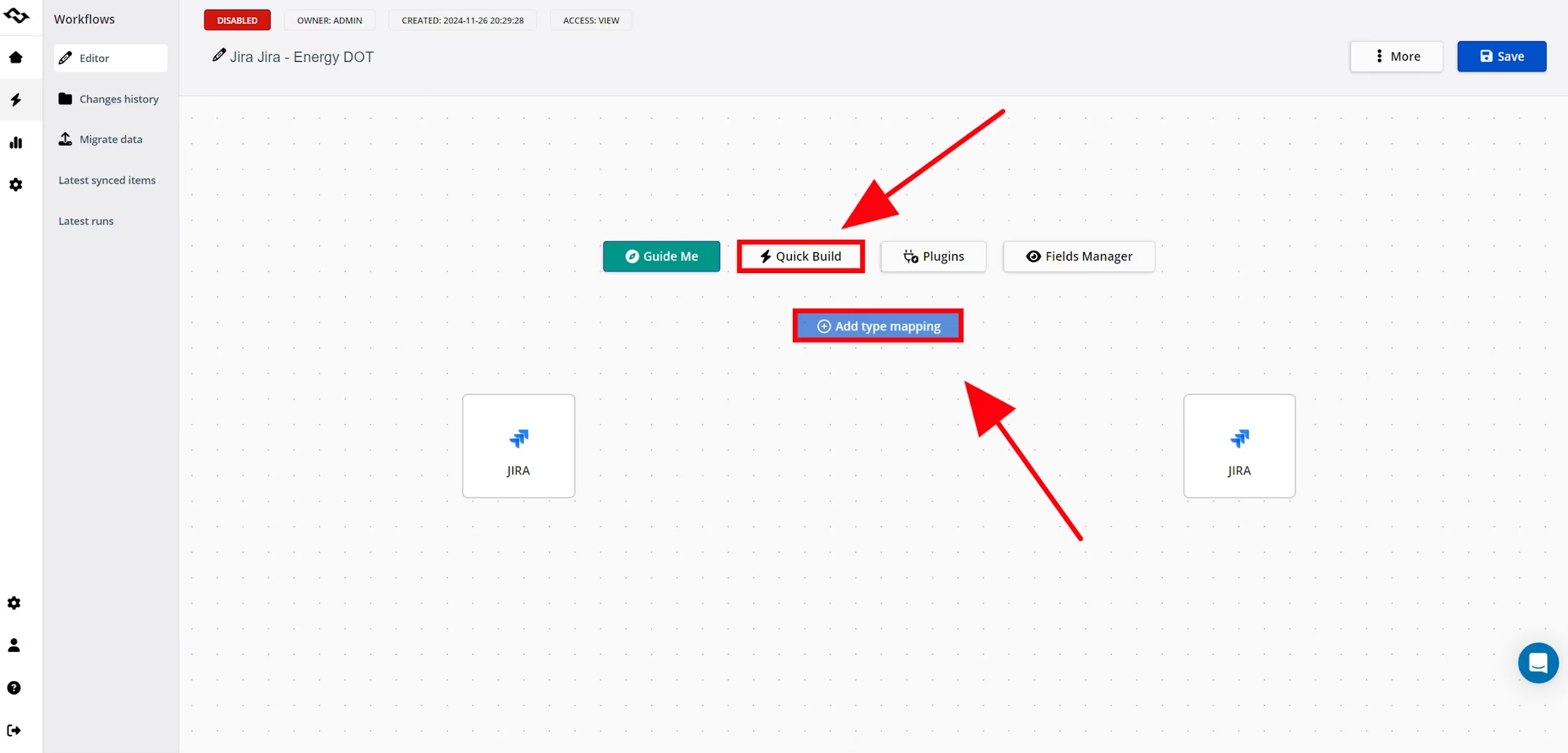
These integrations typically include:
- configurable sync rules
- type and field mapping
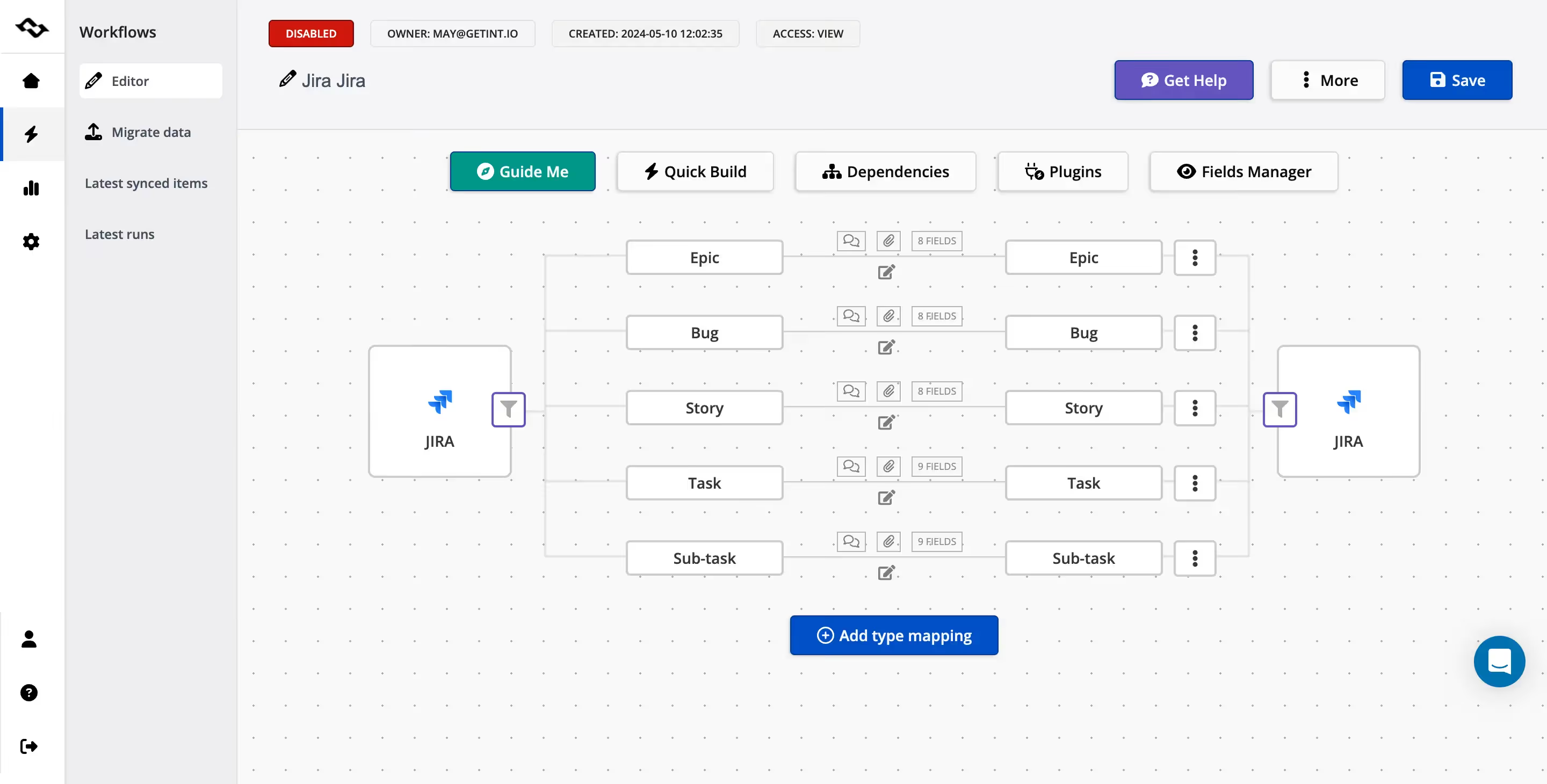
- automated data transformations
- monitoring of sync status
Once configured in a few minutes, the integration maintains an ongoing sync so updates propagate automatically between systems.
For example:
- A support ticket is created in Jira Service Management
- The work item automatically appears in another Jira project used by the development team
- Developers update the ticket while investigating the problem
- Updates synchronize back to the support environment
This bidirectional data flow ensures both teams always see the latest ticket status.
Bidirectional sync between Jira instances
A key capability of modern integration solutions is bidirectional sync. With bidirectional data flow, updates can originate from either system. When a field changes in one Jira instance, the integration automatically propagates the update to the connected environment.
This approach allows different teams to work in separate Jira instances while maintaining a shared view of work progress.
For example:
- a support agent updates a ticket priority
- the change appears automatically in the developer's Jira instance
- the development team updates the work item status
- the support ticket reflects the change in real time
This eliminates the need for manual copying and reduces the risk of inconsistent ticket data.
Advanced configuration and custom field mapping
More complex environments often require advanced configuration options. Integration platforms like Getint allow administrators to configure:
- complex field mappings
- custom field mapping using JQL (Jira Query Language) filters

- conditional logic
- data transformations
These capabilities allow integrations to adapt data between systems with different workflows or schemas. For example, when data flows between two Jira environments:
- priority values may need translation
- workflow states may differ
- certain fields may need filtering
Integration platforms can automatically transform incoming data to match the structure of the destination system.
This provides teams with granular control over how tickets move between environments.
Maintaining integrations with minimal ongoing maintenance
One of the main advantages of using a dedicated solution for Jira Jira integration is reducing the operational burden associated with maintaining custom scripts.
Instead of maintaining Groovy scripts, sync scripts, or API automation, administrators can manage integrations through configuration interfaces.
This simplifies:
- monitoring of sync status
- management of field mapping
- troubleshooting synchronization errors
As organizations scale their Jira environments and introduce new workflows, integration platforms help maintain stable data flows between multiple instances.
One of such examples can be Levare — the oil and gas industry which needed to remain compliant and continue working together along with their partner, and decided to connect two Jira instances to improve collaboration.
Read a full story: Making Two Jira Worlds Work as One: Levare’s Success Story

Security and compliance for cross-instance integrations
When companies synchronize tickets between different Jira instances, security and compliance become critical — especially when integrations involve external vendors or cross-company collaboration.
Getint includes built-in monitoring of sync status and automatic retries to ensure that updates are not lost if temporary connection issues occur. For organizations handling sensitive data, the platform also follows recognized security standards, including SOC 2 Type II, ISO 27001, ISO 27018 certifications, and provides detailed security documentation.

Best Practices for Sharing Tickets Between Multiple Jira Instances
Organizations that successfully maintain integrations across many Jira instances usually follow a few important best practices. These help ensure reliable synchronization while minimizing operational overhead.
Define clear synchronization rules
Before connecting different instances, teams should define exactly what data needs to be shared.
This includes deciding:
- which projects or ticket types should synchronize
- which fields should be included in the integration
- which updates should trigger synchronization
Clear sync rules prevent unnecessary data transfers and make integrations easier to maintain.
Keep field mappings consistent
Different Jira environments often use different custom fields, workflows, and naming conventions.
Maintaining clear field mapping documentation helps ensure that:
- fields match correctly between systems
- incoming data is interpreted properly
- workflow states remain consistent across instances
This becomes especially important when working with multiple Jira Cloud instances across different teams.
Protect sensitive data
When integrating separate Jira environments, organizations must carefully control what information is shared.
Best practices include:
- filtering internal notes that should remain private
- excluding sensitive attachments or customer data
- limiting access to confidential ticket fields
This ensures integrations allow collaboration while still protecting sensitive data.
Monitor synchronization status
Even automated integrations require monitoring. Administrators should periodically check:
- sync status
- synchronization logs
- failed updates or integration errors
Early detection helps teams resolve issues before they impact collaboration across systems.
Avoid unnecessary manual intervention
Well-designed integrations should maintain ongoing sync automatically.
If teams frequently need to manually correct tickets or update fields, it often indicates that synchronization rules or field mappings need adjustment.
Reducing manual intervention improves reliability and saves time across teams.
Conclusion
As organizations grow and collaborate across departments, partners, and external vendors, operating multiple Jira instances becomes increasingly common. While separate environments allow teams to maintain independent workflows and security controls, collaboration still requires a reliable way to share tickets between different Jira instances.
Without integration, teams often rely on manual copying of tickets or improvised automation scripts. These approaches quickly create inconsistent data, fragmented communication, and limited visibility across teams.
To solve this problem, companies typically adopt structured integration approaches that allow work items to move between systems while keeping each environment independent. Solutions such as Jira Automation, REST API integrations, script-based synchronization, or dedicated integration platforms like Getint enable organizations to connect two Jira instances or even multiple Jira Cloud.