
A customer files a ticket in Freshdesk. It's a bug, so it needs to become work in Azure DevOps — the tool engineering actually uses to plan, code, and ship. Someone retypes it. A few days later the fix ships, but nobody updates the original ticket, because closing that loop was never really anyone's job.
That's the gap most support-to-engineering handoffs fall into, and it's the reason more teams are asking how to connect these two systems properly instead of patching it with Slack messages and copy-paste updates. This guide covers why teams connect Azure DevOps and Freshdesk, where Azure DevOps sits inside the broader Microsoft Azure ecosystem, and how to set up a working Azure DevOps Freshdesk integration step by step with Getint.
.png)
Why Azure DevOps and Freshdesk Integration Matters
Freshdesk and Azure DevOps handle two different jobs, and many organizations run both at once:
- Freshdesk is where customer or employee-reported issues live — tickets, SLAs, replies, and agent assignments.
- Azure DevOps is where the actual fix gets built — work items, sprints, repos, and releases.
When these two run in isolation, the same problem shows up on both sides:
- A Freshdesk ticket sits on "Open" long after the linked Azure DevOps task is resolved, because nobody circled back to update it.
- Support agents interrupt developers just to ask for a status check.
- Screenshots and customer data context stay in Freshdesk while the technical discussion happens entirely in Azure DevOps comments.
- As ticket volume grows, someone effectively becomes a full-time relay between the two systems.
A proper integration removes that manual relay by creating a shared data layer, so support keeps an accurate view of engineering progress without asking developers to work inside a helpdesk operating system.
Azure DevOps in the Microsoft Azure Ecosystem
It helps to place Azure DevOps in context. It's one part of Microsoft Azure, a broad cloud computing platform that spans far more than just work tracking.
The Azure Services Landscape
Under the same umbrella as Azure DevOps, organizations typically run a mix of Azure services:
- Azure App Service and Azure Functions for web apps,
- Azure SQL and Azure Cosmos DB for data,
- Azure Kubernetes Service and Azure Container Instances for running workloads,
- Azure Virtual Machines for general-purpose compute,
- Azure Data Factory and Azure Databricks for data analytics,
- and Azure AI and Azure Machine Learning for building AI services on top of it all.
Identity and access across this stack typically runs through Azure Active Directory, managed from the Azure portal alongside everything else in an organization's Azure subscription.
Why This Matters for a Freshdesk Ticket
For teams that treat Azure as their primary cloud provider, Azure DevOps is usually the operational hub tying that cloud infrastructure together — pipelines deploy to Azure App Service or Azure Kubernetes Service, work items track changes to Azure Cosmos DB schemas or Azure Logic Apps workflows, and the same Azure DevOps team managing application code is often also the team managing cloud resources day to day.
That's exactly why a bug reported in Freshdesk so often needs to land as an Azure DevOps work item: the fix isn't just a code change, it may touch a specific Azure service the product depends on. Connecting the two systems means support doesn't need to understand the underlying Azure platform to report an issue — engineering just needs the ticket to reliably become trackable work.
Main Ways to Connect Azure DevOps and Freshdesk
There are a few different paths to linking the two systems, and they don't all offer the same level of reliability.
Manual Process
The default, in the absence of any integration: someone reads the Freshdesk ticket and manually creates a matching Azure DevOps work item, then checks back periodically to update the customer.
This approach may work for small teams with low ticket volume, but quickly becomes difficult to manage as requests increase.
Custom REST API Integration
Both platforms expose REST APIs, so a technical team can build something custom — generating API keys, writing scripts to poll or push data, and handling the translation between a Freshdesk ticket and an Azure DevOps work item themselves.
This is flexible but comes with real maintenance overhead: someone has to own the script, handle edge cases, and update it whenever either platform changes its API.
Dedicated Integration Tools
Most organizations end up choosing a dedicated Azure DevOps integration app built specifically for this kind of sync. Tools like Getint provide:
- No-code or low-code setup
- Two-way synchronization instead of one-off triggers
- Visual field and type mapping
- Filtering and workflow control
- Deployment as SaaS or on-premise, depending on data residency needs
And this is the approach the rest of this guide walks you through.

Where Your Support Data Actually Lives
A Freshdesk ticket often contains more than a bug description — names, email addresses, screenshots, sometimes account or billing details a customer included without thinking twice. Once that ticket starts syncing to Azure DevOps, the question isn't just "does it work," it's "where does this data go, and who can see it along the way."
The honest answer depends on which deployment model you pick:
Whichever model you pick, the following protections apply:
- data moving between Azure DevOps and Freshdesk is encrypted in transit,
- anything stored — sync logs, configuration, credentials — is encrypted at rest,
- log retention is also adjustable, from a few days up to extended retention on request, or disabled outright if you'd rather nothing persist beyond what's needed to run the sync.

For teams that need it verified rather than taken on faith, Getint holds ISO 27001 and ISO 27018 certification and has completed a SOC 2 Type II audit, with current status published on Getint's Trust Center rather than just asserted in a blog post. Access on both ends is controlled through revocable API credentials and role-based permissions, so connecting the two systems doesn't mean handing over broader access than the sync actually needs.
How the Integration Works
A working Azure DevOps–Freshdesk integration is really three layers stacked on top of each other.
1. Connection. You authenticate both platforms — an Azure DevOps Personal Access Token on one side, a Freshdesk API key on the other — establishing a secure link with no data flowing yet.
2. Mapping. You decide how objects and fields translate between systems: which Azure DevOps work item type becomes which Freshdesk ticket type, and which fields on each side actually correspond to each other.
3. Sync logic. You decide direction and conditions — which statuses trigger what, whether comments and attachments move one-way or both ways, and which items are even eligible to sync in the first place.
Get these three layers right, and updates stop needing a person to carry them between tools.
Setting Up Azure DevOps and Freshdesk Sync with Getint
This walkthrough uses Getint's on-premise option; the SaaS flow through app.getint.io follows the same steps behind a different entry screen, and a 30-day free trial is available either way.
For more detailed guide, click below and watch our full video tutorial.
Step 1: Generate an Azure DevOps Personal Access Token
In Azure DevOps, open User Settings → Personal Access Tokens → New Token. Set an expiration date with some runway, select the scopes Getint's documentation recommends, and copy the token — you'll enter it as the password when connecting Azure DevOps.
Step 2: Get a Freshdesk API Key
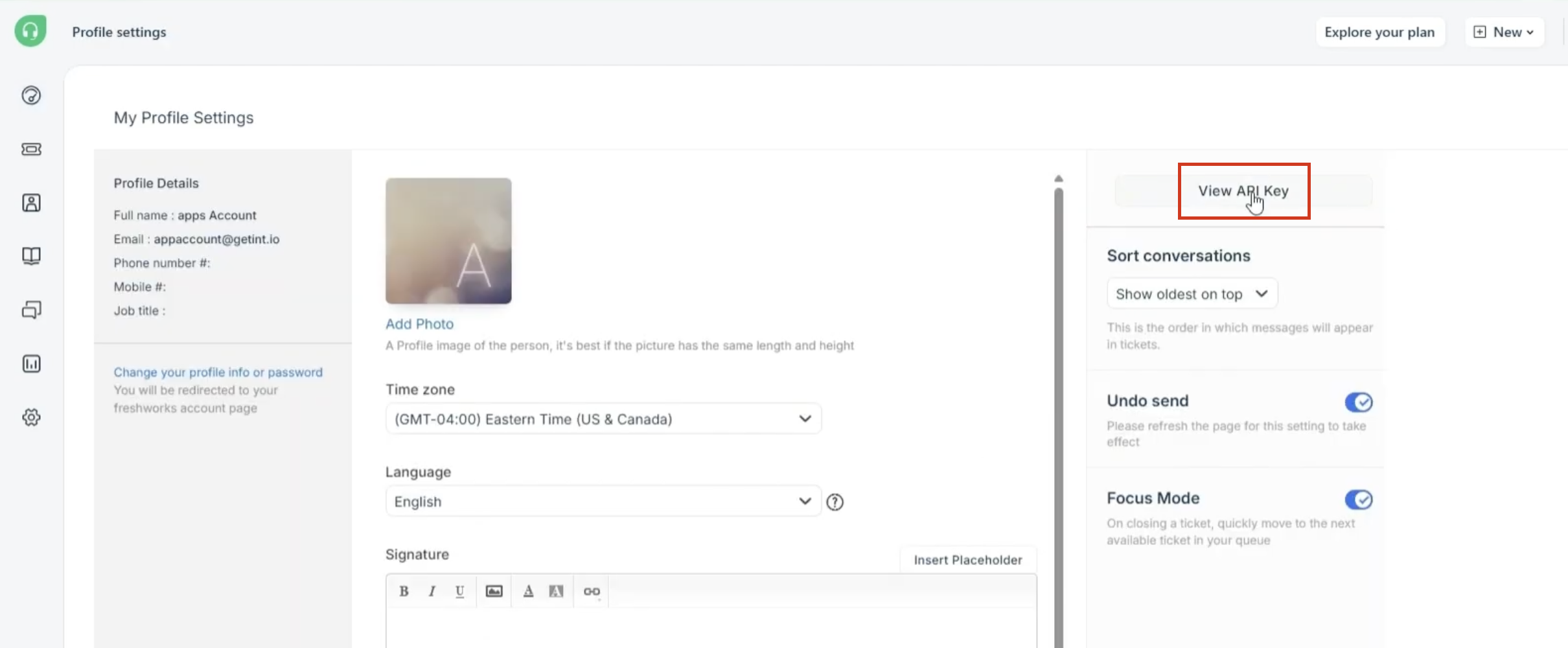
In Freshdesk, click your profile icon → Profile Settings → View API Key, and copy it along with your account URL.
Step 3: Connect Both Accounts in Getint
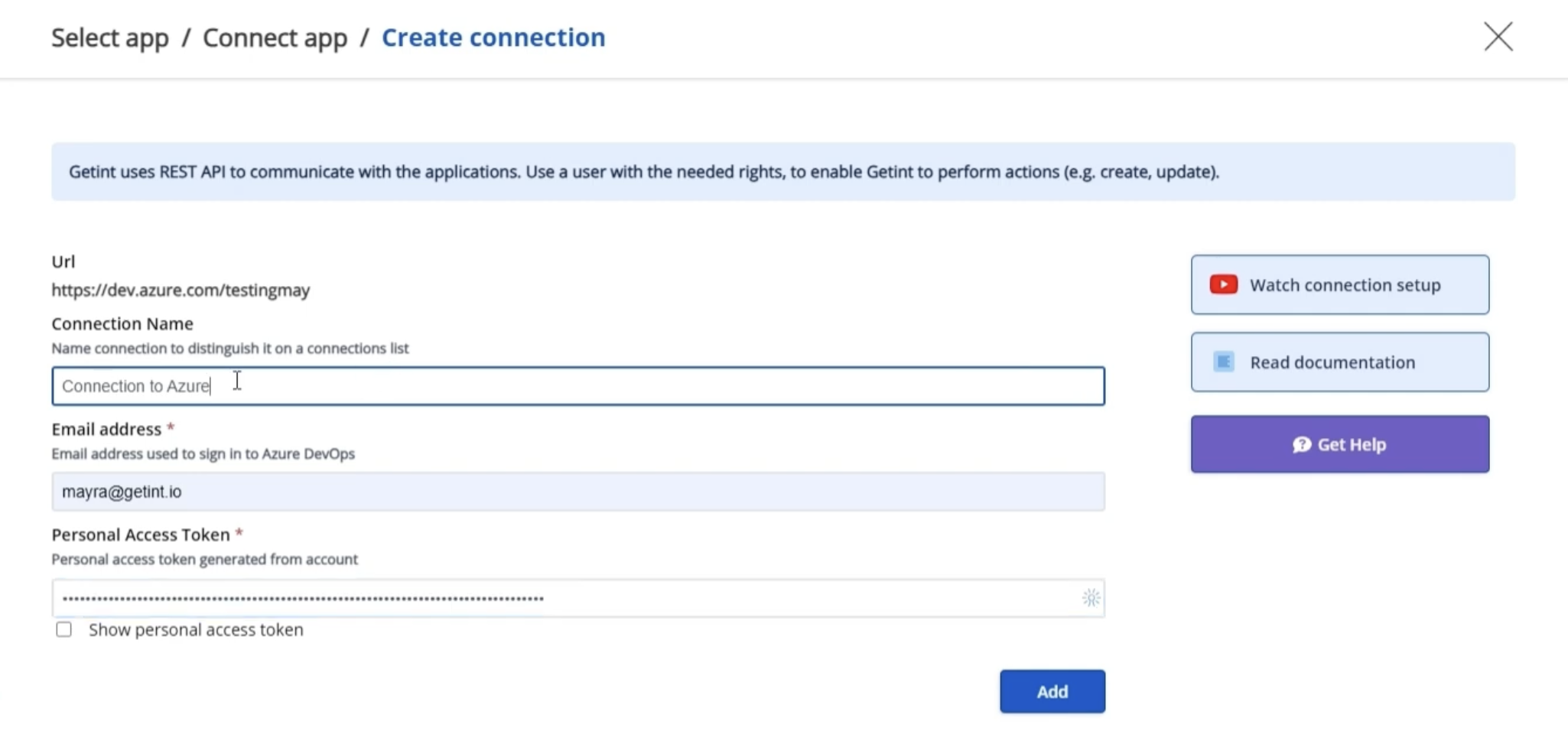
Create a new integration, connect Azure DevOps first (organization URL, name, email, PAT), then connect Freshdesk (URL and API key). No data syncs yet — this step just establishes the accounts.
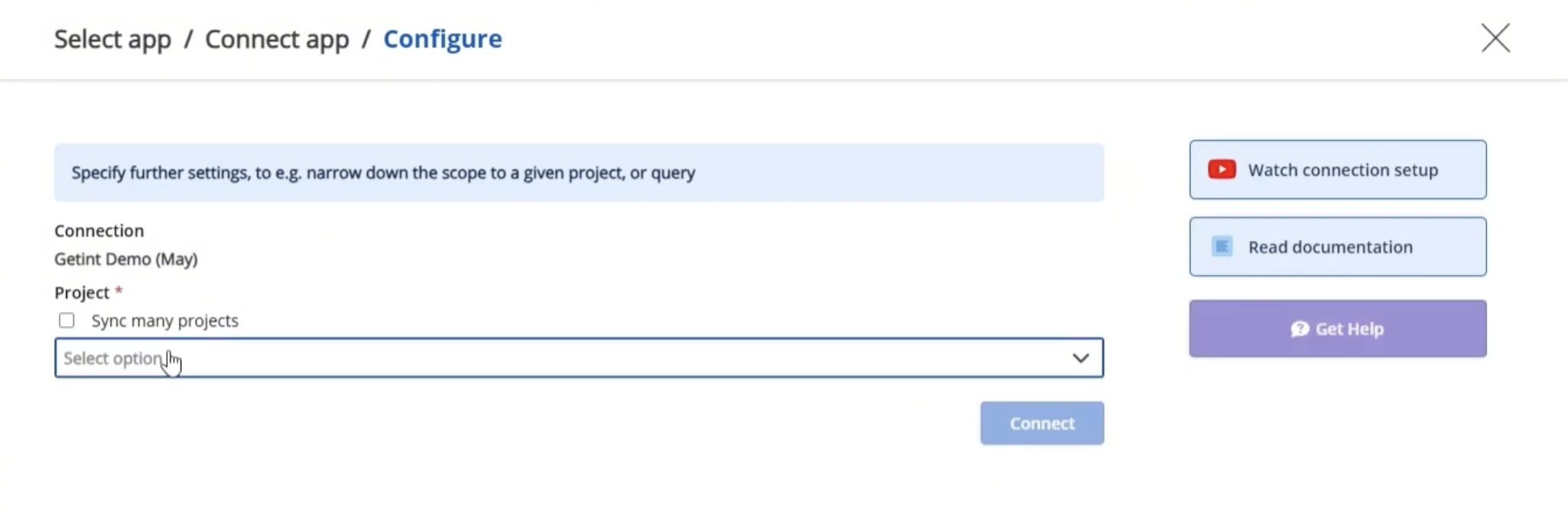
Step 4: Select Your Azure DevOps Project
Choose the specific project (or connect many projects) that should sync with Freshdesk.
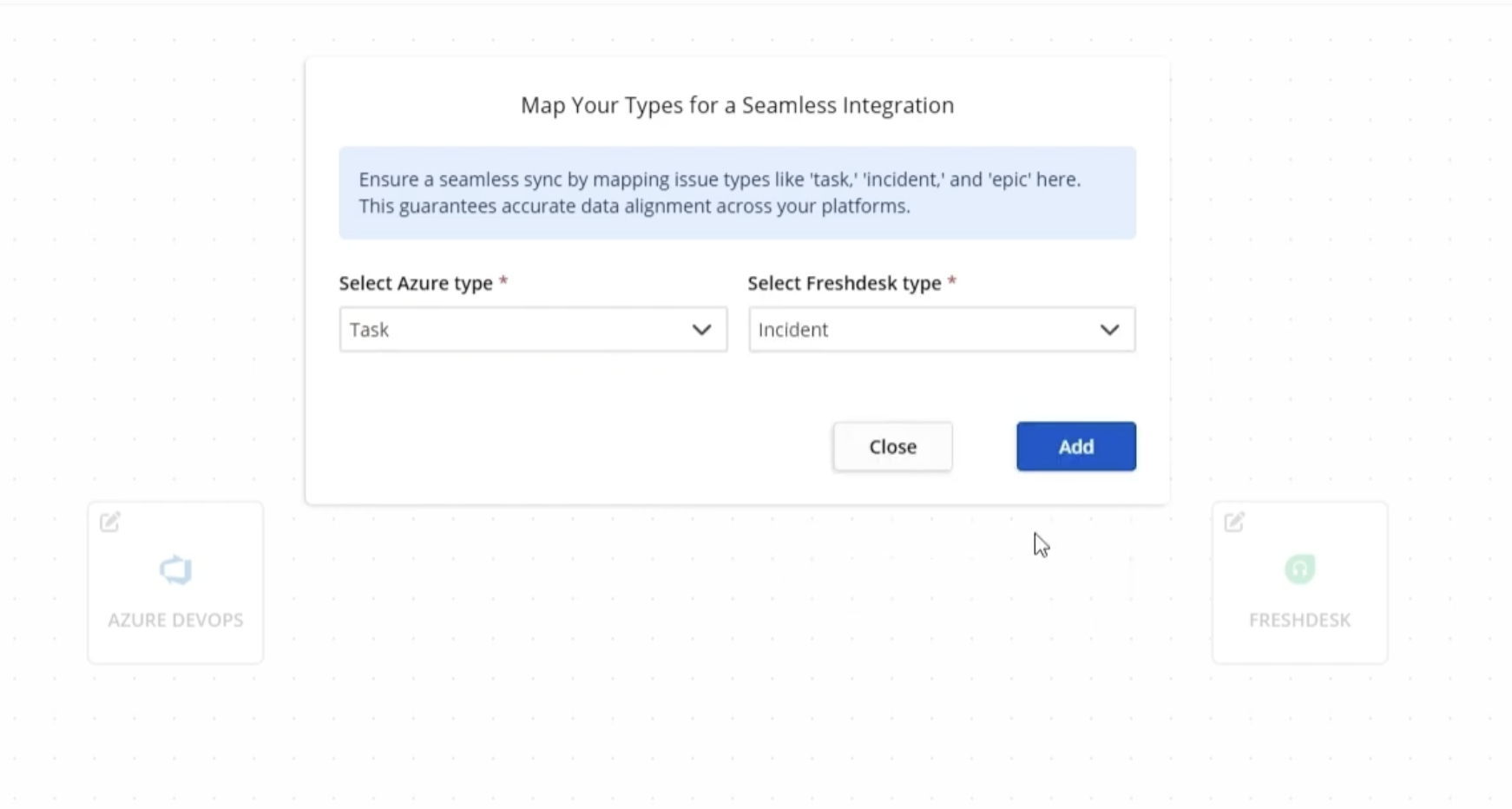
Step 5: Map Work Item and Ticket Types
Pair an Azure DevOps work item type with a Freshdesk ticket type — Task to Incident is the most common starting point. Add more pairs if different item types need different handling.
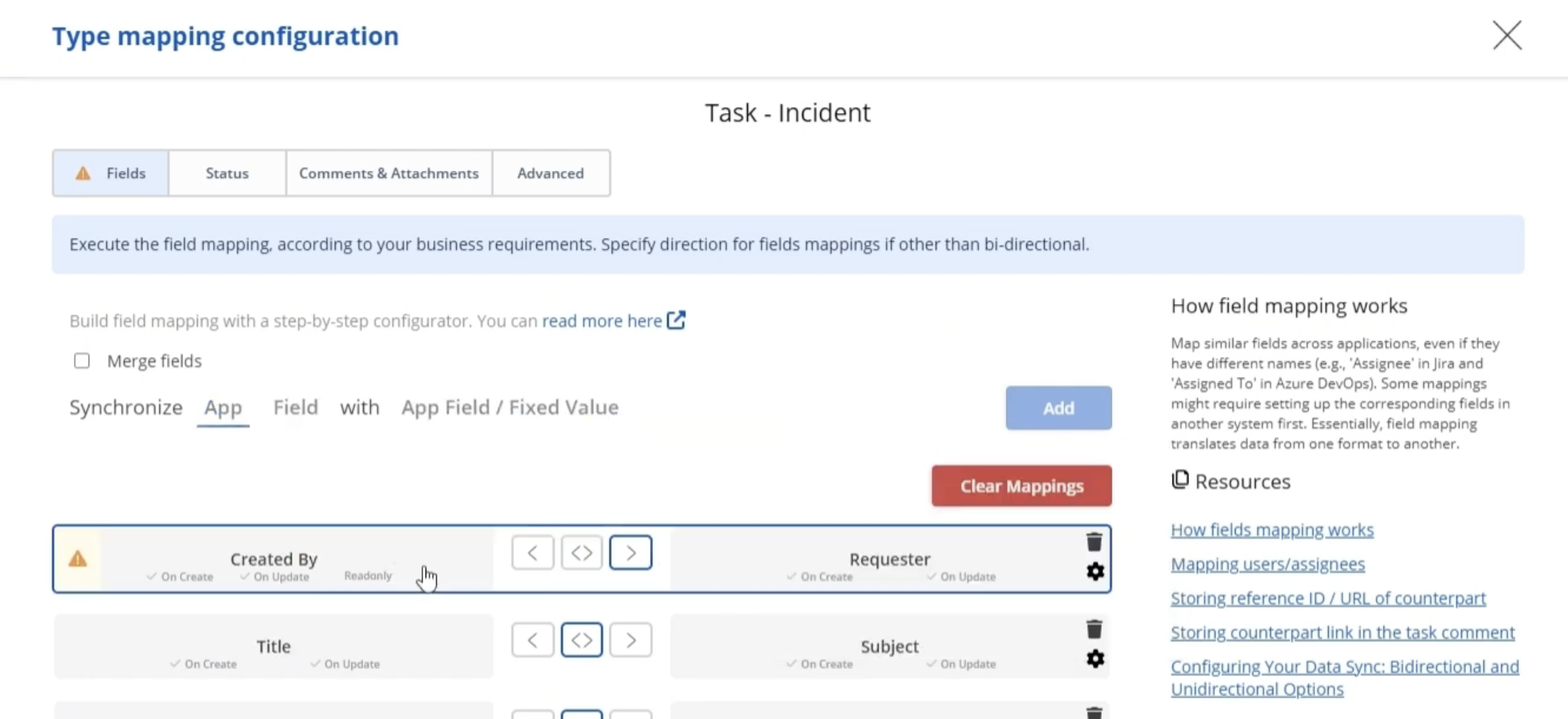
Step 6: Map the Required Fields
A few Azure DevOps fields need to line up with specific Freshdesk fields before sync will work correctly:
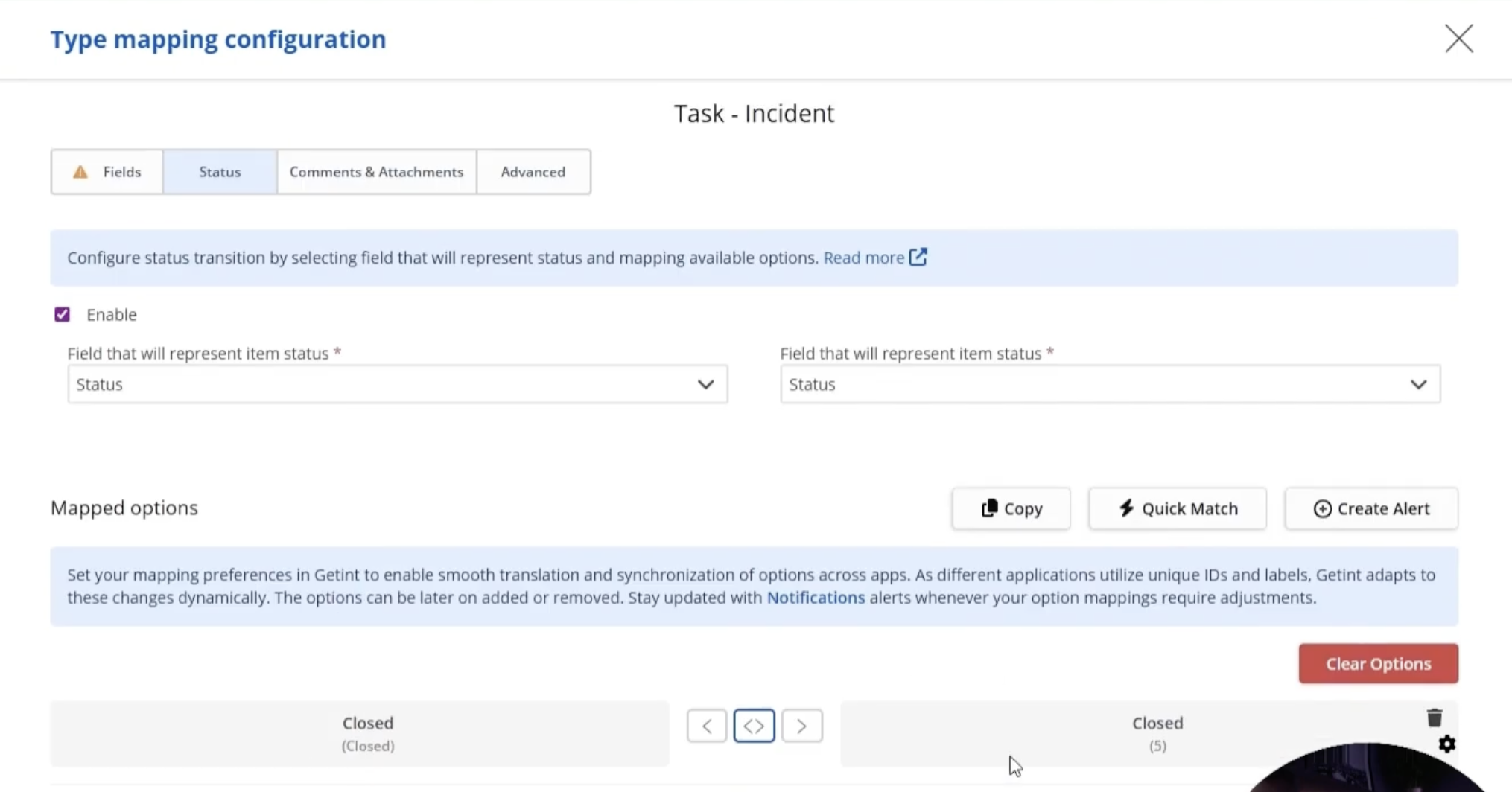
Step 7: Map Statuses
Multiple Azure DevOps states can collapse into a single Freshdesk status — for example, both "Active" and "New" mapping to "Open." Each status pairing can also be set to sync in only one direction, if a closure on one side shouldn't automatically close the other.
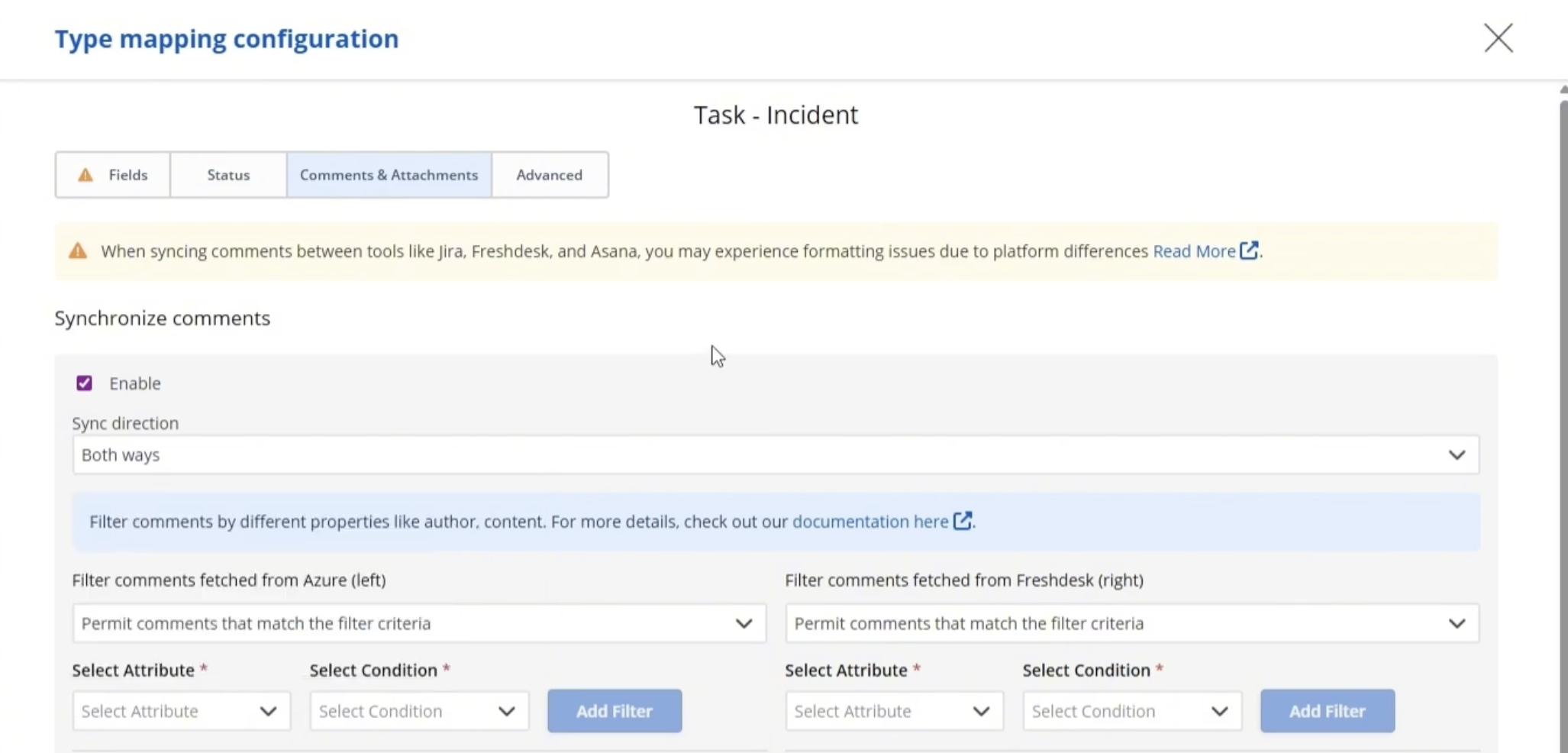
Step 8: Turn On Comments and Attachments
Enable each separately and choose one-way or both-way sync depending on how support and engineering actually collaborate.
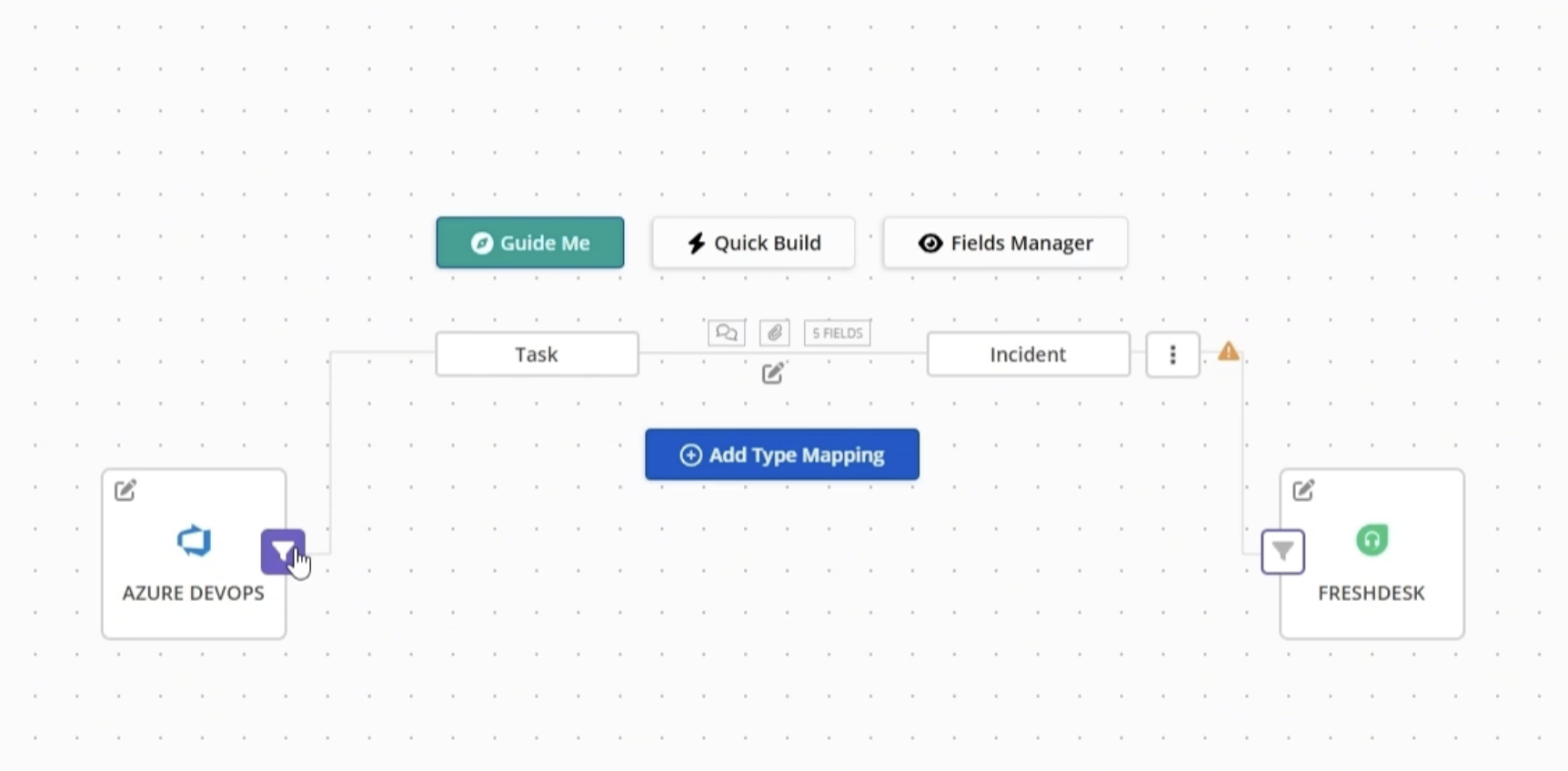
Step 9: Apply Filters if Needed
Restrict what syncs — by tag, label, or another field — so the integration doesn't flood Azure DevOps with low-priority tickets. Filters can apply to All, New, or already-Synced items on either platform.
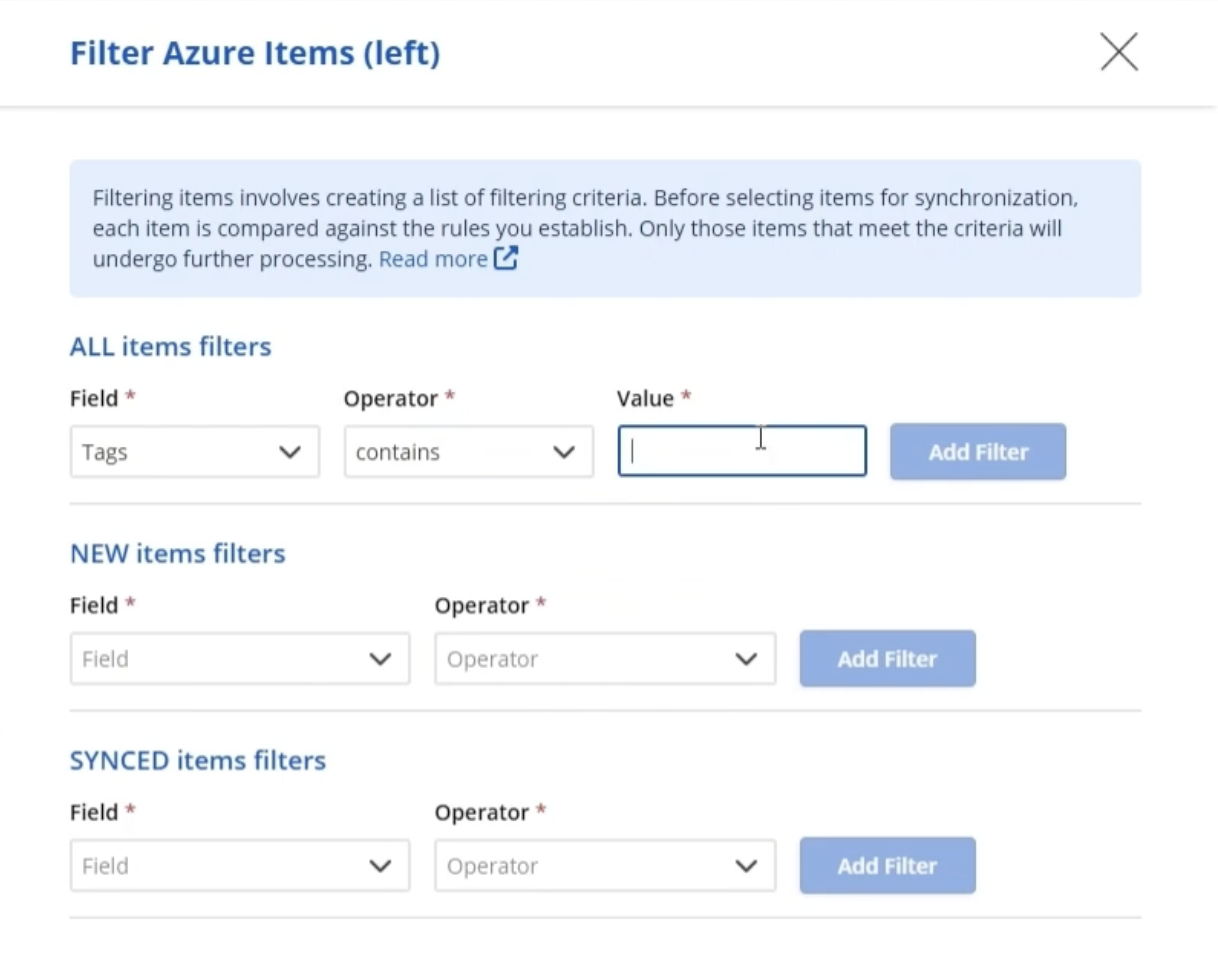
Step 10: Save, Test, and Monitor
Name and save the integration, create a test ticket or task, and check Latest Runs to confirm the sync worked as expected. On-premise deployments typically run on a short interval — often every minute — so a new item shows up on the other side within a run or two.
A Limitation Worth Planning For
Like most integration platforms, Getint doesn't synchronize deletions automatically. Removing a work item in Azure DevOps won't delete the linked Freshdesk ticket, or vice versa. In practice, most organizations solve this by introducing a dedicated status such as "Removed" or "Cancelled," which provides a clear audit trail instead of permanently deleting records.
Common Use Cases
- SaaS and software companies, where customer-reported bugs and feature requests routinely need to become tracked Azure DevOps work.
- IT, Cloud service providers and MSPs, escalating client-reported incidents into an internal engineering backlog.
- E-commerce and fintech platforms, where a payment or checkout issue needs fast, visible engineering follow-up rather than a ticket that goes quiet.
- Internal IT and helpdesk teams, routing employee-reported issues from Freshdesk directly into the Azure DevOps boards the platform team already uses — including issues tied to specific Azure services, cloud resources, or access management requests handled through Azure AD.
What to Look for in an Azure DevOps Freshdesk Integration Tool
Not every integration solution offers the same level of flexibility. Before selecting a platform, consider whether it supports the capabilities your teams will actually rely on as workflows evolve.
- True two-way sync, not a one-time trigger that only handles creation.
- Flexible field and type mapping, including custom fields on both sides.
- Granular sync direction control per field or status.
- Filtering, so only relevant tickets and work items sync.
- A deployment model that matches your data policies — SaaS, on-premise, or a dedicated tenant — rather than a one-size-fits-all cloud connection.
- Verifiable security claims, not just marketing copy — check whether certifications are published somewhere you can actually confirm, like a live trust center.
- Visible sync logs, so teams can trust the integration instead of quietly double-checking it by hand.
Final Thoughts
Connecting Azure DevOps and Freshdesk is about giving support and engineering teams a shared view of the same work without relying on manual updates, emails, or status checks.
Whether you choose a native integration, custom API integration or a dedicated integration platform, the most important factors are reliable two-way synchronization, flexible mapping, and visibility into every sync. Those capabilities help teams reduce manual work, improve collaboration, and ensure Freshdesk and Azure customers always receive accurate updates.
For organizations looking for a faster implementation, solutions like Getint provide a no-code approach that can be configured in minutes while supporting both SaaS and on-premise environments.