
Search for a cloud integration platform, and you'll find tools that can connect many of the same applications yet deliver very different results. One may consolidate customer and financial data into a warehouse, another automates actions across SaaS tools, while a third keeps ServiceNow incidents and Jira work items synchronized as teams collaborate. These differences matter when integrations become part of everyday business operations.
Cloud integration services connect applications, databases, and on-premises systems to exchange data and coordinate workflows. Depending on the use case, this can involve building data pipelines, automating business processes, or maintaining two-way synchronization between applications. Integration solutions also differ in their approach to security, deployment, customization, and scalability.
This guide compares eight cloud integration platforms, including Getint, Workato, Boomi, MuleSoft, and others. We'll explore how they work, where each solution fits best, and what to consider when choosing an integration platform for your business.
What Are Cloud Integration Services?
Cloud integration services help organizations connect disparate systems so applications can exchange data and participate in shared business processes. These services support communication between cloud applications, databases, APIs, and on-premises systems, reducing the need for employees to transfer information manually.
Imagine a company using Salesforce to manage customer relationships, ServiceNow for IT service management, and Jira for software development. When a customer reports a technical issue, the support team may need to involve developers. With cloud application integration, relevant incident details can be transferred to Jira automatically, while updates from the development team become available to support agents. Each department continues working in its preferred application, with the integration maintaining the exchange of information.
Cloud integration services typically cover several activities:
- Integration consulting: Assessing existing systems, identifying business requirements, and designing an integration strategy.
- Application integration: Connecting software applications to synchronize records and automate business processes.
- Cloud data integration: Moving, combining, or transforming information from multiple data sources for reporting and analytics.
- API integration and management: Establishing secure communication between applications through APIs.
- Implementation and maintenance: Configuring integrations, monitoring performance, troubleshooting errors, and adapting workflows as requirements change.
Organizations can access these capabilities through cloud integration platforms, custom middleware, or professional integration services. The right approach depends on the systems involved, the complexity of the required workflows, and the resources available to maintain them.

Cloud Integration Services vs. Cloud Integration Platforms
Although these terms are frequently used together, they describe different aspects of connecting business systems.
Cloud integration services describe the work involved in planning, implementing, and maintaining integrations. This may include consulting, configuration, development, testing, and ongoing technical support. A company might engage an integration specialist to connect an existing ERP system with several cloud applications or to modernize an outdated integration architecture.
A cloud integration platform, meanwhile, provides the software infrastructure used to create and operate those connections. It typically includes application connectors, data mappings, synchronization rules, monitoring capabilities, and automation tools.
One common approach is Integration Platform as a Service (iPaaS), which provides a managed environment for building and running integration workflows. Instead of maintaining separate custom middleware for every new connection, organizations can use an iPaaS platform to standardize how applications communicate. Many platforms also provide low-code or no-code interfaces, allowing business users and IT administrators to configure integrations without developing every workflow from scratch.
Professional services and integration platforms often work together. A company might select an iPaaS solution and engage a consultant to configure complex workflows, handle legacy systems, or establish security requirements.
How Does Cloud Integration Work?
Basically, cloud integration establishes communication between source systems and target applications, then applies rules that determine what information should be exchanged and when. These connections typically rely on APIs, prebuilt connectors, webhooks, or scheduled synchronization processes.
The integration platform manages the underlying data flow, including authentication, field mappings, transformations, and error handling. Depending on the solution, organizations can configure straightforward data transfers or more complex workflows involving multiple systems, conditional logic, and automated actions.
From Connecting Systems to Automating Data Flows
A typical cloud integration process involves five steps:
- Connect the applications. Establish authenticated connections using supported APIs, service accounts, tokens, or dedicated connectors.
- Define the data mappings. Identify which fields and records should correspond between systems, including how to handle different data formats.
- Configure integration logic. Decide whether updates should move in one direction or both, which events should trigger actions, and which records should be included.
- Activate the integration. The platform begins exchanging data according to configured conditions, schedules, or events.
- Monitor and maintain performance. Administrators review integration runs, investigate failures, and update the configuration when business requirements change.
Consider an organization connecting Jira with ServiceNow. An integration can map a ServiceNow Incident to a Jira Bug, synchronize priority and status fields, and share relevant comments between the two applications. When the engineering team changes the work item's status, that update can become available to the support team according to the configured synchronization rules.

Synchronization speed is an important consideration, especially for business-critical operations. Some cloud integration solutions support event-driven architecture, processing changes when particular events occur. Others check for updates at configured intervals, making real-time or near-real-time data synchronization dependent on the platform's architecture, API limits, and current workload.
Types of Cloud Integration
Cloud integration can be organized by the environments being connected and the kind of information exchanged. Understanding these distinctions helps businesses determine whether they need operational synchronization, centralized data management, or broader process automation.
Cloud-to-Cloud Integration
Cloud-to-cloud integration connects two or more cloud applications so they can share data and coordinate workflows. This is particularly common among companies using multiple SaaS tools for sales, marketing, IT operations, development, and project management.
For example, connecting a CRM platform with a customer support application allows employees to access relevant customer information without constantly switching between disconnected systems. More advanced integrations can also support bidirectional synchronization, custom field mappings, and automated updates across several cloud services.
While cloud-to-cloud connections are often easier to establish than integrations involving legacy infrastructure, their complexity increases when applications follow different business processes or use incompatible data structures.
Cloud-to-On-Premises Integration
Many organizations continue operating legacy systems or business-critical applications in their own data centers, particularly in industries where infrastructure control and data security are important.
Cloud-to-on-premises integration connects these existing systems with newer cloud applications, supporting cloud modernization without requiring companies to replace their entire technology environment. A business might connect a cloud-based CRM with an on-premises ERP system or integrate cloud project management software with a customer-managed development platform.
These implementations require careful consideration of network access, authentication, data security, and compatibility. Some integration solutions use gateways or agents to communicate with internal systems, while others offer customer-managed deployment options that provide greater control over the integration infrastructure.
The term hybrid integration is commonly used in the industry for architectures that combine cloud and on-premises systems, sometimes including applications operated by external partners.
Cloud Data Integration
Cloud data integration focuses on moving and combining information from different data sources, often to support business intelligence and analytics.
Consider a retailer that collects transaction data from an e-commerce platform, customer records from a CRM, and financial information from an accounting system. A data integration solution can process these sources through ETL (Extract, Transform, Load) or ELT (Extract, Load, Transform) pipelines, bringing the information into a centralized cloud data warehouse.
Once the data is collected and standardized, analytics tools can use it to generate reports, identify trends, and support business decisions.
Unlike operational application synchronization, data pipelines often prioritize processing large datasets, handling raw data, and maintaining reliable analytical records. Specialized infrastructure may be required to process extremely large workloads involving terabytes or petabytes of information.
Cloud Application Integration and Process Integration
Cloud application integration enables software applications to exchange operational information, while process integration coordinates activities across several systems as part of a broader business workflow.
Employee onboarding is a useful example. When a new employee joins a company, an automated process might create an HR record, initiate IT equipment requests, provision approved application access, and notify the relevant departments. Each action takes place in a different system, but the integration workflow connects them into one coordinated process.
These scenarios often combine application integration, workflow automation, and API management. For organizations using numerous cloud applications, this approach helps reduce fragmented operations and improves coordination between departments.
Key Benefits of Cloud Integration Services
The benefits of cloud integration extend beyond connecting applications. Well-designed integrations can improve everyday operations, reduce unnecessary work, and help organizations adapt as their technology environments grow.
1. Reduce Manual Processes and Operational Costs
Disconnected systems create repetitive work. Employees may need to copy customer information, update project statuses, transfer files, or confirm changes across several applications. Besides consuming time, these manual processes introduce opportunities for errors, particularly when the same information is maintained independently by different teams.
Automated integration workflows handle many of these activities without manual intervention. For example, when customer service and engineering applications are connected, teams can exchange relevant updates automatically instead of relying on emails or spreadsheets. Over time, this reduces operational overhead and allows employees to focus on work that requires their attention.
2. Improve Data Quality and Consistency
When different departments maintain separate versions of the same information, discrepancies are difficult to avoid. A completed task may still appear open in another application, or customer records may contain inconsistent details across sales and support systems.
Cloud integration helps address these problems through defined data mappings, validation rules, and synchronization processes. For analytics, organizations can combine information from multiple sources into a governed repository that serves as a reliable source of truth for reporting. For operational workflows, integration keeps relevant records aligned while allowing teams to continue working in their existing applications.
Maintaining data quality still requires clear ownership. Organizations need to establish which source systems are authoritative and how conflicting updates should be resolved.
3. Enable Faster Collaboration and Decision-Making
Access to current information allows teams to respond more quickly to customer requests, incidents, and changing business priorities. This becomes especially important when a single process involves several departments or external organizations.
For example, a support agent working with a customer can follow relevant development progress without repeatedly contacting the engineering team. Developers, in turn, receive the information they need to investigate the issue through their own project management tools.
With real-time or near-real-time data access, organizations can improve visibility and reduce delays caused by manual communication. The result is better coordination and more informed decisions across business functions.
4. Support Scalability and Business Agility
As organizations grow, they introduce new applications, expand their infrastructure, and connect additional departments or external partners. Integrations that work for a small software environment may become difficult to maintain when dozens of systems and business processes are involved.
A scalable cloud integration platform supports this growth through reusable connectors, configurable integration flows, and centralized management capabilities. Businesses can introduce a new cloud app, expand existing workflows, or adapt to organizational changes without necessarily rebuilding every connection from the beginning.
This flexibility is particularly useful during digital transformation initiatives, mergers, and cloud modernization projects, when older and newer systems may need to operate together for an extended period.
Cloud Integration Services and Platforms Compared
The cloud integration market includes enterprise iPaaS solutions, specialized synchronization platforms, workflow automation tools, and data integration services. Many provide overlapping capabilities, but their strengths reflect different approaches to solving integration challenges.
An enterprise managing hundreds of APIs may need extensive governance and reusable integration architecture. A business automating simple actions between SaaS tools might prioritize usability, while a company connecting ITSM and development teams may need detailed synchronization of work items, comments, and workflow statuses.
The comparison below highlights eight established platforms and the requirements they are best suited to address.
Getint: Operational Integration Across ITSM, DevOps, and Project Management
Getint is an integration and migration platform designed to connect applications used in project management, IT service management, software development, and business operations. It supports integrations between Jira, ServiceNow, Azure DevOps, Salesforce, Zendesk, Freshservice, Asana, monday.com, GitLab, and other systems.
One of Getint's main capabilities is configurable one-way and two-way synchronization. Administrators can map different work item types, standard and custom fields, workflow statuses, comments, and attachments. Advanced filtering options, including JQL filters for Jira integrations, allow organizations to control which records are exchanged.
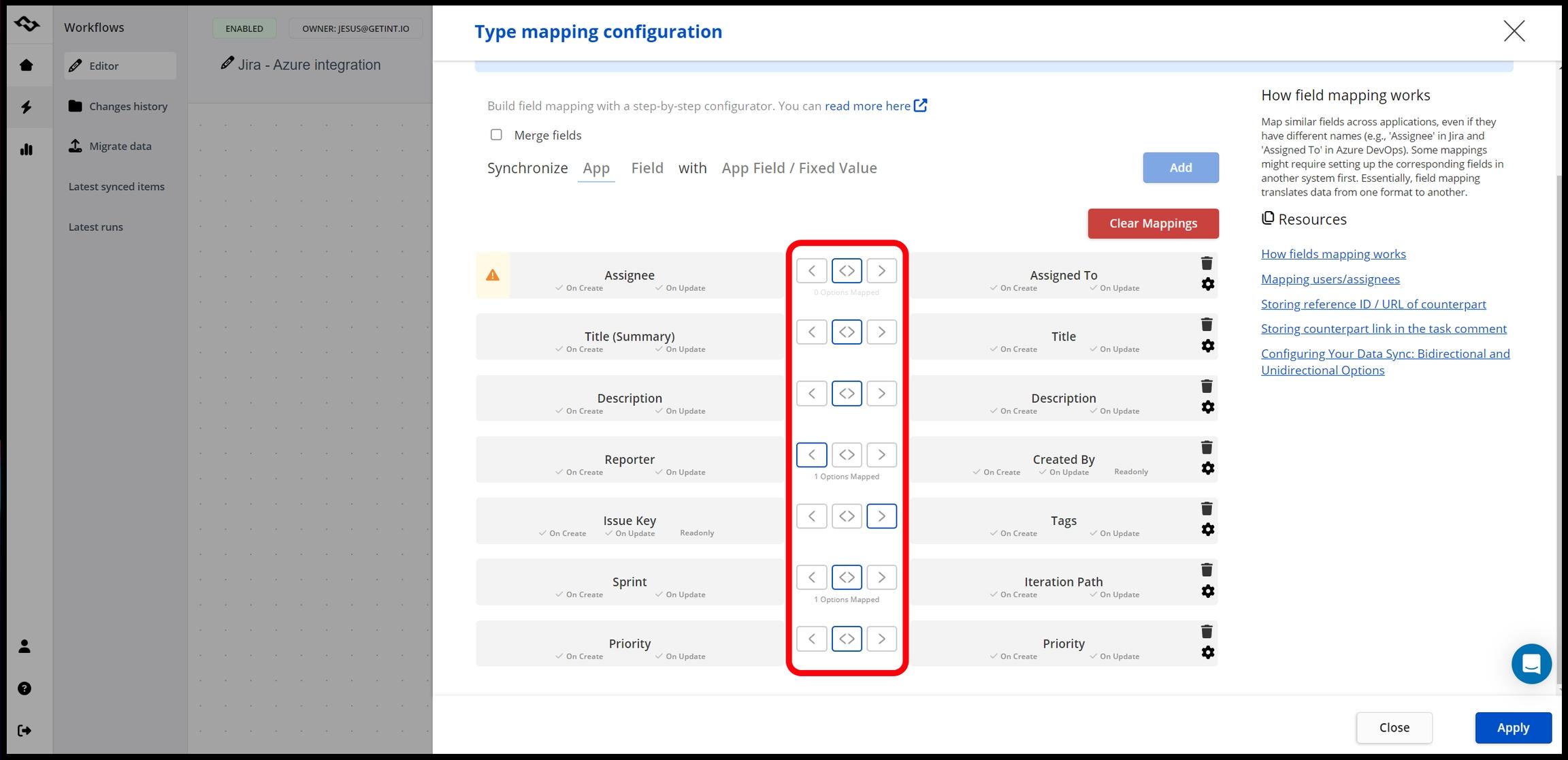
Consider a company that needs to synchronize incidents between ServiceNow and Jira while maintaining separate workflows for support and development teams. Getint allows the organization to define how records correspond, which updates should be shared, and how statuses are interpreted in each application. The platform also supports connections between separate instances and organizations, making it relevant for collaboration with external partners and managed service providers.
Getint provides SaaS and On-Premise deployment options, allowing businesses to choose between a managed cloud environment and running the platform on customer-controlled infrastructure. Its security and compliance credentials include ISO/IEC 27001, ISO/IEC 27018, and SOC 2 Type II.

For businesses that need ongoing operational synchronization with configurable data mappings and deployment flexibility, Getint offers a focused alternative to broader enterprise integration platforms.
Limitations: Getint focuses on operational data synchronization and migration, making it less suitable for large-scale analytical data pipelines or general-purpose API management.
Workato: Enterprise Integration and Workflow Automation
Workato provides a broad enterprise platform for connecting business applications, managing integration workflows, and automating operations across departments. Its integration capabilities cover SaaS tools, enterprise applications, APIs, and business processes, allowing organizations to configure workflows that respond to triggers, exchange information, and coordinate multiple actions across different systems.
For example, a company can use Workato to connect CRM, finance, and HR applications, automating processes that involve information moving between departments. Its API management capabilities also support organizations that need to expose integration functionality through controlled interfaces.
Limitations: Its broad automation capabilities can introduce additional configuration and governance requirements, particularly for organizations that only need straightforward application synchronization.
Boomi: Enterprise Application Integration and Data Management
Boomi offers an enterprise integration platform covering application integration, data management, API management, and business-to-business connectivity. Its capabilities allow organizations to connect cloud applications with databases, existing infrastructure, and enterprise software, including scenarios where information must move between internal systems and external business partners.
An organization might use Boomi to connect CRM and ERP systems, synchronize operational records, manage data across applications, and support B2B information exchange. Its broader functionality can be useful when several integration requirements need to be addressed within a common technology environment.
Limitations: The platform's extensive capabilities may require more implementation planning and administrative resources than simpler integration scenarios demand.
MuleSoft: API-Led Integration for Complex Enterprise Systems
MuleSoft's Anypoint Platform focuses on API-led connectivity, application integration, and API management. It provides tools for designing, implementing, securing, and monitoring APIs that connect business applications and backend services. This approach is particularly valuable in large organizations where multiple development teams need reliable, reusable access to business data and functionality.
For example, an enterprise might create shared APIs that allow its CRM, ERP, and customer-facing applications to access information from the same backend systems. These reusable services can support different integration workflows while helping organizations apply consistent security and governance policies.
MuleSoft is especially relevant for businesses with complex enterprise architectures, custom software applications, and established API management requirements.
Limitations: API-led integration often requires dedicated technical expertise, making MuleSoft less accessible to teams looking for quick, configuration-based application synchronization.
Azure Logic Apps: Workflow Integration Within Microsoft Azure
Azure Logic Apps is a Microsoft Azure service for building automated workflows between applications, services, and data sources. It provides a visual workflow designer, supported connectors, triggers, and actions that help developers and administrators coordinate operations across different systems.
Organizations can use Logic Apps to process incoming files, exchange information between business applications, or automate workflows involving Azure services and on-premises resources. Its integration with the broader Microsoft ecosystem makes it particularly relevant for companies already using Azure infrastructure, although it also supports connections to many external services.
When evaluating Azure Logic Apps, businesses should consider their existing cloud architecture, connector availability, workflow execution costs, and the technical expertise required for deployment and maintenance.
Limitations: Managing integration costs and performance requires attention to Azure's different pricing models, execution limits, and connector configurations.
Celigo: Integration for ERP, E-Commerce, and Business Operations
Celigo provides an iPaaS platform designed to automate data exchange and business processes across cloud applications. It offers prebuilt integration templates, connectors, data transformations, and configurable workflows, with particular relevance to ERP, e-commerce, finance, and business operations.
For example, an online retailer might use Celigo to connect its e-commerce platform with an ERP system, helping maintain inventory records, synchronize customer information, and automate order processing. This can reduce manual data transfers between departments responsible for sales, fulfillment, and financial management.
Limitations: Highly customized workflows or less common application combinations may require additional configuration or development beyond the available prebuilt integrations.
Zapier: No-Code Automation Across SaaS Applications
Zapier makes workflow automation accessible through a no-code interface and a broad range of application connections. Its workflows, called Zaps, use triggers and actions to automate tasks between connected services. For instance, a new form submission might create a CRM contact, update a spreadsheet, and send a notification to a collaboration tool, all without an employee performing those steps manually.
This approach is useful for business users looking to automate repetitive activities across commonly used SaaS tools. Teams can build relatively simple workflows quickly and expand them with additional actions, filters, or conditions as their needs evolve.
Limitations: Zapier does not natively support two-way synchronization, making it less suitable for complex workflows that require continuous updates in both directions.
Fivetran: Automated Cloud Data Integration and Analytics
Fivetran specializes in automated data movement and integration pipelines, connecting applications, databases, and other data sources with cloud data warehouses and data lakes. The platform handles many activities associated with maintaining these pipelines, including data extraction, loading, and adapting to certain changes in source schemas.
For example, a company might use Fivetran to collect information from its CRM, financial systems, and marketing tools, bringing the data into a centralized environment for reporting and business intelligence. The platform also offers data activation capabilities that can make prepared information available to operational applications.
Limitations: Its primary focus on analytical data pipelines makes it less suitable for direct, bidirectional synchronization of operational workflows between business applications.
Cloud Integration Use Cases Across Industries
Cloud integration supports a wide range of business processes, from customer service and financial reporting to supply chain management and software development. Although the applications involved differ by industry, many organizations face similar challenges: disconnected information, delayed updates, and difficult coordination between departments.
Example: Connecting IT Support and Software Development
Consider a software company using ServiceNow for customer incidents and Jira for engineering tasks. A customer reports a technical issue that requires developer investigation, but the support and development teams operate in different applications.
Without integration, a support agent may need to create a separate Jira work item, transfer the incident information manually, and repeatedly check with engineering for progress updates. This adds administrative work to an already time-sensitive process and increases the risk of missing important information.
With Getint, the organization can configure synchronization between the relevant ServiceNow incidents and Jira work items. Comments, mapped fields, and status updates can be exchanged according to the team's integration rules, helping support agents follow progress while developers continue working within Jira.
The same approach can support collaboration between external partners, separate Jira instances, and teams working in different project management applications. In each case, the integration helps preserve established workflows while improving the exchange of information between systems.
Common Challenges of Cloud Integration
Although cloud integration can significantly reduce manual work, implementing reliable connections requires careful planning. Challenges often arise from differences between applications, security restrictions, growing workflow complexity, and changes to the systems being connected.
Inconsistent Data Formats and Legacy Systems
Different applications often represent similar information in different ways. One system may use numerical priority values, while another uses labels such as Low, Medium, or High. Even common fields like dates, customer identifiers, or workflow statuses can follow incompatible structures.
These differences require accurate data mappings and, in some cases, additional transformations to preserve the meaning of information during synchronization. Legacy systems can create further complications through proprietary formats, limited APIs, and older authentication methods.
Before implementing an integration, organizations should examine how their source systems represent data, which fields need to correspond, and how discrepancies will be handled.
Growing Integration Complexity
The more applications an organization uses, the more difficult it becomes to maintain connections between them. Separate point-to-point integrations can work well for a limited number of systems, but complexity increases when every new application requires additional connections and dependencies.
Changes to one system may affect several integration workflows, making troubleshooting and maintenance more demanding. Centralized integration platforms can help manage these relationships through reusable connectors, consistent configuration tools, and monitoring capabilities.
However, technology alone cannot resolve every complexity. Clear ownership, documentation, and an established process for managing changes are essential when integrations become part of critical business operations.
Integration Failures and Error Handling
Even well-configured integrations can experience temporary failures caused by unavailable services, expired credentials, API rate limits, or unexpected changes to application fields.
A reliable integration platform should help administrators identify these problems and recover from them without creating unnecessary duplicates or losing important updates.
Useful capabilities include:
- Integration logs and execution history
- Error notifications and monitoring dashboards
- Retry mechanisms for recoverable failures
- Data validation and reconciliation
- Visibility into synchronization performance
Businesses should also establish procedures for investigating failures, particularly when integration workflows support customer-facing services or other critical processes.
Data Security and Compliance
Integration platforms frequently process sensitive data, including customer information, financial records, employee details, and internal business communications. Every additional connection introduces considerations around access permissions, data handling, and regulatory requirements.
Security should therefore be incorporated into the integration architecture from the beginning. Organizations need to understand how credentials are managed, where information is processed or stored, and which users or systems can access the integrated data.
The appropriate controls depend on the applications involved, the type of information exchanged, and the organization's compliance obligations.
Cloud Integration Security: What Businesses Should Evaluate
Choosing a cloud integration solution involves more than checking its supported applications. Organizations should also understand how the platform accesses information, where data is processed, and how integration activities can be monitored.
Several security capabilities are particularly important:
- Authentication and access controls: Integrations should use properly managed service accounts or supported authentication methods. Permissions should follow the principle of least privilege, limiting access to the information and actions necessary for each workflow.
- Encryption and data protection: Sensitive information should be protected during transmission and, where stored, at rest. Businesses should also review credential storage, data retention policies, and the locations where information is processed.
- Audit logging and monitoring: Integration administrators need visibility into execution results, errors, and relevant changes. Audit logging and monitoring support troubleshooting, accountability, and security investigations.
- Deployment and data residency: Some organizations prefer managed cloud services, while others require greater control over infrastructure and processed data. The deployment model should align with internal security policies and applicable regulations.
For example, Getint provides SaaS and On-Premise deployment options alongside ISO/IEC 27001, ISO/IEC 27018, and SOC 2 Type II credentials. Its On-Premise deployment allows organizations to operate the integration platform on customer-managed infrastructure, which can be relevant when strict data handling requirements apply.
Regardless of the vendor, security teams should verify certifications, contractual commitments, data processing documentation, and the proposed integration architecture before approving a production deployment.
How to Build a Cloud Integration Strategy
A successful cloud integration project begins with understanding which business processes need improvement.Connecting every available application immediately can create unnecessary complexity, especially when responsibilities, data ownership, and synchronization requirements have not been clearly defined.
A more effective approach is to prioritize valuable workflows, implement them carefully, and expand once the integration architecture has been validated.
Step 1: Assess Your Current Systems and Business Requirements
Start by documenting the cloud applications, databases, legacy systems, and other software tools used throughout the organization. Identify which systems already exchange data, where employees rely on manual updates, and which processes frequently experience delays or errors.
For each potential integration, establish a specific business objective. This might involve reducing duplicate data entry, improving reporting, accelerating customer support, or coordinating work across departments. Defining the expected outcome will make it easier to select the right integration approach and evaluate its performance.
Step 2: Identify Data Sources and Integration Flows
Determine where information originates, which applications need access to it, and how frequently it should be updated. You should also identify whether the integration needs to create new records, synchronize existing ones, or trigger additional actions when certain conditions are met.
Some use cases require one-way synchronization or scheduled data pipelines, while others depend on continuous two-way updates. For example, analytical reporting may work well with periodic data transfers, whereas customer support and engineering collaboration may benefit from near-real-time synchronization.
Step 3: Choose the Appropriate Integration Approach
Evaluate available cloud integration solutions based on the applications involved, the complexity of the workflows, and the technical resources available.
An organization synchronizing Jira with ServiceNow may benefit from a specialized integration platform, while a company consolidating information from multiple databases might prioritize a data pipeline service. Businesses with extensive API requirements may prefer a broader enterprise iPaaS platform with advanced governance capabilities.
The goal is to select a solution aligned with actual integration requirements, avoiding unnecessary complexity while leaving room for future expansion.
Step 4: Define Data Mapping, Security, and Ownership
Before activating an integration, document the records and fields that should be exchanged. Specify how different data formats, workflow statuses, identifiers, and custom fields will be mapped, and determine which applications should have permission to create or update particular information.
Security requirements and data ownership should be established at the same stage. This is especially important for two-way integrations, where changes can originate in more than one system and conflicting updates need to be handled consistently.
Step 5: Test Integration Workflows
Begin with a limited integration scope and representative test data. Verify that records are created and updated correctly, mappings preserve their intended meaning, and synchronization behaves as expected when information changes in either application.
Testing should cover common operations and exceptional situations, including authentication failures, missing permissions, duplicate prevention, invalid data, and interrupted processing. This helps identify potential issues before the integration becomes part of critical daily operations.
Step 6: Monitor Performance and Expand Gradually
After deployment, monitor integrations using execution logs, error reporting, and performance metrics. Pay attention to synchronization delays, recurring failures, and changes to connected applications that could affect existing workflows.
Once the initial integration operates reliably, organizations can extend it to additional projects, departments, or systems. Clear ownership, documentation, and regular maintenance will help keep integration workflows effective as business requirements evolve.
How to Choose the Right Cloud Integration Platform
Selecting a cloud integration platform requires balancing technical capabilities with practical business requirements. The platform should support your existing software environment, provide sufficient control over data exchange, and remain manageable as the number of integrations grows.
Before making a decision, compare the following criteria:
The needs of business users and technical teams may differ significantly. A marketing department automating straightforward SaaS workflows might prioritize usability and ready-made templates, while an integration architect managing enterprise systems may require advanced API governance, infrastructure control, and detailed monitoring.
For organizations working across ITSM, DevOps, and project management systems, the depth of synchronization capabilities may matter more than the total number of available connectors. In these cases, it is worth evaluating how a platform handles custom fields, workflow statuses, comments, attachments, and updates originating in different systems.
Testing a realistic integration workflow before making a long-term commitment is one of the most effective ways to evaluate a cloud integration solution. It allows teams to identify limitations, understand configuration requirements, and assess how the platform will perform under their actual operating conditions.
Summing It Up
Cloud integration services help organizations connect disconnected systems, improve data quality, and automate workflows that would otherwise require manual coordination. As businesses adopt more cloud applications, choosing an integration approach that supports both current requirements and future growth becomes increasingly important.
Enterprise iPaaS platforms support broad integration architectures, data integration tools help centralize information for analytics, and specialized solutions such as Getint enable ongoing synchronization between operational applications. Understanding these differences makes it easier to select a platform that fits your business processes, infrastructure, and security requirements.
For teams using Jira, ServiceNow, Azure DevOps, Salesforce, or other supported business tools, Getint offers configurable integrations designed to keep information aligned across departments and organizations.
Want to explore how Getint can support your integration requirements?
Book a free demo to discuss your systems, workflows, and deployment needs with our integration experts.